> For the complete documentation index, see [llms.txt](https://docs.iotex.io/llms.txt). Markdown versions of documentation pages are available by appending `.md` to page URLs; this page is available as [Markdown](https://docs.iotex.io/quicksilver/developers/quicksilver-api/api-key-setup.md).
# API Key Setup
## API Key Setup Guide
Before you can start using the QuickSilver API, you’ll need to create an **API Key**. This guide walks you through the full setup process — from creation to usage and management.
## API Key Creation Steps
#### Log in to QuickSilver
Visit [qs.iotex.ai](https://qs.iotex.ai) and sign in to your account.
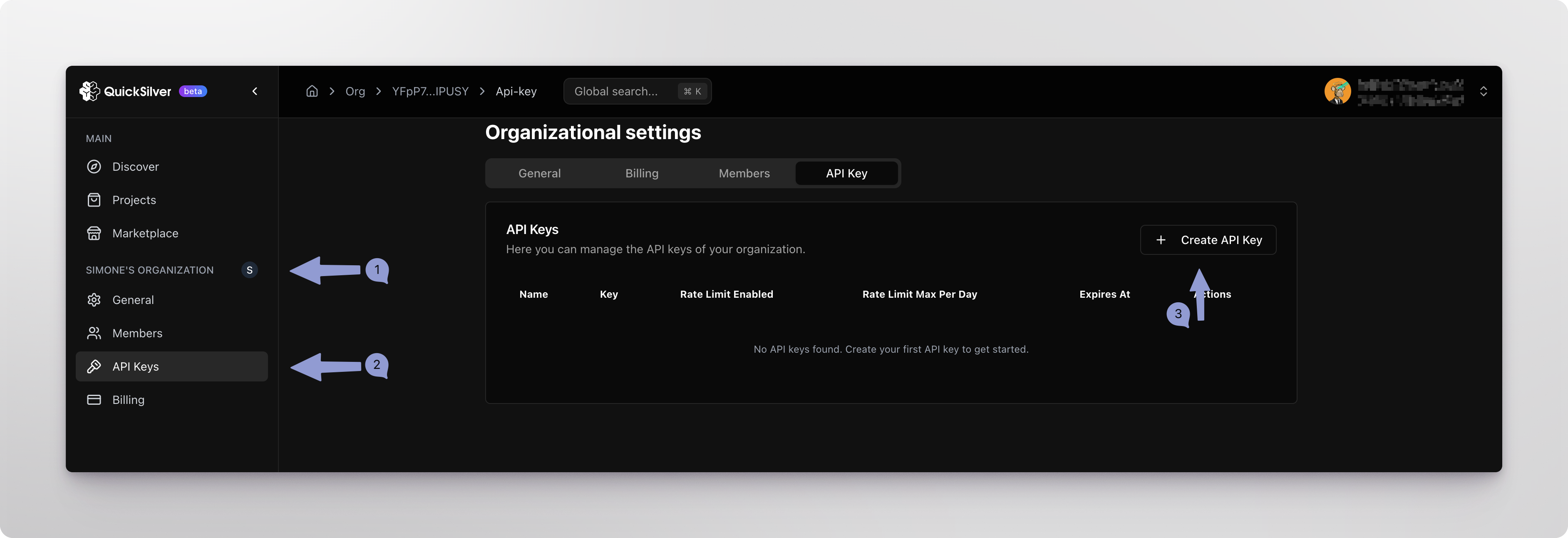
#### Go to Organization Settings
In the left sidebar:
* Locate your organization name
* Click on “**API Keys**” under the organization section
#### Create a New API Key
* Click the “**Create API Key**” button.
In the popup dialog:
* Enter a descriptive name (e.g., “Wallet Tracker Bot” or “Frontend API”)
* We recommend using a project or application name for clarity
* Click “**Submit**” to finish
#### Save Your API Key
Once created, your new key will appear in the list with the following info:
* **Name** – the label you assigned
* **Key** – partially hidden (e.g., 7d09\*\*\*\*eb3e)
* **Rate Limit Enabled** – whether limits are active
* **Rate Limit Max Per Day** – daily requests cap
* **Expires At** – optional expiry time
* **Actions** – actions on the Key like delete or copy
{% hint style="warning" %}
**Important**: You will only see the full key once at the time of creation— copy and save it securely.
{% endhint %}
## Using Your API Key
After creation, you can use this API Key in various integration methods:
```javascript
# Environment variable approach
export QUICKSILVER_API_KEY="your-api-key"
```
```python
# Using in Python code
client = OpenAI(
api_key="your-api-key", # Use your API Key here
base_url="https://api-quicksilver.iotex.ai/v1"
)
```
## Troubleshooting
#### Invalid API Key
* Check for typos when copy/pasting
* Confirm the key hasn’t expired or been deleted
#### Permission Errors
* Ensure your account has access to the correct organization
* Make sure you’re using the correct key
#### Rate Limiting
* Check the rate limits associated with your key
* Reduce request frequency or request higher limits if needed
## Support
If you encounter any issues while creating or using your Quicksilver API Key, check our developers community on [Discord](https://discord.gg/hTkuXSD9b4), or contact [IoTeX Developers](mailto:developers.iotex.io) for support.
---
# Agent Instructions
This documentation is published with GitBook. GitBook is the documentation platform designed so that both humans and AI agents can read, navigate, and reason over technical content effectively. Learn more at gitbook.com.
## Querying This Documentation
If you need additional information that is not directly available in this page, you can query the documentation dynamically by asking a question.
Perform an HTTP GET request on the current page URL with the `ask` query parameter, and the optional `goal` query parameter:
```
GET https://docs.iotex.io/quicksilver/developers/quicksilver-api/api-key-setup.md?ask=&goal=
```
`ask` is the immediate question: it should be specific, self-contained, and written in natural language.
`goal` is optional and describes the broader end goal you are ultimately trying to accomplish on behalf of the user. GitBook uses it to tailor the answer towards what is most useful for that goal.
The response will contain a direct answer to the question and relevant excerpts and sources from the documentation.
Use this mechanism when the answer is not explicitly present in the current page, you need clarification or additional context, or you want to retrieve related documentation sections.