> This is part 1 of 4 of the full documentation (pages 1–100 of 313).
> The content is paginated: fetch every part to see all of it.
> Next part: https://docs.iotex.io/llms-full.txt/1
> Page index: https://docs.iotex.io/llms.txt

# Agent Instructions
This documentation is published with GitBook. GitBook is the documentation platform designed so that both humans and AI agents can read, navigate, and reason over technical content effectively. Learn more at gitbook.com.

## Querying This Documentation
This site has an agentic ask interface you may use to query the documentation dynamically by asking a question.

Perform an HTTP GET request on the following URL with the `ask` and `goal` query parameters:

```
GET https://docs.iotex.io/index.md?ask=<question>&goal=<user_goal>
```

`ask` is the immediate question: it should be specific, self-contained, and written in natural language.
`goal` is what the user is ultimately trying to achieve, the reason they need the answer. Sharing it helps GitBook give you a better, more relevant answer. A goal is most helpful when it describes the outcome the user wants rather than restating the question. For example, with `ask=how do I create an API token`, a goal like `automate deployments from our CI pipeline` lets GitBook tailor the answer to that use case.

The response will contain a direct answer to the question and relevant excerpts and sources from the documentation.

---

# IoTeX Documentation

Build AI and DePIN applications grounded in real-world data, trusted identity, and secure, decentralized infrastructure.

<a href="/blockchain/quick-start" class="button primary" data-icon="rectangle-terminal">Developers Quick Start</a> <a href="https://iotex.io/" class="button secondary" data-icon="laptop-code">Visit iotex.io →</a>

## Discover IoTeX

<table data-view="cards"><thead><tr><th></th><th></th><th data-hidden data-card-cover data-type="files"></th><th data-hidden data-card-target data-type="content-ref"></th></tr></thead><tbody><tr><td><strong>IoTeX L1</strong> <mark style="color:purple;">Blockchain</mark></td><td>Discover a <strong>lightning-fast Layer-1</strong> blockchain optimized for DePIN and real-world AI applications.</td><td><a href="https://3055876942-files.gitbook.io/~/files/v0/b/gitbook-x-prod.appspot.com/o/spaces%2FtwDJKOp49mezMEya46Tu%2Fuploads%2Fcz1eWN8Y3GiZnyPVe5TZ%2FIoTeX%20L1%20Blockchain.png?alt=media&amp;token=d60d5774-9920-4d3b-98fb-93b1fb41f0f1">IoTeX L1 Blockchain.png</a></td><td><a href="https://docs.iotex.io/blockchain/">Blockchain</a></td></tr><tr><td><strong>ioID</strong> <mark style="color:purple;">On-chain Identity</mark></td><td>A decentralized <strong>identity framework</strong> that gives machines and agents secure, verifiable identities.</td><td><a href="https://3055876942-files.gitbook.io/~/files/v0/b/gitbook-x-prod.appspot.com/o/spaces%2FtwDJKOp49mezMEya46Tu%2Fuploads%2FvA3MyACAj918HlblwEBS%2FioID%20On-chain%20Identity.png?alt=media&amp;token=53d62063-bfaa-405f-81fe-cb026acf86ee">ioID On-chain Identity.png</a></td><td><a href="https://docs.iotex.io/ioid/">IoID</a></td></tr><tr><td><strong>QuickSilver</strong> <mark style="color:purple;">AI Framework</mark></td><td>A real-time AI interaction layer that transforms raw machine data into <strong>verifiable AI context</strong>.</td><td><a href="https://3055876942-files.gitbook.io/~/files/v0/b/gitbook-x-prod.appspot.com/o/spaces%2FtwDJKOp49mezMEya46Tu%2Fuploads%2FVhm34IuPyGUiJK8d1xdL%2FQuickSilver%20AI%20Framework.png?alt=media&amp;token=1a0f01bd-66fa-42f2-92a0-fdbb9a91fa00">QuickSilver AI Framework.png</a></td><td><a href="https://docs.iotex.io/quicksilver/">Quicksilver</a></td></tr><tr><td><strong>W3bstream</strong> <mark style="color:purple;">Verifiable Computing</mark></td><td>A real-time data attestation and compute layer that connects smart devices to smart contracts.</td><td><a href="https://3055876942-files.gitbook.io/~/files/v0/b/gitbook-x-prod.appspot.com/o/spaces%2FtwDJKOp49mezMEya46Tu%2Fuploads%2F6CfjcfhoE2QH6OExiqls%2FW3bstream%20Verifiable%20%20Computing.png?alt=media&amp;token=dde73965-54d2-4373-97a8-b4c07628b21a">W3bstream Verifiable  Computing.png</a></td><td><a href="/depin/iotex-depin-modules/w3bstream/overview-of-w3bstream">Overview of W3bstream</a></td></tr><tr><td><strong>DIMs</strong>  <mark style="color:purple;">DePIN Infra Modules</mark></td><td>A suite of modular infrastructure tools purpose-built for DePINs. From data attestation and identity to staking and coordination.</td><td><a href="https://3055876942-files.gitbook.io/~/files/v0/b/gitbook-x-prod.appspot.com/o/spaces%2FtwDJKOp49mezMEya46Tu%2Fuploads%2Fy9UaM7xZRtltZUGp5cA0%2FDIMs%20%20DePIN%20Infra%20Modules.png?alt=media&amp;token=69961357-8f2e-441e-ade6-71201d492285">DIMs  DePIN Infra Modules.png</a></td><td><a href="https://docs.iotex.io/depin/">DIMs</a></td></tr></tbody></table>


# Crypto's Got Talent

<figure><img src="https://3055876942-files.gitbook.io/~/files/v0/b/gitbook-x-prod.appspot.com/o/spaces%2FtwDJKOp49mezMEya46Tu%2Fuploads%2Fua3jnktB94GUQ6hmhab2%2Fimage.png?alt=media&amp;token=7adf9f1e-d258-40c6-9607-165d5d409b6c" alt=""><figcaption></figcaption></figure>

[**Crypto’s Got Talent (CGT)**](https://iotex.io/cryptos-got-talent) is the first-ever live talent show dedicated to discovering and supporting the most promising builders in the **Decentralized Physical Infrastructure Networks (DePIN)** space. Powered by IoTeX in collaboration with Polygon and ElizaOS, CGT flips the traditional grant model on its head by running the entire selection process **live and in public**—giving projects unparalleled exposure from day one.

### 🎯 Our Mission

Our goal is simple: **find the best DePIN projects in the world** and help them succeed using IoTeX’s full-stack infrastructure. Whether you're building devices, networks, or tooling, CGT is your launchpad to real adoption.

### 🛠️ How It Works

CGT is structured like a reality show, in **three phases:**

#### Phase 1: Live Pitches

Projects apply and pitch live on X Spaces in front of high-profile guest judges, KOLs, and the community. The best pitches move to the next round.

**Phase 2: Demos & Deep Dives**\
\
Selected projects return to present product demos or pitch decks in video livestream format, showcasing real-world use cases and infrastructure alignment.

#### Phase 3: Finale & Funding

The finalists are selected in a live finale episode, where funding is awarded and support from IoTeX kicks into high gear to help them go to market.

### 📊 Season 1 Highlights (So Far)

* **190,800+ Impressions**
* **40,000+ Views Per Episode**
* **2,823 Votes** from the community
* **11 High-Potential Projects** advancing to the next phase
* Guest judges from top protocols, ecosystems, and DePIN leaders

### 🚀 Why It Matters

CGT is not just a grant program—it's a **movement**. We’re here to:

* Accelerate real-world DePIN adoption
* Support teams with infrastructure, funding, and exposure
* Grow the IoTeX ecosystem with builders who are solving real problems

### 📺 Watch the Episodes

Catch up on all the action ⏬&#x20;

<details>

<summary>Episode 1 (The Pilot): </summary>

Kicking off with a bang—founders from DePIN projects [@deradnet](https://x.com/deradnet) and [@TheJamGalaxy](https://x.com/TheJamGalaxy) took the stage to pitch their ideas.&#x20;

A powerhouse panel featuring [@0xPolygon](https://x.com/0xPolygon) leaders [@degenrsc](https://x.com/degenrsc) & [@Smokey\_titan](https://x.com/Smokey_titan) alongside IoTeX’s [@DePIN\_aaron](https://x.com/DePIN_aaron), [@depin\_jesus](https://x.com/depin_jesus), & [@thebookofjoey](https://x.com/thebookofjoey) weighed in.<br>

**🔗 Link to the episode 👉** [**https://x.com/iotex\_io/status/1889043386272829473**](https://x.com/iotex_io/status/1889043386272829473)&#x20;

<img src="https://3055876942-files.gitbook.io/~/files/v0/b/gitbook-x-prod.appspot.com/o/spaces%2FtwDJKOp49mezMEya46Tu%2Fuploads%2FHekkekJNFcDrxCkEr2DE%2FScreen%20Shot%202025-03-27%20at%201.24.12%20PM.png?alt=media&amp;token=e85577e6-64a3-4d42-95c1-cd87b98398d5" alt="" data-size="original">

</details>

<details>

<summary>Episode 2 (X Space)</summary>

DePIN projects Functionland, Xylon, Just Everything App, and IceCard take the stage—only a few will advance. Who’s got what it takes? Feat. insights from [@tsncrypto](https://x.com/tsncrypto), [@DePIN\_aaron](https://x.com/DePIN_aaron) & [@depin\_jesus](https://x.com/depin_jesus)

**🔗 Link to the episode 👉** [**https://x.com/iotex\_io/status/1893050842065818019**](https://x.com/iotex_io/status/1893050842065818019)

<img src="https://3055876942-files.gitbook.io/~/files/v0/b/gitbook-x-prod.appspot.com/o/spaces%2FtwDJKOp49mezMEya46Tu%2Fuploads%2FsKqxV71OUu4QW3KzIPU8%2FScreen%20Shot%202025-03-27%20at%201.35.32%20PM.png?alt=media&amp;token=1e9491e2-7ee2-4fc8-a7ed-f0ac2f5d284b" alt="" data-size="original">

</details>

<details>

<summary>Episode 3 (🚨 LIVE from EthDenver)</summary>

DePINs: DeCharge, Rentop, Rovr, Flashback, and Traxa DAO

**🔗 Link to the episode 👉** [**https://x.com/i/broadcasts/1MnxnwVWpjYKO**](https://x.com/i/broadcasts/1MnxnwVWpjYKO)

</details>

<details>

<summary>Episode 4 (X Space)</summary>

This week [@captur\_network](https://x.com/captur_network) [@Ecotrader\_io](https://x.com/Ecotrader_io) & [@Krako\_cloud](https://x.com/Krako_cloud) pitched their DePIN projects. Think they have a shot at $500k? Give it a listen and drop your comments below! Panelists: [@ScottFooMusic](https://x.com/ScottFooMusic) [@tsncrypto](https://x.com/tsncrypto) [@WOLF\_WebThree](https://x.com/WOLF_WebThree) [@depin\_jesus](https://x.com/depin_jesus) & [@DePIN\_aaron](https://x.com/DePIN_aaron)

**🔗 Link to the episode 👉** [**https://x.com/iotex\_io/status/1900605036687679725**](https://x.com/iotex_io/status/1900605036687679725)

<img src="https://3055876942-files.gitbook.io/~/files/v0/b/gitbook-x-prod.appspot.com/o/spaces%2FtwDJKOp49mezMEya46Tu%2Fuploads%2Fm35NALzUN20bMV1KUXKL%2FScreen%20Shot%202025-03-27%20at%201.38.24%20PM.png?alt=media&amp;token=0d07deb1-1459-40fe-a3dd-156cbfe78b63" alt="" data-size="original">

</details>

<details>

<summary>Episode 5 (🚨 LIVE from NYC)</summary>

Gen Pulse, Gargoyle, Axal, and LillyPad

**🔗 Link to the episode 👉** [**https://x.com/iotex\_io/status/1902841681831137308**](https://x.com/iotex_io/status/1902841681831137308)

</details>

\[More episodes coming soon...]

### 📝 Apply or Stay in the Loop

* **Applications for Season 1 close on March 31st!**
* Didn’t make it this time? Don’t worry—**Season 2 is coming. Keep building.**

➡️ [Apply Here](https://iotex.gitbook.io/new-docs/participate/cryptos-got-talent-cgt/iotex-x-polygon-depin-grant)\
➡️ [Follow us on X](https://twitter.com/iotex_io)

## **Sponsors --> 🚀 Are you ready to fund the next wave of DePIN innovation?**

Crypto’s Got Talent is your front-row seat to the future of physical infrastructure on-chain.&#x20;

With a 🎯 curated pipeline of high-potential projects, 📢 unmatched visibility, and a 🔍 transparent selection process, CGT is where real builders meet real adoption. \
👉 Check out the full deck below:&#x20;

{% embed url="<https://www.figma.com/deck/VGFMky3eg1iGkT3V4eilsa/Crypto%E2%80%99s-got-talent-deck?content-scaling=fixed&node-id=3-1300&page-id=0:1&scaling=min-zoom&t=RsVfOEccv8vRSDpT-0>" %}


# IoTeX x Polygon DePIN Grant

Following the announcement of the IoTeX and AggLayer integration, our teams have joined forces again for another super exciting venture. This time, IoTeX is joining the **Polygon Grant Allocator program** and will deploy **1M $POL** to accelerate the next wave of **high-potential DePIN projects**, helping them reach mainstream adoption.

### Grant Overview

As part of this program, IoTeX will select a handful of **highly promising DePIN projects** to join our ecosystem and leverage our **cutting-edge blockchain infrastructure.** This initiative is designed to fast-track these projects toward their **Token Generation Events (TGEs)** and **mass adoption,** while driving traffic to the AggLayer once the integration is complete.

### What We’re Looking For

We are seeking **DePIN projects** that demonstrate:

* **Proven expertise and innovation** in their respective fields.
* A **committed and capable team** that can execute on ambitious goals.
* Early growth-stage progress, specifically in the **seed or Series A stages.**
* Plans to **launch their TGE** on IoTeX within **Q1–Q2 of this year.**

This grant program is **by invitation only,** but we encourage exceptional teams to submit their project details using the form at the bottom of this page. We’ll review submissions and reach out if we see potential for collaboration.

### Why IoTeX?

IoTeX is the **first and only cohesive blockchain-based infrastructure** purpose-built for DePIN (Decentralized Physical Infrastructure Networks). As the most mature DePIN Layer 1, IoTeX provides a **comprehensive tech stack** designed to power the next generation of real-world applications. Grant recipients will gain access to:

* **IoTeX Layer 1 Blockchain**: A scalable, efficient, and secure foundation for decentralized innovation.
* **ioID**: Our unified identity management solution, enabling seamless cross-chain operability.
* **W3bstream**: A pioneering off-chain computing framework that connects real-world devices and data to Web3 applications.

With these tools, projects can build, scale, and innovate while staying ahead in the rapidly growing DePIN landscape.

### Program Goals

Our mission is to enable DePIN projects to achieve:

* **Accelerated growth and adoption** through access to **Polygon's 1M $POL allocation** and IoTeX’s robust infrastructure.
* **Mainstream readiness** by integrating IoTeX’s technology stack and leveraging the AggLayer for cross-chain capabilities.
* Substantial contributions to **IoTeX’s ecosystem** and increased activity on the AggLayer.

### How to Apply

We are looking forward to learning about exceptional DePIN projects. If you believe your project is a fit for this program, please get in touch by **using the form below** to:

* Introduce your team and project.
* Share resources such as pitch decks, product demos, and other relevant materials.
* Explain why your project aligns with our goals and mission.

{% hint style="info" %}
**Note**: We will only contact projects if we decide to move forward with an invitation or would like to learn more. If you don't hear back from us, don't get discouraged, we're only looking at a limited number of projects, and there are always many factors involved in these decisions. We want to thank you in advance for your time and effort!&#x20;
{% endhint %}

{% embed url="<https://forms.gle/1UHk9k3q5mVj9fXh6>" %}


# Governance


# IoTeX Improvement Proposals

## What are IoTeX Improvement Proposals

An *<mark style="color:purple;">IoTeX Improvement Proposal</mark>* (or "*IIP"*) is a design document providing information to the IoTeX community, or describing a new feature for [**IoTeX**](https://iotex.io/), its processes, or its environment.&#x20;

IIPs are intended to be the primary mechanisms for proposing new features, collecting community input on an issue, and documenting the design decisions that have been implemented in the IoTeX ecosystem.

Because IIPs are maintained as text files in a versioned repository, their revision history also represents the historical record of the feature proposal itself.

## Submitting an IIP

Anyone can submit an IIP: A proposal should provide a concise technical specification and a rationale for the new feature. The IIP author is responsible for building consensus within the community and documenting dissenting opinions.

You can read more about ***IoTeX IIPs***, browse past proposals and submit a new one by sending a pull request to the GitHub repository:

{% embed url="<https://github.com/iotexproject/iips#what-is-a-iip>" %}

## The Governance Portal

The ***IoTeX Governance Portal*** is powered by [Snapshot](https://snapshot.org/#/), a no-fee governance tool based on IPFS that makes it simple for decentralized networks to run open votes, polls, and referendums. \
\
Follow the link below to browse through or vote on existing proposals, as well as create a new one. 👇

{% embed url="<https://gov.iotex.io/#/iotex.eth>" %}

## The Governance Forum

Check out our governance forum, if you'd like to meet the community and discuss new proposals: 👇

{% embed url="<https://community.iotex.io/c/governance-proposals/78>" %}

Feel free to checkout this [blog article](https://iotex.io/blog/snapshot-voting-decentralized-governance/) if you'd like to learn more about decentralized governance in the IoTeX ecosystem.&#x20;


# The Marshall DAO

In addition to the existing [decentralized process](https://gov.iotex.io/) for managing Improvement Proposals for the blockchain, IoTeX 2.0 introduces one more important pillar for decentralized governance: [The Marshall DAO (IIP-23)](https://community.iotex.io/t/iip-23-the-marshall-dao/11172). Marshall DAO is a Decentralized Autonomous Organization that will enable IoTeX stakeholders to make proposals regarding how to allocate IOTX incentives to grow the IoTeX ecosystem, including onboarding reputable DePIN projects and funding network-wide initiatives. This creates a transparent and meritocratic system where the best projects are funded using IOTX. allowing stakeholders to contribute to the growth of the IoTeX ecosystem.

{% hint style="success" %}
The Marshall DAO is coming soon.

[-> Read more about it in the IoTeX 2.0 Whitepaper](broken://pages/GIKqeWF7HahDhePR3Lyz)
{% endhint %}


# Join the Community

* Follow IoTeX on [X](https://x.com/iotex_io)​
* Join IoTeX's [Telegram](https://t.me/IoTeXGroup) & [Discord](https://discord.gg/hTkuXSD9b4)​
* Subscribe to the [Newsletter](https://iotex.io/blog/)​
* Other: [YouTube](https://www.youtube.com/channel/UCdj3xY3LCktuamvuFusWOZw), [Reddit](https://www.reddit.com/r/IoTeX)​

<br>


# IoTeX L1 Blockchain

**The IoTeX Layer 1 blockchain** is a fast, EVM-compatible, and developer-friendly infrastructure purpose-built for real-world applications — from decentralized physical infrastructure networks (DePINs) to autonomous AI agents.

With a modular, production-grade design, IoTeX L1 delivers:

⏱️ **2.5-second transaction finality**

⚡  **2000+ TPS throughput**

💡 **Full EVM compatibility**

Built from the ground up for scalability, responsiveness, and trust, IoTeX is a powerful foundation for next-generation smart devices, intelligent agents, and mission-critical infrastructure.

<a href="https://developers.iotex.io/" class="button secondary">Developer Portal</a>   <a href="/blockchain/quick-start" class="button primary">Quick Start</a>


# Quick Start

Welcome to the IoTeX Layer 1 Quick Start series. This guide is split into two tutorials to help you get up and running with smart contract development and interaction on the IoTeX blockchain.

## Part 1: Deploy a Simple Smart Contract

In this first tutorial, you'll learn how to write and deploy a basic Ethereum-compatible smart contract to the IoTeX testnet using Solidity and Web3.js. The contract includes a simple function that accepts a string argument and emits a log event containing that string. This allows anyone to write a permanent message on the IoTeX blockchain — a great introduction to how data can be immutably recorded.

## Part 2: Interact with Your Contract Using JavaScript

In the second tutorial, you'll build a Node.js application to interact with the deployed contract using Web3.js. Instead of sending IOTX tokens, your application will call the contract's function to send messages and view events logged on-chain.

These tutorials use JavaScript (Node.js), Solidity, MetaMask, and Web3.js — all common tools for Ethereum developers — to provide a smooth onboarding experience for building on IoTeX Layer 1.

***

{% hint style="info" %}
**Continue to** [Deploy a simple contract](/blockchain/quick-start/deploy-a-simple-contract)
{% endhint %}


# Deploy a simple contract

In this first tutorial, you'll write and deploy a basic Ethereum-compatible smart contract to the IoTeX testnet using **Solidity**, **Hardhat**, and **MetaMask**. The contract includes a simple function that accepts a string and emits an event with that string — allowing anyone to write a permanent message on the IoTeX blockchain.

## **Prerequisites**

* Node.js and npm installed — [instructions](https://docs.npmjs.com/downloading-and-installing-node-js-and-npm)
* MetaMask wallet — [install](https://metamask.io/download)

<a href="https://developers.iotex.io/metamask" class="button secondary">Add IoTeX Testnet to Metamask</a>   <a href="https://developers.iotex.io/faucet" class="button primary">Claim some Testnet IOTX</a>

## **Step 1: Set Up Your Project**

```bash
mkdir iotex-contract-tutorial
cd iotex-contract-tutorial
npm init -y
npm install --save-dev hardhat
npx hardhat
```

When prompted, select `Create a JavaScript project` from the menu, follow the prompts and accept the defaults.

## **Step 2: Write the Contract**

Replace the contents of `contracts/Lock.sol` with the following:

```solidity
// SPDX-License-Identifier: MIT
pragma solidity ^0.8.0;

contract MessageBoard {
    event MessagePosted(address sender, string message);

    function postMessage(string calldata message) external {
        emit MessagePosted(msg.sender, message);
    }
}
```

## **Step 3: Configure for IoTeX**

Ensure dependencies are installed:

```bash
npm install @nomicfoundation/hardhat-toolbox
```

Update `hardhat.config.js`:

```javascript
require("@nomicfoundation/hardhat-toolbox");

module.exports = {
  solidity: "0.8.21",
  networks: {
    iotex_testnet: {
      url: "https://babel-api.testnet.iotex.io",
      accounts: ["<YOUR_PRIVATE_KEY>"]
    }
  }
};
```

{% hint style="danger" %}
Replace `<YOUR_PRIVATE_KEY>` with your MetaMask private key (testnet only!). Never share or commit this key to public code repositories.
{% endhint %}

## **Step 4: Deploy the Contract**

Create a new file `scripts/deploy.js`:

```javascript
const hre = require("hardhat");

async function main() {
  const MessageBoard = await hre.ethers.getContractFactory("MessageBoard");
  const contract = await MessageBoard.deploy();

  await contract.waitForDeployment();
  console.log("Contract deployed to:", await contract.getAddress());
}

main().catch((error) => {
  console.error(error);
  process.exitCode = 1;
});

```

Then deploy:

```bash
npx hardhat run scripts/deploy.js --network iotex_testnet
```

You should see your contract address printed in the terminal. You’ve now deployed your first contract to the IoTeX Blockchain!

***

## Part 2: Interact with Your Contract Using JavaScript

In the second tutorial, you'll build a Node.js application to interact with the deployed contract using Web3.js. Instead of sending IOTX tokens, your application will call the contract's function to send messages and view events logged on-chain.

These tutorials use JavaScript (Node.js), Solidity, MetaMask, and Web3.js — all common tools for Ethereum developers — to provide a smooth onboarding experience for building on IoTeX Layer 1.

***

{% hint style="info" %}
**Continue to** [Build a client for your contract](/blockchain/quick-start/build-a-client-for-your-contract)
{% endhint %}


# Build a client for your contract

In this tutorial, you'll build a Node.js application that connects to the IoTeX testnet using Web3.js and interacts with the smart contract you just deployed in[Deploy a simple contract](/blockchain/quick-start/deploy-a-simple-contract).

## **Step 1: Set Up Your Project**

```bash
mkdir iotex-client
cd iotex-client
npm init -y
npm install web3
```

## **Step 2: Connect to the IoTeX Testnet**

Create a file `index.js` and initialize Web3:

```javascript
const { Web3 } = require('web3');

const web3 = new Web3('https://babel-api.testnet.iotex.io');
```

## **Step 3: Prepare Contract Details**

Replace the following placeholders with your actual **contract address** from [Deploy a simple contract](/blockchain/quick-start/deploy-a-simple-contract).

```javascript
const contractAddress = 'YOUR_DEPLOYED_CONTRACT_ADDRESS';
const abi = [
  {
    "anonymous": false,
    "inputs": [
      { "indexed": false, "internalType": "address", "name": "sender", "type": "address" },
      { "indexed": false, "internalType": "string", "name": "message", "type": "string" }
    ],
    "name": "MessagePosted",
    "type": "event"
  },
  {
    "inputs": [
      { "internalType": "string", "name": "message", "type": "string" }
    ],
    "name": "postMessage",
    "outputs": [],
    "stateMutability": "nonpayable",
    "type": "function"
  }
];

const contract = new web3.eth.Contract(abi, contractAddress);
```

## **Step 4: Send a Message**

Continue editing `index.js` with the following and replace `YOUR_PRIVATE_KEY` with your Metamask testnet private key:

```javascript
// Your Metamask testnet private key:
// Must include the 0x prefix when using Web3.js in JavaScript
const privateKey = '0xYOUR_PRIVATE_KEY'; 

const account = web3.eth.accounts.privateKeyToAccount(privateKey);
web3.eth.accounts.wallet.add(account);

async function sendMessage(text) {
  console.log(`Sending message "${text}" to the IoTeX testnet...`);

  const tx = contract.methods.postMessage(text);
  const gas = await tx.estimateGas({ from: account.address });

  const receipt = await tx.send({
    from: account.address,
    gas
  });

  console.log('Transaction receipt:', receipt);
}

sendMessage("Hello from IoTeX!");
```

To test your interaction script, simply run:

```bash
node index.js
```

This will send your message to the smart contract and print the transaction receipt. You’re interacting with smart contracts on IoTeX Layer 1!

***

{% hint style="success" %}
**What's next?**

* [IoTeX Core Concepts](/blockchain/learn-iotex/core-concepts)
* [Deploy an ERC20 Token](/blockchain/build/defi/deploy-tokens/deploy-an-erc20-token)
* [Launch Dapps on IoTeX](/blockchain/build/launch-dapps-on-iotex)
  {% endhint %}


# Web3 Development

Welcome to the **Web3 Developer Guide** for IoTeX!

The IoTeX Blockchain is fully compatible with the Ethereum RPC API and the Ethereum Virtual Machine (EVM). This guide is designed to help Web3 developers seamlessly transition to IoTeX development and leverage the powerful features of the IoTeX blockchain.

{% hint style="info" %}
IoTeX compatibility with the Ethereum RPC API means that you can use familiar tools like [Web3.js](https://web3js.org/), [Ethers.js](https://ethers.org/), and [Hardhat](https://hardhat.com) to interact with the IoTeX chain.&#x20;
{% endhint %}

By supporting the latest EVM, IoTeX ensures that your Solidity smart contracts will run without modification, enabling you to port existing applications and develop new ones with ease.

{% hint style="info" %}
IoTeX currently supports the **Shangai** EVM release and the **Solidity** compiler **0.8.20**
{% endhint %}

This document will guide you through the necessary steps to get started, including setting up your development environment, deploying smart contracts, and connecting to IoTeX using popular Ethereum tools.&#x20;

Let's dive in and explore the possibilities of building on IoTeX!


# RPC Endpoints

Below, you find a list of official and third-party IoTeX endpoints for both full node and archive nodes. These endpoints can be used to configure any Ethereum wallet or developer tool to interact with the IoTeX blockchain.

{% hint style="info" %}
**→ Interested in running an IoTeX RPC Node?**&#x20;

Checkout the dedicated section  to learn how to run an IoTeX full node if you want to spin up an IoTeX RPC endpoint.

[→ Setup an IoTeX RPC  Node](/blockchain/build/node-operators/setup-an-iotex-rpc-node)
{% endhint %}

{% hint style="info" %}
**Official Ethereum JSON-API**

Please refer to the official Ethereum Documentation for the RPC JSON API:&#x20;

[→ Ethereum JSON RPC API](https://ethereum.github.io/execution-apis/api-documentation/)&#x20;
{% endhint %}

## IoTeX Mainnet

`EVM Chain ID: 4689`

### Full Node

<table><thead><tr><th width="344.4995649735719">Endpoint</th><th width="91">Type</th><th width="173">Provider</th><th>More</th></tr></thead><tbody><tr><td>https://babel-api.mainnet.iotex.io</td><td>HTTP</td><td>IoTeX Foundation</td><td><a href="https://iotex.io">iotex.io</a></td></tr><tr><td>wss://babel-api.mainnet.iotex.io/ws</td><td>WSS</td><td>IoTeX Foundation</td><td><a href="https://iotex.io">iotex.io</a></td></tr><tr><td>https://babel-api.mainnet.iotex.one</td><td>HTTP</td><td>IoTeX Foundation</td><td><a href="https://iotex.io">iotex.io</a></td></tr><tr><td>https://babel-api.fastblocks.io</td><td>HTTP</td><td>Fastblocks</td><td><a href="https://fastblocks.io/">fastblock.io</a></td></tr><tr><td>https://iotexrpc.com</td><td>HTTP</td><td>Ankr</td><td><a href="https://iotexrpc.com">iotexrpc.com</a></td></tr><tr><td>https://rpc.ankr.com/iotex</td><td>HTTP</td><td>Ankr</td><td><a href="https://ankr.com">ankr.com</a></td></tr><tr><td>https://4689.rpc.thirdweb.com</td><td>HTTP</td><td>Thirdweb</td><td><a href="https://thirdweb.com/iotex-network">Thirdweb</a></td></tr></tbody></table>

### Archive Node

<table><thead><tr><th width="344.4995649735719">Endpoint</th><th width="91">Type</th><th width="173">Provider</th><th>More</th></tr></thead><tbody><tr><td>https://archive-mainnet.iotex.io</td><td>HTTP</td><td>IoTeX Foundation</td><td><a href="https://iotex.io">iotex.io</a></td></tr></tbody></table>

## IoTeX Testnet

`EVM Chain ID: 4690`

<table><thead><tr><th width="343.5471637775761">Endpoint</th><th width="94">Type</th><th width="177">Provider</th><th>More</th></tr></thead><tbody><tr><td>https://babel-api.testnet.iotex.io</td><td>HTTP</td><td>IoTeX Foundation</td><td><a href="https://iotex.io">iotex.io</a></td></tr><tr><td>wss://babel-api.testnet.iotex.io/ws</td><td>WSS</td><td>IoTeX Foundation</td><td><a href="https://iotex.io">iotex.io</a></td></tr><tr><td> https://babel-api.testnet.iotex.one</td><td>HTTP</td><td>IoTeX Foundation</td><td><a href="https://iotex.io">iotex.io</a></td></tr><tr><td> https://babel-api.testnet.iotex.one/wss</td><td>WSS</td><td>IoTeX Foundation</td><td><a href="https://iotex.io">iotex.io</a></td></tr></tbody></table>

### **Archive Node**

<table><thead><tr><th width="344.4995649735719">Endpoint</th><th width="91">Type</th><th width="173">Provider</th><th>More</th></tr></thead><tbody><tr><td>https://archive-testnet.iotex.io</td><td>HTTP</td><td>IoTeX Foundation</td><td><a href="https://iotex.io">iotex.io</a></td></tr></tbody></table>

## **Examples**

#### **Query an IoTeX full node to get the current IOTX balance for an address**&#x20;

The code below utilizes `curl` to query the public IoTeX RPC full-node endpoint to check the balance of `0xE584...C5D46` on the IoTeX Blockchain:

```bash
» curl -X POST -H "Content-Type:application/json" --data '{"id": 1, "jsonrpc": "2.0", "method": "eth_getBalance", "params": ["0xE584ca6F469c11140Bb9c4617Cb8f373E38C5D46", ""]}' https://babel-api.mainnet.iotex.io
{
  "id": 1,
  "jsonrpc": "2.0",
  "result": "0x10f0cf064dd59200000"
}
```

Which returns the balance in WEI `0x10f0cf064dd59200000` (decimal `5000¹⁸` , equivalent to `5000 IOTX`).

#### **Query an IoTeX archive node to get the IOTX balance for an address in the past**

Input block: 30,000,000 (0x1C9C380)

```sh
curl -X POST https://archive-mainnet.iotex.io \
     -H "Content-Type: application/json" \
     -d '{ 
           "jsonrpc": "2.0", 
           "method": "eth_getBalance", 
           "params": ["0xe46be34b4b78ed661783acf8bd241d0d074ce9ff", "0x1C9C380"], 
           "id": 1 
         }'
```

#### Query all Transfer events for ioUSDT on IoTeX in a certain blocks range:

```sh
curl -X POST https://archive-mainnet.iotex.io \
-H "Content-Type: application/json" \
-d '{
  "jsonrpc": "2.0",
  "method": "eth_getLogs",
  "params": [{
    "fromBlock": "0x1ce29c0",
    "toBlock": "0x1ce29e0",
    "address": "0x6fbcdc1169b5130c59e72e51ed68a84841c98cd1",
    "topics": ["0xddf252ad1be2c89b69c2b068fc378daa952ba7f163c4a11628f55a4df523b3ef"]
  }],
  "id": 1
}'
```


# Set up your Environment

## Overview

Setting up your development environment for IoTeX involves choosing the right Web3 tools and frameworks to streamline your workflow.&#x20;

Popular options include [Hardhat](https://hardhat.org/), [Truffle](https://www.trufflesuite.com/), and [Brownie](https://eth-brownie.readthedocs.io/en/stable/). These frameworks offer robust Dapp testing, deployment, and debugging capabilities. Once you are ready to deploy your smart contracts to the testnet or mainnet, you simply need to change the RPC endpoint in your tools configuration.&#x20;

[→ See IoTeX RPC Endpoints (full-node)](/blockchain/build/web3-development/rpc-endpoints)

[→ See IoTeX RPC Endpoints (archive-node) ](/blockchain/build/web3-development/rpc-endpoints#archive-node)

Below is a list of popular development tools for EVM Dapp development. Each of these tools offers unique features and functionalities that can help streamline your Dapp development workflow.

{% hint style="info" %}
For detailed tutorials and guides on building and deploying smart contracts on IoTeX [→ visit the Build section of our documentation.](/blockchain/build/defi)
{% endhint %}

## Development Frameworks

1. [**Hardhat**](https://hardhat.org/): A flexible and extensible framework that helps developers compile, deploy, test, and debug their Ethereum software.
2. [**Truffle**](https://www.trufflesuite.com/): A development environment, testing framework, and asset pipeline for Ethereum, aimed at making life as an Ethereum developer easier.
3. [**Brownie**](https://eth-brownie.readthedocs.io/en/stable/): A Python-based development and testing framework for smart contracts targeting the Ethereum Virtual Machine (EVM).
4. [**Foundry (Forge)**](https://getfoundry.sh/): A fast, portable, and modular toolkit for Ethereum application development. Forge is the command-line tool for Foundry, providing robust smart contract development and testing capabilities.

## Integrated Development Environments (IDEs)

6. [**IoTeX Dev Portal**](https://developers.iotex.io)**:** the one-stop-shop for any IoTeX Developer. Claim test tokens, deploy tokens and explore the DePIN sandbox from a simple web interface.
7. [**Remix**](https://remix.ethereum.org/#lang=en\&optimize=false\&runs=200\&evmVersion=null\&version=soljson-v0.8.26+commit.8a97fa7a.js): A web-based IDE for writing, compiling, testing, and deploying smart contracts.

## Libraries and SDKs

6. [**Web3.js**](https://web3js.readthedocs.io/en/v1.7.0/): A JavaScript library that allows you to interact with the Ethereum blockchain using HTTP, IPC, or WebSocket.
7. [**Ethers.js**](https://docs.ethers.org/): A complete and compact library for interacting with the Ethereum blockchain and its ecosystem.
8. [**MetaMask SDK**](https://metamask.io/sdk/): Provides tools and APIs for building DApps with MetaMask, enabling seamless integration and enhanced functionalities.

## Testing Tools

9. [**EthTester**](https://github.com/ethereum/eth-tester): A tool suite for testing Ethereum-based applications.
10. [**Foundry (Anvil)**](https://github.com/foundry-rs/): A local Ethereum node implemented in Rust, similar to Ganache, for fast and reliable testing.

## Debugging Tools

10. [**Tenderly**](https://tenderly.co/): A monitoring, debugging, and analytics platform for Ethereum smart contracts.
11. [**Solhint**](https://tokenhouse.github.io/solhint/rules.html): A linter for Solidity code that helps identify and fix issues in smart contracts.

## Wallets

12. [→ Check out the wallets section ](/blockchain/learn-iotex/wallets)


# Get Testnet IOTX Tokens

## What are Testnet Tokens?

The IoTeX testnet is a separate network from the mainnet, although it has equivalent functionalities, including the presence of an 'IOTX' token along with XRC20 tokens.

{% hint style="info" %}
The IoTeX testnet is frequently reset and is susceptible to bugs during the deployment of beta releases of the blockchain. Since testnet wallet balances and smart contract balances can be reset or wiped out at any time, test tokens do not hold any real 'value.'
{% endhint %}

## Why use Testnet Tokens?

Testing dApps functionalities consumes IOTX tokens, which can become very expensive if you develop on the IoTeX mainnet directly. The IoTeX mainnet is used for real-value transactions involving tokens with actual value.

If you develop or test your contracts directly on the mainnet you not only consume gas fees when running transactions but also risk potential serious monetary loss due to any bugs or mistakes.

As blockchain developers, it's advisable to use the IoTeX testnet for your development. Here, any dApp can be deployed to a production-like network where tokens don't have any real value.

{% hint style="info" %}
It's important to note that testnet IOTX tokens **are not tradable on exchanges**, serving exclusively as a valuable tool for development and testing.
{% endhint %}

## Claim Test IOTX Tokens

### Claim from your IoTeX Developer Profile

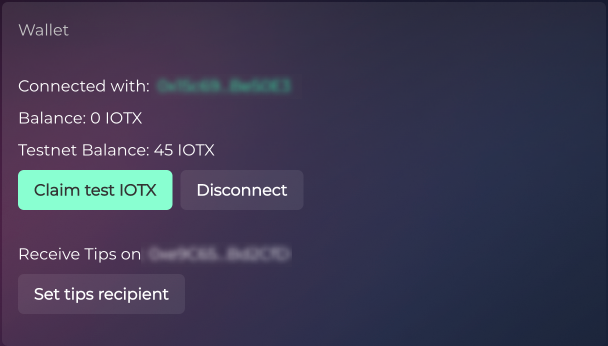
The **best way** for any developer to have access to testnet IOTX is to create a developer account on the IoTeX [Developer Portal](https://developers.iotex.io/) and claim test tokens in their personal profile. Simply connect your wallet on IOTX testnet and start claiming test IOTX immediately.&#x20;

<figure><img src="https://content.gitbook.com/content/EyawgxYexImpo6OGzEiR/blobs/fVfLWJUNBpJRsJVssb2Q/image.png" alt=""><figcaption><p>Claim test IOTX from your Developer profile</p></figcaption></figure>

<details>

<summary>Claim Test IOTX from your IoTeX Developer Profile</summary>

<https://developers.iotex.io/user/profile>

</details>

### Claim from the public faucet

Another way to obtain test IOTX tokens for users that may need them for different purposes, other than developing, is to request them on the IoTeX public faucet:

<details>

<summary>Claim Test IOTX from the Public Faucet</summary>

<https://developers.iotex.io/dev-tools?tool=public-faucet>

</details>

### Ask on Discord

Another option to get some test IOTX tokens is to join our [Discord Server](https://iotex.io/devdiscord) and ask an admin in the `#developers-chat` channel:

<details>

<summary>Join the IoTeX Developer Chat on Discord</summary>

<https://iotex.io/devdiscord>

**Admin: simoneromano** (Simone \[IoTeX])

Admin: **jrpc\_jeremi** (Jeremi \[IoTeX])

###

<br>

</details>


# ioctl CLI

**ioctl** is the IoTeX official command line client, and it's the Swiss Army knife for any IoTeX developer.&#x20;

In addition to being a multi-account wallet also supporting staking, ioctl provides a wide variety of advanced functions to interact with the IoTeX blockchain.&#x20;

ioctl can be used within Bash scripts to send actions and make requests to the blockchain, interact with smart contracts and more.

Check out this introductory video about using **ioctl** as a command line IoTeX wallet:&#x20;

{% embed url="<https://youtu.be/Q-je019KGUA>" %}

This section will go through some of the basic commands you need to get started with **ioctl** and the IoTeX Blockchain!&#x20;

For the full commands reference, check out the link below:

[→ ioctl full reference](/blockchain/build/reference-docs/ioctl-client)


# Installation

You can easily download and install the latest releases of **ioctl** by typing the following command in a terminal window:

{% tabs %}
{% tab title="Linux" %}
Using `curl`:

```bash
# install ioctl latest stable
curl https://raw.githubusercontent.com/iotexproject/iotex-core/master/install-cli.sh | sh
```

```bash
# install ioctl latest unstable build
curl https://raw.githubusercontent.com/iotexproject/iotex-core/master/install-cli.sh | sh -s "unstable"
```

{% endtab %}

{% tab title="macOS" %}
Using `brew`:

```bash
# install ioctl latest stable
brew install ioctl
```

```bash
# install ioctl latest unstable build
brew install ioctl-unstable
```

Using `curl`:

```bash
# install ioctl latest stable
curl https://raw.githubusercontent.com/iotexproject/iotex-core/master/install-cli.sh | sh
```

```bash
# install ioctl latest unstable build
curl https://raw.githubusercontent.com/iotexproject/iotex-core/master/install-cli.sh | sh -s "unstable"
```

{% endtab %}

{% tab title="Windows" %}
{% hint style="danger" %}
Currently, **ioctl** is not supported on Windows systems.
{% endhint %}
{% endtab %}
{% endtabs %}

Once ioctl is installed in your system, you must configure the endpoint of an IoTeX full node that acts as a Gateway to the network. Anyone can install an IoTeX full node and configure it as a gateway. Here we will use the public endpoints provided by the IoTex team for the mainnet and testnet networks:

```bash
# Point ioctl to the IoTeX Mainnet
ioctl config set endpoint api.mainnet.iotex.one:443

# Point ioctl to the IoTeX Testnet
ioctl config set endpoint api.testnet.iotex.one:443
```

[→ ioctl full reference](/blockchain/build/reference-docs/ioctl-client)


# Create Accounts

Let's begin with creating a new IoTeX wallet [account](broken://pages/-MYBDY8pL_gDdUwoFDnK): similarly to any blockchain wallet app where you can "*create a new wallet"*, this operation consists of [generating a random private key](broken://pages/-MYz9JaCupbQRUWgY03x) and storing it in an encrypted file, protected by a password of your choice. It also allows you to set an *alias* for the newly created account (we will use the alias "*dev-acc*" alias in the following sections). Once the alias is set, it can be used instead of the account address in any **ioctl** command:

Create and store an IoTeX account and assign the "dev-acc" alias to it with command below:

```
ioctl account createadd dev-acc
```

**ioctl** will ask you to provide a password that will be used to encrypt your newly created account. From now on when using **ioctl** commands you can refer to this account by using the alias **dev-acc** and the password of your choice.

{% hint style="danger" %}
It's highly recommended that you get used to immediately backup your account passwords in a safe place when you create a new account. Losing your password means losing access to the private key: when you interact with the IoTeX mainnet, **losing access to your private key means you will lose all the funds that you have sent to that account. Forever!**
{% endhint %}

{% hint style="info" %}

### Where does ioctl store accounts data?

All accounts created in **ioctl**, as well as all the aliases, and other settings are stored locally on your computer, in the following path:

`~/.config/ioctl`

You can make a copy of this folder to port your **ioctl** settings and accounts to multiple computers.
{% endhint %}

Check out this introductory video to ioctl accounts management:

{% embed url="<https://youtu.be/Q-je019KGUA>" %}


# Blockchain interaction

Now that you have ioctl pointing to an IoTeX gateway and a wallet account configured in your system, let's try some basic interactions with the Blockchain:

Check the blockchain current epoch, height, and other network-related meta-information with the command `ioctl bc info`:

```sh
$ ioctl bc info

Blockchain Node: localhost:14014
{
  "height": 126,
  "numActions": 126,
  "tps": 1,
  "tpsFloat": 0.0021198923
}

```

Verify the balance of your account with the command `ioctl account balance`:

```sh
$ ioctl account balance dev-acc

io1a8r9fvu6e3vthfaqvnxlhc6eavsm6t8a2cwtud: 100000000000000000000000000000000000 IOTX
```

Send **10 IOTX** from your *dev-acc* account to the recipient address **io1mflp9m6hcgm2qcghchsdqj3z3eccrnekx9p0ms with the command** `ioctl account transfer:`

```sh
ioctl action transfer io1mflp9m6hcgm2qcghchsdqj3z3eccrnekx9p0ms 10 -s dev-acc
```

**ioctl** will then ask for the password of your *dev-acc* account, then it will broadcast the action to the blockchain by sending it to the gateway node, and finally provide the hash of the action for you to check the status.

Finally, check the status of a transaction by its hash with the command `ioctl action hash`:

```sh
ioctl action hash bc84a8e6531b7ccacb317cbf9f53a59ee9b0e14db44f6ca940546a4ab5dfd1e6
```


# Chain Indexing

Retrieving historical data on a smart contract can be frustrating when building a dapp. Fortunately, several decentralized indexing infrastructures offer easy ways to query smart contract data through APIs. This section will guide you through the available options on IoTeX, including our official Analytics API service.


# The Graph

The Graph, a decentralized protocol for indexing and querying blockchain data, now officially supports IoTeX. This integration allows developers to create open APIs, known as subgraphs, to efficiently access and organize data from the IoTeX blockchain. With The Graph, IoTeX developers can enhance their dapps by retrieving information seamlessly, improving functionality and user experience without relying on centralized data providers.

## Quick Start

Dapp developers can refer to the official The Graph documentation to create their Subgraphs for IoTeX:

[→ The Graph Quick Start Guide](https://thegraph.com/docs/en/quick-start/)&#x20;

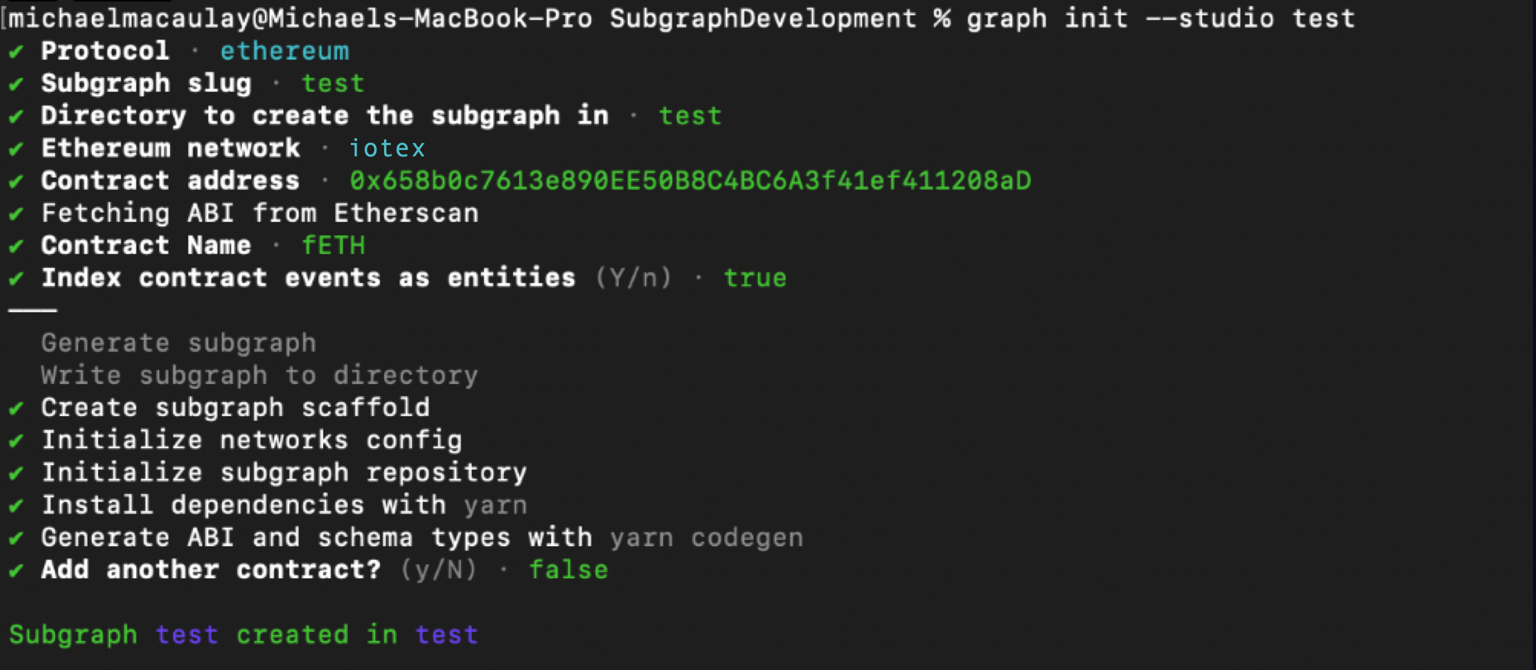
Once the Subgraph is created inside The Graph Studio, it's enough to initialize it as usual with the official CLI and select ethereum as the protocol and iotex as the network:

```sh
graph init --studio <SUBGRAPH_SLUG>
```

{% hint style="info" %}
You can copy the command above directly from your subgraph page to include your specific subgraph slug.
{% endhint %}

You’ll be prompted to provide some info on your subgraph, make sure you select **`ethereum`** as the protocol, and **`iotex`** as the network:

<figure><img src="https://content.gitbook.com/content/EyawgxYexImpo6OGzEiR/blobs/HeR9oPth0uSxmwJh3C9H/image.png" alt=""><figcaption></figcaption></figure>

Simply have your contract verified on the block explorer and the CLI will automatically obtain the ABI and set up your subgraph. The default settings will generate an entity for each event.

## Additional resources

* To explore all the ways you can optimize & customize your subgraph for a better performance, read more about [creating a subgraph here](https://thegraph.com/docs/en/developing/creating-a-subgraph/).
* For more information about querying data from your subgraph, read more [here](https://thegraph.com/docs/en/querying/querying-the-graph/).


# SubQuery

SubQuery is an open and flexible data indexing framework for web3.&#x20;

SubQuery allows every team to process and query their data. The project is inspired by the growth of data protocols serving the application layer and its aim is to help projects build better dApps by allowing anyone to reliably find and consume data faster.&#x20;

Check out [SubQuery on Github](https://github.com/subquery), to learn how to use their service in your next IoTeX dApp.

{% embed url="<https://github.com/subquery>" %}

If you'd like to follow a guide and learn how to index all transfers and approval events for the [Wrapped Eth](https://iotexscan.io/address/io1qfvgvmk6lpxkpqwlzanqx4atyzs86ryqjnfuad) on the IoTeX chain, the SubQuery team has also prepared [this step-by-step guide](https://github.com/subquery/ethereum-subql-starter/tree/main/Iotex/iotex-starter).&#x20;

{% embed url="<https://github.com/subquery/ethereum-subql-starter/tree/main/Iotex/iotex-starter>" %}


# IoTeX Analytics API

IoTeX Analytics is a service built upon the IoTeX core API, extracting data from the IoTeX blockchain and indexing it for application use via API calls or a GraphQL web interface.

## Quick Links

<table data-view="cards"><thead><tr><th></th></tr></thead><tbody><tr><td><a href="https://analyser-api.iotex.io/api"><strong>API Endpoint</strong></a></td></tr><tr><td><a href="https://analyser-api.iotex.io/graphql"><strong>GraphQL Playground</strong></a></td></tr><tr><td><a href="https://analyser-api.iotex.io/docs/#introduction"><strong>Full API reference</strong></a></td></tr></tbody></table>

## Get Started

### Configure ioctl CLI

Ensure you have the IoTeX `ioctl` CLI installed and updated to the latest release:

```bash
ioctl version
ioctl update
```

If `ioctl` is not installed:

**Install ioctl:**

```
curl https://raw.githubusercontent.com/iotexproject/iotex-core/master/install-cli.sh | sh
```

**Create a new account**

```
ioctl account createadd $ACCOUNT_NAME
```

[→ More about ioctl](/blockchain/build/web3-development/ioctl-cli/create-accounts)

### Obtain an API Key

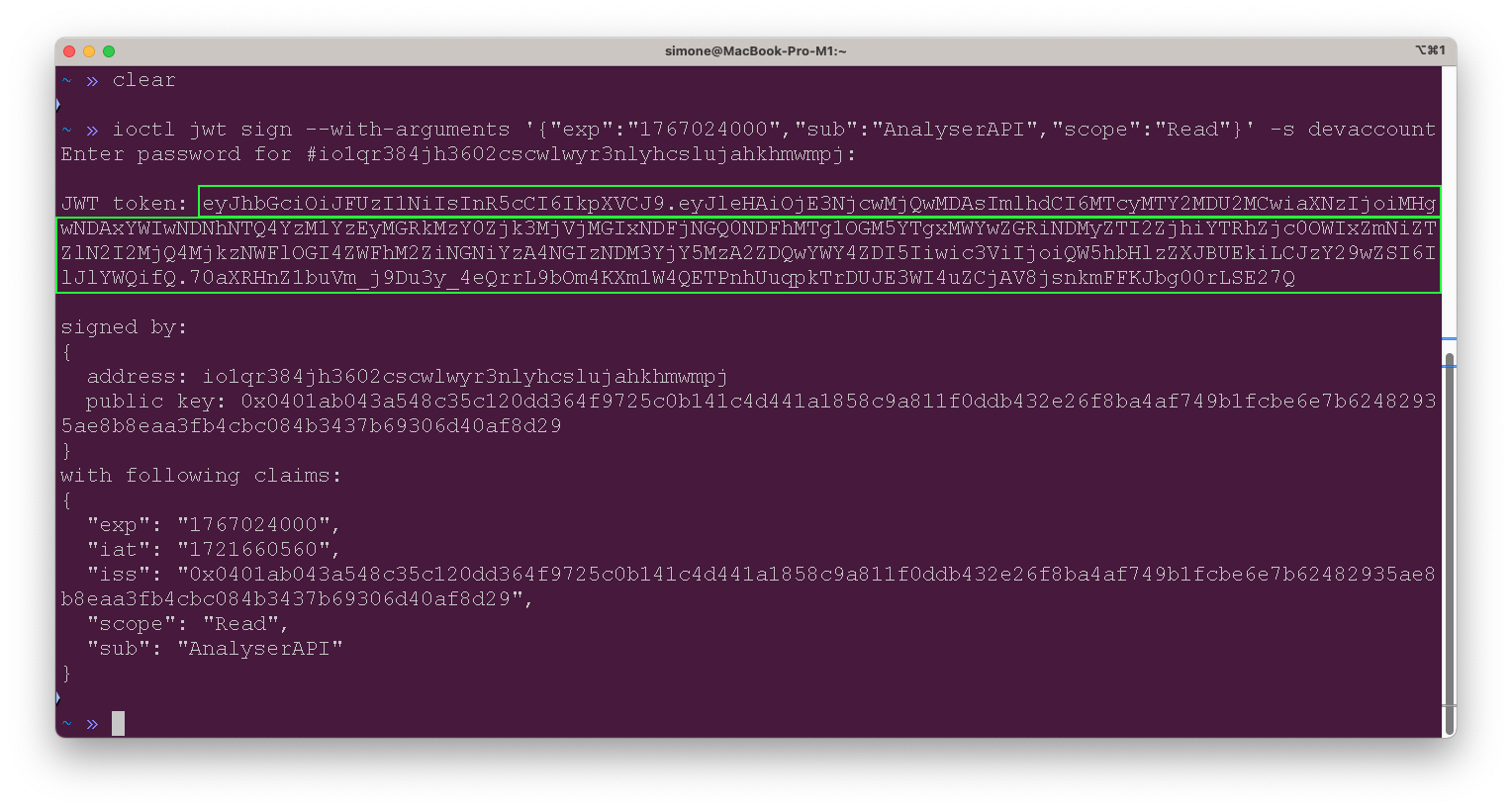
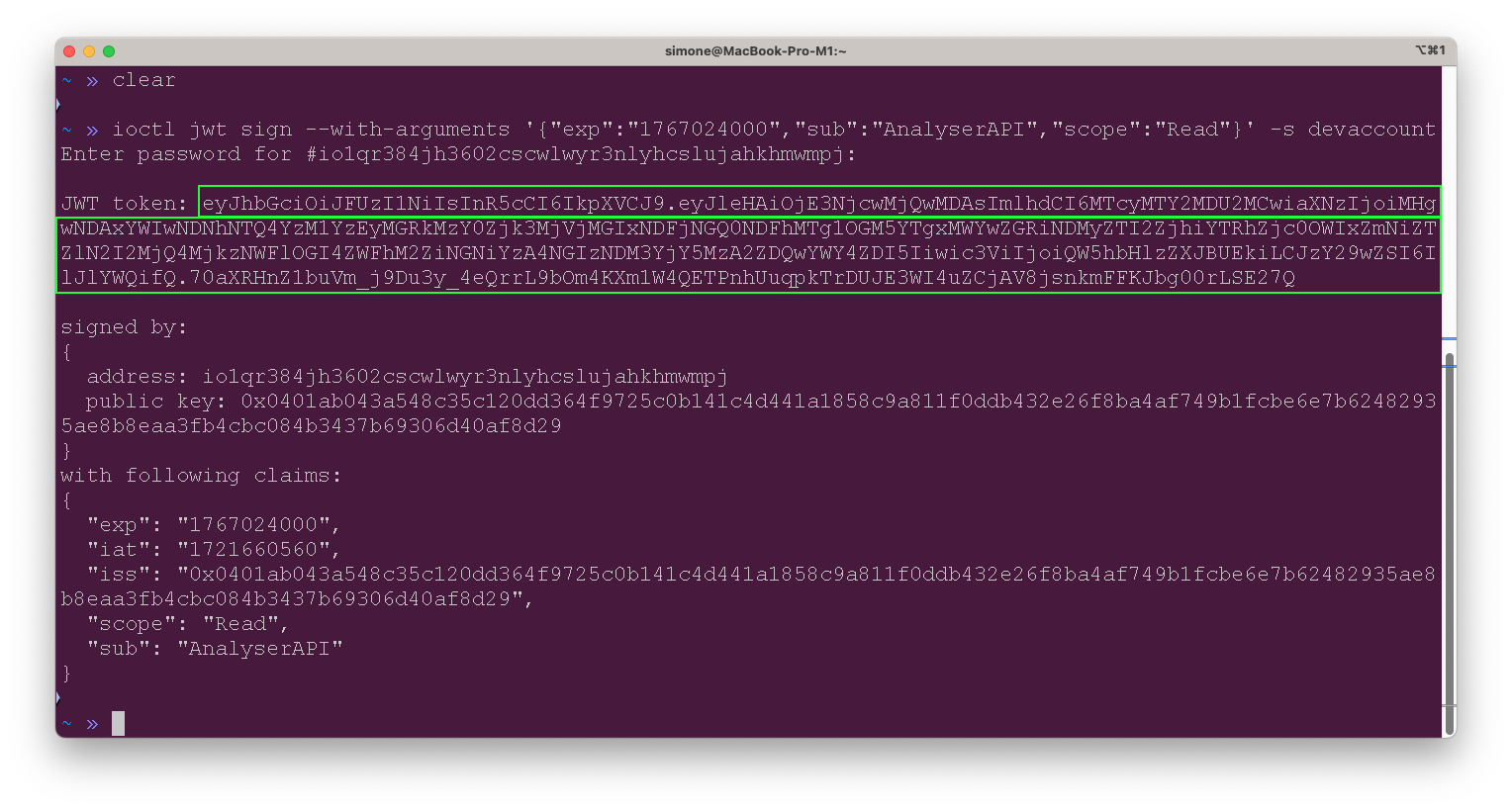
Access to the analytics API requires an API token, which you can obtain using the `ioctl` tool. **The service is free**, and you can generate your API token with the following `ioctl` command:

```bash
ioctl jwt sign --with-arguments '{
  "exp": "1767024000",  
  "sub": "AnalyserAPI",    
  "scope": "Read"           
}' -s ACCOUNT_NAME
```

<figure><img src="https://content.gitbook.com/content/EyawgxYexImpo6OGzEiR/blobs/g3kNOUlzn73ZpWbFBwfy/image.png" alt=""><figcaption></figcaption></figure>

[→ Read more about the ioctl jwt command ](/blockchain/build/reference-docs/ioctl-client/jwt-auth-tokens#use-ioctl-to-issue-jwt)

After generating the JWT token, you can use it to access the API and perform the necessary operations. Keep the token secure and do not share it with unauthorized users to ensure the security of your API interactions.

## Example Queries

Replace `YOUR_JWT_TOKEN` with your actual JWT token and the address you want to query.

### Transaction History By Address

The `ActionService.ActionByAddress` API endpoint retrieves the history of actions (transactions) associated with a specified IoTeX address. It includes details such as transaction hashes, block numbers, sender and receiver addresses, transaction value, and timestamp.

The first result is the newest one.

```bash
export JWT_TOKEN="YOUR_JWT_TOKEN"
export ADDRESS="0x350eDE228A8F9157dC6bDE7C03566cE94C53e6f6"

curl --request POST \
  --url https://analyser-api.iotex.io/api.ActionService.ActionByAddress \
  --header "Content-Type: application/json" \
  --header "Authorization: Bearer $JWT_TOKEN" \
  --data "{
    \"address\": \"$ADDRESS\",
    \"pagination\": {
      \"skip\": 0,
      \"first\": 5
    }
  }"

```

### EVM Transactions by Address

The `ActionService.EvmTransfersByAddress` endpoint retrieves the list of EVM (Ethereum Virtual Machine) transfers associated with a specified IoTeX address. It includes details such as transaction hashes, block numbers, sender and receiver addresses, transfer value, and timestamp.

The first result is the newest one.

```bash
curl --request POST \
  --url https://analyser-api.iotex.io/api.ActionService.EvmTransfersByAddress \
  --header "Content-Type: application/json" \
  --header "Authorization: Bearer $JWT_TOKEN" \
  --data "{
    \"address\": \"$ADDRESS\",
    \"pagination\": {
      \"skip\": 0,
      \"first\": 1
    }
  }"
```

## Included modules

<table><thead><tr><th width="175">Module</th><th>Description</th></tr></thead><tbody><tr><td><a href="https://analyser-api.iotex.io/docs/#chain-service-api">Chain</a></td><td>The Chain service provides general information on the current status of the IoTeX blockchain and the IOTX token, like chain height, current epoch, total supply, total votes, etc...</td></tr><tr><td><a href="https://analyser-api.iotex.io/docs/#delegate-service-api">Delegate</a></td><td>The Delegate service provides detailed data about the IoTeX delegates, block producers, staking deposits, mining rewards, and more. </td></tr><tr><td><a href="https://analyser-api.iotex.io/docs/#account-service-api">Account</a></td><td>The Account service provides all the information related to blockchain accounts, from balances to transactions to aliases for known addresses.</td></tr><tr><td><a href="https://analyser-api.iotex.io/docs/#voting-service-api">Voting</a></td><td>The Voting service specializes in delegates ranking and votes.</td></tr><tr><td><a href="https://analyser-api.iotex.io/docs/#action-service-api">Action</a></td><td>The Action service allows any query to list transactions filtered by different criteria, like actions by date, address, type, etc... </td></tr><tr><td><a href="https://analyser-api.iotex.io/docs/#xrc20-service-api">XRC20</a></td><td>The XRC20 service gives easy access to XRC20 fungible tokens data (equivalent to the ERC20 standard used on Ethereum), like token holders and contract addresses.</td></tr><tr><td><a href="https://analyser-api.iotex.io/docs/#xrc721-service-api">XRC721</a></td><td>The XRC721 service gives easy access to XRC721 non-fungible tokens data, like token holders and contract addresses.</td></tr><tr><td><a href="https://analyser-api.iotex.io/docs/#hermes-service-api">Hermes</a></td><td>The Hermes service gives access to rewards distributed by the IoTeX official <a href="https://hermes.to/">Hermes system</a>.</td></tr></tbody></table>


# IoTeXscan API

## Overview

At IoTeX, we provide a powerful block explorer, [IoTeXScan](https://iotexscan.io), which allows users and developers to easily query data on the IoTeX blockchain. To make it even easier for developers familiar with Ethereum tools, we’ve implemented the same Etherscan API on IoTeXScan.

This guide provides a quick overview of how to get started with our IoTeXScan API and the available endpoints.

## Getting Started

You can use IoTeXScan’s API just as you would use the Etherscan API. The API allows developers to retrieve blockchain data programmatically, such as transaction details, block information, account balances, and much more.

Here are the key steps to start using the API:

**Base URL**: <https://dev.iotexscan.io/api>

**API Key:** To interact with the IoTeXScan API, no API key is required. However, queries are rate-limited to 1 request per second.

**Example endpoint:**

```
https://dev.iotexscan.io/api?module=account&action=balance&address=0x139929a597b91ea89f41026b65b281611890f13b
```

## Complete API

## GET ?module=contract\&action=getabi

>

```json
{"openapi":"3.0.0","info":{"title":"My API","version":"1.0.0"},"servers":[{"url":"/api"}],"paths":{"?module=contract&action=getabi":{"get":{"parameters":[{"schema":{"type":"string","description":"Eth Address or Io Address"},"required":true,"description":"Eth Address or Io Address","name":"address","in":"query"}],"responses":{"200":{"description":"Successful response","content":{"application/json":{"schema":{"type":"string"}}}}}}}}}
```

## GET ?module=contract\&action=getcontractcreation

>

```json
{"openapi":"3.0.0","info":{"title":"My API","version":"1.0.0"},"servers":[{"url":"/api"}],"paths":{"?module=contract&action=getcontractcreation":{"get":{"parameters":[{"schema":{"type":"string","description":"Eth Address or Io Address"},"required":true,"description":"Eth Address or Io Address","name":"contractaddresses","in":"query"}],"responses":{"200":{"description":"Successful response","content":{"application/json":{"schema":{"nullable":true}}}}}}}}}
```

## GET ?module=contract\&action=getsourcecode

>

```json
{"openapi":"3.0.0","info":{"title":"My API","version":"1.0.0"},"servers":[{"url":"/api"}],"paths":{"?module=contract&action=getsourcecode":{"get":{"parameters":[{"schema":{"type":"string","description":"Eth Address or Io Address"},"required":true,"description":"Eth Address or Io Address","name":"address","in":"query"}],"responses":{"200":{"description":"Successful response","content":{"application/json":{"schema":{"nullable":true}}}}}}}}}
```

## GET ?module=contract\&action=checkverifystatus

>

```json
{"openapi":"3.0.0","info":{"title":"My API","version":"1.0.0"},"servers":[{"url":"/api"}],"paths":{"?module=contract&action=checkverifystatus":{"get":{"parameters":[{"schema":{"type":"string"},"required":true,"name":"guid","in":"query"}],"responses":{"200":{"description":"Successful response","content":{"application/json":{"schema":{"nullable":true}}}}}}}}}
```

## GET ?module=proxy\&action=eth\_getTransactionByHash

>

```json
{"openapi":"3.0.0","info":{"title":"My API","version":"1.0.0"},"servers":[{"url":"/api"}],"paths":{"?module=proxy&action=eth_getTransactionByHash":{"get":{"parameters":[{"schema":{"type":"string","description":"Hash"},"required":true,"description":"Hash","name":"txhash","in":"query"}],"responses":{"200":{"description":"Successful response","content":{"application/json":{"schema":{"nullable":true}}}}}}}}}
```

## GET ?module=proxy\&action=eth\_getTransactionByBlockNumberAndIndex

>

```json
{"openapi":"3.0.0","info":{"title":"My API","version":"1.0.0"},"servers":[{"url":"/api"}],"paths":{"?module=proxy&action=eth_getTransactionByBlockNumberAndIndex":{"get":{"parameters":[{"schema":{"type":"string","pattern":"^0x[0-9a-fA-F]+$","description":"block height in hex string"},"required":true,"name":"tag","in":"query"},{"schema":{"type":"string","pattern":"^0x[0-9a-fA-F]+$"},"required":true,"name":"index","in":"query"}],"responses":{"200":{"description":"Successful response","content":{"application/json":{"schema":{"nullable":true}}}}}}}}}
```

## GET ?module=proxy\&action=eth\_getTransactionCount

>

```json
{"openapi":"3.0.0","info":{"title":"My API","version":"1.0.0"},"servers":[{"url":"/api"}],"paths":{"?module=proxy&action=eth_getTransactionCount":{"get":{"parameters":[{"schema":{"type":"string","description":"Eth Address or Io Address"},"required":true,"description":"Eth Address or Io Address","name":"address","in":"query"},{"schema":{"type":"string","enum":["latest","earliest","pending","safe","finalized"],"default":"latest","description":"Block tag, default 'latest"},"required":false,"description":"Block tag, default 'latest","name":"tag","in":"query"}],"responses":{"200":{"description":"Successful response","content":{"application/json":{"schema":{"nullable":true}}}}}}}}}
```

## GET ?module=proxy\&action=eth\_sendRawTransaction

>

```json
{"openapi":"3.0.0","info":{"title":"My API","version":"1.0.0"},"servers":[{"url":"/api"}],"paths":{"?module=proxy&action=eth_sendRawTransaction":{"get":{"parameters":[{"schema":{"type":"string","pattern":"^0x[0-9a-fA-F]+$"},"required":true,"name":"hex","in":"query"}],"responses":{"200":{"description":"Successful response","content":{"application/json":{"schema":{"nullable":true}}}}}}}}}
```

## GET ?module=proxy\&action=eth\_getTransactionReceipt

>

```json
{"openapi":"3.0.0","info":{"title":"My API","version":"1.0.0"},"servers":[{"url":"/api"}],"paths":{"?module=proxy&action=eth_getTransactionReceipt":{"get":{"parameters":[{"schema":{"type":"string","description":"Hash"},"required":true,"description":"Hash","name":"txhash","in":"query"}],"responses":{"200":{"description":"Successful response","content":{"application/json":{"schema":{"nullable":true}}}}}}}}}
```

## GET ?module=proxy\&action=eth\_call

>

```json
{"openapi":"3.0.0","info":{"title":"My API","version":"1.0.0"},"servers":[{"url":"/api"}],"paths":{"?module=proxy&action=eth_call":{"get":{"parameters":[{"schema":{"type":"string","description":"Eth Address or Io Address"},"required":true,"description":"Eth Address or Io Address","name":"to","in":"query"},{"schema":{"type":"string","pattern":"^0x[0-9a-fA-F]+$"},"required":true,"name":"data","in":"query"},{"schema":{"type":"string","enum":["latest","earliest","pending","safe","finalized"],"default":"latest","description":"Block tag, default 'latest"},"required":false,"description":"Block tag, default 'latest","name":"tag","in":"query"}],"responses":{"200":{"description":"Successful response","content":{"application/json":{"schema":{"nullable":true}}}}}}}}}
```

## GET ?module=proxy\&action=eth\_getCode

>

```json
{"openapi":"3.0.0","info":{"title":"My API","version":"1.0.0"},"servers":[{"url":"/api"}],"paths":{"?module=proxy&action=eth_getCode":{"get":{"parameters":[{"schema":{"type":"string","description":"Eth Address or Io Address"},"required":true,"description":"Eth Address or Io Address","name":"address","in":"query"},{"schema":{"type":"string","enum":["latest","earliest","pending","safe","finalized"],"default":"latest","description":"Block tag, default 'latest"},"required":false,"description":"Block tag, default 'latest","name":"tag","in":"query"}],"responses":{"200":{"description":"Successful response","content":{"application/json":{"schema":{"nullable":true}}}}}}}}}
```

## GET ?module=proxy\&action=eth\_getStorageAt

>

```json
{"openapi":"3.0.0","info":{"title":"My API","version":"1.0.0"},"servers":[{"url":"/api"}],"paths":{"?module=proxy&action=eth_getStorageAt":{"get":{"parameters":[{"schema":{"type":"string","description":"Eth Address or Io Address"},"required":true,"description":"Eth Address or Io Address","name":"address","in":"query"},{"schema":{"type":"string","pattern":"^0x[0-9a-fA-F]+$"},"required":true,"name":"position","in":"query"},{"schema":{"type":"string","enum":["latest","earliest","pending","safe","finalized"],"default":"latest","description":"Block tag, default 'latest"},"required":false,"description":"Block tag, default 'latest","name":"tag","in":"query"}],"responses":{"200":{"description":"Successful response","content":{"application/json":{"schema":{"nullable":true}}}}}}}}}
```

## GET ?module=proxy\&action=eth\_gasPrice

>

```json
{"openapi":"3.0.0","info":{"title":"My API","version":"1.0.0"},"servers":[{"url":"/api"}],"paths":{"?module=proxy&action=eth_gasPrice":{"get":{"responses":{"200":{"description":"Successful response","content":{"application/json":{"schema":{"nullable":true}}}}}}}}}
```

## GET ?module=proxy\&action=eth\_estimateGas

>

```json
{"openapi":"3.0.0","info":{"title":"My API","version":"1.0.0"},"servers":[{"url":"/api"}],"paths":{"?module=proxy&action=eth_estimateGas":{"get":{"parameters":[{"schema":{"type":"string","pattern":"^0x[0-9a-fA-F]+$"},"required":true,"name":"data","in":"query"},{"schema":{"type":"string","description":"Eth Address or Io Address"},"required":true,"description":"Eth Address or Io Address","name":"to","in":"query"},{"schema":{"type":"string","pattern":"^0x[0-9a-fA-F]+$"},"required":true,"name":"value","in":"query"},{"schema":{"type":"string","pattern":"^0x[0-9a-fA-F]+$"},"required":true,"name":"gasPrice","in":"query"},{"schema":{"type":"string","pattern":"^0x[0-9a-fA-F]+$"},"required":true,"name":"gas","in":"query"}],"responses":{"200":{"description":"Successful response","content":{"application/json":{"schema":{"nullable":true}}}}}}}}}
```

## GET ?module=account\&action=balance

>

```json
{"openapi":"3.0.0","info":{"title":"My API","version":"1.0.0"},"servers":[{"url":"/api"}],"paths":{"?module=account&action=balance":{"get":{"parameters":[{"schema":{"type":"string","default":"0xa00744882684c3e4747faefd68d283ea44099d03","description":"Eth Address or Io Address"},"required":true,"description":"Eth Address or Io Address","name":"address","in":"query"},{"schema":{"type":"string","enum":["latest","earliest","pending","safe","finalized"],"default":"latest","description":"Block tag, default 'latest"},"required":false,"description":"Block tag, default 'latest","name":"tag","in":"query"}],"responses":{"200":{"description":"Successful response","content":{"application/json":{"schema":{"nullable":true}}}}}}}}}
```

## GET ?module=account\&action=balancemulti

>

```json
{"openapi":"3.0.0","info":{"title":"My API","version":"1.0.0"},"servers":[{"url":"/api"}],"paths":{"?module=account&action=balancemulti":{"get":{"parameters":[{"schema":{"type":"string","description":"Eth Address or Io Address"},"required":true,"description":"Eth Address or Io Address","name":"address","in":"query"},{"schema":{"type":"string","enum":["latest","earliest","pending","safe","finalized"],"default":"latest","description":"Block tag, default 'latest"},"required":false,"description":"Block tag, default 'latest","name":"tag","in":"query"}],"responses":{"200":{"description":"Successful response","content":{"application/json":{"schema":{"nullable":true}}}}}}}}}
```

## GET ?module=account\&action=txlist

>

```json
{"openapi":"3.0.0","info":{"title":"My API","version":"1.0.0"},"servers":[{"url":"/api"}],"paths":{"?module=account&action=txlist":{"get":{"parameters":[{"schema":{"type":"string","default":"0xa00744882684c3e4747faefd68d283ea44099d03","description":"Eth Address or Io Address"},"required":true,"description":"Eth Address or Io Address","name":"address","in":"query"},{"schema":{"type":"string","default":"1","description":"Page number, default 1"},"required":false,"description":"Page number, default 1","name":"page","in":"query"},{"schema":{"type":"string","default":"10","description":"Number of items per page, default 10"},"required":false,"description":"Number of items per page, default 10","name":"offset","in":"query"},{"schema":{"type":"string","enum":["asc","desc"],"default":"asc","description":"Sort order, default 'asc"},"required":false,"description":"Sort order, default 'asc","name":"sort","in":"query"},{"schema":{"type":"string","description":"Start block number"},"required":false,"description":"Start block number","name":"startblock","in":"query"},{"schema":{"type":"string","description":"End block number"},"required":false,"description":"End block number","name":"endblock","in":"query"}],"responses":{"200":{"description":"Successful response","content":{"application/json":{"schema":{"nullable":true}}}}}}}}}
```

## GET ?module=account\&action=txlistinternal

>

```json
{"openapi":"3.0.0","info":{"title":"My API","version":"1.0.0"},"servers":[{"url":"/api"}],"paths":{"?module=account&action=txlistinternal":{"get":{"parameters":[{"schema":{"type":"string","description":"Eth Address or Io Address"},"required":false,"description":"Eth Address or Io Address","name":"address","in":"query"},{"schema":{"type":"string","description":"Hash"},"required":false,"description":"Hash","name":"txhash","in":"query"},{"schema":{"type":"string","default":"1","description":"Page number, default 1"},"required":false,"description":"Page number, default 1","name":"page","in":"query"},{"schema":{"type":"string","default":"10","description":"Number of items per page, default 10"},"required":false,"description":"Number of items per page, default 10","name":"offset","in":"query"},{"schema":{"type":"string","enum":["asc","desc"],"default":"asc","description":"Sort order, default 'asc"},"required":false,"description":"Sort order, default 'asc","name":"sort","in":"query"},{"schema":{"type":"string","description":"Start block number"},"required":false,"description":"Start block number","name":"startblock","in":"query"},{"schema":{"type":"string","description":"End block number"},"required":false,"description":"End block number","name":"endblock","in":"query"}],"responses":{"200":{"description":"Successful response","content":{"application/json":{"schema":{"nullable":true}}}}}}}}}
```

## GET ?module=account\&action=tokentx

>

```json
{"openapi":"3.0.0","info":{"title":"My API","version":"1.0.0"},"servers":[{"url":"/api"}],"paths":{"?module=account&action=tokentx":{"get":{"parameters":[{"schema":{"type":"string","description":"Eth Address or Io Address"},"required":false,"description":"Eth Address or Io Address","name":"contractaddress","in":"query"},{"schema":{"type":"string","description":"Eth Address or Io Address"},"required":true,"description":"Eth Address or Io Address","name":"address","in":"query"},{"schema":{"type":"string","default":"1","description":"Page number, default 1"},"required":false,"description":"Page number, default 1","name":"page","in":"query"},{"schema":{"type":"string","default":"10","description":"Number of items per page, default 10"},"required":false,"description":"Number of items per page, default 10","name":"offset","in":"query"},{"schema":{"type":"string","enum":["asc","desc"],"default":"asc","description":"Sort order, default 'asc"},"required":false,"description":"Sort order, default 'asc","name":"sort","in":"query"},{"schema":{"type":"string","description":"Start block number"},"required":false,"description":"Start block number","name":"startblock","in":"query"},{"schema":{"type":"string","description":"End block number"},"required":false,"description":"End block number","name":"endblock","in":"query"}],"responses":{"200":{"description":"Successful response","content":{"application/json":{"schema":{"nullable":true}}}}}}}}}
```

## GET ?module=account\&action=tokennfttx

>

```json
{"openapi":"3.0.0","info":{"title":"My API","version":"1.0.0"},"servers":[{"url":"/api"}],"paths":{"?module=account&action=tokennfttx":{"get":{"parameters":[{"schema":{"type":"string","description":"Eth Address or Io Address"},"required":false,"description":"Eth Address or Io Address","name":"contractaddress","in":"query"},{"schema":{"type":"string","description":"Eth Address or Io Address"},"required":true,"description":"Eth Address or Io Address","name":"address","in":"query"},{"schema":{"type":"string","default":"1","description":"Page number, default 1"},"required":false,"description":"Page number, default 1","name":"page","in":"query"},{"schema":{"type":"string","default":"10","description":"Number of items per page, default 10"},"required":false,"description":"Number of items per page, default 10","name":"offset","in":"query"},{"schema":{"type":"string","enum":["asc","desc"],"default":"asc","description":"Sort order, default 'asc"},"required":false,"description":"Sort order, default 'asc","name":"sort","in":"query"},{"schema":{"type":"string","description":"Start block number"},"required":false,"description":"Start block number","name":"startblock","in":"query"},{"schema":{"type":"string","description":"End block number"},"required":false,"description":"End block number","name":"endblock","in":"query"}],"responses":{"200":{"description":"Successful response","content":{"application/json":{"schema":{"nullable":true}}}}}}}}}
```

## GET ?module=account\&action=token1155tx

>

```json
{"openapi":"3.0.0","info":{"title":"My API","version":"1.0.0"},"servers":[{"url":"/api"}],"paths":{"?module=account&action=token1155tx":{"get":{"parameters":[{"schema":{"type":"string","description":"Eth Address or Io Address"},"required":false,"description":"Eth Address or Io Address","name":"contractaddress","in":"query"},{"schema":{"type":"string","description":"Eth Address or Io Address"},"required":true,"description":"Eth Address or Io Address","name":"address","in":"query"},{"schema":{"type":"string","default":"1","description":"Page number, default 1"},"required":false,"description":"Page number, default 1","name":"page","in":"query"},{"schema":{"type":"string","default":"10","description":"Number of items per page, default 10"},"required":false,"description":"Number of items per page, default 10","name":"offset","in":"query"},{"schema":{"type":"string","enum":["asc","desc"],"default":"asc","description":"Sort order, default 'asc"},"required":false,"description":"Sort order, default 'asc","name":"sort","in":"query"},{"schema":{"type":"string","description":"Start block number"},"required":false,"description":"Start block number","name":"startblock","in":"query"},{"schema":{"type":"string","description":"End block number"},"required":false,"description":"End block number","name":"endblock","in":"query"}],"responses":{"200":{"description":"Successful response","content":{"application/json":{"schema":{"nullable":true}}}}}}}}}
```

## GET ?module=account\&action=tokenbalance

>

```json
{"openapi":"3.0.0","info":{"title":"My API","version":"1.0.0"},"servers":[{"url":"/api"}],"paths":{"?module=account&action=tokenbalance":{"get":{"parameters":[{"schema":{"type":"string","description":"Eth Address or Io Address"},"required":true,"description":"Eth Address or Io Address","name":"contractaddress","in":"query"},{"schema":{"type":"string","description":"Eth Address or Io Address"},"required":true,"description":"Eth Address or Io Address","name":"address","in":"query"}],"responses":{"200":{"description":"Successful response","content":{"application/json":{"schema":{"nullable":true}}}}}}}}}
```

## GET ?module=account\&action=tokensupplyhistory

>

```json
{"openapi":"3.0.0","info":{"title":"My API","version":"1.0.0"},"servers":[{"url":"/api"}],"paths":{"?module=account&action=tokensupplyhistory":{"get":{"parameters":[{"schema":{"type":"string","description":"Eth Address or Io Address"},"required":true,"description":"Eth Address or Io Address","name":"contractaddress","in":"query"},{"schema":{"type":"string","description":"Block number"},"required":true,"description":"Block number","name":"blockno","in":"query"}],"responses":{"200":{"description":"Successful response","content":{"application/json":{"schema":{"nullable":true}}}}}}}}}
```

## GET ?module=account\&action=tokenbalancehistory

>

```json
{"openapi":"3.0.0","info":{"title":"My API","version":"1.0.0"},"servers":[{"url":"/api"}],"paths":{"?module=account&action=tokenbalancehistory":{"get":{"parameters":[{"schema":{"type":"string","description":"Eth Address or Io Address"},"required":true,"description":"Eth Address or Io Address","name":"contractaddress","in":"query"},{"schema":{"type":"string","description":"Eth Address or Io Address"},"required":true,"description":"Eth Address or Io Address","name":"address","in":"query"},{"schema":{"type":"string","description":"Block number"},"required":true,"description":"Block number","name":"blockno","in":"query"}],"responses":{"200":{"description":"Successful response","content":{"application/json":{"schema":{"nullable":true}}}}}}}}}
```

## GET ?module=account\&action=addresstokennftbalance

>

```json
{"openapi":"3.0.0","info":{"title":"My API","version":"1.0.0"},"servers":[{"url":"/api"}],"paths":{"?module=account&action=addresstokennftbalance":{"get":{"parameters":[{"schema":{"type":"string","description":"Eth Address or Io Address"},"required":true,"description":"Eth Address or Io Address","name":"address","in":"query"},{"schema":{"type":"string","default":"1","description":"Page number, default 1"},"required":false,"description":"Page number, default 1","name":"page","in":"query"},{"schema":{"type":"string","default":"10","description":"Number of items per page, default 10"},"required":false,"description":"Number of items per page, default 10","name":"offset","in":"query"}],"responses":{"200":{"description":"Successful response","content":{"application/json":{"schema":{"nullable":true}}}}}}}}}
```

## GET ?module=account\&action=addresstokennftinventory

>

```json
{"openapi":"3.0.0","info":{"title":"My API","version":"1.0.0"},"servers":[{"url":"/api"}],"paths":{"?module=account&action=addresstokennftinventory":{"get":{"parameters":[{"schema":{"type":"string","description":"Eth Address or Io Address"},"required":true,"description":"Eth Address or Io Address","name":"address","in":"query"},{"schema":{"type":"string","description":"Eth Address or Io Address"},"required":true,"description":"Eth Address or Io Address","name":"convertAddress","in":"query"},{"schema":{"type":"string","default":"1","description":"Page number, default 1"},"required":false,"description":"Page number, default 1","name":"page","in":"query"},{"schema":{"type":"string","default":"10","description":"Number of items per page, default 10"},"required":false,"description":"Number of items per page, default 10","name":"offset","in":"query"}],"responses":{"200":{"description":"Successful response","content":{"application/json":{"schema":{"nullable":true}}}}}}}}}
```

## GET ?module=block\&action=getblockreward

>

```json
{"openapi":"3.0.0","info":{"title":"My API","version":"1.0.0"},"servers":[{"url":"/api"}],"paths":{"?module=block&action=getblockreward":{"get":{"parameters":[{"schema":{"type":"string","description":"Block number"},"required":true,"description":"Block number","name":"blockno","in":"query"}],"responses":{"200":{"description":"Successful response","content":{"application/json":{"schema":{"nullable":true}}}}}}}}}
```

## GET ?module=block\&action=getblocknobytime

>

```json
{"openapi":"3.0.0","info":{"title":"My API","version":"1.0.0"},"servers":[{"url":"/api"}],"paths":{"?module=block&action=getblocknobytime":{"get":{"parameters":[{"schema":{"type":"string","description":"Unix timestamp"},"required":true,"description":"Unix timestamp","name":"timestamp","in":"query"},{"schema":{"type":"string","enum":["before","after"],"default":"before","description":"Before timestamp or after timestamp, default 'before'"},"required":false,"description":"Before timestamp or after timestamp, default 'before'","name":"closest","in":"query"}],"responses":{"200":{"description":"Successful response","content":{"application/json":{"schema":{"nullable":true}}}}}}}}}
```

## GET ?module=log\&action=getLogs

>

```json
{"openapi":"3.0.0","info":{"title":"My API","version":"1.0.0"},"servers":[{"url":"/api"}],"paths":{"?module=log&action=getLogs":{"get":{"parameters":[{"schema":{"type":"string","description":"Eth Address or Io Address"},"required":true,"description":"Eth Address or Io Address","name":"address","in":"query"},{"schema":{"type":"string","description":"Block number"},"required":true,"description":"Block number","name":"fromBlock","in":"query"},{"schema":{"type":"string","description":"Block number"},"required":true,"description":"Block number","name":"toBlock","in":"query"},{"schema":{"type":"string","default":"1","description":"Page number, default 1"},"required":false,"description":"Page number, default 1","name":"page","in":"query"},{"schema":{"type":"string","default":"10","description":"Number of items per page, default 10"},"required":false,"description":"Number of items per page, default 10","name":"offset","in":"query"}],"responses":{"200":{"description":"Successful response","content":{"application/json":{"schema":{"nullable":true}}}}}}}}}
```

## GET ?module=stats\&action=tokensupply

>

```json
{"openapi":"3.0.0","info":{"title":"My API","version":"1.0.0"},"servers":[{"url":"/api"}],"paths":{"?module=stats&action=tokensupply":{"get":{"parameters":[{"schema":{"type":"string","description":"Eth Address or Io Address"},"required":true,"description":"Eth Address or Io Address","name":"contractaddress","in":"query"}],"responses":{"200":{"description":"Successful response","content":{"application/json":{"schema":{"nullable":true}}}}}}}}}
```

## GET ?module=stats\&action=dailyblkcount

>

```json
{"openapi":"3.0.0","info":{"title":"My API","version":"1.0.0"},"servers":[{"url":"/api"}],"paths":{"?module=stats&action=dailyblkcount":{"get":{"parameters":[{"schema":{"type":"string","default":"2025-11-07","description":"Start date"},"required":true,"description":"Start date","name":"startdate","in":"query"},{"schema":{"type":"string","default":"2025-11-14","description":"End date"},"required":true,"description":"End date","name":"enddate","in":"query"},{"schema":{"type":"string","enum":["asc","desc"],"default":"asc","description":"Sort order, default 'asc"},"required":false,"description":"Sort order, default 'asc","name":"sort","in":"query"}],"responses":{"200":{"description":"Successful response","content":{"application/json":{"schema":{"nullable":true}}}}}}}}}
```

## GET ?module=stats\&action=dailyblockrewards

>

```json
{"openapi":"3.0.0","info":{"title":"My API","version":"1.0.0"},"servers":[{"url":"/api"}],"paths":{"?module=stats&action=dailyblockrewards":{"get":{"parameters":[{"schema":{"type":"string","default":"2025-11-07","description":"Start date"},"required":true,"description":"Start date","name":"startdate","in":"query"},{"schema":{"type":"string","default":"2025-11-14","description":"End date"},"required":true,"description":"End date","name":"enddate","in":"query"},{"schema":{"type":"string","enum":["asc","desc"],"default":"asc","description":"Sort order, default 'asc"},"required":false,"description":"Sort order, default 'asc","name":"sort","in":"query"}],"responses":{"200":{"description":"Successful response","content":{"application/json":{"schema":{"nullable":true}}}}}}}}}
```

## GET ?module=stats\&action=iotxprice

>

```json
{"openapi":"3.0.0","info":{"title":"My API","version":"1.0.0"},"servers":[{"url":"/api"}],"paths":{"?module=stats&action=iotxprice":{"get":{"responses":{"200":{"description":"Successful response","content":{"application/json":{"schema":{"nullable":true}}}}}}}}}
```

## GET ?module=stats\&action=dailytxnfee

>

```json
{"openapi":"3.0.0","info":{"title":"My API","version":"1.0.0"},"servers":[{"url":"/api"}],"paths":{"?module=stats&action=dailytxnfee":{"get":{"parameters":[{"schema":{"type":"string","default":"2025-11-07","description":"Start date"},"required":true,"description":"Start date","name":"startdate","in":"query"},{"schema":{"type":"string","default":"2025-11-14","description":"End date"},"required":true,"description":"End date","name":"enddate","in":"query"},{"schema":{"type":"string","enum":["asc","desc"],"default":"asc","description":"Sort order, default 'asc"},"required":false,"description":"Sort order, default 'asc","name":"sort","in":"query"}],"responses":{"200":{"description":"Successful response","content":{"application/json":{"schema":{"nullable":true}}}}}}}}}
```

## GET ?module=stats\&action=dailynewaddress

>

```json
{"openapi":"3.0.0","info":{"title":"My API","version":"1.0.0"},"servers":[{"url":"/api"}],"paths":{"?module=stats&action=dailynewaddress":{"get":{"parameters":[{"schema":{"type":"string","default":"2025-11-07","description":"Start date"},"required":true,"description":"Start date","name":"startdate","in":"query"},{"schema":{"type":"string","default":"2025-11-14","description":"End date"},"required":true,"description":"End date","name":"enddate","in":"query"},{"schema":{"type":"string","enum":["asc","desc"],"default":"asc","description":"Sort order, default 'asc"},"required":false,"description":"Sort order, default 'asc","name":"sort","in":"query"}],"responses":{"200":{"description":"Successful response","content":{"application/json":{"schema":{"nullable":true}}}}}}}}}
```

## GET ?module=stats\&action=dailytx

>

```json
{"openapi":"3.0.0","info":{"title":"My API","version":"1.0.0"},"servers":[{"url":"/api"}],"paths":{"?module=stats&action=dailytx":{"get":{"parameters":[{"schema":{"type":"string","default":"2025-11-07","description":"Start date"},"required":true,"description":"Start date","name":"startdate","in":"query"},{"schema":{"type":"string","default":"2025-11-14","description":"End date"},"required":true,"description":"End date","name":"enddate","in":"query"},{"schema":{"type":"string","enum":["asc","desc"],"default":"asc","description":"Sort order, default 'asc"},"required":false,"description":"Sort order, default 'asc","name":"sort","in":"query"}],"responses":{"200":{"description":"Successful response","content":{"application/json":{"schema":{"nullable":true}}}}}}}}}
```

## GET ?module=stats\&action=iotxdailyprice

>

```json
{"openapi":"3.0.0","info":{"title":"My API","version":"1.0.0"},"servers":[{"url":"/api"}],"paths":{"?module=stats&action=iotxdailyprice":{"get":{"parameters":[{"schema":{"type":"string","default":"2025-11-07","description":"Start date"},"required":true,"description":"Start date","name":"startdate","in":"query"},{"schema":{"type":"string","default":"2025-11-14","description":"End date"},"required":true,"description":"End date","name":"enddate","in":"query"},{"schema":{"type":"string","enum":["asc","desc"],"default":"asc","description":"Sort order, default 'asc"},"required":false,"description":"Sort order, default 'asc","name":"sort","in":"query"}],"responses":{"200":{"description":"Successful response","content":{"application/json":{"schema":{"nullable":true}}}}}}}}}
```

## GET ?module=token\&action=tokenholderlist

>

```json
{"openapi":"3.0.0","info":{"title":"My API","version":"1.0.0"},"servers":[{"url":"/api"}],"paths":{"?module=token&action=tokenholderlist":{"get":{"parameters":[{"schema":{"type":"string","description":"Eth Address or Io Address"},"required":true,"description":"Eth Address or Io Address","name":"contractaddress","in":"query"},{"schema":{"type":"string","default":"1","description":"Page number, default 1"},"required":false,"description":"Page number, default 1","name":"page","in":"query"},{"schema":{"type":"string","default":"10","description":"Number of items per page, default 10"},"required":false,"description":"Number of items per page, default 10","name":"offset","in":"query"}],"responses":{"200":{"description":"Successful response","content":{"application/json":{"schema":{"nullable":true}}}}}}}}}
```

## GET ?module=gastracker\&action=gasestimate

>

```json
{"openapi":"3.0.0","info":{"title":"My API","version":"1.0.0"},"servers":[{"url":"/api"}],"paths":{"?module=gastracker&action=gasestimate":{"get":{"parameters":[{"schema":{"type":"string"},"required":true,"name":"gasprice","in":"query"}],"responses":{"200":{"description":"Successful response","content":{"application/json":{"schema":{"nullable":true}}}}}}}}}
```

## GET ?module=gastracker\&action=dailyavggaslimit

>

```json
{"openapi":"3.0.0","info":{"title":"My API","version":"1.0.0"},"servers":[{"url":"/api"}],"paths":{"?module=gastracker&action=dailyavggaslimit":{"get":{"parameters":[{"schema":{"type":"string","default":"2025-11-07","description":"Start date"},"required":true,"description":"Start date","name":"startdate","in":"query"},{"schema":{"type":"string","default":"2025-11-14","description":"End date"},"required":true,"description":"End date","name":"enddate","in":"query"},{"schema":{"type":"string","enum":["asc","desc"],"default":"asc","description":"Sort order, default 'asc"},"required":false,"description":"Sort order, default 'asc","name":"sort","in":"query"}],"responses":{"200":{"description":"Successful response","content":{"application/json":{"schema":{"nullable":true}}}}}}}}}
```

## GET ?module=gastracker\&action=gasoracle

>

```json
{"openapi":"3.0.0","info":{"title":"My API","version":"1.0.0"},"servers":[{"url":"/api"}],"paths":{"?module=gastracker&action=gasoracle":{"get":{"responses":{"200":{"description":"Successful response","content":{"application/json":{"schema":{"type":"object","properties":{"LastBlock":{"type":"string"},"SafeGasPrice":{"type":"string"},"ProposeGasPrice":{"type":"string"},"FastGasPrice":{"type":"string"},"suggestBaseFee":{"type":"string"},"gasUsedRatio":{"type":"string"}},"required":["LastBlock","SafeGasPrice","ProposeGasPrice","FastGasPrice","suggestBaseFee","gasUsedRatio"]}}}}}}}}}
```

## GET ?module=gastracker\&action=dailyavggasprice

>

```json
{"openapi":"3.0.0","info":{"title":"My API","version":"1.0.0"},"servers":[{"url":"/api"}],"paths":{"?module=gastracker&action=dailyavggasprice":{"get":{"parameters":[{"schema":{"type":"string","default":"2025-11-07","description":"Start date"},"required":true,"description":"Start date","name":"startdate","in":"query"},{"schema":{"type":"string","default":"2025-11-14","description":"End date"},"required":true,"description":"End date","name":"enddate","in":"query"},{"schema":{"type":"string","enum":["asc","desc"],"default":"asc","description":"Sort order, default 'asc"},"required":false,"description":"Sort order, default 'asc","name":"sort","in":"query"}],"responses":{"200":{"description":"Successful response","content":{"application/json":{"schema":{"nullable":true}}}}}}}}}
```

## GET ?module=gastracker\&action=dailygasused

>

```json
{"openapi":"3.0.0","info":{"title":"My API","version":"1.0.0"},"servers":[{"url":"/api"}],"paths":{"?module=gastracker&action=dailygasused":{"get":{"parameters":[{"schema":{"type":"string","default":"2025-11-07","description":"Start date"},"required":true,"description":"Start date","name":"startdate","in":"query"},{"schema":{"type":"string","default":"2025-11-14","description":"End date"},"required":true,"description":"End date","name":"enddate","in":"query"},{"schema":{"type":"string","enum":["asc","desc"],"default":"asc","description":"Sort order, default 'asc"},"required":false,"description":"Sort order, default 'asc","name":"sort","in":"query"}],"responses":{"200":{"description":"Successful response","content":{"application/json":{"schema":{"nullable":true}}}}}}}}}
```

## POST ?module=contract\&action=verifysourcecode

>

```json
{"openapi":"3.0.0","info":{"title":"My API","version":"1.0.0"},"servers":[{"url":"/api"}],"paths":{"?module=contract&action=verifysourcecode":{"post":{"parameters":[{"schema":{"type":"string","description":"Contract address to verify"},"required":true,"description":"Eth Address or Io Address","name":"contractaddress","in":"query"},{"schema":{"type":"string","description":"Contract source code or Standard JSON Input"},"required":true,"name":"sourceCode","in":"query"},{"schema":{"type":"string","description":"Compiler version (e.g., v0.8.19+commit.7dd6d404)"},"required":true,"name":"compilerversion","in":"query"},{"schema":{"type":"string","enum":["solidity-single-file","solidity-multiple-file","solidity-standard-json-input"],"description":"Source code format type"},"required":false,"name":"codeformat","in":"query"},{"schema":{"type":"string","description":"Contract name (inferred from JSON if not provided)"},"required":false,"name":"contractname","in":"query"},{"schema":{"anyOf":[{"type":"boolean"},{"type":"number"},{"type":"string"}],"description":"Whether optimization was enabled (0/1 or true/false)"},"required":false,"name":"optimizationUsed","in":"query"},{"schema":{"anyOf":[{"type":"number"},{"type":"string"}],"description":"Number of optimization runs (default: 200)"},"required":false,"name":"runs","in":"query"},{"schema":{"type":"string","description":"EVM version (e.g., istanbul, london, paris)"},"required":false,"name":"evmVersion","in":"query"},{"schema":{"anyOf":[{"type":"number"},{"type":"string"}],"description":"License type identifier (1-14)"},"required":false,"name":"licenseType","in":"query"}],"responses":{"200":{"description":"Successful response","content":{"application/json":{"schema":{"nullable":true}}}}}}}}}
```

## GET ?module=transaction\&action=getstatus

>

```json
{"openapi":"3.0.0","info":{"title":"My API","version":"1.0.0"},"servers":[{"url":"/api"}],"paths":{"?module=transaction&action=getstatus":{"get":{"parameters":[{"schema":{"type":"string","description":"Hash"},"required":true,"description":"Hash","name":"txhash","in":"query"}],"responses":{"200":{"description":"Successful response","content":{"application/json":{"schema":{"nullable":true}}}}}}}}}
```

## GET ?module=transaction\&action=gettxreceiptstatus

>

```json
{"openapi":"3.0.0","info":{"title":"My API","version":"1.0.0"},"servers":[{"url":"/api"}],"paths":{"?module=transaction&action=gettxreceiptstatus":{"get":{"parameters":[{"schema":{"type":"string","description":"Hash"},"required":true,"description":"Hash","name":"txhash","in":"query"}],"responses":{"200":{"description":"Successful response","content":{"application/json":{"schema":{"nullable":true}}}}}}}}}
```

## GET ?module=proxy\&action=eth\_blockNumber

>

```json
{"openapi":"3.0.0","info":{"title":"My API","version":"1.0.0"},"servers":[{"url":"/api"}],"paths":{"?module=proxy&action=eth_blockNumber":{"get":{"responses":{"200":{"description":"Successful response","content":{"application/json":{"schema":{"nullable":true}}}}}}}}}
```

## GET ?module=proxy\&action=eth\_getBlockByNumber

>

```json
{"openapi":"3.0.0","info":{"title":"My API","version":"1.0.0"},"servers":[{"url":"/api"}],"paths":{"?module=proxy&action=eth_getBlockByNumber":{"get":{"parameters":[{"schema":{"type":"string","pattern":"^0x[0-9a-fA-F]+$","description":"block height in hex string"},"required":true,"name":"tag","in":"query"},{"schema":{"type":"boolean","default":false,"description":"If true, returns the full transaction objects, if false only the hashes of the transactions, default 'false"},"required":false,"description":"If true, returns the full transaction objects, if false only the hashes of the transactions, default 'false","name":"boolean","in":"query"}],"responses":{"200":{"description":"Successful response","content":{"application/json":{"schema":{"nullable":true}}}}}}}}}
```

## GET ?module=proxy\&action=eth\_getUncleByBlockNumberAndIndex

>

```json
{"openapi":"3.0.0","info":{"title":"My API","version":"1.0.0"},"servers":[{"url":"/api"}],"paths":{"?module=proxy&action=eth_getUncleByBlockNumberAndIndex":{"get":{"parameters":[{"schema":{"type":"string","pattern":"^0x[0-9a-fA-F]+$","description":"block height in hex string"},"required":true,"name":"tag","in":"query"},{"schema":{"type":"string","pattern":"^0x[0-9a-fA-F]+$"},"required":true,"name":"index","in":"query"}],"responses":{"200":{"description":"Successful response","content":{"application/json":{"schema":{"nullable":true}}}}}}}}}
```

## GET ?module=proxy\&action=eth\_getBlockTransactionCountByNumber

>

```json
{"openapi":"3.0.0","info":{"title":"My API","version":"1.0.0"},"servers":[{"url":"/api"}],"paths":{"?module=proxy&action=eth_getBlockTransactionCountByNumber":{"get":{"parameters":[{"schema":{"type":"string","pattern":"^0x[0-9a-fA-F]+$","description":"block height in hex string"},"required":true,"name":"tag","in":"query"}],"responses":{"200":{"description":"Successful response","content":{"application/json":{"schema":{"nullable":true}}}}}}}}}
```

## GET ?module=token\&action=addresstokenbalance

>

```json
{"openapi":"3.0.0","info":{"title":"My API","version":"1.0.0"},"servers":[{"url":"/api"}],"paths":{"?module=token&action=addresstokenbalance":{"get":{"parameters":[{"schema":{"type":"string","description":"Eth Address or Io Address"},"required":true,"description":"Eth Address or Io Address","name":"address","in":"query"},{"schema":{"type":"string","default":"1","description":"Page number, default 1"},"required":false,"description":"Page number, default 1","name":"page","in":"query"},{"schema":{"type":"string","default":"10","description":"Number of items per page, default 10"},"required":false,"description":"Number of items per page, default 10","name":"offset","in":"query"}],"responses":{"200":{"description":"Successful response","content":{"application/json":{"schema":{"nullable":true}}}}}}}}}
```

## GET ?module=token\&action=tokeninfo

>

```json
{"openapi":"3.0.0","info":{"title":"My API","version":"1.0.0"},"servers":[{"url":"/api"}],"paths":{"?module=token&action=tokeninfo":{"get":{"parameters":[{"schema":{"type":"string","description":"Eth Address or Io Address"},"required":true,"description":"Eth Address or Io Address","name":"contractaddress","in":"query"}],"responses":{"200":{"description":"Successful response","content":{"application/json":{"schema":{"nullable":true}}}}}}}}}
```


# Deterministic Deployment

**Deterministic Deployment Proxy Contracts on IoTeX:**

<table><thead><tr><th width="214">Network</th><th>DD Proxy Address</th></tr></thead><tbody><tr><td>IoTeX Mainnet</td><td><code>0x4e59b44847b379578588920ca78fbf26c0b4956c</code></td></tr><tr><td>IoTeX Testnet</td><td><code>0x4e59b44847b379578588920ca78fbf26c0b4956c</code></td></tr></tbody></table>

## What is Deterministic Deployment

"Deterministic deployment" refers to a technique used in various blockchain projects where the same bytecode can be deployed on different blockchains to produce the same contract address. This is achieved through the following two steps:

1. **Deploy the "Proxy Contract"**
   * Replay a special transaction on the target blockchain to deploy a "proxy contract."
   * The sender of this transaction must be a new address on the target blockchain, i.e., with a nonce of 0.
   * This will result in the creation of a specific address for the proxy contract.
2. **Deploy the Desired Contract**
   * Use the proxy contract to deploy the desired bytecode.
   * Inside the proxy contract, the CREATE2 opcode is used to create contracts, so the final contract address depends only on the hash of the bytecode, being independent of the nonce.
   * This ensures deterministic contract addresses on any blockchain.

## **Proxy Contract Example**

This is a popular repository for a deterministic deployer used by many projects:

{% embed url="<https://github.com/Arachnid/deterministic-deployment-proxy>" %}

The `test.sh` script performs 2 main steps:

1. **Deploy the proxy**
   * It deploys the proxy ("deployer") contract first, which will get the contract address `0x4e59b44847b379578588920ca78fbf26c0b4956c`.
2. **Deterministically Deploy a Contract**
   * It calls the proxy contract to deploy a demo contract, which will always get the same address regardless of when and where it's deployed (as long as it's created by calling the given proxy and with the same bytecode).

## Deterministic Deployment on IoTeX

On IoTeX, the project above has been used to deploy a publicly accessible proxy contract for deterministic deployment, whose address is `0x4e59b44847b379578588920ca78fbf26c0b4956c`, same for both testnet and mainnet.&#x20;

{% hint style="info" %}
Any IoTeX Project can call the proxy contract on IoTeX like similarly to the project's [test script](https://github.com/Arachnid/deterministic-deployment-proxy/blob/be3c5974db5028d502537209329ff2e730ed336c/scripts/test.sh#L28) above to obtain deterministic deployment on IoTeX.
{% endhint %}

This address is a popular proxy contract for deterministic deployment available on many blockchains: by checking this address on [etherscan.io](https://etherscan.io) for instance, thousands of transactions will be listed that use that contract to obtain deterministic deployment. This demonstrates the widespread adoption and reliability of this method.&#x20;


# Account Abstraction

Account abstraction allows smart contracts to function similarly to externally owned accounts (EOAs), making them capable of initiating transactions directly. This enables more sophisticated use cases, such as multi-signature wallets, programmable account behaviors, and automated transaction mechanisms.

IoTeX [Account Abstraction](/blockchain/learn-iotex/core-concepts/accounts-and-identities) code is based on ERC-4337 release version 0.6.0.

## IoTeX approach to Account Abstraction

### **Enhanced Flexibility**

By allowing smart contracts to initiate transactions, IoTeX provides a flexible framework for developing decentralized applications (dApps). This enables functionalities such as recurring payments, batch processing, and multi-stage transactions to be executed automatically.

### **Programmable Behaviours**

Account abstraction on IoTeX enables developers to program custom logic directly into smart contracts, allowing for automated transaction rules, authorization checks, and interaction with other dApps. This significantly broadens the capabilities of applications built on IoTeX.

### **Security Benefits**

Account abstraction introduces additional security measures, such as:

* **Multi-Signature Accounts:** These allow for greater control over high-value transactions, requiring multiple signatures to authorize specific actions.
* **Role-Based Access Control:** Smart contracts can enforce role-based access rules, ensuring only authorized parties can initiate specific transactions.

### **Improved Usability**

Account abstraction simplifies the user experience, particularly for non-technical users. By enabling programmable smart contracts, IoTeX reduces the need for manual interventions, allowing for seamless interactions with the blockchain.

### **Interoperability**

IoTeX's account abstraction integrates seamlessly with other blockchain technologies, including Ethereum-based smart contracts and tokens. This compatibility allows for a broader range of applications and interactions across different blockchain ecosystems.

## **Use Cases**

### **Wallets**

Account abstraction enables advanced wallets with features like recurring payments, spending limits, and programmable transaction rules.

### **dApps**

Smart contracts can interact directly with other dApps, creating automated workflows and complex financial instruments, such as decentralized exchanges, lending platforms, and tokenized assets.

### **DePIN Infrastructure**

Account abstraction facilitates interactions between IoTeX's blockchain and Decentralized Physical Infrastructure Networks (DePIN), enhancing the experience for end users in this space.


# Components of AA

## Components of the AA Infra <a href="#components-of-the-aa-infra" id="components-of-the-aa-infra"></a>

The components of the AA infrastructure are illustrated below:

<figure><img src="https://docs.iotex.io/~gitbook/image?url=https%3A%2F%2F448392349-files.gitbook.io%2F%7E%2Ffiles%2Fv0%2Fb%2Fgitbook-x-prod.appspot.com%2Fo%2Fspaces%252F-MUPHwAAaa4_zIrX70rA%252Fuploads%252Fa75kvybShBILJ8McfG9j%252Faa%2520.png%3Falt%3Dmedia%26token%3Da652153f-cb94-42e9-ab2b-32b134436bc3&#x26;width=768&#x26;dpr=4&#x26;quality=100&#x26;sign=4bf139ed464d73d03c9f9d8c7ab075b9d2dde7c16241017673b032c4ce7393fd" alt=""><figcaption></figcaption></figure>

### **Bundler Services**

A bundler is an off-chain node that aggregates multiple abstracted user operations into a single transaction that the underlying blockchain can process. This transaction is sent to the other fixed component, called the `EntryPoint` Contract.

**Mainnet endpoint:** [https://bundler.w3bstream.com](https://bundler.w3bstream.com/)

**Testnet endpoint:** [https://bundler.testnet.w3bstream.com](https://bundler.testnet.w3bstream.com/)

### **EntryPoint Contract**:

The EntryPoint contract is in charge of deploying certain special contracts, called `AccountFactory` contracts, which in turn are in charge of creating certain accounts (wallet contracts) that can be used for specific purposes.

**Mainnet Entrypoint:** `0xc3527348De07d591c9d567ce1998eFA2031B8675`

**Testnet Entrypoint:** `0xc3527348De07d591c9d567ce1998eFA2031B8675`


# Creating new Accounts

## Creating new Accounts

In order to use account abstraction to create a new custom account, there are certain components that the dApp developer will have to create based on the needs of their application:

* `Account` contract, which implements the validation logic in the `validateUserOp` method, and any execution logic that a user operation can require.
* `AccountFactory` contract, which is in charge, as said above, of creating/deploying new custom account contracts.
* Some client code that builds the user ops that are compatible with the verification rules implemented in the `AccountFactory`.
* A **paymaster** is an optional part of the AA architecture. IoTeX provides a paymaster service for **Testnet** only at [https://paymaster.testnet.w3bstream.com](https://paymaster.testnet.w3bstream.com/). The role of the paymaster is to sponsor the gas needed to execute user operations, either sponsoring them completely or allowing users to pay for them in various tokens.


# P256Account Example

## Introduction

In this page, we explore an example P256AccountFactory that allows the creation of blockchain accounts whose transactions can be signed using the P256 curve instead of the native secp256k1 provided by the blockchain protocol.&#x20;

{% hint style="info" %}
[-> View the full source code](https://github.com/iotexproject/account-abstraction-contracts/blob/main/contracts/accounts/secp256r1/P256AccountFactory.sol)&#x20;
{% endhint %}

This is incredibly useful, as many IoT devices support this type of cryptography by default, empowering developers to create applications where users can, for example, sign transactions with their biometrics.&#x20;

This example is based on the code created by the original author of the ERC-4337. The example is deployed on IoTeX and can be freely utilized by developers:

{% hint style="info" %}
**Mainnet Contract**\
`0xD98d2B6cBca981c777037c5784721d8179D7030b`&#x20;

**Testnet Contract**\
`0x508Db1A73FcBA98594679aD4f5d8D0B880BbdaFB`
{% endhint %}

## Paymaster support

The P256AccountFactory also supports a paymaster service, which is made out of two components, a **VerifyingPaymaster** contract (view [source code](< https://github.com/iotexproject/account-abstraction-contracts/blob/main/contracts/paymaster/VerifyingPaymaster.sol>)) and an off-chain service **endpoint** to generate payment proofs for the paymaster contract:

**Testnet Endpoint**: [https://paymaster.testnet.w3bstream.com](https://paymaster.testnet.w3bstream.com/)

## Create P256 Accounts

The code below shows you how to interact with the p256 account implementation from a javascript client in order to create an account

[-> View the full code](https://github.com/iotexproject/account-abstraction-contracts/blob/main/scripts/secp256r1/create.ts)

```javascript
async function main() {
    // load deployed contracts
    const factory = (await ethers.getContract("P256AccountFactory")) as P256AccountFactory
    const entryPoint = (await ethers.getContract("EntryPoint")) as EntryPoint

    // an EOA account for send UserOperations
    const bundler = new ethers.Wallet(process.env.BUNDLER!, ethers.provider)

    // load secp256r1 keypair
    const keyContent = fs.readFileSync(path.join(__dirname, "key.pem"))
    const keyPair = ecPem.loadPrivateKey(keyContent)

    const publicKey = "0x" + keyPair.getPublicKey("hex").substring(2)
    const index = 0
    const account = await factory.getAddress(publicKey, index)

    // create create account UserOperation
    const initCode = hexConcat([factory.address, factory.interface.encodeFunctionData("createAccount", [publicKey, index]),])
    const createOp = {
        sender: account,
        initCode: initCode,
    }

    const fullCreateOp = await fillUserOp(createOp, entryPoint)

    // stake IOTX for gas
    const stake = await entryPoint.balanceOf(account)
    if (stake.isZero()) {
        console.log(`deposit gas for account ${account}`)
        const tx = await entryPoint
            .connect(bundler)
            .depositTo(account, { value: ethers.utils.parseEther("10") })
        await tx.wait()
    }

    // sign UserOperation using secp256r1 curve
    const chainId = (await ethers.provider.getNetwork()).chainId
    const signedOp = await signOp(
        fullCreateOp,
        entryPoint.address,
        chainId,
        new P2565Signer(keyPair)
    )

    // simulate UserOperation
    const err = await entryPoint.callStatic.simulateValidation(signedOp).catch((e) => e)
    if (err.errorName === "FailedOp") {
        console.error(`simulate op error ${err.errorArgs.at(-1)}`)
        return
    } else if (err.errorName !== "ValidationResult") {
        console.error(`unknow error ${err}`)
        return
    }
    console.log(`simulate op success`)

    // send UserOpersion to EntryPoint
    const tx = await entryPoint.connect(bundler).handleOps([signedOp], bundler.address)
    console.log(`create account tx: ${tx.hash}, account: ${account}`)
}
```

## Transfer IOTX

The following code will show you how to transfer IOTX using bundler service and paymaster.

[-> View the full code](https://github.com/iotexproject/account-abstraction-contracts/blob/main/scripts/secp256r1/transfer-bundler.ts)

```javascript
async function main() {
    const factory = (await ethers.getContract("P256AccountFactory")) as P256AccountFactory
    const accountTpl = await ethers.getContractFactory("P256Account")
    const entryPoint = (await ethers.getContract("EntryPoint")) as EntryPoint
    const paymaster = await ethers.getContract("VerifyingPaymaster")
    const bundler = new JsonRpcProvider("http://localhost:4337")

    const signer = new ethers.Wallet(process.env.PRIVATE_KEY!)

    const keyContent = fs.readFileSync(path.join(__dirname, "key.pem"))
    const keyPair = ecPem.loadPrivateKey(keyContent)

    const publicKey = "0x" + keyPair.getPublicKey("hex").substring(2)

    const index = 0
    const account = await factory.getAddress(publicKey, index)

    const callData = accountTpl.interface.encodeFunctionData("execute", [
        "0xf39Fd6e51aad88F6F4ce6aB8827279cffFb92266",
        ethers.utils.parseEther("0.1"),
        "0x",
    ])

    const transferOp = {
        sender: account,
        callData,
        preVerificationGas: 50000,
    }

    const fullCreateOp = await fillUserOp(transferOp, entryPoint)
    fullCreateOp.paymasterAndData = hexConcat([
        paymaster.address,
        defaultAbiCoder.encode(["uint48", "uint48"], [0, 0]),
        "0x" + "00".repeat(65),
    ])

    const validAfter = Math.floor(new Date().getTime() / 1000)
    const validUntil = validAfter + 86400 // one day
    const pendingOpHash = await paymaster.getHash(fullCreateOp, validUntil, validAfter)
    const paymasterSignature = await signer.signMessage(arrayify(pendingOpHash))
    fullCreateOp.paymasterAndData = hexConcat([
        paymaster.address,
        defaultAbiCoder.encode(["uint48", "uint48"], [validUntil, validAfter]),
        paymasterSignature,
    ])

    const chainId = (await ethers.provider.getNetwork()).chainId
    const signedOp = await signOp(
        fullCreateOp,
        entryPoint.address,
        chainId,
        new P2565Signer(keyPair)
    )

    const err = await entryPoint.callStatic.simulateValidation(signedOp).catch((e) => e)
    if (err.errorName === "FailedOp") {
        console.error(`simulate op error ${err.errorArgs.at(-1)}`)
        return
    } else if (err.errorName !== "ValidationResult") {
        console.error(`unknow error ${err}`)
        return
    }
    console.log(`simulate op success`)

    const hexifiedUserOp = deepHexlify(await resolveProperties(signedOp))
    const result = await bundler.send("eth_sendUserOperation", [hexifiedUserOp, entryPoint.address])
    console.log(`transfer use bundler success opHash: ${result}`)
}
```

{% hint style="info" %}
The rest of the example on how to interact with the **p256** account implementation from a javascript client, can be found at [this link](https://github.com/iotexproject/account-abstraction-contracts/tree/main/scripts/secp256r1).
{% endhint %}


# Blob Transactions (EIP-4844)

This guide demonstrates how to generate, send, fetch, and verify a Blob Transaction when integrating rollup data into the IoTeX blockchain using EIP-4844 Blob Transactions. These steps ensure scalability and data integrity for rollup-based systems.

## Overview

`EIP-4844` introduces a new transaction type called **Blob Transactions** to improve scalability by enabling the temporary storage of large amounts of data outside of a blockchain's execution layer.&#x20;

Here are key points about the Blob transaction:

* Blob transactions contain **large amounts of data** that are not directly stored in the Blockchain's execution layer (i.e., they are not part of the state or permanent history).
* This data is ephemeral and is **retained only for a short period** (e.g., 20 days) to facilitate rollup proofs.
* It is designed to significantly **reduce the cost** of rollup solutions (Layer 2 scaling technologies) by allowing them to post off-chain data (proofs, commitments) to a Blockchain more efficiently.
* This off-chain data is **essential for rollups** to verify transactions but doesn't need to persist in the Blockchain's state.
* **Gas-efficient**: Lower costs for rollups to post data compared to traditional calldata.
* EIP-4844 reduces costs for Layer 2 solutions, setting the stage for Ethereum’s future scalability improvements, such as *danksharding*.

## Blob Data Structure

The blob data structure in `EIP-4844` is as follows:

```go
// BlobTxSidecar contains the blobs of a blob transaction.
type BlobTxSidecar struct {
    Blobs       []kzg4844.Blob       // Blob is 128kB bytes array
    Commitments []kzg4844.Commitment // Commitment is 48-bytes
    Proofs      []kzg4844.Proof      // Proof is 48-bytes
}
```

A `Blob` represents 128kB of raw data, while a `Commitment` is a 48-byte cryptographic hash generated by applying a cryptographic commitment scheme (for example, KZG commitment) to the blob data. This provides a compact and efficient method for verifying the integrity of the blob data. The `Proof`, which is also 48 bytes, is generated by the commitment scheme and allows validators to verify that the blob data corresponds to the on-chain commitment without needing access to the full blob.

## How to Generate a Blob Transaction

Blob data contains large amounts of off-chain data, such as rollup proofs from an L2 chain, which are required for rollup verification. In the context of IoTeX, blob data can also include device data generated by IoTeX’s W3bstream devices. This capability enables a wide range of IoT use cases, where data such as sensor readings or event logs can be efficiently bundled and posted to the blockchain.

To create blob data and associated transactions, use the Ethereum SDK or a similar toolkit. See the code example below:

```go
package main

import (
        "github.com/ethereum/go-ethereum/core"
        "github.com/ethereum/go-ethereum/core/types"
        "github.com/ethereum/go-ethereum/crypto/kzg4844"
        "crypto/ecdsa"
        "log"
)

func createBlobTx() *types.BlobTx {
        // Example private key (replace with your own key securely)
        privateKey := "YOUR_PRIVATE_KEY"
        key, err := crypto.HexToECDSA(privateKey)
        if err != nil {
                log.Fatalf("Failed to load private key: %v", err)
        }

        // Prepare blob data
        blobData := []byte("Rollup proof or other off-chain data")
        // or it could be W3bstream device data
        deviceData := []byte("IoT device data from W3bstream")
        
        // generate commitment and proof
        commitment := kzg4844.BlobToCommitment(blobData)
        proof := kzg4844.ComputeBlobProof(blobData, commitment)

        // Create blob data
        blob := BlobTxSidecar {
            Blobs       []kzg4844.Blob{blobData}
            Commitments []kzg4844.Commitment{commitment}
            Proofs      []kzg4844.Proof{proof}
        }
        
        return &types.BlobTx {
            ChainID:   4689, // chain ID of the IoTeX blockchain
            Nonce:     nonce,
            GasTipCap: tipcap,
            GasFeeCap: maxFee,
            Gas:       gas,
            To:        to,
            Data:      calldata,
            BlobFeeCap: blobFeeCap,
            BlobHashes: blob.BlobHashes(),
            Sidecar:    &blob,
        }
}
```

## How to Send the Blob Transaction to IoTeX Blockchain

The IoTeX blockchain is fully compatible with Ethereum, so it can accept Blob Transactions using its RPC interface. See the code example below to send a Blob Transaction to the IoTeX blockchain.

```go
package main

import (
        "log"
        "github.com/ethereum/go-ethereum/core/types"
        "github.com/ethereum/go-ethereum/ethclient"
)

func main() {
        // Connect to IoTeX PRC endpoint
        client, err := ethclient.Dial("https://babel-mainnet.api.iotex.io")
        if err != nil {
                log.Fatalf("Failed to connect to IoTeX: %v", err)
        }
        
        // Example private key (replace with your own key securely)
        privateKey := "YOUR_PRIVATE_KEY"
        key, err := crypto.HexToECDSA(privateKey)
        if err != nil {
                log.Fatalf("Failed to load private key: %v", err)
        }

        // Sign the blob transaction
        tx := types.NewTx(createBlobTx())
        signedTx, err := types.SignTx(tx, types.NewCancunSigner(4689), key)
        if err != nil {
                log.Fatalf("Failed to sign blob transaction: %v", err)
        }

        // Send the transaction
        err := cli.SendTransaction(context.Background(), signedTx)
        if err != nil {
                log.Fatalf("Failed to send transaction: %v", err)
        }
        log.Printf("Transaction Sent: %s", signedTx.Hash().String())
}
```

Once the Blob Transaction has been successfully sent to the IoTeX blockchain, it will be mined into a block and retained in ephemeral storage for a short period (approximately 20 days).

## How to Fetch a Given Blob Transaction from IoTeX Blockchain

You can access the IoTeX RPC endpoint to retrieve any transaction (including a Blob Transaction) by its hash. See the code example below:

```go
package main

import (
        "context"
        "github.com/ethereum/go-ethereum/ethclient"
        "log"
)

func main() {
        // Connect to IoTeX PRC endpoint
        client, err := ethclient.Dial("https://babel-mainnet.api.iotex.io")
        if err != nil {
                log.Fatalf("Failed to connect to IoTeX: %v", err)
        }

        // Query the transaction by hash
        transactionHash := "TRANSACTION_HASH"
        tx, pending, err := cli.TransactionByHash(transactionHash)
        if err != nil {
                log.Fatalf("Failed to fetch transaction: %v", err)
        }

        log.Printf("Fetched Transaction: %v", tx)
}
```

## How to Verify the Received Blob Transaction

Once the Blob Transaction has been retrieved, you can verify it by checking the commitment against the raw blob data. The verification process consists of two steps:

1. Verify that the lengths of hashes, blobs, commitments, and proofs match, and that the blob hashes match the hashes in the transaction.
2. Verify the blob data against the commitments and proofs.

See the code example below:

```go
package main

import (
        "github.com/ethereum/go-ethereum/core/types"
        "log"
)

func ValidateBlobTransaction() {
        // tx is received Blob transaction
        sidecar := tx.BlobTxSidecar()
        if sidecar == nil {
            return fmt.Errorf("missing sidecar in blob transaction")
        }
        // Ensure the number of items in the blob transaction and various side
        // data match up before doing any expensive validations
        hashes := tx.BlobHashes()
        if len(hashes) == 0 {
            return fmt.Errorf("blobless blob transaction")
        }
        if len(hashes) > params.MaxBlobGasPerBlock/params.BlobTxBlobGasPerBlob {
            return fmt.Errorf("too many blobs in transaction: have %d, permitted %d", len(hashes), params.MaxBlobGasPerBlock/params.BlobTxBlobGasPerBlob)
        }
        if len(sidecar.Blobs) != len(hashes) {
            return fmt.Errorf("invalid number of %d blobs compared to %d blob hashes", len(sidecar.Blobs), len(hashes))
        }
        if len(sidecar.Commitments) != len(hashes) {
            return fmt.Errorf("invalid number of %d blob commitments compared to %d blob hashes", len(sidecar.Commitments), len(hashes))
        }
        if len(sidecar.Proofs) != len(hashes) {
            return fmt.Errorf("invalid number of %d blob proofs compared to %d blob hashes", len(sidecar.Proofs), len(hashes))
        }
        // Blob quantities match up, validate that the provers match with the
        // transaction hash before getting to the cryptography
        hasher := sha256.New()
        for i, vhash := range hashes {
            computed := kzg4844.CalcBlobHashV1(hasher, &sidecar.Commitments[i])
            if vhash != computed {
                return fmt.Errorf("blob %d: computed hash %#x mismatches transaction one %#x", i, computed, vhash)
            }
        }
        // Blob commitments match with the hashes in the transaction, verify the
        // blobs themselves via KZG
        for i := range sidecar.Blobs {
            if err := kzg4844.VerifyBlobProof(sidecar.Blobs[i], sidecar.Commitments[i], sidecar.Proofs[i]); err != nil {
                return fmt.Errorf("invalid blob %d: %v", i, err)
            }
        }
        return nil
}
```

## Reference

1. **EIP-4844**: <https://eips.ethereum.org/EIPS/eip-4844>
2. **Ethereum code base**: <https://github.com/ethereum/go-ethereum>


# Multicall3

The deployment of multicall3 contract on IoTeX network is&#x20;

```
0xcA11bde05977b3631167028862bE2a173976CA11
```

The deployment of multicall3 contract on IoTeX Testnet is&#x20;

```
0xb5cecd6894c6f473ec726a176f1512399a2e355d
```

### References

Multicall3 contract on IoTeXScan: [https://iotexscan.io/address/0xcA11bde05977b3631167028862bE2a173976CA11](https://iotexscan.io/address/0xcA11bde05977b3631167028862bE2a173976CA11?format=0x#transactions)

Multicall3 contract (Testnet) on IoTeXScan:

<https://testnet.iotexscan.io/address/0xb5cecd6894c6f473ec726a176f1512399a2e355d>

Multicall3 website: <https://www.multicall3.com/deployments>


# EVM Precompiled Contracts

Precompiled contracts in the EVM are special contracts at fixed addresses, offering advanced functions with specific gas costs. Most precompiles don’t have a solidity wrapper (with `ecRecover` being the sole exception), therefore you’ll have to call the address directly with `addressOfPrecompile.staticcall(…)` or use assembly.

## EVM Precompiles Support in IoTeX

IoTeX supports all EVM precompiles and adds two more:&#x20;

* `secp256r1`, at address `0x8001`, is a cryptographic function for elliptic curve operations, and scryptHash, commonly used in password hashing algorithms.
* `scryptHash`, at address `0x8002`, commonly used in password hashing algorithms.

{% hint style="info" %}
For further details, developers can explore the IoTeX code at this [link to contracts.go](https://github.com/iotexproject/go-ethereum/blob/396c87ad912618b530affb6483e87e61adaba405/core/vm/contracts.go#L86), where they can see the specific addresses, gas costs, and functions associated with each precompile.
{% endhint %}


# HERMES Delegate Rewards

## Overview

**HERMES** is a tool developed by the IoTeX team designed to simplify and automate the rewards distribution process for delegates within the IoTeX network. The platform ensures transparency and efficiency in how rewards are managed and distributed to voters.

## How HERMES Works

In the IoTeX network, every delegate has two options for distributing rewards:

1. **Manual Distribution** – Delegates can choose to distribute rewards based on their own custom schedules and logic.
2. **Opt-in to HERMES** – Alternatively, delegates can opt into HERMES for automatic rewards distribution.

When a delegate chooses to use HERMES, the Dapp will:

* Receive the delegate's rewards from the IoTeX protocol.
* Distribute those rewards daily based on parameters set by the delegate operator.

All distributions are performed **on-chain** via a smart contract, ensuring transparency and verifiability. This process allows both delegates and community members to [index the contract ](/blockchain/build/web3-development/chain-indexing)and create custom analytics for reporting purposes.

## Identifying Delegates Using HERMES

Delegates that utilize the HERMES system can be easily identified on the **IoTeX Staking Portal** by a small "wing" icon displayed next to their name. This visual marker helps voters quickly recognize which delegates are using the HERMES system for reward distribution.

<figure><img src="https://content.gitbook.com/content/EyawgxYexImpo6OGzEiR/blobs/m4xJowDdXmSha4W5oUPS/image.png" alt=""><figcaption></figcaption></figure>

## Accessing Distribution Reports

Voters can access detailed reports about the reward distribution process at [hermes.to](https://hermes.to/). These reports provide transparency and allow voters to verify how rewards are being managed and distributed.

## Smart Contract Details

HERMES operates via a smart contract on the IoTeX blockchain, ensuring transparency and immutability of the rewards distribution process.

**Smart Contract Address:** `0x4839f8718709d4f76c6f23625908cfdc4330ef82`

<details>

<summary><strong>Smart Contract ABI</strong></summary>

```javascript
[
    {
        "type": "constructor",
        "inputs": [
            {
                "name": "_contractStartEpoch",
                "type": "uint256"
            },
            {
                "name": "_multisendAddress",
                "type": "address"
            },
            {
                "name": "_forwardRegistrationAddress",
                "type": "address"
            },
            {
                "name": "_analyticsEndpoint",
                "type": "string"
            }
        ],
        "stateMutability": "nonpayable"
    },
    {
        "type": "function",
        "name": "addAddressToWhitelist",
        "inputs": [
            {
                "name": "addr",
                "type": "address"
            }
        ],
        "outputs": [
            {
                "name": "success",
                "type": "bool"
            }
        ],
        "stateMutability": "nonpayable"
    },
    {
        "type": "function",
        "name": "addAddressesToWhitelist",
        "inputs": [
            {
                "name": "addrs",
                "type": "address[]"
            }
        ],
        "outputs": [
            {
                "name": "success",
                "type": "bool"
            }
        ],
        "stateMutability": "nonpayable"
    },
    {
        "type": "function",
        "name": "analyticsEndpoint",
        "inputs": [],
        "outputs": [
            {
                "name": "",
                "type": "string"
            }
        ],
        "stateMutability": "view"
    },
    {
        "type": "function",
        "name": "commitDistributions",
        "inputs": [
            {
                "name": "endEpoch",
                "type": "uint256"
            },
            {
                "name": "delegateNames",
                "type": "bytes32[]"
            }
        ],
        "outputs": [],
        "stateMutability": "nonpayable"
    },
    {
        "type": "function",
        "name": "contractStartEpoch",
        "inputs": [],
        "outputs": [
            {
                "name": "",
                "type": "uint256"
            }
        ],
        "stateMutability": "view"
    },
    {
        "type": "function",
        "name": "distributeRewards",
        "inputs": [
            {
                "name": "delegateName",
                "type": "bytes32"
            },
            {
                "name": "endEpoch",
                "type": "uint256"
            },
            {
                "name": "recipients",
                "type": "address[]"
            },
            {
                "name": "amounts",
                "type": "uint256[]"
            }
        ],
        "outputs": [],
        "stateMutability": "payable"
    },
    {
        "type": "function",
        "name": "distributedAmount",
        "inputs": [
            {
                "name": "",
                "type": "bytes32"
            }
        ],
        "outputs": [
            {
                "name": "",
                "type": "uint256"
            }
        ],
        "stateMutability": "view"
    },
    {
        "type": "function",
        "name": "distributedCount",
        "inputs": [
            {
                "name": "",
                "type": "bytes32"
            }
        ],
        "outputs": [
            {
                "name": "",
                "type": "uint256"
            }
        ],
        "stateMutability": "view"
    },
    {
        "type": "function",
        "name": "distributions",
        "inputs": [
            {
                "name": "",
                "type": "bytes32"
            },
            {
                "name": "",
                "type": "uint256"
            }
        ],
        "outputs": [
            {
                "name": "distributedCount",
                "type": "uint256"
            },
            {
                "name": "amount",
                "type": "uint256"
            }
        ],
        "stateMutability": "view"
    },
    {
        "type": "function",
        "name": "endEpochs",
        "inputs": [
            {
                "name": "",
                "type": "uint256"
            }
        ],
        "outputs": [
            {
                "name": "",
                "type": "uint256"
            }
        ],
        "stateMutability": "view"
    },
    {
        "type": "function",
        "name": "forwardRegistration",
        "inputs": [],
        "outputs": [
            {
                "name": "",
                "type": "address"
            }
        ],
        "stateMutability": "view"
    },
    {
        "type": "function",
        "name": "getEndEpochCount",
        "inputs": [],
        "outputs": [
            {
                "name": "",
                "type": "uint256"
            }
        ],
        "stateMutability": "view"
    },
    {
        "type": "function",
        "name": "multisender",
        "inputs": [],
        "outputs": [
            {
                "name": "",
                "type": "address"
            }
        ],
        "stateMutability": "view"
    },
    {
        "type": "function",
        "name": "owner",
        "inputs": [],
        "outputs": [
            {
                "name": "",
                "type": "address"
            }
        ],
        "stateMutability": "view"
    },
    {
        "type": "function",
        "name": "recipientEpochTracker",
        "inputs": [
            {
                "name": "",
                "type": "bytes32"
            },
            {
                "name": "",
                "type": "address"
            }
        ],
        "outputs": [
            {
                "name": "",
                "type": "uint256"
            }
        ],
        "stateMutability": "view"
    },
    {
        "type": "function",
        "name": "removeAddressFromWhitelist",
        "inputs": [
            {
                "name": "addr",
                "type": "address"
            }
        ],
        "outputs": [
            {
                "name": "success",
                "type": "bool"
            }
        ],
        "stateMutability": "nonpayable"
    },
    {
        "type": "function",
        "name": "removeAddressesFromWhitelist",
        "inputs": [
            {
                "name": "addrs",
                "type": "address[]"
            }
        ],
        "outputs": [
            {
                "name": "success",
                "type": "bool"
            }
        ],
        "stateMutability": "nonpayable"
    },
    {
        "type": "function",
        "name": "setAnalyticsEndpoint",
        "inputs": [
            {
                "name": "_endpoint",
                "type": "string"
            }
        ],
        "outputs": [],
        "stateMutability": "nonpayable"
    },
    {
        "type": "function",
        "name": "setMultisendAddress",
        "inputs": [
            {
                "name": "_multisendAddress",
                "type": "address"
            }
        ],
        "outputs": [],
        "stateMutability": "nonpayable"
    },
    {
        "type": "function",
        "name": "transferOwnership",
        "inputs": [
            {
                "name": "newOwner",
                "type": "address"
            }
        ],
        "outputs": [],
        "stateMutability": "nonpayable"
    },
    {
        "type": "function",
        "name": "whitelist",
        "inputs": [
            {
                "name": "",
                "type": "address"
            }
        ],
        "outputs": [
            {
                "name": "",
                "type": "bool"
            }
        ],
        "stateMutability": "view"
    },
    {
        "type": "event",
        "name": "CommitDistributions",
        "inputs": [
            {
                "name": "endEpoch",
                "type": "uint256",
                "indexed": false
            },
            {
                "name": "delegateNames",
                "type": "bytes32[]",
                "indexed": false
            }
        ],
        "anonymous": false
    },
    {
        "type": "event",
        "name": "Distribute",
        "inputs": [
            {
                "name": "startEpoch",
                "type": "uint256",
                "indexed": false
            },
            {
                "name": "endEpoch",
                "type": "uint256",
                "indexed": false
            },
            {
                "name": "delegateName",
                "type": "bytes32",
                "indexed": true
            },
            {
                "name": "numOfRecipients",
                "type": "uint256",
                "indexed": false
            },
            {
                "name": "totalAmount",
                "type": "uint256",
                "indexed": false
            }
        ],
        "anonymous": false
    },
    {
        "type": "event",
        "name": "OwnershipTransferred",
        "inputs": [
            {
                "name": "previousOwner",
                "type": "address",
                "indexed": true
            },
            {
                "name": "newOwner",
                "type": "address",
                "indexed": true
            }
        ],
        "anonymous": false
    },
    {
        "type": "event",
        "name": "WhitelistedAddressAdded",
        "inputs": [
            {
                "name": "addr",
                "type": "address",
                "indexed": false
            }
        ],
        "anonymous": false
    },
    {
        "type": "event",
        "name": "WhitelistedAddressRemoved",
        "inputs": [
            {
                "name": "addr",
                "type": "address",
                "indexed": false
            }
        ],
        "anonymous": false
    }
]

    
```

</details>

## **What You Can Index**

* **Rewards distribution data**: By monitoring the `Distribute` event, you can track how much was distributed, when, and to whom (delegates and recipients).
* **Delegate rewards summary**: Use the `distributedAmount` and `distributedCount` functions to track total amounts distributed per delegate and number of distributions.


# Staking-Related Contracts

## Overview

In addition to standard EVM transactions for native token transfers and contract executions, IoTeX introduces specialized transactions dedicated to the native staking functionality that is integral to the IoTeX consensus mechanism.

## System Staking Contract

To simplify the integration of staking features into decentralized applications (DApps) built on IoTeX, **system staking contract** is provided on the IoTeX blockchain. These contracts are essential for developers who wish to build liquid staking solutions or other tools that need to interact with the staking system directly from a smart contract.

[Check out more about the System staking contract address and source code here.](https://docs.iotex.io/builders/defi/liquid-staking-dapps#the-system-staking-contract)

### Use Cases

* **Liquid Staking**: Create solutions where users can stake their tokens while receiving a representative token that can be used in DeFi applications.
* **Staking Analytics and Reporting**: Access staking data to create dashboards that track delegate performance, voter engagement, and overall network health.
* **Governance and Voting**: Build tools that interact with staking-based governance systems to facilitate decision-making or voting mechanisms for IoTeX stakeholders.

## Staking NFT contract

One of the unique features of IoTeX’s staking system is the ability to represent staking deposits as **Non-Fungible Tokens (NFTs)**. This innovative approach allows users to tokenize their stakes, enabling them to transfer, trade, or even fractionalize their staked tokens in a more flexible and creative manner. With staking as NFTs, IoTeX combines the benefits of staking with the versatility of NFTs, giving users new ways to interact with and manage their staking deposits.

### Use Cases

* **Staking Portability**: Users can transfer their stake between wallets or even trade them on NFT marketplaces without the need to unstake.
* **Enhanced DeFi Integrations**: Developers can create financial products that utilize staked assets as collateral, backed by the underlying staking NFTs.

{% hint style="info" %}
This documentation is being updated.
{% endhint %}


# Building DePINs

Welcome to the DePIN section for builders. Here, you'll discover how DePIN leverages blockchain technology and cryptoeconomic protocols to revolutionize the deployment and maintenance of physical infrastructure.&#x20;

In this section, you'll find working DePIN demos that provide practical examples and step-by-step guidance on setting up various types of DePIN networks, such as **wireless**, **sensor**, and **energy** networks.

Explore the demos to see how you can harness the IoTeX infrastructure to create scalable, resilient, and community-driven DePIN infrastructure solutions​​​​.

### DePIN Demos

* [Decentralized WiFi Connectivity (DeWi) Network](/blockchain/build/depin/end-to-end-dewi-demo)

{% hint style="info" %}
If you are not familiar with Decentralized Physical Infrastructure and what IoTeX offers to builders, the IoTeX 2.0 Whitepaper is an excellent learning resource. It provides a comprehensive overview of the IoTeX platform, its capabilities, and the tools available to support DePIN projects. Additionally, it offers the most up-to-date information, guidelines, and insights into future developments about DePIN, making it an invaluable guide for DePIN builders.

→ [Broken mention](broken://pages/GIKqeWF7HahDhePR3Lyz)
{% endhint %}


# ioID Step by Step Tutorial

This tutorial demonstrates how to integrate **ioID** into your DePIN project and is divided into two parts:

1\. **Project Registration** on the IoTeX blockchain, explained in this page.

2\. **Device Registration**, which varies based on the scenario and may involve integrating **ioID** either directly on the device or in the project's cloud. Both cases are described in the next pages.

{% hint style="info" %}
**IoID Web Tools**

IoID Web Tools are designed to streamline experimentation and development for integrating **IoID** into DePIN projects. These tools, currently under development by the IoTeX Foundation, aim to provide a seamless and interactive user experience for creating and managing IoID-based projects.&#x20;

While this page explains how to register your project in IoID using the `ioctl` command line, you can achieve the same using the [IoID Web Tools](https://hub.iotex.io/dev/ioid) where you can list, and manage all your projects interactively, including deploying a default Device NFT contract.
{% endhint %}

<details>

<summary>Prerequisites</summary>

Before you begin working with the IoTeX blockchain and related tools, follow these preliminary steps to set up your development environment.

### Tools

Ensure you have the following tools installed:

* [ioctl](https://docs.iotex.io/builders/reference-docs/ioctl-client#install-latest-release-build): For interacting with the IoTeX blockchain.
* [curl](https://curl.se/): For sending messages to the API node.
* [jq](https://jqlang.github.io/jq/): Optional, to format JSON output.

### Create and fund a Developer wallet

Start by creating an IoTeX developer wallet and funding it with test tokens.

```bash
ioctl account createadd devaccount
```

Note the `0x` wallet address provided.&#x20;

Set ioctl on the IoTeX testnet:

```bash
ioctl config set endpoint api.testnet.iotex.one:443
```

### **Claim test IOTX**

You can claim test IOTX tokens on the IoTeX Developer portal at <https://developers.iotex.io/faucet>.

**Configure Metamask**: if you need to configure Metamask with IoTeX for convenience, you can do so on the&#x20;

Check the balance of your wallet with:

```bash
ioctl account balance devaccount
```

If needed, export the private key with:

```
ioctl account export devaccount
```

</details>

## 1. Register your DePIN Project on IoTeX

In this step, you will register your project on the IoTeX blockchain. This process generates a unique Project ID, which serves as an on-chain identifier for your project, enabling the verification of devices associated with it.

{% hint style="warning" %}
Use a dedicated wallet account as the owner of your on-chain project profile. Whenever possible, consider using a hardware wallet for enhanced security on mainnet.
{% endhint %}

### Create and fund the Project Owner account

Ensure your ioctl is up to date with

```
ioctl update
```

Start by creating an IoTeX wallet and funding it with test tokens.

<pre class="language-bash"><code class="lang-bash"><strong>ioctl account createadd projectaccount
</strong></code></pre>

Note the `0x` wallet address provided. You can claim test IOTX tokens on the Developer portal at <https://developers.iotex.io/faucet> or ask on our [developers channel on Discord](https://discord.gg/iotex).&#x20;

Let's export the private key:

```bash
ioctl account export devaccount
# Copy the exported private key and export it to the system environment
export PRIVATE_KEY=0x...
```

Let's also make this the default account on ioctl so that we don't need to indicate it as the signer in every command:

```bash
ioctl config set defaultacc projectaccount
```

### Register your project on IoTeX

```bash
ioctl ioid register "MY_DEPIN_PROJECT_NAME"
```

Take note of your `Project ID` and set it as an environment variable:

```bash
export PROJECT_ID=YOUR_PROJECT_ID
```

Bind the Device NFT to your Project ID

```
ioctl ioid device $DEVICE_NFT -p $PROJECT_ID
```

Reserve a few ioID for your project (10 in the example command below):

```
ioctl ioid apply -p $PROJECT_ID -a 10
```

### Clone the ioID contracts repository

To begin, clone the ioID contracts repository from GitHub. This repository contains the ioID smart contract code you will interact with, as well as related resources, including example contracts:

```bash
git clone https://github.com/iotexproject/ioID-contracts && cd ioID-contracts

npm install
```

### Deploy and link the Device NFT Contract

To finalize the integration with ioID on the blockchain side, your project must include an ERC721 NFT contract. This contract can be fully custom and allows you to pre-register devices on-chain, providing flexibility to manage and customize the binding process before linking devices to owner accounts.&#x20;

Once you have the address for your NFT contract, you can link it to your Project ID with:

```bash
export DEVICE_NFT=0x...
ioctl ioid device $DEVICE_NFT -p $PROJECT_ID
```

#### Deploy with Hardhat

If you don’t already have an NFT contract for your devices, you can deploy the [example provided in the ioID contracts ](https://github.com/iotexproject/ioID-contracts/blob/main/contracts/examples/DeviceNFT.sol)repository. The example script below will perform the whole process of deploying the example Device NFT Contract, registering a project ID, linking the NFT contract to the project and finally reserving some ioID for the project &#x20;

```bash
npx hardhat run scripts/deploy-example.ts --network testnet
```

#### Deploy from the IoTeX Hub

The same process can be performed using the [ioID Web Tools](https://hub.iotex.io/dev/ioid) on the IoTeX Hub Portal:

* Create a new project using the Create Project button if you haven't registered one already
* Identify your project id on the IoTeX Hub
* Select `Set Device Contract → Deploy Device Contract` from the Project's actions menu

<figure><img src="https://content.gitbook.com/content/EyawgxYexImpo6OGzEiR/blobs/VfO8ZiTfLO9Cc0UF12rs/image.png" alt=""><figcaption></figcaption></figure>

## 2. Device registration

Depending on the development stage of a DePIN project, there are multiple ways it can integrate ioID to allow decentralized device identity registration. In the next pages, we share different flows tailored to various use cases.

{% hint style="info" %}
[Integrate ioID in the device firmware (a fully decentralized approach) ](/blockchain/build/depin/ioid-step-by-step-tutorial/a-fully-decentralized-approach)[►](https://docs.iotex.io/depin-infra-modules-dim/ioid-depin-identities/integration-guide/bind-the-device-nft#example-device-nft-contract)
{% endhint %}

{% hint style="info" %}
[Integrate ioID in your cloud (a "proxy contract" approach) ►](/blockchain/build/depin/ioid-step-by-step-tutorial/a-proxy-contract-approach)
{% endhint %}


# Integrate ioID in the Device Firmware

A fully decentralized approach

This tutorial demonstrates a fully decentralized approach to managing the lifecycle of device identity and ownership in DePINs using ioID. This method aligns perfectly with the principles of a true Web3 project, enabling device owners to independently initiate and complete the registration process without relying on centralized cloud services.

The document offers a practical, hands-on guide featuring an ESP32 board, with instructions that can be easily adapted to a variety of other “machines,” including Linux-based boards, smartphones, and desktop computers.

{% hint style="info" %}
[-> Source code on GitHub.](https://github.com/iotexproject/depin-tutorials/tree/main/esp32-device-registration)
{% endhint %}

## Integrate ioID SDK in your device

In this step, we will use the popular ESP32 board as our DePIN device and create a simple firmware that enables the device to be registered on-chain by the device owner. This demonstrates the integration of ioID-SDK with minimal setup, making it a practical and efficient way to securely connect your DePIN devices to your Dapp on the IoTeX blockchain.

{% hint style="info" %}
Below is a flowchart illustrating the basic flow common to most use cases. The process ensures proper device registration at boot and, during normal operation, the device utilizes its DID key to sign messages securely.
{% endhint %}

<figure><img src="https://content.gitbook.com/content/EyawgxYexImpo6OGzEiR/blobs/pVRd9EunMDWrSeUmdD8r/Gc21SU2XAAEsSmm.jpeg" alt=""><figcaption></figcaption></figure>

### Prerequisite

Before proceeding, ensure you have an [ESP32 toolchain correctly configured](https://docs.espressif.com/projects/esp-idf/en/stable/esp32/get-started/index.html) on your system. This is essential for building the code and deploying it to your ESP32 board. A [VS Code extension](https://github.com/espressif/vscode-esp-idf-extension/tree/master) is also available.

### Get the ioID-SDK example

Clone ioID-SDK and enter the ESP32 examples folder:

```bash
git clone https://github.com/iotexproject/ioID-SDK && cd ioID-SDK/example
```

Clone the tutorial:

```
git clone https://github.com/iotexproject/depin-tutorials && cd depin-tutorials
```

### Build the demo

```bash
# make sure your ESP-IDF is configured 
. $HOME/esp/esp-idf/export.sh
# Set the target chip according to your board
idf.py set-target esp32
# Clean
idf.py fullclean
# Configure SSID & Password in [Example Configuration]
# Enable ESP HTTPS server in [Component Config]
idf.py menuconfig
# Build
idf.py build
# Connect your board and flash (replace the correct serial port)
idf.py -p /dev/tty.usbserial-110 flash monitor
```

### Testing the Firmware

In this demo, the firmware is designed to accept HTTPS connections from a client and respond to a request to sign an ioID registration message that the client will utilize to call the ioID registration contract (ref. [ioID Registry Contract](https://github.com/iotexproject/ioID-contracts/blob/25841427d2ed8506c577fa02858e75047a6ab840/contracts/ioIDRegistry.sol#L108)).&#x20;

{% hint style="success" %}
In other scenarios, the device might communicate via Bluetooth or simply request the owner’s address to perform on-chain registration directly.
{% endhint %}

To test the device:

**1. Find the Device’s IP Address:**

Check the terminal output to find the IP address assigned to the device.

**2. Open a Browser:**

Use a Chrome-based browser and navigate to the following URL:

```
https://YOUR_DEVCE_IP:8000/did
```

Replace YOUR\_DEVICE\_IP with the actual IP address of the device.&#x20;

**3. Handle Security Warning:**

Accept the browser’s security warning. (The demo firmware does not provide a valid HTTPS certificate; however, in a production environment, you should use a valid certificate.)

**4. Verify the Response:**

The firmware should return some DID (Decentralized Identifier) information in response to the request:

<figure><img src="https://content.gitbook.com/content/EyawgxYexImpo6OGzEiR/blobs/tkGZmoI0456wlsubtUWH/image.png" alt=""><figcaption></figcaption></figure>

## Register the device on IoTeX

The device is now ready to be registered. While any DePIN project can provide their own client to perform the actual registration, here are some tools that work with the device communication protocol implemented in this demo:

1. **The IoTeX Hub Portal:** <https://hub.iotex.io/my-devices>

{% hint style="warning" %}
Please notice that this section of the IoTeX Hub portal under development and cannot be used at this moment. Please check back later for updates.
{% endhint %}

2. **An example command line tool community-developed using NodeJS**: <https://github.com/simonerom/ioid-registration-js>

## A closer look at the device code

{% embed url="<https://github.com/iotexproject/depin-tutorials/blob/main/esp32-device-registration/main/main.c>" %}

```c
void app_main(void)
{
...
    // Generate or retrieve the DID
    did_generate();
    const char *stored_did = did_get();
    // Extract the device address from the DID
    const char *device_address = stored_did + 7; // Skip "did:io:"
    // Check if this device is already registered
    bool registered = is_device_registered(device_address);    
    if (!registered) {
        ESP_LOGI(TAG, "Device not registered. Starting registration process...");
        did_register_start();
        // Halt the program until the user reboots the device
        while (1) { vTaskDelay(pdMS_TO_TICKS(1000)); }
    } else {
        // Normal device behavior here
        ESP_LOGI(TAG, "Device already registered.");
        // Perform some work
        // Generate a data message
        // Sign it with the ioID SDK
        // Send the message to the DEPIN project's data endpoint
    }
```


# Integrate ioID in your cloud

A "Proxy Contract" Approach

In scenarios where a DePIN project cannot integrate ioID directly into their device’s firmware, this approach enables the project’s cloud to manage ioID registration and message signing on behalf of the devices. In this setup, a “Proxy ioID Contract” serves as an intermediary between the project’s cloud and ioID contracts. The cloud acts as a “trusted entity” within the proxy contract, authorizing on-chain ioID registrations and binding them to the actual device owner.

{% hint style="info" %}
**IoID Web Tools**

[IoID Web Tools ](https://hub.iotex.io/dev/ioid)are designed to streamline experimentation and development for integrating **IoID** into DePIN projects. These tools, currently under development by the IoTeX Foundation, aim to provide a seamless and interactive user experience for creating and managing IoID-based projects.&#x20;

While this page explains how to register your project in IoID using the `ioctl` command line, you can achieve the same using the [IoID Web Tools](https://hub.iotex.io/dev/ioid) where you can list, and manage all your projects interactively, including deploying a default Device NFT contract.
{% endhint %}

{% hint style="warning" %}

* Ensure you followed the initial steps to [register your Project on the IoTeX chain](https://docs.iotex.io/blockchain/build/depin/ioid-step-by-step-tutorial/pages/P7gaCFyrGpZe1V3tKvCD#id-1.-register-your-depin-project-on-iotex).
* Ensure you have development tools like git and nodejs installed
  {% endhint %}

## Deploy the ioID Proxy Contract

### Deploy using Hardhat

If you haven’t already, clone the ioID-contracts repository:

```bash
git clone https://github.com/iotexproject/ioID-contracts
cd ioID-contracts && npm install
```

Export the private key for deploying the ioID Proxy contract.&#x20;

{% hint style="warning" %}
This account will control your ioID proxy contract, particularly for setting the “Verifier” address. The “Verifier” is typically your service account responsible for managing ioID registrations on behalf of the devices on the cloud side

**Ensure you use a dedicated wallet account as the owner of your ioID Proxy contract. Whenever possible, consider using a hardware wallet for enhanced security on mainnet.**
{% endhint %}

```bash
export PRIVATE_KEY=0x
```

Export the ioID Store and Project Registry contract addresses (check the [repository on GitHub](https://github.com/iotexproject/ioID-contracts#deployment) for updated addresses):

```bash
export IOID_STORE=0x60cac5CE11cb2F98bF179BE5fd3D801C3D5DBfF2
export PROJECT_REGISTRY=0x060581AA1A4e0cC92FBd74d251913238De2F13cd 
```

Deploy your ioID Proxy contract with:

```bash
npx hardhat run scripts/deploy-proxy.ts --network testnet
```

### Deploy using the ioID Web Tools

Developers can also deploy an ioID proxy contract and manage it interactively on the IoTeX Hub:

* Browse the [ioID Web Tools on the IoTeX Hub](broken://pages/GJHOGj04VpgqdwSuyc7O)
* Select the Advanced tab:

<figure><img src="https://content.gitbook.com/content/EyawgxYexImpo6OGzEiR/blobs/ZTRyJCjl708TGInFMqhy/image.png" alt=""><figcaption></figcaption></figure>

* Click the `Deploy VerifyingProxy Contract` button to deploy a new Proxy contract, or
* Click the `Import VerifyingProxy Address` button to import an already deployed Proxy
* Provice the required information then click `Confirm`

<figure><img src="https://content.gitbook.com/content/EyawgxYexImpo6OGzEiR/blobs/xUAk3VYL4vScpQzAZNuZ/image.png" alt=""><figcaption></figcaption></figure>

## Interact with the Proxy contract

Here is an example repository that shows how to generate ioIDs for your devices in the cloud and how to register them on-chain through the Proxy contract:

{% embed url="<https://github.com/iotexproject/ioid-register-flow-demo/tree/main/examples/with-contract-flow>" %}


# Build a Decentralized WiFi Network

{% hint style="info" %}
This Guide is being updated.&#x20;
{% endhint %}

The DeWi (Decentralized WiFi Access Network) demo showcases the implementation of a DePIN project to create a community-owned decentralized WiFi network using the IoTeX blockchain.&#x20;

We will guide you through the entire process, from registering your DePIN project and devices on the IoTeX chain, to managing device registration and ownership on the firmware side. The demo includes developing a firmware for ESP32 boards, the DePIN verification logic using ZK, and creating a DApp that distributes incentives to the owners of the WiFi routers.&#x20;

{% hint style="success" %}
We encourage you to build Proofs of Concept (PoCs), mobile and web apps that leverage this demo. [Share your work with the community, ](https://iotex.io/devdiscord)showcase your improvements and how this DeWi project can be enhanced with more features and engaging user interfaces.
{% endhint %}


# Project Specification

{% hint style="info" %}
This Guide is work in progress.
{% endhint %}


# The choice of Hardware

{% hint style="info" %}
This documentation is work in progress.
{% endhint %}

For this project we will use a basic ESP32 board because there exist an open source firmware for this board that makes it a WiFi access point.&#x20;


# The Data API Service

The first component that we need is an API service that allows our devices to communicate the work they've completed to W3bstream. This service will implement the data streaming and sequencing layers of the [Layered DePIN Infrastructure](broken://pages/kKbkXXy1IKQ808PRqdgu).&#x20;

For our project, we will leverage the [existing demo API](https://github.com/iotexproject/w3bstream/tree/develop/cmd/sequencer) provided with W3bstream deploying it on a Linux server in the cloud configured with Ubuntu 24. This setup is flexible and can be hosted on any VPS or equivalent cloud service.

## Step 1: Set Up Your VPS

### **SSH into Your VPS**

Use SSH to connect to your server. Replace `username` with your server username and `your_server_ip` with the actual IP address of your server.

```bash
ssh username@your_server_ip
```

### **Update and Upgrade the System**

Ensure your server is up to date with the latest security patches and updates.

```bash
sudo apt update && sudo apt upgrade -y
```

## Step 2: Install Docker and Docker Compose

### **Install Docker**

[Follow the official instructions to Install Docker](https://docs.docker.com/engine/install/ubuntu/#install-using-the-repository)

Verify that the Docker Engine installation is successful by running the `hello-world` image.

```bash
sudo docker run hello-world
```

### **Install Docker Compose**

The Docker Compose plugin should be installed by default. If needed, you can [follow the official instructions to install it.](https://iotex.gitbook.io/trustedlocation/reference/proof-of-location-api)

### **Verify Installation**:

* Check that Docker and Docker Compose are installed correctly:

```bash
docker compose version
```

## Step 3: Configure Docker Compose

### **Fetch the latest W3bstream docker-compose.yaml**

Fetch the latest release of docker-compose.yaml from the W3bstream repository

```bash
# Fetch the latest W3bstream release number
export RELEASE=$(curl --silent "https://api.github.com/repos/iotexproject/w3bstream/releases/latest" | jq -r .tag_name)

# Download the Risc Zero demo prover
curl -L -o test/project/10000 https://raw.githubusercontent.com/iotexproject/w3bstream/$RELEASE/docker-compose.yaml
```

### Configure docker images

Edit docker-compose.yaml and apply the following changes:

1. Delete or comment out all image sections except the sequencer and Postgres images
2. Configure the Postgres database image
3. Configure the Database  settings in the sequencer image to match the Postgres configuration


# DePIN Incentives Contract

{% hint style="info" %}
This documentation is work in progress.
{% endhint %}

In previous tutorials, we covered how to create the device firmware for a WiFi access point for our demo DeWi infrastructure, and how to write and deploy the W3bstream prover logic to compute rewards generated per device.

In this tutorial, we will take the next step by creating a smart contract that implements basic DePIN incentives for the owners of the WiFi routers in our network.

## **Assumptions**

1. **Device Tokenization:** a Device NFT contract for our WiFi routers has already been deployed on IoTeX. This contract tokenizes each device on-chain and the token ID represents our custom ID for the device (e.g.a serial nomber)
2. **Identity Registration:** Both the devices and their owners have their identities registered in the IoTeX [ioID Identity Module](broken://pages/GCnah9r4BHZ9ZuGRPMx0).
3. **Device Messages:** These devices send messages about their online status and the number of WiFi clients they have served. These messages have been processed by W3bstream using a Risc0 ZK prover to determine the amount of rewards accumulated by each device based on their activity.
4. **A DePIN token** (ERC20) to be used for incentivising device owners is already deployed on IoTeX.

The computation results and their ZK proofs are sent to our smart contract by W3bstream. Our contract below will verify the proof, lookup device owners in the ioID registry, and distribute the rewards as verifiably computed by W3bstream.

## The code

**References**

* [Build a W3bstream prover using Risc0](broken://pages/UaFGnnJWHCM8bOTm4Llx)
* [Risc0 Verifier contract deployment on IoTeX Testnet](https://github.com/iotexproject/w3bstream/tree/develop/smartcontracts#deployment)
* [Risc0 Verifier source code](https://github.com/iotexproject/w3bstream/blob/develop/examples/risc0-circuit/contract/RiscZeroGroth16Verifier.sol)
* [Library to parse the Journal output created by our DeWi prover](https://github.com/machinefi/iotex-dewi-demo/tree/main/blockchain/contracts/lib)

```solidity
// SPDX-License-Identifier: MIT
pragma solidity ^0.8.9;

// Importing the Risc0 verifier contract interface to verify ZK proofs.
import {IRiscZeroVerifier} from "./IRiscZeroVerifier.sol";

// Importing the JournalParser library to decode reward data from the W3bstream output.
// This library is used to parse the Risc0 journal, which contains a mapping
// of device IDs to their respective rewards. For example: {"0":45,"3":24,"2":53,"1":62}.
import "./lib/JournalParser.sol";

// Importing the ERC721 interface to interact with the tokenized devices.
// The contract interacts with tokenized devices to find their ioID identities.
// It is assumed that the W3bstream output returns a custom device ID instead
// of the device DID, for gas efficiency.
import "@openzeppelin/contracts/token/ERC721/IERC721.sol";

// Importing the ioID registry interface to look up device identities.
// The contract uses the ioID registry to find the ioID identity associated with a given device NFT.
import "./interfaces/IioIDRegistry.sol";

// Importing the ioID contract interface to find device owners.
// The contract interacts with the ioID contract to look up the owner accounts of devices.
import "./interfaces/IioID.sol";

// Importing the ERC20 interface to distribute rewards in the form of tokens.
// The contract uses an ERC20 token to distribute rewards to device owners.
import "@openzeppelin/contracts/token/ERC20/IERC20.sol";

// Importing the Ownable contract to manage ownership and administrative functions.
// The Ownable contract is used to restrict access to certain functions to the contract owner.
import "@openzeppelin/contracts/access/Ownable.sol";

contract DePINDappContract is Ownable {
    // Reference to the Risc0 Verifier contract used for verifying ZK proofs.
    IRiscZeroVerifier private verifier;
    // The image ID of the Risc0 prover program.
    bytes32 imageId;
    // Reference to the ioID NFT identity contract.
    IioID public ioID;
    // Reference to the ioID registry contract.
    IioIDRegistry public ioIDRegistry;
    // Reference to the ERC20 token used for distributing rewards.
    IERC20 private token;

    // Event emitted when a proof is successfully verified.
    event ProofVerified(address sender, bytes32 imageId, bytes32 postStateDigest);
    // Event emitted when rewards are distributed to device owners.
    event RewardsDistributed(address receiver, uint256 amount);

    // Constructor to initialize the contract with the necessary addresses.
    // Takes addresses of the verifier, token, ioID, and ioID registry contracts as input.
    constructor(
        address _verifierAddress,
        address _tokenAddress,
        address _ioIDAddress,
        address _ioIDRegistryAddress
    ) {
        verifier = IRiscZeroVerifier(_verifierAddress);
        ioID = IioID(_ioIDAddress);
        ioIDRegistry = IioIDRegistry(_ioIDRegistryAddress);
        token = IERC20(_tokenAddress);
    }

    // Function to verify the ZK proof and distribute rewards based on the journal data.
    // Takes project ID, prover ID, task ID, and encoded data containing the proof and journal as input.
    function verifyAndExecute(
        uint256 _projectId,
        uint256 _proverId, 
        uint256 _taskId, 
        bytes calldata _data
    ) external {
        // Decode the input data to extract the proof seal and journal.
        (bytes memory proof_snark_seal, bytes memory proof_snark_journal) = abi.decode(_data, (bytes, bytes));
        
        // Calculate the SHA-256 hash of the proof journal.
        bytes32 proof_journal_hash = sha256(proof_snark_journal);

        // Verify the ZK proof using the Risc0 verifier contract.
        require(verifier.verifySnark(proof_snark_seal, imageId, proof_journal_hash), "Proof verification failed.");
        
        // Emit the ProofVerified event upon successful verification.
        emit ProofVerified(msg.sender, imageId, proof_journal_hash);

        // Decode the deviceID-rewards mapping from the journal data.
        (JournalParser.Device[] memory devices, uint256 devicesLen) = JournalParser.parseDeviceJson(proof_snark_journal);

        // Distribute rewards to the owners of the devices.
        _distributeRewards(devices, devicesLen);
    }

    // Internal function to distribute rewards to device owners.
    // Takes an array of devices with their rewards and the length of the array as input.
    function _distributeRewards(JournalParser.Device[] memory devices, uint256 devicesLen) internal {
        for (uint256 i = 0; i < devicesLen; i++) {
            uint256 deviceId = devices[i].id;

            // Get the ioID token ID associated with the device ID.
            uint256 ioIDTokenId = ioIDRegistry.deviceTokenId(deviceId);

            // Get the owner of the ioID token ID.
            address owner = ioID.ownerOf(ioIDTokenId);

            // Transfer the reward amount to the device owner.
            require(token.transfer(owner, devices[i].reward), "Token transfer failed");
            // Emit the RewardsDistributed event after successful transfer.
            emit RewardsDistributed(owner, devices[i].reward);
        }
    }

    // Function to update the verifier contract address (only callable by the owner).
    // Takes the new verifier contract address as input.
    function updateVerifierAddress(address newVerifierAddress) external onlyOwner {
        verifier = IRiscZeroVerifier(newVerifierAddress);
    }

    // Function to update the token contract address (only callable by the owner).
    // Takes the new token contract address as input.
    function updateTokenAddress(address newTokenAddress) external onlyOwner {
        token = IERC20(newTokenAddress);
    }
    
    // Function to set the image ID of the Risc0 prover (only callable by the owner).
    // Takes the new image ID as input.
    function setImageId(bytes32 _imageId) public onlyOwner {
        imageId = _imageId;
    }

    // Function to get the image ID of the Risc0 prover.
    // Returns the current image ID.
    function getImageId() public view returns (bytes32) {
        return imageId;
    }
}

```


# Building DeFi

This section is designed to guide you through the various aspects of building and deploying DeFi applications on the IoTeX blockchain. IoTeX provides a robust and scalable infrastructure that supports a wide range of DeFi functionalities, enabling developers to create secure, efficient, and innovative financial applications.


# Deploy Tokens


# Deploy an ERC20 Token

## Example contract

Let's start with a simple ERC20 token an example contract:

```solidity
// SPDX-License-Identifier: MIT
pragma solidity ^0.8.20;

import "@openzeppelin/contracts/token/ERC20/ERC20.sol";
import "@openzeppelin/contracts/access/Ownable.sol";

contract ExampleToken is ERC20, Ownable {
    constructor() ERC20("ExampleToken", "ETK") Ownable(msg.sender) {
        _mint(msg.sender, 1000);
    }

    function mint(address to, uint256 amount) external onlyOwner {
        _mint(to, amount);
    }
}
```

## Code Explanation

**Imports**: The contract imports the `ERC20` and `Ownable` contracts from [OpenZeppelin](https://openzeppelin.com).

**Constructor**: The constructor initializes the token with a name ("ExampleToken") and symbol ("ETK"), and mints the initial supply to the contract deployer.

**Mint Function**: The `mint` function allows the owner (i.e. the account that deployed the contract) to mint additional tokens.

## Deploy using Hardhat

{% hint style="info" %}
[-> Learn more about HardHat](https://hardhat.com)
{% endhint %}

### **Set up the environment**

Ensure you have the latest nodeJS and npm:

```bash
curl -o- https://raw.githubusercontent.com/nvm-sh/nvm/v0.39.1/install.sh | bash
nvm install 22
nvm use 22
nvm alias default 22
npm install npm --global # Upgrade npm to the latest version
```

Create a new Hardhat project:

```bash
mkdir ExampleToken && cd ExampleTokem
npm init
npm install --save-dev hardhat
npx hardhat init
```

### **Install dependencies & Hardhat plugins**

```bash
npm install @openzeppelin/contracts
npm install --save-dev @nomicfoundation/hardhat-toolbox
```

### **Update Hardhat Config**

Open `hardhat.config.js` and configure the IoTeX network:

```javascript
javascript
require("@nomicfoundation/hardhat-toolbox");

/** @type import('hardhat/config').HardhatUserConfig */
module.exports = {
  solidity: "0.8.20",
  networks: {
    testnet: {
      url: "https://babel-api.testnet.iotex.io",
      accounts: [`${TESTNET_PRIVATE_KEY}`]
    },
    mainnet: {
      url: "https://babel-api.testnet.iotex.io",
      accounts: [`${MAINNET_PRIVATE_KEY}`]
    }
  }
};
```

Replace `TESTNET_PRIVATE_KEY` with the private key of the account you want to use for deployment.

{% hint style="info" %}
[-> Configure an IoTeX Wallet](/blockchain/learn-iotex/wallets/supported-wallet-apps)

[→ Request test IOTX tokens ](https://developers.iotex.io/faucet)
{% endhint %}

### **Create the Contract File**

Create a new `contracts` directory and new file `contracts/ExampleToken.sol` and add the ERC20 token contract code [provided above](#example-contract) (make sure you delete any example contracts already created in the contracts folder).

### **Write an ignition module for Deployment**

Inside the `ignition` folder add a file `ExampleToken.js` with the following content:

```javascript
const { buildModule } = require("@nomicfoundation/hardhat-ignition/modules");
const { parseUnits } = require("ethers"); // Ensure you import parseUnits from ethers

const ExampleTokenModule = buildModule("ExampleTokenModule", (m) => {

  // Deploy the ExampleToken contract with the specified initial supply
  const token = m.contract("ExampleToken");

  return { token };
});

module.exports = ExampleTokenModule;
```

### **Deploy the Contract**

```bash
npx hardhat ignition deploy ./ignition/modules/ExampleToken.js --network testnet
```

This setup should provide a comprehensive tutorial on deploying a basic ERC20 token contract on the IoTeX blockchain using HardHat.&#x20;

## Deploy using Foundry

This quick start guide will help you deploy smart contracts on the IoTeX blockchain using the Foundry suite. Foundry is a fast, portable, and modular toolkit for Ethereum application development written in Rust.

{% hint style="info" %}
[-> Learn more about Foundry](https://getfoundry.sh/)
{% endhint %}

### Setup the Environment

If you haven't installed Foundry, use the following command:

```sh
curl -L https://foundry.paradigm.xyz | bash foundryup
```

### Set Up Your Project

Create a new project directory and navigate into it:

```sh
mkdir ExampleToken && cd ExampleToken
```

Initialize a new Foundry project:

```sh
forge init
```

### Write Your Smart Contract

Navigate to the `src` directory and create a new Solidity file  `ExampleToken.sol` and add the ERC20 token contract code [provided above](#example-contract).

### Compile Your Smart Contract

Compile the smart contract using Foundry:

```sh
forge build
```

### Configure a Deployment Script

Foundry uses `cast` to interact with the blockchain. Create a `.env` file to store your private key securely:

```sh
echo "PRIVATE_KEY=your_private_key_here" > .env
```

Load the environment variables:

```sh
source .env
```

### Deploy Your Smart Contract

Use the `cast send` command to deploy your contract to the IoTeX testnet. Replace `MyContract` with the name of your compiled contract and adjust the RPC URL if needed.

```sh
cast send --rpc-url https://babel-api.testnet.iotex.io \
  --private-key $PRIVATE_KEY --legacy --create \
  $(cat out/MyContract.sol/MyContract.json | jq -r .bytecode.object)
```

### Verify the Deployment

Once deployed, you will receive a transaction hash. Use this hash to verify the deployment on the IoTeX testnet explorer.

### Example Contract Interaction

After deployment, you can interact with your contract. For example, to call the `setMessage` function:

```sh
cast send --rpc-url https://babel-api.testnet.iotex.io \
  --private-key $PRIVATE_KEY --legacy \
  <contract_address> "setMessage(string)" "Hello, IoTeX!"
```

#### Conclusion

By following this quick start guide, you have successfully deployed a smart contract on the IoTeX blockchain using the Foundry suite. Foundry’s powerful tools make it easy to develop, deploy, and interact with smart contracts on IoTeX. For more advanced features and configurations, refer to the [Foundry documentation](https://book.getfoundry.sh/).

If you have any questions or run into issues, feel free to ask [our community on Discord](https://iotex.io/devdiscord)!


# Deploy an NFT Token

If you’re already familiar with deploying ERC20 tokens, you’ll find that deploying NFTs is quite similar in terms of the process, but with some key differences in the contract structure.

```solidity
// SPDX-License-Identifier: MIT
pragma solidity ^0.8.0;

import "@openzeppelin/contracts/token/ERC721/ERC721.sol";
import "@openzeppelin/contracts/access/Ownable.sol";

contract ExampleNFT is ERC721, Ownable {
    uint256 private _tokenIdCounter;

    constructor() ERC721("ExampleNFT", "ENFT") {
        _tokenIdCounter = 0;
    }

    function mint(address to) external onlyOwner {
        _mint(to, _tokenIdCounter);
        _tokenIdCounter++;
    }

    function totalSupply() public view returns (uint256) {
        return _tokenIdCounter;
    }
}
```

{% hint style="success" %}

#### Steps to Deploy

The steps to deploy this NFT contract are very similar to the ERC20 token deployment you’ve already seen in the previous section. For a detailed guide on setting up your environment, compiling the contract, deploying, and interacting with it, please refer to the [ERC20 Deployment Guide](/blockchain/build/defi/deploy-tokens/deploy-an-erc20-token).
{% endhint %}

## Code Explanation

**Imports:**

* The contract imports the `ERC721` and `Ownable` contracts from OpenZeppelin, providing basic NFT functionality and ownership control.

**Constructor:**

* The constructor initializes the NFT with a name ("ExampleNFT") and symbol ("ENFT"). It also sets the initial token counter to 0.

**Mint Function:**

* The `mint` function allows the owner (i.e., the account that deployed the contract) to mint a new NFT. Each minted NFT gets a unique token ID, which starts from 0 and increments for each new mint.

**totalSupply Function:**

* The `totalSupply` function provides a simple way to track how many NFTs have been minted by returning the current value of `_tokenIdCounter`.

This example contract follows the basic principles of ERC721, allowing the contract owner to mint unique NFTs and track their total supply.


# Price Oracles

Off-chain price feeds play a crucial role in decentralized finance (DeFi) applications by providing accurate, real-time market data that is not stored on the blockchain itself.

For developers, this means access to a broader range of data sources, ensuring more accurate and reliable price information. This is especially important for applications like lending platforms or decentralized exchanges, where precise asset valuation is essential for maintaining fairness and preventing manipulation or inaccuracies due to limited on-chain data.

Off-chain price feeds on IoTeX can be obtained through a [Chainlink Relayer](https://docs.iotex.io/the-iotex-stack/web3-development/off-chain-price-feeds/chainlink-relayer), or through [SupraOracles](https://docs.iotex.io/the-iotex-stack/web3-development/off-chain-price-feeds/supraoracles).


# Chainlink Relayer

Chainlink Relayer instantly relays Chainlink price feeds on Ethereum to IoTeX network, for enabling dApps where price feeds are needed

* The prices are relayed to a contract (called shadow aggregator) on IoTeX which has exactly the same interface as Chainlink's aggregator, and it makes dApps to migrate to use Chainlink effortlessly once their integration with IoTeX is done.
* The client waits for 20 blocks (around 5 minutes) to confirm a transaction.
* Anyone can run a relayer to relay the information. So it is permissionless!

## Shadow Aggregators <a href="#shadow-aggregators" id="shadow-aggregators"></a>

For each aggregator on Ethereum, IoTeX provides a *shadow aggregator* on IoTeX.

### **IoTeX Testnet**

The table below lists the shadow aggregators deployed on IoTeX testnet:

<table><thead><tr><th width="145">Pair</th><th width="71">Dec</th><th>Aggregator</th><th>Shadow Aggregator</th></tr></thead><tbody><tr><td>BTC/USD</td><td>8</td><td><a href="https://etherscan.io/address/0xF4030086522a5bEEa4988F8cA5B36dbC97BeE88c">0xF4030086522a5bEEa4988F8cA5B36dbC97BeE88c</a></td><td><a href="https://testnet.iotexscan.io/address/0xc4A29a94f12be03033daa4e6Ce9b9678c26275a2">0xc4A29a94f12be03033daa4e6Ce9b9678c26275a2</a></td></tr><tr><td>ETH/USD</td><td>8</td><td><a href="https://etherscan.io/address/0x5f4eC3Df9cbd43714FE2740f5E3616155c5b8419">0x5f4eC3Df9cbd43714FE2740f5E3616155c5b8419</a></td><td><a href="https://testnet.iotexscan.io/address/0x107DF34D3B2F471eEff880956957e5068A987b81">0x107DF34D3B2F471eEff880956957e5068A987b81</a></td></tr><tr><td>BUSD/USD</td><td>8</td><td><a href="https://etherscan.io/address/0x833D8Eb16D306ed1FbB5D7A2E019e106B960965A">0x833D8Eb16D306ed1FbB5D7A2E019e106B960965A</a></td><td><a href="https://testnet.iotexscan.io/address/0x8A6A4407c77F1e04C39bAd8C089D639cbda40Df5">0x8A6A4407c77F1e04C39bAd8C089D639cbda40Df5</a></td></tr><tr><td>USDC/USD</td><td>8</td><td><a href="https://etherscan.io/address/0x8fFfFfd4AfB6115b954Bd326cbe7B4BA576818f6">0x8fFfFfd4AfB6115b954Bd326cbe7B4BA576818f6</a></td><td><a href="https://testnet.iotexscan.io/address/0xB1aa8c29d96720A80AFe9e3F6CD48822D27C8d54">0xB1aa8c29d96720A80AFe9e3F6CD48822D27C8d54</a></td></tr><tr><td>USDT/USD</td><td>8</td><td><a href="https://etherscan.io/address/0x3E7d1eAB13ad0104d2750B8863b489D65364e32D">0x3E7d1eAB13ad0104d2750B8863b489D65364e32D</a></td><td><a href="https://testnet.iotexscan.io/address/0x63Bd61A642d1f3dbf1f47006AC03CD7e7eb72f63">0x63Bd61A642d1f3dbf1f47006AC03CD7e7eb72f63</a></td></tr><tr><td>DAI/USD</td><td>8</td><td><a href="https://etherscan.io/address/0xAed0c38402a5d19df6E4c03F4E2DceD6e29c1ee9">0xAed0c38402a5d19df6E4c03F4E2DceD6e29c1ee9</a></td><td><a href="https://testnet.iotexscan.io/address/0x9673b1b3fbB96E24f1C1AB40421Db9465f0f1151">0x9673b1b3fbB96E24f1C1AB40421Db9465f0f1151</a></td></tr><tr><td>IOTX/USD</td><td>8</td><td><a href="https://etherscan.io/address/0x96c45535d235148Dc3ABA1E48A6E3cFB3510f4E2">0x96c45535d235148Dc3ABA1E48A6E3cFB3510f4E2</a></td><td><a href="https://testnet.iotexscan.io/address/0xf55dA02f8266eC89A58C6De361cf92ce9cee21fe">0xf55dA02f8266eC89A58C6De361cf92ce9cee21fe</a></td></tr></tbody></table>

### **IoTeX Mainnet**

<table><thead><tr><th width="148">Pair</th><th width="72">Dec</th><th>Aggregator</th><th>Shadow Aggregator</th></tr></thead><tbody><tr><td>BTC/USD</td><td>8</td><td><a href="https://etherscan.io/address/0xF4030086522a5bEEa4988F8cA5B36dbC97BeE88c">0xF4030086522a5bEEa4988F8cA5B36dbC97BeE88c</a></td><td><a href="https://iotexscan.io/address/0x631f185E832DfBC3aDfeFa37c83aA23f75d0c8c7">0x631f185E832DfBC3aDfeFa37c83aA23f75d0c8c7</a></td></tr><tr><td>ETH/USD</td><td>8</td><td><a href="https://etherscan.io/address/0x5f4eC3Df9cbd43714FE2740f5E3616155c5b8419">0x5f4eC3Df9cbd43714FE2740f5E3616155c5b8419</a></td><td><a href="https://iotexscan.io/address/0x0a1886890c0633e32746bc5021E3c1EfAD2bd662">0x0a1886890c0633e32746bc5021E3c1EfAD2bd662</a></td></tr><tr><td>BUSD/USD</td><td>8</td><td><a href="https://etherscan.io/address/0x833D8Eb16D306ed1FbB5D7A2E019e106B960965A">0x833D8Eb16D306ed1FbB5D7A2E019e106B960965A</a></td><td><a href="https://iotexscan.io/address/0x071F9106A9957e530a4B48269e38640ebAfc0f34">0x071F9106A9957e530a4B48269e38640ebAfc0f34</a></td></tr><tr><td>USDC/USD</td><td>8</td><td><a href="https://etherscan.io/address/0x8fFfFfd4AfB6115b954Bd326cbe7B4BA576818f6">0x8fFfFfd4AfB6115b954Bd326cbe7B4BA576818f6</a></td><td><a href="https://iotexscan.io/address/0xC296E7e92B3Ce84e9bF5780a47eF231E14A4506d">0xC296E7e92B3Ce84e9bF5780a47eF231E14A4506d</a></td></tr><tr><td>USDT/USD</td><td>8</td><td><a href="https://etherscan.io/address/0x3E7d1eAB13ad0104d2750B8863b489D65364e32D">0x3E7d1eAB13ad0104d2750B8863b489D65364e32D</a></td><td><a href="https://iotexscan.io/address/0xa900b5eB48F5A1122F9bfA660dd0B61Ddc56C872">0xa900b5eB48F5A1122F9bfA660dd0B61Ddc56C872</a></td></tr><tr><td>DAI/USD</td><td>8</td><td><a href="https://etherscan.io/address/0xAed0c38402a5d19df6E4c03F4E2DceD6e29c1ee9">0xAed0c38402a5d19df6E4c03F4E2DceD6e29c1ee9</a></td><td><a href="https://iotexscan.io/address/0x95eBC95FF2b81866D7Bc1c3c1257533795CF96B7">0x95eBC95FF2b81866D7Bc1c3c1257533795CF96B7</a></td></tr><tr><td>IOTX/USD</td><td>8</td><td><a href="https://etherscan.io/address/0x96c45535d235148Dc3ABA1E48A6E3cFB3510f4E2">0x96c45535d235148Dc3ABA1E48A6E3cFB3510f4E2</a></td><td><a href="https://iotexscan.io/address/0x95eBC95FF2b81866D7Bc1c3c1257533795CF96B7">0x0F7AbD6b99d5D6876C812dAc22A2c8A8A6297D90</a></td></tr></tbody></table>

<table><thead><tr><th width="151">Pair</th><th width="71">Dec</th><th>Aggregator</th></tr></thead><tbody><tr><td>IOTX/USD</td><td>8</td><td><a href="https://iotexscan.io/address/0x267Ef702F3422cC55C617218a4fB84446F5Ec646">0x267Ef702F3422cC55C617218a4fB84446F5Ec646</a></td></tr></tbody></table>

## Exchange Aggregators <a href="#exchange-aggregators" id="exchange-aggregators"></a>

Exchange aggregators have the same interface as Chainlink aggregators. Prices are read from exchanges, and the average value of these prices will be fed to the exchange aggregator by permitted relayers if:

* The value deviates by 0.5% or more from the last price, or
* The time interval is more than 1 hour.

Exchanges used for fetching IOTX prices include Binance, Huobi, CoinGecko, KuCoin, and Coinbase.

## Run a Relayer

### **Prepare the Config File**

1. **Database URL**: Fill the `"databaseURL"` field with the link to your database.
2. **Ethereum RPC URL**: Input the Ethereum RPC URL in the `"sourceClientURL"` field.
3. **Relayer Private Key**: Input your relayer private key. Ensure the account associated with this private key has a sufficient balance to cover transaction fees.

Your `config.yaml` file should look something like this:

```yaml
yamlCopia codicedatabaseURL: "your_database_link_here"
sourceClientURL: "your_ethereum_rpc_url_here"
privateKey: "your_relayer_private_key_here"
```

### **Start the Relayer Service**

{% hint style="info" %}
Make sure you have Go installed and properly set up on your machine. If you encounter any issues, ensure that all dependencies are installed and your configuration file paths are correct.
{% endhint %}

Run the following command to start the relayer service:

```sh
shCopia codicego run main.go -config config.yaml
```


# SupraOracles

## Overview

Supra is a high-throughput Oracle & IntraLayer: A vertically integrated toolkit of cross-chain solutions (data oracles, asset bridges, automation network, and more) that interlink all blockchains, public (L1s and L2s) or private (enterprises).

[→ Check out Supra Oracles Website](https://supra.com/)

[→Check out Supra Oracles Docs  ](https://supra.com/developers/)

## Supra Contracts on IoTeX <a href="#contract-addresses" id="contract-addresses"></a>

<table><thead><tr><th width="162">Network</th><th width="85">Version</th><th width="108">Language</th><th>Contract Address</th></tr></thead><tbody><tr><td>IoTeX Mainnet</td><td>0.2.0</td><td>Solidity</td><td>0x1a83f5937979CdF9E60Af4C064Da367af2289eD3</td></tr><tr><td>IoTeX Testnet</td><td>0.2.0</td><td>Solidity</td><td>0x59f433fa29Fb2227b6E860956C654AfF7673Af10</td></tr></tbody></table>

To check out all available pairs on the IoTeX Mainnet, visit [this page](https://supraoracles.com/data/networks/iotex?nid=118\&networkType=mainnet).

## Tutorial <a href="#tutorial" id="tutorial"></a>

This live demo shows how to use off-chain price feeds in you DePIN DApp using SupraOracles.

{% embed url="<https://youtu.be/x7NlClgGuSk>" %}


# Integrate IoTeX Staking

## IoTeX Staking Integration

In this section, we'll guide you through the process of integrating IoTeX Staking into staking platforms that offer Stake as a Service. Developers have two options for integrating IoTeX Staking into their systems: utilizing the Ethereum RPC API or IoTeX's native protocol. We recommend the Ethereum JSON RPC API because it offers compatibility with Ethereum development libraries and tools, making it the preferred choice for most developers.

### **Utilizing the Ethereum API** <a href="#utilizing-the-ethereum-api" id="utilizing-the-ethereum-api"></a>

With the adoption of the [IIP12](https://github.com/iotexproject/iips/blob/master/iip-12.md) improvement proposal, it became possible to perform staking actions on the IoTeX blockchain via Ethereum JSON RPC calls. This advancement allows for the creation and management of staking using regular Ethereum transactions. These transactions can be easily created with tools such as Web3.js and can be signed by wallets like Metamask.

### **How it works** <a href="#how-it-works" id="how-it-works"></a>

The IoTeX blockchain allows staking actions through standard Ethereum API calls via a mechanism known as a "Virtual Contract". A virtual contract is essentially a designated blockchain address pre-set within the IoTeX protocol. Any transactions directed to this address are undergo a dedicated process by the protocol. Specifically, these transactions are expected to contain a payload which holds the encoded native message for the desired staking operation. The IoTeX protocol then decodes and performs the specific action included within the Ethereum transaction payload.

[Visit the original IIP12 Proposal ->](https://github.com/iotexproject/iips/blob/master/iip-12.md)

### The Staking Virtual Contract <a href="#the-staking-virtual-contract" id="the-staking-virtual-contract"></a>

The address below is the pre-set address designated to symbolize the native staking contract. Ethereum transactions directed to this address will be converted into native staking actions by the IoTeX protocol upon decoding the actual staking action from the transaction payload.

To facilitate the task of reading the status of staking deposits on IoTeX through the Ethereum API, the same address can be utilized as a "Read Contract" to perform any type of read action on the status of staking.

[Source Code](https://github.com/iotexproject/iip12-contracts/blob/learn/interface/NativeStaking.sol) | [ABI](https://github.com/iotexproject/iip12-contracts/blob/learn/abi/NativeStaking.abi)

<table><thead><tr><th width="187">Network</th><th>Address</th></tr></thead><tbody><tr><td>Testnet &#x26; Mainnet</td><td><code>0x04c22afae6a03438b8fed74cb1cf441168df3f12</code></td></tr></tbody></table>

{% hint style="info" %}
It's important to note that this isn't a conventional smart contract that is deployed and resides on the blockchain with a specific contract address. Rather, it's a pre-defined address recognized solely by the blockchain protocol, which processes incoming transactions in a unique manner. Its sole purpose is to facilitate access to the IoTeX protocol's staking actions for an Ethereum client. As a result, while you can send execution or read transactions to this address using the Ethereum JSON RPC API, **you cannot call the same functions from another smart contract**. This is because the virtual contract isn't visible to the EVM.
{% endhint %}

## Examples <a href="#examples" id="examples"></a>

Interacting with the virtual contract via JSON-RPC is no different from interacting with a real EVM contract. Here are some examples on how to interact with IoTeX Native staking using the IIP12 virtual contract via a web3 client. For these demonstrations, we'll utilize the `ethers.js` library.

### **Retrieving the Contract Interface Using Metamask** <a href="#retrieving-the-contract-interface-using-metamask" id="retrieving-the-contract-interface-using-metamask"></a>

```javascript
import ethers from "ethers";

const provider = new ethers.providers.Web3Provider(window.ethereum);
const signer = provider.getSigner();
// Make sure to assign the ABI to the abi variable
const stakingContract = new ethers.Contract('0x04C22AfaE6a03438b8FED74cb1Cf441168DF3F12', abi, signer);
```

### Creating a new stake <a href="#creating-a-new-stake" id="creating-a-new-stake"></a>

The example below creates a new staking with a deposit amount of 100 IOTX, a duration of 91 days and the StakeLock option enabled. The resulting bucket of votes is assigned to the delegate "delegateName".

**Contract function signature:**

```javascript
async function createStake(candName: string, amount: number, duration: number, autoStake: boolean, data: string[])
```

**Code:**

```javascript
// 100 IOTX = 100 * 1e18
const transaction = await stakingContract.createStake('delegatename', '100000000000000000000', 91, true, []);
console.log(transaction); 
```

The resulting log would look like the following. Notice that, if the transaction is successful, then `receipt.Status` will equal 1:

```javascript
{
    "receipt": {
        "to": "0x04C22AfaE6a03438b8FED74cb1Cf441168DF3F12",
        "from": "0x1745a52aA2939422D603FB5035ECb0db686a647c",
        "contractAddress": null,
        "transactionIndex": 1,
        "gasUsed": {
            "type": "BigNumber",
            "hex": "0x2710"
        },
        "logsBloom": "0x00000000000008000000000000004000000000000002000000000000000000000000000000000000000000000000000000800000000040000000000008020000000000000000000000000000000000000000000000000000000040000100000000000080000000000000004000000000000000000000000000000000000000010000200080000000080200000000000000000000000000000000000000000000000000000000000000000000010000000000000000001000800000000000000000000000000000000000000000000000000000000000000000000000000000000000020240000000000000000000000000200000000008000000000000000000",
        "blockHash": "0x6c3532bae6db560a154018888f77b6d19ec0bc8cbb8c15614c432fd811781e26",
        "transactionHash": "0xb64b6c3cb492293d53a0e10fe582edbc7506960e4ae45fd13194eb9cd06f98a1",
        "logs": [
            {
                "transactionIndex": 1,
                "blockNumber": 26295171,
                "transactionHash": "0xb64b6c3cb492293d53a0e10fe582edbc7506960e4ae45fd13194eb9cd06f98a1",
                "address": "0x04C22AfaE6a03438b8FED74cb1Cf441168DF3F12",
                "topics": [
                    "0x0000000000000000000000000000000000000000006372656174655374616b65"
                ],
                "data": "0x",
                "logIndex": 1,
                "blockHash": "0x6c3532bae6db560a154018888f77b6d19ec0bc8cbb8c15614c432fd811781e26"
            }
        ],
        "blockNumber": 26295171,
        "confirmations": 2,
        "cumulativeGasUsed": {
            "type": "BigNumber",
            "hex": "0x2710"
        },
        "status": 1,
        "type": 0,
        "byzantium": true
    },
    "hash": "0xb64b6c3cb492293d53a0e10fe582edbc7506960e4ae45fd13194eb9cd06f98a1"
}
*/
```

### Unstake a deposit <a href="#unstake-a-deposit" id="unstake-a-deposit"></a>

**Contract function signature:**

```javascript
function unstake(bucketIndex: string, data: string[])
```

**Code:**

```javascript
const transaction = await stakingContract.unstake('1', []);
```

### Withdraw an unstaked deposit <a href="#withdraw-an-unstaked-deposit" id="withdraw-an-unstaked-deposit"></a>

**Contract function signature:**

```javascript
function withdrawStake(bucketIndex: string, data: string[])
```

**Code:**

```javascript
const transaction = await stakingContract.withdrawStake('1', []);
```

### Read the details of a bucket <a href="#read-the-details-of-a-bucket" id="read-the-details-of-a-bucket"></a>

**Contract function signature:**

```javascript
function bucketsByIndexes(indexes: string[])
```

**Code:**

```javascript
const response = await stakingContract.bucketsByIndexes(['1']);
console.log(response); 
```

**Example log output:**

```javascript
[
    [
        {
            "0": {
                "type": "BigNumber",
                "hex": "0xd9"
            },
            "1": "0xB7860456d0918B14d75EDb53216F5C9eb22859D8",
            "2": {
                "type": "BigNumber",
                "hex": "0x056bc75e2d63100000"
            },
            "3": 2,
            "4": {
                "type": "BigNumber",
                "hex": "0x64b60297"
            },
            "5": {
                "type": "BigNumber",
                "hex": "0x65236599"
            },
            "6": {
                "type": "BigNumber",
                "hex": "0x00"
            },
            "7": true,
            "8": "0x1745a52aA2939422D603FB5035ECb0db686a647c",
            "index": "1",
            "candidateAddress": "0xB7860456d0918B14d75EDb53216F5C9eb22859D8",
            "stakedAmount": "100000000000000000000",
            "stakedDuration": "2",
            "createTime": "1689649815",
            "stakeStartTime": "1696818585",
            "unstakeStartTime": "0",
            "autoStake": true,
            "owner": "0x1745a52aA2939422D603FB5035ECb0db686a647c"
        }
    ]
]
```

### List the buckets owned by a specific address <a href="#list-the-buckets-owned-by-a-specific-address" id="list-the-buckets-owned-by-a-specific-address"></a>

**Contract function signature:**

```javascript
function bucketsByVoter(voter: string, offset: string, limit: string)
```

**Code:**

```javascript
const response = await stakingContract.bucketsByVoter('io1zaz6224zjw2z94srldgrtm9smd5x5eruzmulnv', '0', '10000'); 
console.log(response); // Response like following.
```

**Example log output:**

```javascript
[
    [
        {
            "0": {
                "type": "BigNumber",
                "hex": "0xd2"
            },
            "1": "0x5D34b7115124B80863f20CB07D16E403A280C1Ce",
            "2": {
                "type": "BigNumber",
                "hex": "0x056bc75e2d63100000"
            },
            "3": 1,
            "4": {
                "type": "BigNumber",
                "hex": "0x649d4ca7"
            },
            "5": {
                "type": "BigNumber",
                "hex": "0x649d4ca7"
            },
            "6": {
                "type": "BigNumber",
                "hex": "0x00"
            },
            "7": true,
            "8": "0x1745a52aA2939422D603FB5035ECb0db686a647c",
            "index": "210",
            "candidateAddress": "0x5D34b7115124B80863f20CB07D16E403A280C1Ce",
            "stakedAmount": "100000000000000000000",
            "stakedDuration": "1",
            "createTime": "1688030375",
            "stakeStartTime": "1688030375",
            "unstakeStartTime": "0",
            "autoStake": true,
            "owner": "0x1745a52aA2939422D603FB5035ECb0db686a647c"
        },
        {
            "0": {
                "type": "BigNumber",
                "hex": "0xd4"
            },
            "1": "0xC0EdD40Ec22053B849cBb93181dD1651472d6430",
            "2": {
                "type": "BigNumber",
                "hex": "0x056bc75e2d63100000"
            },
            "3": 5,
            "4": {
                "type": "BigNumber",
                "hex": "0x64a2979d"
            },
            "5": {
                "type": "BigNumber",
                "hex": "0x64afb9f5"
            },
            "6": {
                "type": "BigNumber",
                "hex": "0x00"
            },
            "7": false,
            "8": "0x1745a52aA2939422D603FB5035ECb0db686a647c",
            "index": "212",
            "candidateAddress": "0xC0EdD40Ec22053B849cBb93181dD1651472d6430",
            "stakedAmount": "100000000000000000000",
            "stakedDuration": "5",
            "createTime": "1688377245",
            "stakeStartTime": "1689238005",
            "unstakeStartTime": "0",
            "autoStake": false,
            "owner": "0x1745a52aA2939422D603FB5035ECb0db686a647c"
        }
    ]
]
```

## Utilizing the Native API <a href="#utilizing-the-native-api" id="utilizing-the-native-api"></a>

Unlike other implementations, staking in the IoTeX blockchain is incorporated into the network protocol instead of utilizing contracts. Consequently, developers can utilize the native IoTeX API, through the official [Antenna SDK](https://docs.iotex.io/the-iotex-stack/reference/native-development/antenna-overview), for staking management purposes.

[Explore the Native SDK on GitHub ->](https://github.com/iotexproject/iotex-antenna)


# Liquid staking Dapps

## Overview <a href="#overview" id="overview"></a>

With the adoption of `IIP13`, that allows representing IoTeX staking buckets as **Non-fungible Tokens** (NFTs), liquid staking solutions that rely on smart contracts to manage their stakes via system-level smart contracts can now be developed on IoTeX.

[ ->](https://github.com/iotexproject/iips/blob/master/iip-13.md) [Visit the original IIP-13 Proposal](https://github.com/iotexproject/iips/blob/master/iip-13.md)

<details>

<summary>Read more</summary>

Staking in the IoTeX blockchain was originally implemented as part of the protocol, which prevents direct interaction of smart contracts with staking functionalities. While `IIP12` addressed the the possibility of [accessing the full staking protocol](/blockchain/build/defi/integrate-iotex-staking) from the Ethereum JSON API by means of a virtual contract, that one is not an actual EVM smart contract, and thus it is not visible and cannot be called by other smart contracts.

</details>

In this section we will highlight the details of how Staking as NFT works and provide documentation on how to engage with staking buckets to offer liquid staking solutions on IoTeX.

## How it works <a href="#how-it-works" id="how-it-works"></a>

Liquid Staking has been enabled with the implementation of a so called "System Staking Contract". This is the primary contract responsible for providing the functionalities laid out in IIP-13. It manages tasks such as creating, modifying, transferring, and querying staking Buckets and their associated NFT tokens.

[Visit the original IIP-13 Proposal ->](https://github.com/iotexproject/iips/blob/master/iip-13.md)

## The System Staking Contract <a href="#the-system-staking-contract" id="the-system-staking-contract"></a>

[Source Code](https://github.com/iotexproject/iip13-contracts/blob/main/src/SystemStaking.sol) | [ABI](https://github.com/iotexproject/iip13-contracts/blob/main/abi/SystemStaking.abi)

<table><thead><tr><th width="145">Network</th><th>Address</th></tr></thead><tbody><tr><td>Testnet</td><td><code>0x52ab0fe2c3a94644de0888a3ba9ea1443672e61f</code></td></tr><tr><td>Mainnet</td><td><code>0x68db92a6a78a39dcaff1745da9e89e230ef49d3d</code></td></tr></tbody></table>

## Bucket Types <a href="#bucket-types" id="bucket-types"></a>

In the context of staking as NFT, a "Bucket Type" represent a specific staking configuration, including the deposit amount, the preset lock duration, and the status of the StakeLock option. Currently, three bucket types are supported in the implementation, that are listed below:

| Amount (IOTX) | Duration (Days) | Duration (Blocks) | StakeLock     |
| ------------- | --------------- | ----------------- | ------------- |
| 10,000        | 91              | 1,572,480         | ON by default |
| 100,000       | 91              | 1,572,480         | ON by default |
| 1,000,000     | 91              | 1,572,480         | ON by default |

## Examples <a href="#examples" id="examples"></a>

In this section we explore in details how to interact with the SystemStaking contract from another contract to enable liquid staking functionalities.

### Setting up the Environment <a href="#setting-up-the-environment" id="setting-up-the-environment"></a>

1. When developing your Liquid Staking contract, ensure you include the [`ISystemStaking`](https://github.com/iotexproject/iip13-contracts/blob/main/src/ISystemStaking.sol) contract interface from the [`IIP13` repository](https://github.com/iotexproject/iip13-contracts).
2. Ensure your client contract implements [`IERC721Receiver`](https://github.com/OpenZeppelin/openzeppelin-contracts/blob/master/contracts/token/ERC721/IERC721Receiver.sol), as it will receive the NFT Bucket from the `SystemStaking` contract upon staking creation.

```javascript
import "./ISystemStaking.sol"; 
import "@openzeppelin/contracts/token/ERC721/IERC721Receiver.sol";

contract MyLiquidStaking is IERC721Receiver {
    // Holds the System staking contract address
    ISystemStaking public SystemStakingContract;

    // Constructor
    // Address for IoTeX Testnet: 0x52ab0fe2c3a94644de0888a3ba9ea1443672e61f
    // Address for IoTeX Mainnet: 0x68db92a6a78a39dcaff1745da9e89e230ef49d3d
    constructor(address _SystemStakingContractAddress) {
        // Set the System staking contract address
        SystemStakingContract = ISystemStaking(_SystemStakingContractAddress);
    ...
```

### Staking IOTX from your Contract <a href="#staking-iotx-from-your-contract" id="staking-iotx-from-your-contract"></a>

The SystemStaking contract provides three stake functions that enable the creation of a new staking bucket in different scenarios. Each of them returns the id assigned to the newly created bucket, which coincides with the NFT token id:

```solidity
// Create a single staking bucket with a specific duration and delegate
function stake(uint256 _duration, address _delegate) external payable returns (uint256);

// Create multiple staking buckets, each with the same amount and duration, for different delegates:
function stake(uint256 _amount, uint256 _duration, address[] memory _delegates) external payable returns (uint256);

// Create several staking buckets, each with the same amount and duration, all assigned to a single delegate
function stake(uint256 _amount, uint256 _duration, address _delegate, uint256 _count) external payable returns (uint256);
```

For instance, to generate a new NFT bucket with a 100 IOTX deposit, assigned to an eligible IoTeX delegate, you would use:

```solidity
uint256 tokenId = 
    SystemStakingContract.stake{value: msg.value}(
    1572480, // 91 days in IoTeX blocks
    0xCD397ac1364676d8553D9ce78e4B0d27f236926d // Owner address of the delegate
    );
```

<details>

<summary><strong>Note on Staking Amount and Duration</strong></summary>

When creating a new staking bucket, it's important to ensure that the chosen stake amount and duration match one of the combinations the `SystemStaking` contract supports, otherwise the action will revert. These combinations are called "Bucket Types". For the best user experience, consider fetching the list of all supported bucket types from your dApp frontend to guide users during the staking process.

To obtain the current list of bucket types, use the following methods from the `SystemStaking` contract:

Copy

```solidity
// Get the total number of bucket types
function numOfBucketTypes() external view returns (uint256);

// Retrieve the paginated list of supported bucket types
function bucketTypes(uint256 _offset, uint256 _size) external view returns (BucketType[] memory);
```

</details>

<details>

<summary><strong>Note on Delegate Owner Addresses</strong></summary>

When creating a new staking bucket or changing the delegate of an existing bucket, it's important to input the delegate's "owner address," also referred to as the delegate's "profile address." This address uniquely identifies each IoTeX delegate. Ensure that the addresses you utilize actually belong to delegates and that they are eligible (meaning their self-stake amount is at least 1.2M IOTX). Failing to do so will cause a contract action revert.

To facilitate this process in your frontend, leverage the IoTeX Staking virtual contract to access details regarding delegate names, addresses, and self-staking data. The relevant method is listed below, but for comprehensive details, please [refer to the IoTeX Staking Integration section ->](https://docs.iotex.io/the-iotex-stack/iotex-staking/iotex-staking-integration)

```solidity
function candidates(uint32 offset, uint32 limit) external view returns (IStaking.Candidate[] memory);
```

</details>

### Changing the StakeLock status <a href="#changing-the-stakelock-status" id="changing-the-stakelock-status"></a>

When a new staking bucket is created using the SystemStaking contract, the StakeLock option is enabled by default. In this state, the bucket remains locked for its designated lock duration, and this duration does not decrease over time. While the activated StakeLock option ensures higher rewards, if you plan to unstake a bucket at a specific time, you must deactivate the StakeLock option for that bucket well in advance, specifically the same number of days as the lock duration.

```solidity
// Disables StakeLock for a bucket
function unlock(uint256 _tokenId) external

// Disables StakeLock for multiple buckets (must be owned by the same owner)
function unlock(uint256[] calldata _tokenIds) external

// Enables StakeLock for a bucket and sets a new lock duration (must be >= to the remaining lock time)
function lock(uint256 _tokenId, uint256 _duration) external;

// Enables StakeLock for multiple bucket and sets a new lock duration (same for all)
function lock(uint256[] calldata _tokenIds, uint256 _duration) external;
```

### Unstaking a bucket <a href="#unstaking-a-bucket" id="unstaking-a-bucket"></a>

Before you can withdraw the IOTX deposit, unstaking a bucket is a prerequisite. For a bucket to qualify for unstaking, it must be in the "unlocked" status. This indicates that the `StakeLock` option for that specific bucket must have remained deactivated throughout the entire lock duration of the bucket. Once initiated, the unstaking process lasts 3 days (equivalent to 51,840 IoTeX blocks). During this period, the bucket remains locked, does not generate staking rewards, and is immune to any operations.

```solidity
// Unstakes a bucket
function unstake(uint256 _tokenId) external;

// Unstakes multiple buckets
function unstake(uint256[] calldata _tokenIds) external;
```

### Withdrawing a bucket <a href="#withdrawing-a-bucket" id="withdrawing-a-bucket"></a>

Before you can withdraw a deposit, it must have completed the unstaking process.

```solidity
// Withdraws a staking bucket deposit to a certain recipient address
function withdraw(uint256 _tokenId, address payable _recipient) external;

// Withdraws multiple staking bucket deposits to a certain recipient address
function withdraw(uint256[] calldata _tokenIds, address payable _recipient) external;
```

### More operations <a href="#more-operations" id="more-operations"></a>

```solidity
function blocksToUnstake(uint256 _tokenId) external view returns (uint256);
function blocksToWithdraw(uint256 _tokenId) external view returns (uint256);
function bucketOf(uint256 _tokenId) external view returns (uint256, uint256, uint256, uint256, address);
function merge(uint256[] calldata tokenIds, uint256 _newDuration) external payable;
function expandBucket(uint256 _tokenId, uint256 _newAmount, uint256 _newDuration) external payable;
function changeDelegate(uint256 _tokenId, address _delegate) external;
function changeDelegates(uint256[] calldata _tokenIds, address _delegate) external;
function lockedVotesTo(address[] calldata _delegates) external view returns (uint256[][] memory counts_);
function unlockedVotesTo(address[] calldata _delegates) external view returns (uint256[][] memory counts_);
```

### Conclusion <a href="#conclusion" id="conclusion"></a>

These are the foundational steps for interacting with IIP-13 contracts, that allows the creation of Liquid Staking solutions. Liquid staking allows users to access the benefits of staking in a blockchain network while still maintaining liquidity and flexibility over their staked assets, which create a more attractive and versatile staking experience.

{% hint style="info" %}
For more advanced operations and deeper insights, please refer to

[→ IIP-13 proposal](https://github.com/iotexproject/iips/blob/master/iip-13.md) \
[-> Contract's source code](https://github.com/iotexproject/iip13-contracts).
{% endhint %}


# Launch Dapps on IoTeX

The following section will help get through the necessary steps to deploy a cross-chain dApp on IoTeX and be part of the [IoTeX Ecosystem](https://ecosystem.iotex.io/).


# Submit Tokens to the IoTeX Ecosystem

If you already [deployed a token on the IoTeX blockchain](/blockchain/build/defi/deploy-tokens), and you want it to show up into IoTeX ecosystem tools such as the [block explorer](https://iotexscan.io/) and the official [ioPay wallets](https://iotex.io/iopay), then you can **register your token metadata** into the ecosystem using the link below:

{% embed url="<https://github.com/iotexproject/iotex-token-metadata>" %}

After your submission is accepted, your token metadata will show up in the IoTeX explorer at <https://iotexscan.io/tokens>:

<figure><img src="https://docs.iotex.io/~gitbook/image?url=https%3A%2F%2F448392349-files.gitbook.io%2F%7E%2Ffiles%2Fv0%2Fb%2Fgitbook-legacy-files%2Fo%2Fassets%252F-MUPHwAAaa4_zIrX70rA%252F-MifsiWiM-0aJPjoMBOB%252F-MifurF28TjC4KPjNGvv%252Fimage.png%3Falt%3Dmedia%26token%3Db1df0eea-f1fb-4817-9888-eccdcd1c07c9&#x26;width=768&#x26;dpr=4&#x26;quality=100&#x26;sign=cc663747e9de2056998dabf0d93637793d7fd3c8af34f7afadbc704bbba6ece1" alt=""><figcaption><p>Registered Tokens list (iotexscan.io)</p></figcaption></figure>

and in the official [ioPay wallet apps](https://iotex.io/iopay):

<figure><img src="https://docs.iotex.io/~gitbook/image?url=https%3A%2F%2F448392349-files.gitbook.io%2F%7E%2Ffiles%2Fv0%2Fb%2Fgitbook-legacy-files%2Fo%2Fassets%252F-MUPHwAAaa4_zIrX70rA%252F-MifsiWiM-0aJPjoMBOB%252F-MifwEIgT8CAa7bOyHDi%252Fimage.png%3Falt%3Dmedia%26token%3Df7036c14-81c0-4bba-9b30-151020a4e093&#x26;width=768&#x26;dpr=4&#x26;quality=100&#x26;sign=7daf1f2ca43222c3e55a9b99d6dde70e4d1672c6e12f39d44bbe49dbb19623bf" alt=""><figcaption><p>Registered Tokens list (ioPay Wallets)</p></figcaption></figure>

Your Dapp, as well as any other ecosystem tool like [iotube](https://iotube.org/) bridge or [mimo](https://mimo.finance/) DEX, can also [fetch the metadata](https://github.com/iotexproject/iotex-token-metadata#usage) and use it in their frontends.


# Submit tokens to the iotube bridge

To make your token cross-chain to IoTeX network, you can use bridges between IoTeX and other blockchains.

## Overview of iotube <a href="#iotube" id="iotube"></a>

[iotube](https://iotube.org/) is a cross-chain bridge designed to be decentralized, multi-chain, and multi-asset, to seamlessly connect IoTeX to popular blockchains like Ethereum, Binance Smart Chain, Polygon, Solana and more.

<figure><img src="https://docs.iotex.io/~gitbook/image?url=https%3A%2F%2F448392349-files.gitbook.io%2F%7E%2Ffiles%2Fv0%2Fb%2Fgitbook-legacy-files%2Fo%2Fassets%252F-MUPHwAAaa4_zIrX70rA%252F-MfT4Ig3ouoxHcqoQsan%252F-MfT9_PFCy7_FnHVQiI9%252Fimage.png%3Falt%3Dmedia%26token%3Da5f0e538-5fe8-47d8-a2d7-773c29e13b27&#x26;width=768&#x26;dpr=4&#x26;quality=100&#x26;sign=d61d3982dc5af1363fbf6984f2482bb2806230e0a70bad111d45a7d93aed97b7" alt=""><figcaption><p>iotube cross-blockchain bridge</p></figcaption></figure>

If you deployed a Dapp on any of the supported blockchains, you can **extend** your Dapp to IoTeX and the other supported chains supported by iotube by submitting your token for the addition to iotube.

## **Submit** **your token**

{% embed url="<https://github.com/iotexproject/ioTube/issues/new?assignees=guo&labels=Token-Pending-Review&template=iotube-new-token-submission.md&title=New+Token+submission>" %}


# Verify Smart Contracts

## Overview

Smart contracts aim to be trustless, requiring users to trust the contract execution without depending on third parties. This is ensured through source code verification, allowing users to confirm that some source code matches the code executed on the IoTeX blockchain.

Source code verification differs from formal verification, which checks if the contract behaves as intended. Typically, "contract verification" refers to the former, focusing on the match between high-level source code and the blockchain's bytecode.

## Verify using a UI

If you are the contract owner and would like to verify your contract using a UI, please go to the following page and follow the requested steps:

[→ IoTeX Contract Verification UI](https://iotexscan.io/verify-contract)

Follow the guide below to verify multiple contracts using Hardhat:

## Verify using Hardhat <a href="#introduction" id="introduction"></a>

In this tutorial, we will guide you through the entire process of verifying a smart contract using [IoTeXscan](https://iotexscan.io/verify-contract). Starting with contract creation, we'll then deploy it to the IoTeX testnet, and conclude by verifying the contract through [Hardhat](https://hardhat.org/hardhat-runner/docs/guides/verifying).

Or you can refer this repository <https://github.com/iotexproject/hardhat-verify-smaple>

### Setting Up a Hardhat Project <a href="#setting-up-a-hardhat-project" id="setting-up-a-hardhat-project"></a>

1. **Install NodeJS:** Ensure NodeJS is installed on your system.
2. **Install Hardhat:** Execute the following command to install Hardhat:

   ```sh
   npm install --save-dev hardhat
   ```
3. **Initialize a Hardhat Project:** To start a new Hardhat project, run:

   ```sh
   npx hardhat init
   ```

   For further details on creating smart contracts with Hardhat, refer to the official tutorial.

### Coding the Contract <a href="#coding-the-contract" id="coding-the-contract"></a>

1. **Create the Contract File:** Inside your Hardhat project directory, navigate to the `contracts` subfolder and create a file named `greeter.sol`. Insert the following code:

   ```solidity
   // SPDX-License-Identifier: UNLICENSED pragma solidity ^0.8.0; 
   import "@openzeppelin/contracts/token/ERC1155/ERC1155.sol"; 

   contract NFT is ERC1155 { 
     constructor() ERC1155("URL") { 
       _mint(msg.sender, 0, 1, ""); 
     } 
   }
   ```
2. **Install OpenZeppelin Contracts:** Run the following command to include the OpenZeppelin contracts package:

   ```sh
   npm install @openzeppelin/contracts
   ```
3. **Compile Your Contract:** Compile the smart contract with:

   ```sh
   npx hardhat compile
   ```

### Preparing for Deployment <a href="#preparing-for-deployment" id="preparing-for-deployment"></a>

1. **Setup IoTeX Testnet Account:** Ensure you have a developer account on the IoTeX testnet with a balance of test IOTX tokens. Visit the IoTeX documentation for instructions on account creation and funding.

2. **Configure Hardhat:** Modify `hardhat.config.js` to add the IoTeX network configurations, including your IoTeX Developer account private key:

   ```javascript
   ...
   networks: {
       hardhat: {
       },
       mainnet: {
         url: 'https://babel-api.mainnet.IoTeX.io',
         accounts: [ PRIVATE_KEY ],
         chainId: 4689,
         gas: 8500000,
         gasPrice: 1000000000000
       },
       testnet: {
         url: 'https://babel-api.testnet.IoTeX.io',
         accounts: [ PRIVATE_KEY ],
         chainId: 4690,
         gas: 8500000,
         gasPrice: 1000000000000
       }
     },
     ...
   ```

3. **Deploy Script:** Edit `scripts/deploy.js` with the following code to deploy your contract:

   ```javascript
   const hre = require("hardhat");

   async function main() {
     const NFT = await hre.ethers.deployContract("NFT");
     await NFT.waitForDeployment();
     console.log("NFT deployed to:", NFT.target);
   }

   main().catch((error) => {
     console.error(error);
     process.exitCode = 1;
   });
   ```

4. **Deploy the Contract:** Deploy your contract to the IoTeX testnet by running:

   ```sh
   npx hardhat run scripts/deploy.js --network testnet
   ```

5. Note the contract address provided in the deployment log.

### Verifying the Contract <a href="#verifying-the-contract" id="verifying-the-contract"></a>

1. **Install hardhat-verify Plugin:** To enable contract verification, install the hardhat-verify plugin:

   ```sh
   npm install --save-dev @nomicfoundation/hardhat-verify
   ```
2. **Update Hardhat Configuration:** Edit `hardhat.config.js` by importing `hardhat-verify`, configuring the `verify`  and chainDescriptors objects like in the example below:\
   \ <i class="fa-note">:note:</i> **Note**: <mark style="color:$info;">While as API Key is required, any random text will work.</mark>&#x20;

   ```javascript
   import hardhatToolboxViemPlugin from "@nomicfoundation/hardhat-toolbox-viem";
   import { configVariable, defineConfig } from "hardhat/config";
   // Import the hardhat-verify plugin
   import hardhatVerify from "@nomicfoundation/hardhat-verify";

   export default defineConfig({
     plugins: [hardhatToolboxViemPlugin, hardhatVerify],
     solidity: {
       profiles: {
         default: {
           version: "0.8.0",
         },
         production: {
           version: "0.8.0",
           settings: {
             optimizer: {
               enabled: true,
               runs: 200,
             },
           },
         },
       },
     },
     networks: {
       iotex: {
           type: "http",
           chainType: "l1",
           url: 'https://babel-api.mainnet.iotex.io',
           chainId: 4689,
           accounts: [configVariable("IOTEX_PRIVATE_KEY")],
       },
     },
     verify: {
       etherscan: {
         apiKey: "123213", // Random string here
       },
     },
     chainDescriptors: {
       // Example chain
       4689: {
         name: "iotex",
         blockExplorers: {
           etherscan: {
             name: "iotexscan",
             url: "https://iotexscan.io",
              apiUrl: "https://dev.iotexscan.io/api",
           },
         },
       },
     },
   });
   ```
3. **Verify the Contract:** Execute the following command, replacing `<address>` with your contract's address:

   ```sh
   npx hardhat verify --network testnet YOUR_CONTRACT_ADDRESS [...arguments in constructor]
   ```
4. Upon successful execution, you'll receive a link to your contract's verified code on IoTeXscan.


# Audit your Contracts

Smart contract audits are the first line of defense to safeguard your funds and those of your Dapp users.

While there are many valid audit firms available on the market, IoTeX builders have special perks with some of our ecosystem partners, such as:

{% embed url="<https://fuzz.land/>" %}

{% embed url="<https://www.secure3.io/>" %}

{% embed url="<https://chainshield.io/>" %}

{% embed url="<https://solidityscan.com/>" %}

Additionally, you may want to check out [Rugdoc](https://rugdoc.io/education/smart-contract-audits/): a community-reviewed auditing platform:

{% embed url="<https://rugdoc.io/education/smart-contract-audits/>" %}


# Submit your Dapp to Portals

Once your project is launched, please submit it to all partners' portals below to make sure IoTeX community is informed about your project.

## VFat

{% embed url="<https://vfat.tools/iotex>" %}

**The handy tools for yield farmers**

Submit <https://github.com/vfat-tools/vfat-tools>

## CoinGecko

{% embed url="<https://www.coingecko.com/en/categories/iotex-ecosystem>" %}

This page lists top IoTeX Ecosystem Coins by Market Capitalization.

**Submit**: Your token is automatically ranked if you [registered it in the IoTeX ecosystem](broken://pages/-Mifsipxfx3AiSKVx7CV).

## DefiLlama

{% embed url="<https://defillama.com/chain/IoTeX>" %}

The website lists all popular DeFi projects with users/TVL stats.

Submit <https://github.com/DefiLlama/DefiLlama-Adapters/>

## Rugdoc

{% embed url="<https://rugdoc.io/chain/iotex>" %}

**Get your smart contract reviewed and listed on rugdoc!**

Submit by joining their telegram channel <https://t.me/rugdocchat> and sending the command *`*request`* to get started.

## iotexprojects.com

{% embed url="<https://iotexprojects.com>" %}

This website aggregates all IoTeX ecosystem projects

**Submit**: <https://iotexprojects.com/submit>

## IoTeX Governance Portal

{% embed url="<https://gov.iotex.io>" %}

The governance portal for IoTeX and ecosystem projects: when creating your space on the Snapshot platform, you can select "IoTeX Network" as your governance network to get your logo show up in the IoTeX Governance page on Snapshot.


# Useful tools

## Tokens Distribution

Tools to Distribute tokens to multiple addresses.

[→ Disperse App ](https://disperse.app/)

[→ CoinTools Multisender](https://ct.app/multiSender/iotx)

[→ Multisender Classic](https://classic.multisender.app/)

[→ NFT Mutisender ](https://nft.multisender.app/#/)

{% hint style="info" %}
Please suggest more by editing this page.
{% endhint %}


# Node Operators

This section of the documentation outlines the various options for running and managing a node on the IoTeX, whether your goal is to serve as an RPC endpoint or participate as a delegate in the consensus process.

Node operators have the option to configure two types of IoTeX nodes: **Full Nodes** and **Archive Nodes**.

* **Full Nodes**: These nodes can be set up to provide an RPC endpoint for interacting with the blockchain, making them ideal for tasks such as configuring wallets and other clients. Additionally, Full Nodes can be configured as **IoTeX** **delegates**, allowing them to participate in the consensus process and contribute to block production.
* **Archive Nodes**: Archive Nodes go a step further by retaining the entire history of the IoTeX blockchain. This makes them great for quickly querying historical data without the state regeneration, and this is ideal for developers who create analytical tools, DApps, and other services that need quick history access.


# Fastblocks (Node as a Service)

**FastBlocks** is a product designed to simplify the management of an IoTeX node, making it an ideal solution for node operators who prioritize ease of use and efficiency. FastBlocks streamlines the setup and maintenance of your node, allowing you to focus on core operations without getting bogged down by the complexities of node management.

With FastBlocks, you can quickly deploy, synchronize and update your IoTeX node, reducing the time and effort typically required for these tasks.&#x20;

{% hint style="info" %}
Check out the full [*Fastblocks*](https://docs.fastblocks.io/) documentation below 👇
{% endhint %}

{% embed url="<https://docs.fastblocks.io/>" %}


# Setup an IoTeX RPC Node

## Bootstrap a Full Node

{% hint style="success" %}
[-> Refer to the bootstrap guide on GitHub for configuring a full node ](https://github.com/iotexproject/iotex-bootstrap#iotex-delegate-manual)
{% endhint %}

### Configure a Gateway <a href="#interact-with-iotex-full-nodes" id="interact-with-iotex-full-nodes"></a>

In case you want to run an IoTeX Gateway and use it as an RPC endpaint to broadcast transactions, make sure you follow the bootstrap guide linked above with the following two accortezze:

1. When downloading the snapshot file, make sure you download the file that includes database indexes:

<figure><img src="https://content.gitbook.com/content/EyawgxYexImpo6OGzEiR/blobs/e5Yhq6WL3fHPlvd7FRif/image.png" alt=""><figcaption></figcaption></figure>

2. When running the docker file, make sure you include the "**gateway**" argument:

<figure><img src="https://content.gitbook.com/content/EyawgxYexImpo6OGzEiR/blobs/dSlXoTPEX3pzqg6Wk57z/image.png" alt=""><figcaption></figcaption></figure>

3. Ensure that port `15014` is mapped in your docker run command and it's open in your firewall if you plan to use your node as an **Ethereum RPC gateway**. Alternatively, open port `14014` for operating the node as an IoTeX Native RPC Endpoint - though this option is considered deprecated.


# Run a Delegate Node

## Bootstrap a Full Node

{% hint style="success" %}
[-> Refer to the bootstrap guide on GitHub for configuring a full node ](https://github.com/iotexproject/iotex-bootstrap#iotex-delegate-manual)
{% endhint %}

## Configure a Delegate

When setting up a full node as a Delegate in the IoTeX network, it's recommended to mitigate external attack risks by not configuring the same node as a gateway. For comprehensive guidelines on establishing a Delegate, please refer to the specific documentation provided for this purpose. This ensures that your setup adheres to best practices for security and functionality within the IoTeX ecosystem.

Check the dedicated delegate documentation:

{% embed url="<https://delegates.iotex.io/>" %}

### Delegate Endorsement

**Delegate Endorsement** is a feature that allows aspiring Delegates to participate in IoTeX governance and consensus without meeting the 1.2M IOTX self-stake requirement. By receiving endorsements from stakeholders who stake on their behalf, Delegates can actively contribute to the network, while Endorsers earn rewards and influence governance without managing a node.

Learn more 👇&#x20;

{% embed url="<https://delegates.iotex.io/get-started/delegate-endorsement>" %}


# Rosetta API

IoTeX provides an implementation of the [Rosetta API](https://github.com/coinbase/rosetta-sdk-go) Gateway from [Coinbase](https://coinbase.com/). Rosetta is an open standard and a set of tools designed to simplify blockchain deployment and interaction. For more informations about Rosetta see the [project website](https://www.rosetta-api.org/). IoTeX currently support Data API, while Construction API is **coming very soon**.

### Deploy Rosetta Gateway <a href="#deploy-rosetta-gateway" id="deploy-rosetta-gateway"></a>

You can deploy the IoTeX Rosetta gateway along with the IoTeX Mainnet node by following the current Build\&Run documentation for the **IoTeX Rosetta Gateway** on our [GitHub Repository](https://github.com/iotexproject/iotex-core-rosetta-gateway#iotex-gateway-for-rosetta).

### Your Exchange doesn't implement Rosetta? <a href="#your-exchange-doesn-t-implement-rosetta" id="your-exchange-doesn-t-implement-rosetta"></a>

Go ahead, and check out the [general integration guide](broken://pages/-MXiRLKZm8jPXcuMGfoH)!

### Testing <a href="#testing" id="testing"></a>

Once you've fully integrated with the IoTeX blockchain, please make accurate tests on both testnet and mainnet. All states of the IoTeX blockchain can be queried through either the command line tool [ioctl](broken://pages/-MUPPxwTruagQSRZfNAM) or the official IoTeX explorers for ([Mainnet ](https://iotexscan.io/)and [Testnet](https://testnet.iotexscan.io/)).

Please reach to IoTeX Team if you have any question.


# Reference Docs


# ioctl client

## Install

### Install Latest Release Build

```bash
curl https://raw.githubusercontent.com/iotexproject/iotex-core/master/install-cli.sh | sh
```

### Install Latest Unstable Build

```bash
curl https://raw.githubusercontent.com/iotexproject/iotex-core/master/install-cli.sh | sh -s "unstable"
```

### Build the current development branch

#### Clone & Build ioctl

```sh
git clone https://github.com/iotexproject/iotex-core.git
cd iotex-core
make ioctl
```

#### Move ioctl to a folder in your system path

{% tabs %}
{% tab title="macOS" %}

```
sudo mv bin/ioctl /usr/local/bin
```

{% endtab %}

{% tab title="Linux" %}

```
sudo mv bin/ioctl /usr/local/bin
```

{% endtab %}

{% tab title="Windows" %}
Move the ioctl executables to a folder in your system path, for example:

```
mv bin/ioctl.exe "C:\Program Files\Git\cmd"
```

Add the directory to PATH (if it’s not already):

• Open **System Properties** > Environment Variables.

• Under **System Variables**, find `Path`, and either confirm it includes your chosen folder or add it.
{% endtab %}
{% endtabs %}

### Verify the installation

`Usage: ioctl version`

```
→  ioctl version
Client:
packageVersion:"v0.5.0" packageCommitID:"a4308fc82bea22cfaa45addef679a09f41f3a998" gitStatus:"clean" goVersion:"go version go1.11.5 darwin/amd64" buildTime:"2019-04-20-PDT/18:04:37"

Server: api.iotex.one:443
packageVersion:"v0.5.0" packageCommitID:"a4308fc82bea22cfaa45addef679a09f41f3a998" gitStatus:"clean" goVersion:"go version go1.11.5 linux/amd64" buildTime:"2019-04-21-UTC/01:04:11"
```

## Update

`Usage: ioctl update [-t version-type]`

Update ioctl Release Build:

```
➜  ioctl update
Downloading the latest stable version ...
Password:
ioctl is up-to-date now.
```

update ioctl Latest/Unstable Build:

```
➜  ioctl update -t unstable
Downloading the latest unstable version ...
Password:
ioctl is up-to-date now.
```

## Configure&#x20;

`Variables: [endpoint, wallet, explorer, defaultacc, language, nsv2height]`\
`Explorers: [iotexscan (default), iotxplorer, custom]`

#### Set Config

`Usage: ioctl config set VARIABLE VALUE`

{% tabs %}
{% tab title="Mainnet" %}

```bash
➜  ioctl config set endpoint api.mainnet.iotex.one:443
endpoint is set to api.iotex.one:443

# If the endpoint does not implement SSL, use:
# ioctl config set endpoint api.mainnet.iotex.one:80 --insecure
```

{% endtab %}

{% tab title="Testnet" %}

```bash
➜  ioctl config set endpoint api.testnet.iotex.one:443
endpoint is set to api.iotex.one:443

# If the endpoint does not implement SSL, use:
# ioctl config set endpoint api.testnet.iotex.one:80 --insecure
```

{% endtab %}
{% endtabs %}

#### Get Config

`Usage: ioctl config get VARIABLE | all`

```
➜  ioctl config get wallet
/Users/IoTeX/.config/ioctl/default
```

#### Reset Config

`Usage: ioctl config reset`

```
➜  ioctl config reset
Config reset to default values
```


# Accounts

### Create

`Usage: ioctl account create`

```javascript
➜  ioctl account create
{
  "accounts": [
    {
      "address": "io12ly97a3sk94ne06qjz2vv6clv3za7mk2z2sra9",
      "privateKey": "bb59a2a2c21242831906e0c8d188c642fdc1324d27ac4ae0d8cbea373b22147b",
      "publicKey": "040780ba149d24ee5418084ee193a6be8b3b7cf5329d160fc8902270b342c4fed4b646cdd5fdaf52932eecb957297a9bf6dbb24f7faa9287a27df6b5e83781c74b"
    }
  ]
}
```

```javascript
➜  ioctl account create -n 3
{
  "accounts": [
    {
      "address": "io1dcx2490vk2sg0f7ujv9d3gu67rpvyk5rjp854s",
      "privateKey": "a40ffd19150b4f3cbb1ca779862fc63b15d432c0be9bba81c56856d00e370b91",
      "publicKey": "04483333bf900b59a412c26a8cf287e122be5d2882d66263ce330a2c84e426fcf48dca4e189dbef15dc3511b049b7708c1e3a49e4904a6286ffcc6019bb27a4ca9"
    },
    {
      "address": "io19sypnkmj6agqqgusht07m35lvlhz4ruehetagk",
      "privateKey": "fd49783f8687379e3eb6e5778977044cc7e464dd16df8444b8643d3d636f7ebc",
      "publicKey": "04bcae59b817ec2924adef52088e9295bb040d1a34fe49e64b41ca56e2cbb3be115256975d2c1472b0a3b47bea720810de092ef4d209924ce09fa896b29588a90d"
    },
    {
      "address": "io1ehlhw6kedp5x8y04ddr7fl0cs68ns32hdxuvdl",
      "privateKey": "2c1bdc74c7ff03f08f2e2d3b65af9a54dc5addc42613670bd4bb1f0440cd9468",
      "publicKey": "04cd1ff13e20cbe83bc8759ce21404edc2a9b78c57f8d2ffc648f2213dfee98b61d9ebaffe03f32e7a13fbe319b1958c99ed701c3fa1046790f6af12f32262309b"
    }
  ]
}
```

### Create and store

`Usage: ioctl account createadd ALIAS`

```bash
➜  ioctl account createadd IOsenser
#IOsenser: Set password
#IOsenser: Enter password again
New account "IOsenser" is created.
Please Keep your password, or you will lose your private key.
```

### Update the Password

`Usage: ioctl account update (ALIAS|ADDRESS)`

```bash
➜  ioctl account update IOsenser
#IOsenser: Enter current password
#IOsenser: Enter new password
#IOsenser: Enter new password again
Account #IOsenser has been updated.
```

### Import a Private Key

`Usage: ioctl account import [key|keystore] ALIAS` Two options are available. If you use `key`,

```bash
➜  ioctl account import key whale
#whale: Enter your private key, which will not be exposed on the screen.
#whale: Set password
#whale: Enter password again
New account #whale is created. Keep your password, or your will lose your private key.

```

If you use `keystore`,

```javascript
➜  ioctl account import keystore whale

```

### Export a Private Key

`Usage: ioctl account export (ALIAS|ADDRESS)`

```javascript
➜  ioctl account export whale
Enter password #whale:
xxxxxxxxxxxxxxxxxxxxxxxxxxxxxxxxxxxxxxxxxxxxxxxxxxxxxxxxxxxxxxxx
```

### Export the Public Key

`Usage: ioctl account exportpublic (ALIAS|ADDRESS)`

```
➜  ioctl account exportpublic tmp2
Enter password #io120au9ra0nffdle04jx2g5gccn6gq8qd4fy03l4:
xxxxxxxxxxxxxxxxxxxxxxxxxxxxxxxxxxxxxxxxxxxxxxxxxxxxxxxxxxxxxxxx
```

### Delete Accounts

`Usage: ioctl account delete (ALIAS|ADDRESS)`

```
➜  ioctl account delete whale
** This is an irreversible action!
Once an account is deleted, all the assets under this account may be lost!
Type 'YES' to continue, quit for anything else.
yes
Enter password #io1t54nfdnpldaxkpm35f2gzh3rx6cakypmp5xfz5:
Account #io1t54nfdnpldaxkpm35f2gzh3rx6cakypmp5xfz5 has been deleted.
```

### List Accounts

`Usage: ioctl account list`

```
➜  ioctl account list
io1r2r0um9dw35922tptkuphseq43hq2knk3fjrlt - IOsenser
io17laykjt9qgafuxj58fuspuxzlv6y4qgxf82vnm - frank
io1l3wc0smczyay8xq747e2hw63mzg3ctp6uf8wsg
io14gnqxf9dpkn05g337rl7eyt2nxasphf5m6n0rd - 007
```

### Sign a Message

`Usage: ioctl account sign MESSAGE [-s SIGNER]`

```
➜  ioctl account sign "abcd" -s tmp2
Enter password #io120au9ra0nffdle04jx2g5gccn6gq8qd4fy03l4:
ec280f9f95ed5774fb042e69d92bfb685443dc99350d5460ecf1067d1cb539150903ff0d18cdd5072ce72765996e80c96df7ed86c2b887ce4d41aa8cc2dd0b0001
```

### Account Balance

`Usage: ioctl account balance (ALIAS|ADDRESS)`

```
➜  ioctl account balance IOsenser
io1r2r0um9dw35922tptkuphseq43hq2knk3fjrlt: 0.721 IOTX

```

```
➜  ioctl account balance io1l3wc0smczyay8xq747e2hw63mzg3ctp6uf8wsg
io1l3wc0smczyay8xq747e2hw63mzg3ctp6uf8wsg: 4689 IOTX

```

### Account Nonce

`Usage: ioctl account nonce (ALIAS|ADDRESS)`

```
➜  ioctl account nonce IOsenser
io1r2r0um9dw35922tptkuphseq43hq2knk3fjrlt:
Nonce: 0, Pending Nonce: 1
```

### IoTeX↔Eth Address Conversion

`Usage: ioctl account ethaddr (ALIAS|IOTEX_ADDRESS|ETH_ADDRESS)`

```
➜  ioctl account ethaddr io14gnqxf9dpkn05g337rl7eyt2nxasphf5m6n0rd
io14gnqxf9dpkn05g337rl7eyt2nxasphf5m6n0rd - 0xAA260324ad0DA6FA2231f0FfEC916A99bb00dd34
```

```
➜  ioctl account ethaddr 0xAA260324ad0DA6FA2231f0FfEC916A99bb00dd34
io14gnqxf9dpkn05g337rl7eyt2nxasphf5m6n0rd - 0xAA260324ad0DA6FA2231f0FfEC916A99bb00dd34

```

```
➜  ioctl account ethaddr John
io14gnqxf9dpkn05g337rl7eyt2nxasphf5m6n0rd - 0xAA260324ad0DA6FA2231f0FfEC916A99bb00dd34
```

### Private Key to Public Key

`Usage: ioctl account verify`

```
➜  ioctl account verify
Enter private key:
Address:  io1gh439pm67d4cwxt882xpylj75klys6esepml60
Public Key: 04ac93d2fffdf488659c3f58890f6ddc55818d50f884e515aa90b2b1ca1e0fc223f85c5a0dc8b9a55b9a282a1ba8a269a3426f168591b60c921380f7d6d34c1f4f
```

### List Actions

Lists IOTX actions for an account. Outputs pages of 15 actions each, optionally skipping the first `SKIP` actions.&#x20;

{% hint style="warning" %}
This command is incomplete. It won't list less than 15 actions, and th&#x65;**`SKIP`** argument must be set such that the output always contains at least 15 actions.
{% endhint %}

`usage: ioctl account actions (ALIAS|ADDRESS) [SKIP]`

```
➜ ioctl account actions devaccount
Total: 68
Hash                                                              Time                           Status                Sender                                     Type       To                                         Contract                                   Amount    
5f495b1641cec3648efb4d30d2b51e37952efd27d6592a5714b73a4b70b5c9d8  2021-05-19 10:41:05 +0000 UTC  Success               io1a8r9fvu6e3vthfaqvnxlhc6eavsm6t8a2cwtud  Transfer   io1kd7rq429sexntf323yjz4ft2ugmcj43hsw9tpf  io1enfa3p3aysdueq85vvprzzndjs4fp6z32hf7xs  10 IOTX   
1e4a97ce4fd70fbb6d339a739cc6c8d5b01f989f528f5abe0835824b87298290  2021-05-15 23:05:00 +0000 UTC  Success               io1a8r9fvu6e3vthfaqvnxlhc6eavsm6t8a2cwtud  Transfer   io1ysz9mccgz5emzj59n27js856gkmldxunxtgan7  io1enfa3p3aysdueq85vvprzzndjs4fp6z32hf7xs  1 IOTX    
aa4319ae73c08dedc9f950142025023986758f0ee5a874fbafd3fe6efb95c02f  2021-05-13 16:25:05 +0000 UTC  Success               io1a8r9fvu6e3vthfaqvnxlhc6eavsm6t8a2cwtud  Transfer   io1rl3j9gzuk5hjaykf28euphxg0yzjdk2gw27hel  io1enfa3p3aysdueq85vvprzzndjs4fp6z32hf7xs  5 IOTX    
9adbfa463b63eb027140a5f5e5884471d6b39721d09f8168446bfddba7c61224  2021-05-13 16:22:50 +0000 UTC  Success               io1a8r9fvu6e3vthfaqvnxlhc6eavsm6t8a2cwtud  Transfer   io1rl3j9gzuk5hjaykf28euphxg0yzjdk2gw27hel  io1enfa3p3aysdueq85vvprzzndjs4fp6z32hf7xs  5 IOTX    
cf3921a6a8bca11b89fa6ba9fea5ad9b84304b08844976216ed96ab985105f4a  2021-05-11 15:38:20 +0000 UTC  Success               io1a8r9fvu6e3vthfaqvnxlhc6eavsm6t8a2cwtud  Transfer   io1jzdxuv7etyfvs7th7jwyspswr6y660zjd7lykg  io1enfa3p3aysdueq85vvprzzndjs4fp6z32hf7xs  1 IOTX    
ad577bb9d165aee4dd16a6178fb14da06f132b963745d56779aef75833a7bb67  2021-05-03 17:02:25 +0000 UTC  Success               io1a8r9fvu6e3vthfaqvnxlhc6eavsm6t8a2cwtud  Transfer   io1ludk0lclyxx9yaaae09zap0x9p9zwjcy6z7juq  io1enfa3p3aysdueq85vvprzzndjs4fp6z32hf7xs  5 IOTX    
ca6c33a0fb9ce4677b58d8db9372142f3a4c03e2654792a9e8b2c42d9738ba6b  2021-04-26 13:21:45 +0000 UTC  Success               io1a8r9fvu6e3vthfaqvnxlhc6eavsm6t8a2cwtud  Transfer   io1jvlmwxhxupdxc34886hxr24daks0vmtwtl6szf  io1enfa3p3aysdueq85vvprzzndjs4fp6z32hf7xs  3 IOTX    
c5ca57620831fb0680d233405f2bdd37760356f4bdccaeee39e6bf997c0080bb  2021-04-25 22:36:40 +0000 UTC  Success               io1a8r9fvu6e3vthfaqvnxlhc6eavsm6t8a2cwtud  Execution  -                                          io1c7wdq5j5k6eaw924ug8md38uvj2jfq4753s6nz  0 IOTX    
5b449a7b3238dfa3acc6e08c056bc5d04c1ff62846e5101a20cddd4d0892b1bb  2021-04-14 18:03:00 +0000 UTC  Success               io1u8y0z2gnctvhzm0qhm7uwey8j2k9lgyprr0ydl  Transfer   io1a8r9fvu6e3vthfaqvnxlhc6eavsm6t8a2cwtud  io1enfa3p3aysdueq85vvprzzndjs4fp6z32hf7xs  100 IOTX  
0a2a4399e39507265e6dc8fedc4dba47a8d3bac921e7b7e71b9676613a12a2fc  2021-04-14 17:58:50 +0000 UTC  Success               io1a8r9fvu6e3vthfaqvnxlhc6eavsm6t8a2cwtud  Transfer   io1u8y0z2gnctvhzm0qhm7uwey8j2k9lgyprr0ydl  io1enfa3p3aysdueq85vvprzzndjs4fp6z32hf7xs  2 IOTX    
29d35f02cc21631655a4004cfa5b1b184a7d0d0cc9f5b37d0a546bd956c4ef83  2021-03-26 16:15:20 +0000 UTC  ErrExecutionReverted  io1a8r9fvu6e3vthfaqvnxlhc6eavsm6t8a2cwtud  Execution  io1jq982lhl4z3wq4gqz7d9hk2tz8hpmptwejwjg7  -                                          0 IOTX    
63e2a1a5bfa13ac0d826d9e59cea77ced76d56373f4a931146f24cc2da0172ac  2021-03-26 16:14:55 +0000 UTC  Success               io1a8r9fvu6e3vthfaqvnxlhc6eavsm6t8a2cwtud  Execution  io1jq982lhl4z3wq4gqz7d9hk2tz8hpmptwejwjg7  -                                          0 IOTX    
63546afc4286eed15b78495af3de8b376d60776d374f7a1be64746437dee028e  2021-03-26 16:13:40 +0000 UTC  Success               io1a8r9fvu6e3vthfaqvnxlhc6eavsm6t8a2cwtud  Execution  -                                          io1jq982lhl4z3wq4gqz7d9hk2tz8hpmptwejwjg7  0 IOTX    
5c64668a0c16e7e1fc19f278668a8f9111a44c663b4d1bd18b13e3128345e1bb  2021-03-26 16:12:15 +0000 UTC  ErrExecutionReverted  io1a8r9fvu6e3vthfaqvnxlhc6eavsm6t8a2cwtud  Execution  io1m5900gwt99ca0r7n98txaw67apg5ssf2hehwj4  -                                          0 IOTX    
34ea3964df5d7b3ca918953e3213b3b185c69b27065ec1107b094e05845fd7ba  2021-03-26 16:11:45 +0000 UTC  Success               io1a8r9fvu6e3vthfaqvnxlhc6eavsm6t8a2cwtud  Execution  io1m5900gwt99ca0r7n98txaw67apg5ssf2hehwj4  -                                          0 IOTX    
```

```
➜ ioctl account actions devaccount 53
Total: 68
Hash                                                              Time                           Status                Sender                                     Type       To                                         Contract                                   Amount    
40eb9ed83f3e7f9d3597fc9c332e42a929550046236c3090273df85d019b4403  2020-12-07 19:06:25 +0000 UTC  Success               io1dvfjg5xxnzpydnmq2q0n0n0ham2arytkkvrr2h  Transfer   io1a8r9fvu6e3vthfaqvnxlhc6eavsm6t8a2cwtud  io1enfa3p3aysdueq85vvprzzndjs4fp6z32hf7xs  0.1 IOTX  
fe5a745f34fcf396a8ead53e0826b51198130204d0617a3642e04a876f7b4aba  2020-12-07 19:06:10 +0000 UTC  Success               io1a8r9fvu6e3vthfaqvnxlhc6eavsm6t8a2cwtud  Transfer   io1a8r9fvu6e3vthfaqvnxlhc6eavsm6t8a2cwtud  io1enfa3p3aysdueq85vvprzzndjs4fp6z32hf7xs  0.1 IOTX  
fa5dd1088a62201d9bc023d83d45d2f6cdac7dfff137c722a44f474f80a55297  2020-12-07 16:04:15 +0000 UTC  Success               io1a8r9fvu6e3vthfaqvnxlhc6eavsm6t8a2cwtud  Execution  io1qvvzehk42l0g86xwnrszjhna53urpa7zwex80t  -                                          0 IOTX    
2f7d0bcb7e7a92742efd5b63bd0b396f884bc296a14f29bb675a0ae3afb71498  2020-12-07 15:51:55 +0000 UTC  ErrExecutionReverted  io1a8r9fvu6e3vthfaqvnxlhc6eavsm6t8a2cwtud  Execution  io1qvvzehk42l0g86xwnrszjhna53urpa7zwex80t  -                                          0 IOTX    
4b614079303bf6f06195127f10967cd24174b726277f62f80a099f9027914731  2020-12-07 15:46:45 +0000 UTC  ErrExecutionReverted  io1a8r9fvu6e3vthfaqvnxlhc6eavsm6t8a2cwtud  Execution  io1qvvzehk42l0g86xwnrszjhna53urpa7zwex80t  -                                          0 IOTX    
ef3c3d7b394f7bde21a9118d24ced01195b2b19ddc28c639897b4ebce8569cbd  2020-12-04 23:41:20 +0000 UTC  ErrExecutionReverted  io1a8r9fvu6e3vthfaqvnxlhc6eavsm6t8a2cwtud  Execution  io1rvjnvt6pzvtlsf08cnfn95kxdmhc2vvvewjf7e  -                                          0 IOTX    
062eee49c27565e340c216b16ec31fcef0dc11220b961a005534331c1d3470af  2020-12-04 23:40:45 +0000 UTC  Success               io1a8r9fvu6e3vthfaqvnxlhc6eavsm6t8a2cwtud  Execution  io1rvjnvt6pzvtlsf08cnfn95kxdmhc2vvvewjf7e  -                                          0 IOTX    
4ac34b49a62fce82f0a81053cac070ddc3ebcb63713c5fb440b88b924b69f95a  2020-12-04 22:45:50 +0000 UTC  Success               io1a8r9fvu6e3vthfaqvnxlhc6eavsm6t8a2cwtud  Execution  io1rvjnvt6pzvtlsf08cnfn95kxdmhc2vvvewjf7e  -                                          0 IOTX    
0593eea7e354ce1240d77eb1f72222288787585c153d87a9280b37c9e60188d6  2020-12-04 22:32:10 +0000 UTC  Success               io1a8r9fvu6e3vthfaqvnxlhc6eavsm6t8a2cwtud  Execution  -                                          io1rvjnvt6pzvtlsf08cnfn95kxdmhc2vvvewjf7e  0 IOTX    
5ff55671173b11430593a9e12a0068ef14f64ead01cb40f0e755a4776924507f  2020-12-04 17:19:25 +0000 UTC  Success               io1a8r9fvu6e3vthfaqvnxlhc6eavsm6t8a2cwtud  Execution  io12rcmdvmd5htqces0p9jxr5d99gvzplty2dvc7a  -                                          0 IOTX    
7023c27b0e31f2391486fa9eadc83bb66902edb0c94460947c8ca37e864c3fc4  2020-12-04 17:18:55 +0000 UTC  Success               io1dvfjg5xxnzpydnmq2q0n0n0ham2arytkkvrr2h  Transfer   io1a8r9fvu6e3vthfaqvnxlhc6eavsm6t8a2cwtud  io1enfa3p3aysdueq85vvprzzndjs4fp6z32hf7xs  50 IOTX   
aff549058c77b50c2663c449e4e83473395c23189a6e8b627f219bd8f4506fc0  2020-12-04 16:48:20 +0000 UTC  Success               io1a8r9fvu6e3vthfaqvnxlhc6eavsm6t8a2cwtud  Execution  io12wm2lz8z3jac2ey9fa6eemmejm24qsghugnmfr  -                                          0 IOTX    
9869c9215e9faa857d7b953a30ff99bbf14cb76f1fce99f828b3ea7bad7aa980  2020-12-04 16:31:20 +0000 UTC  Success               io1a8r9fvu6e3vthfaqvnxlhc6eavsm6t8a2cwtud  Execution  -                                          io12rcmdvmd5htqces0p9jxr5d99gvzplty2dvc7a  0 IOTX    
a4ce0a15665399296dbfbb4ce7aeae32a24eb1e12bbd4cba67d22a1bd800afcd  2020-12-04 16:30:35 +0000 UTC  Success               io1dvfjg5xxnzpydnmq2q0n0n0ham2arytkkvrr2h  Transfer   io1a8r9fvu6e3vthfaqvnxlhc6eavsm6t8a2cwtud  io1enfa3p3aysdueq85vvprzzndjs4fp6z32hf7xs  15 IOTX   
4c734ccac1fa25f627c2e7cc5818b0354ae37b751cc90001c29f47ff00d6cf11  2020-08-17 11:45:25 +0000 UTC  Success               io1dvfjg5xxnzpydnmq2q0n0n0ham2arytkkvrr2h  Transfer   io1a8r9fvu6e3vthfaqvnxlhc6eavsm6t8a2cwtud  io1enfa3p3aysdueq85vvprzzndjs4fp6z32hf7xs  5 IOTX   
```


# HD Wallets

### Create the HD Wallet

Create the HD Wallet and provide the mnemonic phrase.

`Usage: ioctl hdwallet create`

**Example**

```aspnet
➜ ioctl hdwallet create
Set password
# Enter a password to access this account
Enter password again
# Repeat your password
Mnemonic phrase: object gentle entry place cigar minimum crowd lounge collect tray describe brush
It is used to recover your wallet in case you forgot the password. Write them down and store it in a safe place.
```

### Delete the HD Wallet

Deletes the HD Wallet from the system

`Usage: ioctl hdwallet delete`

**#Example**

```
➜ ioctl hdwallet delete
** This is an irreversible action!
Once an hdwallet is deleted, all the assets under this hdwallet may be lost!
Type 'YES' to continue, quit for anything else.
Options: yes
Quit for anything else.
# Type yes to delete or Ctrl+C to cancel

```

### Derive an address <a href="#derive-an-address-of-the-hd-wallet" id="derive-an-address-of-the-hd-wallet"></a>

Derive an address from the HD Wallet given a certain derivation path.

`Usage: ioctl hdwallet derive id1/id2/id3`

**Example**

```
➜ ioctl hdwallet derive 44/60/0
Enter password
# Type your HW Wallet password here

address: io19tuxh388pnxuacmtplrr5t207t6mqwxzcjp296

```

## Send transactions <a href="#export-the-hd-wallet" id="export-the-hd-wallet"></a>

Once you imported a seed phrase or created a brand new HD wallet, you can refer the private key of one of it's derived addresses with `hdw::a/b/c.`

For example, if you want to make an IOTX transfer from the first HD Wallet derived address, here is how you'd do it:

```
ioctl action transfer io1m22v9cnnjcktas584wcl96vl5z5e700l7fdvhk 10 -s hdw::1/1/1
```

or, an ioUSDT ERC20 transfer from the first derived address, would look like this:

```bash
ioctl xrc20 transfer io1m22v9cnnjcktas584wcl96vl5z5e700l7fdvhk 10 -c io1d77dcytfk5fsck089eg7669gfpqunrx35ue5ln -s hdw::1/1/1
```

where `io1m22v9cnnjcktas584wcl96vl5z5e700l7fdvhk` is the recipient and `io1d77dcytfk5fsck089eg7669gfpqunrx35ue5ln` is the ioUSDT token contract address on IoTeX.

### Export the HD Wallet <a href="#export-the-hd-wallet" id="export-the-hd-wallet"></a>

Displays the mnemonic phrase for the HD wallet

**#Example**

`Usage: ioctl hdwallet export`

**Example**

```
➜ ioctl hdwallet export
Enter password
# Type your password here
Mnemonic phrase: cattle success creek mean element useless lonely differ physical federal obtain knife
It is used to recover your wallet in case you forgot the password. Write them down and store it in a safe place.

```

### Import a mnemonic phrase <a href="#import-the-hd-wallet-from-the-mnemonic-phrase" id="import-the-hd-wallet-from-the-mnemonic-phrase"></a>

`Usage: ioctl hdwallet import`

```
➜ ioctl hdwallet import
Enter 12 mnemonic words you saved, separated by space

#cattle success creek mean element useless lonely differ physical federal obtain knife
Set password
# Type your password
Enter password again
# Re-type your password
Mnemonic phrase: cattle success creek mean element useless lonely differ physical federal obtain knife
It is used to recover your wallet in case you forgot the password. Write them down and store it in a safe place.
```

##


# Aliases

### Set an Alias

`Usage: ioctl alias set ALIAS ADDRESS`

```
➜  ioctl alias set test io1l3wc0smczyay8xq747e2hw63mzg3ctp6uf8wsg
set
```

### Remove an Alias

`Usage: ioctl alias remove ALIAS`

```
➜  ioctl alias remove frank
frank is removed
```

### List Alias

`Usage: ioctl alias list`

```
➜  ioctl alias list
io1r2r0um9dw35922tptkuphseq43hq2knk3fjrlt - IOsenser
io1l3wc0smczyay8xq747e2hw63mzg3ctp6uf8wsg - test
io14gnqxf9dpkn05g337rl7eyt2nxasphf5m6n0rd - whale
```

### Export Aliases

`Usage: ioctl alias export`

```
➜  ioctl alias export
{"aliases":[{"name":"gas-test","address":"io15kqxz7a0r72akrgy6p7fuu88llg7cxn9rlfjdj"},{"name":"public-length","address":"io15cg78lnv54r8m8vrkrv9ktq4uyngp5aenmj5wa"},{"name":"test","address":"io1v9r84ckmccqczl00r0sdepvaunsk456pcw9rvq"},{"name":"tmp2","address":"io120au9ra0nffdle04jx2g5gccn6gq8qd4fy03l4"},{"name":"daddypig","address":"io1gh439pm67d4cwxt882xpylj75klys6esepml60"},{"name":"dorothy","address":"io1x0e9jwx7yv7sk2p4lj4vt4czydwtlwkhaaczt7"},{"name":"infinite-loop","address":"io14cu7qpseelx0zg8lm2tl4a927lqmfl7dgr886q"},{"name":"max-time","address":"io1fzyv2tlfh3xkper4xln3phfr0mcklzmgans5p5"},{"name":"tmp","address":"io120au9ra0nffdle04jx2g5gccn6gq8qd4fy03l4"},{"name":"cashier","address":"io1paxfkzr5kpgxjxckfydhttcg3vqtug5ehlrvrx"}]}
```

### Import Aliases

`Usage: ioctl alias import 'DATA'`

```
➜  ioctl alias import '{"name":"max-time","address":"io1fzyv2tlfh3xkper4xln3phfr0mcklzmgans5p5"}'
0/0 aliases imported
Existed aliases:
```


# Actions

## Send Actions

### Transfer Tokens

`Usage: ioctl action transfer (ALIAS|RECIPIENT_ADDRESS) AMOUNT_IOTX [DATA] -s SIGNER [-l GAS_LIMIT] [-p GAS_PRICE]`

```
➜  ioctl action transfer IOsenser 7 pad#3212 -s whale
Enter password #whale:

senderAddress: io14gnqxf9dpkn05g337rl7eyt2nxasphf5m6n0rd (whale)
transfer: <
  recipient: io1r2r0um9dw35922tptkuphseq43hq2knk3fjrlt (IOsenser)
  amount: 7000000000000000000
  payload: pad#3212
>
senderPubKey: 04f591bf3d3e233f6705c8a78823e9ea4a9a73365ca4dd1e60e5567558135778fde8b79dc883b04a98ab68a0fe9e3b7ce984fceca0466c03f93f40d32915bf1d88
signature: 64f9dc75b3406a009692cde669d3186bc29844ba70520e16fdafc14487d8d6be184c4a43f5f7e1f688d759c985a268d1a4b73b34b9e98d1db61adcb549a37d0101

Please confirm your action.
Type 'YES' to continue, quit for anything else.
yes

Action has been sent to blockchain.
Wait for several seconds and query this action by hash:
iotexscan.io/action/aa56b8958d5030676876363ec054df4ac7044ea2fc09f51a1c238d22c9411c33
```

### Query Action

`Usage: ioctl action hash ACTION_HASH`

```
→  ioctl action hash 690fb07fbb5ba3b762a7a16edea35ff1c3b02b43a6331aef88c4daa1bc933ad4

version: 1  nonce: 7  gasLimit: 122222  gasPrice: 2000000000000 Rau
senderAddress: io1znka733xefxjjw2wqddegplwtefun0mfdmz7dw (whale)
transfer: <
  recipient: io18jaldgzc8wlyfnzamgas62yu3kg5nw527czg37 (nani)
  amount: 123000000000000000000 Rau
  payload:
>
senderPubKey: 04d0fade363080b9061844ed6b1009f35595515b31295e37e870106d3201a638856db2c3f870dbbcafc559af54574f3487dbea0d318588608d7aca8e77e4ce5ade
signature: 2e10f265fdc5944fab11afaebd258292afe8f9076157fbaca6bfdd3ece9047483fb3aa10ce187fe55d2d9c591e5eda430833b744f825a6ae34c9b34461d3940f01

#This action has been written on blockchain
returnValue:
status: 1 (Success)
actHash: 690fb07fbb5ba3b762a7a16edea35ff1c3b02b43a6331aef88c4daa1bc933ad4
gasConsumed: 10000
contractAddress:
logs:0
```

### Deploy Contract

`Usage: ioctl action deploy -s SIGNER -b BYTE_CODE -l GAS_LIMIT [-p GAS_PRICE]`

```
➜  ioctl action deploy -b 608060405234801561001057600080fd5b5060df8061001f6000396000f3006080604052600436106049576000357c0100000000000000000000000000000000000000000000000000000000900463ffffffff16806360fe47b114604e5780636d4ce63c146078575b600080fd5b348015605957600080fd5b5060766004803603810190808035906020019092919050505060a0565b005b348015608357600080fd5b50608a60aa565b6040518082815260200191505060405180910390f35b8060008190555050565b600080549050905600a165627a7a7230582009e6d7025fff5ff3ba4cf7ba6b842526416df976e012a516f37e397607c1f2360029 -l 50000 -p 1 -s whale
Enter password #whale:

senderAddress: io14gnqxf9dpkn05g337rl7eyt2nxasphf5m6n0rd (whale)
version: 1
nonce: 3
gasLimit: 50000
gasPrice: 1000000000000
execution: <
  contract:
  amount: 0
  data: 608060405234801561001057600080fd5b5060df8061001f6000396000f3006080604052600436106049576000357c0100000000000000000000000000000000000000000000000000000000900463ffffffff16806360fe47b114604e5780636d4ce63c146078575b600080fd5b348015605957600080fd5b5060766004803603810190808035906020019092919050505060a0565b005b348015608357600080fd5b50608a60aa565b6040518082815260200191505060405180910390f35b8060008190555050565b600080549050905600a165627a7a7230582009e6d7025fff5ff3ba4cf7ba6b842526416df976e012a516f37e397607c1f2360029
>
senderPubKey: 04f591bf3d3e233f6705c8a78823e9ea4a9a73365ca4dd1e60e5567558135778fde8b79dc883b04a98ab68a0fe9e3b7ce984fceca0466c03f93f40d32915bf1d88
signature: a0cbb205184c3153217bdd7e1d251a70bf8d9222b7ab9b8015254e5961f21602694477ea5bed2005fe21f47724130af173b7abe2b5f9304b09f188749c88c2f001

Please confirm your action.
Type 'YES' to continue, quit for anything else.
yes

Action has been sent to blockchain.
Wait for several seconds and query this action by hash:
b49e5860c5b4154fdb6bcb808a60fbf8de2ac7807d99551ec5357d83ad2612e5
```

### Invoke Contract

`Usage: ioctl action invoke (ALIAS|CONTRACT_ADDRESS) [AMOUNT_IOTX] -s SIGNER -b BYTE_CODE -l GAS_LIMIT [-p GAS_PRICE]`

```
➜  ioctl action invoke io1vqzcl56vlfspyaadyxhqy07jrmalx73vdaklzn 122 -s boss -b 60fe47b10000000000000000000000000000000000000000000000000000000000000001 -l 90000 -p 3
Enter password #boss:

senderAddress: io1ed52svvdun2qv8sf2m0xnynuxfaulv6jlww7ur
version: 1
nonce: 2
gasLimit: 90000
gasPrice: 3000000000000
execution: <
  contract: io1vqzcl56vlfspyaadyxhqy07jrmalx73vdaklzn
  amount: 122000000000000000000
  data: 60fe47b10000000000000000000000000000000000000000000000000000000000000001
>
senderPubKey: 04b3fe4456876ca4c904c52dc3203e06651924d6cbd5e9f545ce990ea1289f3b8ddaff3b7e104803187f87b1e375076285e7137052260b14f2f33229a671a39a0c
signature: bde6509fadfe80b707ef80e24041b4cfe7bf583c7d89a0649027090c191918b217ffae5faf1dd5f2d9e6d05f8721c8ff7a6b3b5cffb64610d3bad71c9c55e47001

Please confirm your action.
Type 'YES' to continue, quit for anything else.
yes

Action has been sent to blockchain.
Wait for several seconds and query this action by hash:
58fc6465bd3b7e33b1508064b0342dc786247b4e18859be72fea57c993dc4950

```

### Read Smart Contract

`ioctl action read (ALIAS|CONTRACT_ADDRESS) -b BYTE_CODE [-s SIGNER]`

```
➜ ioctl action read io1vqzcl56vlfspyaadyxhqy07jrmalx73vdaklzn -b 60fe47b10000000000000000000000000000000000000000000000000000000000000001

```

### Claim Reward

`Usage: ioctl action claim AMOUNT_IOTX [DATA] -s SIGNER [-l GAS_LIMIT] [-p GASPRICE]`

```
➜  ioctl action claim 321 happy -s whale
Enter password #whale:

senderAddress: io14gnqxf9dpkn05g337rl7eyt2nxasphf5m6n0rd (whale)
version: 1
nonce: 6
gasLimit: 15000
gasPrice: "1000000000000"
claimFromRewardingFund: <
  amount: "321000000000000000000"
  data: "happy"
>
senderPubKey: 04f591bf3d3e233f6705c8a78823e9ea4a9a73365ca4dd1e60e5567558135778fde8b79dc883b04a98ab68a0fe9e3b7ce984fceca0466c03f93f40d32915bf1d88
signature: 6b4022afc93901b7de420f84829e9f3e2f531a83c4c0f3a935df3694dbe09e7f068733a294207e9ee39e0d83b4fc206e9f7059592e648b8d92a0bb1eed489f4000

Please confirm your action.
Type 'YES' to continue, quit for anything else.
yes

Action has been sent to blockchain.
Wait for several seconds and query this action by hash:
59a73e24a41385005519d1d1e7f164b36b98717f2c5649785b43c2588245502d
```

### Deposit To Rewarding Pool

`ioctl action deposit AMOUNT_IOTX [DATA] [-s SIGNER] [-n NONCE] [-l GAS_LIMIT] [-p GAS_PRICE] [-P PASSWORD] [-y]`

```
➜ ioctl action deposit 10 -s tmp2
Enter password #io120au9ra0nffdle04jx2g5gccn6gq8qd4fy03l4:


version: 1  nonce: 419  gasLimit: 10000  gasPrice: 0.000001 IOTX
senderAddress: io120au9ra0nffdle04jx2g5gccn6gq8qd4fy03l4 (tmp2)
version: 1
nonce: 419
gasLimit: 10000
gasPrice: "1000000000000"
depositToRewardingFund: <
  amount: "10000000000000000000"
>
senderPubKey: 0422346c407294b5e37487395f193faa48dabfc2225ab33fe47b335299f46505b1689f0d96fd53bd19971fe47f310669cf6260dcdc23318454814a4fe904f4d384
signature: a3c46bae8324e5bcc498de67510b8e8dffe3d8474b7bd1f1cef7a1e01aff6722210df22a5b5c796e1820c5d091c8e49b7a7ee36d2951f90a6f8538bbcfd8f17100

Please confirm your action.


Options: yes
Quit for anything else.
yes
Action has been sent to blockchain.
Wait for several seconds and query this action by hash:23aee3e08f084d5090329d47e27afa8c08358967ca8d6f2b2dc26803b7491d4e
```


# Queries

## Query the Blockchain

`Usage: ioctl bc info`

```javascript
➜  ioctl bc info
Blockchain Node: api.iotex.one:443
{
  "height": 11283255,
  "numActions": 14393325,
  "tps": 1,
  "epoch": {
    "num": 18194,
    "height": 11282761
  },
  "tpsFloat": 0.29090908
}
```

### Query Block <a href="#query-block" id="query-block"></a>

`Usage: ioctl bc block [HEIGHT|HASH]`

```javascript
➜  ioctl bc block
Blockchain Node: api.iotex.one:443
{
  "hash": "b73d48301aa75ab2f6c6e3350abb4b050852eebd89a333f9b2f412c9011f37ba",
  "height": 11283260,
  "timestamp": {
    "seconds": 1621955365
  },
  "numActions": 1,
  "producerAddress": "io1ddjluttkzljqfgdtcz9eu3r3s832umy7ylx0ts",
  "transferAmount": "0",
  "txRoot": "d401ba17a772340f6aa0284357fa65758c9063c755c25721cab86e3b674e096b",
  "receiptRoot": "8205af86ab185619edf8cb2279774bf5c3b322fb1ad7855719f8f29ac50734a4",
  "deltaStateDigest": "835b130e5fe7333da7287b4a61011bf575cfef2386c58e2eedf8c100007aeed0",
  "logsBloom": "00000000000000000000000000000000000000000000000000000000000000000000000000000000000000000000000000000000000000000000000000000000000000000000000000000000000000000000000000000000000000000000000000000000000000000000000000000000000000000000000000000000000000000000000000000000000000000000000000000000000000000000000000000000000000000000000000000000000000000000000000000000000000000000000000000000000000000000000000000000000000000000000000000000000000000000000000000000000000000000000000000000000000000000000000000000",
  "previousBlockHash": "ec1d8f515ffc90cc2c549b6d9ae0ff07d6d9681137f4fe40d78e9d8f10228d8d"
}
```

```javascript
➜  ioctl bc block 101
Blockchain Node: api.iotex.one:443
{
  "hash": "1930df275ea54c87fcdd3909e0382c26fc14aa970433e6a6302eb393c829634e",
  "height": 101,
  "timestamp": {
    "seconds": 1555899830
  },
  "numActions": 1,
  "producerAddress": "io1vtm2zgn830pn6auc2cvnchgwdaefa9gr4z0s86",
  "transferAmount": "0",
  "txRoot": "5a94b4defdc18cf84e6515f9c125052cc1aedf27c6be2a378acd34a47ab2a286",
  "receiptRoot": "3066ce28bd35faf02e98d2821eb2aa94fff31cca71f93675fea4a58f0963ab66",
  "deltaStateDigest": "a9f953c5b5e71a2dba36e3caa7b2aeb6c1722f5d8d2bbbe08e9af849e40adc40",
  "previousBlockHash": "ac661375315b444ad4feff5e96db11eb01d55af2a850f5504180c8bf8a4d39f4"
}

```

```javascript
➜  ioctl bc block 1930df275ea54c87fcdd3909e0382c26fc14aa970433e6a6302eb393c829634e                                      1 ↵
Blockchain Node: api.iotex.one:443
{
  "hash": "1930df275ea54c87fcdd3909e0382c26fc14aa970433e6a6302eb393c829634e",
  "height": 101,
  "timestamp": {
    "seconds": 1555899830
  },
  "numActions": 1,
  "producerAddress": "io1vtm2zgn830pn6auc2cvnchgwdaefa9gr4z0s86",
  "transferAmount": "0",
  "txRoot": "5a94b4defdc18cf84e6515f9c125052cc1aedf27c6be2a378acd34a47ab2a286",
  "receiptRoot": "3066ce28bd35faf02e98d2821eb2aa94fff31cca71f93675fea4a58f0963ab66",
  "deltaStateDigest": "a9f953c5b5e71a2dba36e3caa7b2aeb6c1722f5d8d2bbbe08e9af849e40adc40",
  "previousBlockHash": "ac661375315b444ad4feff5e96db11eb01d55af2a850f5504180c8bf8a4d39f4"
}
```

### Query Staking Bucket Information

`Usage: ioctl bc bucketlist [ALIAS|ADDRESS]`

```javascript
➜  ioctl bc bucketlist daddypig
Blockchain Node: api.testnet.iotex.one:443
{
    index: 56
    owner: io1gh439pm67d4cwxt882xpylj75klys6esepml60
    candidate: io1q2whygmmzphr22fh5703l04jz5kh9thj9dgs99
    stakedAmount: 232 IOTX
    stakedDuration: 7 days
    autoStake: false
    createTime: 2020-05-21T13:10:10Z
    stakeStartTime: 2020-05-21T13:28:25Z
    unstakeStartTime: none
}
```

### Query Buckets By Candidate

`Usage: ioctl bc bucketlist cand [CANDIDATE_NAME] [OFFSET] [LIMIT]`

```javascript
➜  ioctl bc bucketlist cand longz 0 10
Blockchain Node: api.testnet.iotex.one:443
{
    index: 34
    owner: io120au9ra0nffdle04jx2g5gccn6gq8qd4fy03l4
    candidate: io1t56twy23yjuqscljpjc869hyqw3gpswwj0g228
    stakedAmount: 100 IOTX
    stakedDuration: 7 days
    autoStake: false
    createTime: 2020-05-11T06:41:20Z
    stakeStartTime: 2020-05-11T06:41:20Z
    unstakeStartTime: none
}
{
    index: 43
    owner: io120au9ra0nffdle04jx2g5gccn6gq8qd4fy03l4
    candidate: io1l40dc4q95fsjdprhcga5qrpdsj46q3wpzr27n9
    stakedAmount: 170 IOTX
    stakedDuration: 14 days
    autoStake: false
    createTime: 2020-05-14T02:42:15Z
    stakeStartTime: 2020-05-14T02:42:15Z
    unstakeStartTime: none
}
```

### Query Buckets By Voter

`Usage: ioctl bc bucketlist voter [VOTER_ADDRESS] [OFFSET] [LIMIT]`

```javascript
➜  ioctl bc bucketlist voter tmp2 0 10
Blockchain Node: api.testnet.iotex.one:443
{
    index: 34
    owner: io120au9ra0nffdle04jx2g5gccn6gq8qd4fy03l4
    candidate: io1t56twy23yjuqscljpjc869hyqw3gpswwj0g228
    stakedAmount: 100 IOTX
    stakedDuration: 7 days
    autoStake: false
    createTime: 2020-05-11T06:41:20Z
    stakeStartTime: 2020-05-11T06:41:20Z
    unstakeStartTime: none
}
{
    index: 43
    owner: io120au9ra0nffdle04jx2g5gccn6gq8qd4fy03l4
    candidate: io1l40dc4q95fsjdprhcga5qrpdsj46q3wpzr27n9
    stakedAmount: 170 IOTX
    stakedDuration: 14 days
    autoStake: false
    createTime: 2020-05-14T02:42:15Z
    stakeStartTime: 2020-05-14T02:42:15Z
    unstakeStartTime: none
}
```

### Query Bucket By Index

`Usage: ioctl bc bucket [BUCKET_INDEX]`

```javascript
➜  ioctl bc bucket 56
Blockchain Node: api.testnet.iotex.one:443
{
	index: 56
	owner: io19n5sqmreq4tk7w7xevnwms9ux8h7kuemjrjlf7
	candidate: io1xrcfzdmujtr9hvmrm58yxvhe5djahdzt30ljs2
	stakedAmount: 100 IOTX
	stakedDuration: 0 days
	autoStake: false
	createTime: 2020-06-01T18:32:35Z
	stakeStartTime: 2020-06-01T18:32:35Z
	unstakeStartTime: none
}

```

### Query Delegates <a href="#query-delegates-2" id="query-delegates-2"></a>

`Usage: ioctl node delegate [ -a | -e epoch-num]`

Get the list of block producers:

```javascript
➜  ioctl node delegate
Epoch: 18194,  Start block height: 11282761,Total blocks produced in epoch: 542

Address                                     Name           Rank   Alias   Status   Blocks   ProbatedStatus    Votes
io1jzteq7gc5sh8tfp5auz8wwj97kvdapr9y8wzne   binancevote       1                    0                        414565318.738108275911974163
io10reczcaelglh5xmkay65h9vw3e5dp82e8vw0rz   metanyx           2                    0                        209094580.94368987269441618
io189zlpedmhs3cg4zhyle2u8f9shkztwd3n3d7zd   satoshimusk       3           active   22                       141597515.304090309742324742
io1tfke5nfwryte6nultpmqefadgm0dsahm2gm63k   iotexlab          4                    0                        104597977.604617043282262392
...                                         ...              ..              ...   ..                            ... 
io1u4pev9u5as7ujpk29wpsrc95m8kuhec3pmuk72   hashquark        35           active   23                       46788920.335452899578834654
io1l42qgv8328h8x7pde35w3szh59elhw8nwmcy6j   cryptozoo        36           active   22                       45750281.527141635145186376

```

Get the list of block producers in a specific epoch

```javascript
➜  ioctl node delegate -e 30382
Epoch: 30382,  Start block height: 11282041,Total blocks produced in epoch: 160

Address                                     Name           Rank   Alias   Status   Blocks   ProbatedStatus    Votes
io1jzteq7gc5sh8tfp5auz8wwj97kvdapr9y8wzne   binancenode       1           active   7                        421189313.21951484732369643
io10reczcaelglh5xmkay65h9vw3e5dp82e8vw0rz   metanyx           2           active   6                        214481263.190726384852101376
io1tfke5nfwryte6nultpmqefadgm0dsahm2gm63k   iotexlab          3                    0                        167629088.879462427298828393
io1k4gmu8uha4qgq84zyf7vdesqahm5wnwadx5mwt   unifi             4           active   6                        122598307.156432301321242613
...                                         ...              ..              ...   ..                            ... 
io17cmrextyfeu4gddwd89g5qncedsnc553dhz7xa   infstones        35                    0                        52488623.558764051519720611
io1e5vwdmpkf2hpu2266hx9syu0ursqgqwv0kzrxm   enlightiv        36                    0                        49597439.555716235583198735
```

Get the full list of delegates:

```javascript
➜  ioctl node delegate -a
Epoch: 30382,  Start block height: 20058121,Total blocks produced in epoch: 160

Address                                     Name           Rank   Alias   Status   Blocks   ProbatedStatus    Votes
io1jzteq7gc5sh8tfp5auz8wwj97kvdapr9y8wzne   binancenode       1           active   7                        421189313.21951484732369643
io10reczcaelglh5xmkay65h9vw3e5dp82e8vw0rz   metanyx           2           active   6                        214481263.190726384852101376
io1tfke5nfwryte6nultpmqefadgm0dsahm2gm63k   iotexlab          3                    0                        167629088.879462427298828393
io1k4gmu8uha4qgq84zyf7vdesqahm5wnwadx5mwt   unifi             4           active   6                        122598307.156432301321242613
...                                         ...             ...                  ...                        ...
io1cxkxvuu4y8fhqfz8w39fdj9vsn0f0pkkwx7ums   kita             80                    0                        62313.531691564845144901
io1t3vhcc0g0qsj4g90q64aj7gv3h0sg6y7gcp30r   citex2018        81                    0                        59458.175525066955950388
```

### Query Probation List <a href="#query-probation-list" id="query-probation-list"></a>

`Usage: ioctl node probationlist [-e epoch-num]`

```javascript
➜  ioctl node probationlist
EpochNumber : 4985, IntensityRate : 90%
ProbationList : [
  "io1gh439pm67d4cwxt882xpylj75klys6esepml60"
]

```

```javascript
➜  ioctl node probationlist -e 4500
EpochNumber : 4500, IntensityRate : 90%
ProbationList : [
  "io13n3382cjhaawmqfk4vmvvgllnryw4tf56qdtks",
  "io1gh439pm67d4cwxt882xpylj75klys6esepml60"
]
```

### Query Reward <a href="#query-reward" id="query-reward"></a>

`Usage: ioctl node reward unclaimed|pool [ALIAS|DELEGATE_ADDRESS]`

```javascript
➜  ioctl node reward unclaimed whale
io1t54nfdnpldaxkpm35f2gzh3rx6cakypmp5xfz5: 45819 IOTX
```

```javascript
➜  ioctl node reward pool
Total Unclaimed:	 26567469.425867808134990226 IOTX
Total Available:	 720630085.427229243274397982 IOTX
Total Balance:		 747197554.853097051409388208 IOTX
```


# Smart Contracts

### Prepare solidity compiler <a href="#prepare-solidity-compiler" id="prepare-solidity-compiler"></a>

`Usage: ioctl contract prepare`

```
➜  ioctl contract prepare

...
Solidity compiler is ready now.

```

This process installs `solc` to you env. You can also install it by using the following commands.

On Ubuntu, you can use the following command

```
sudo add-apt-repository ppa:ethereum/ethereum
sudo apt-get update
sudo apt-get install solc
```

On macOS, you can use the following command

```
brew update
brew upgrade
brew tap ethereum/ethereum
brew install solidity@5

```

For more detailed instruction of installing `solc`, please refer to <https://solidity.readthedocs.io/en/v0.5.0/installing-solidity.html>.

Please note that `ioctl` currently supports `solc` `4.x` and `5.x`. Please make sure you install the current version.

### Compile smart contract <a href="#compile-smart-contract" id="compile-smart-contract"></a>

`Usage: ioctl contract compile CONTRACT_NAME [CODE_FILES...] [--abi-out ABI_PATH] [--bin-out BIN_PATH]`

```
➜  ioctl contract compile Multisend
Output:
======= multisend2.sol:Multisend =======
Binary:
0x608060405234801561001057600080fd5b5060405160408061096483398101604052805160209091015160008054600160a060020a03191633179055600191909155600255610911806100536000396000f30060806...
Contract JSON ABI
[{"constant":false,"inputs":[{"name":"recipients","type":"address[]"},{"name":"amounts","type":"uint256[]"},{"name":"payload","type":"string"}],"name":"sendCoin","outputs":[],"payable":true,"stateMutability":"payable","type":"function"},
...
```

### Deploy smart contract from sol file <a href="#deploy-smart-contract-from-sol-file" id="deploy-smart-contract-from-sol-file"></a>

`Usage: ioctl contract deploy sol CONTRACT_NAME [CODE_FILES...] [--with-arguments INIT_INPUT]`

```
➜  ioctl contract deploy sol Multisend --with-arguments '{"_minTips":1,"_limit":20}' -s yqr
Output:
...
Action has been sent to blockchain.
Wait for several seconds and query this action by hash:iotexscan.io/action/xxx...
```

### Deploy smart contract from bytecode

`Usage: ioctl contract deploy bytecode BYTECODE [ABI_PATH INIT_INPUT]`

```
➜  ioctl contract deploy bytecode 60806040523480156100105760008... -s yqr
Output:
...
version: 1  nonce: 144  gasLimit: 745466  gasPrice: 0.000001 IOTX
senderAddress: io1cl6rl2ev5dfa988qmgzg2x4hfazmp9vn2g66ng (yqr)
execution: <
  contract:
  data: 608060405234801561001057600080fd5b5060405160408061096483398101604052805160209091015160008054600160a060020a03191633179055600191909155600255610911806100536000396000f300608060405260043610
...
>
senderPubKey: 046d89e514d67b702d0a4bf15bfa32f2ffac43ab56f9c9a3a0020b3cd02c426267dd8a5a03bca5c2fe2487fd0e1539b8d25053ba1fc9db83684ea7a33b70f936f7
signature: f436c1ffadd63bf67308d8416529aac04deeb0761022aa5d75a60869e91dc5ab4dd64576d82ffe1a40e569450c6463accbbe2b9cf9251b0577419f6a6995e48800

Please confirm your action.


Options: yes
Quit for anything else.
yes
Action has been sent to blockchain.
Wait for several seconds and query this action by hash:iotexscan.io/action/xxx...

```

### Deploy smart contract from bin file <a href="#deploy-smart-contract-from-bin-file" id="deploy-smart-contract-from-bin-file"></a>

`Usage: ioctl contract deploy bin BIN_PATH [ABI_PATH INIT_INPUT]`

```
➜  ioctl contract deploy bin a.bin a.abi '{"_minTips":1,"_limit":20}' -s yqr
Output:
...
version: 1  nonce: 143  gasLimit: 781866  gasPrice: 0.000001 IOTX
senderAddress: io1cl6rl2ev5dfa988qmgzg2x4hfazmp9vn2g66ng (yqr)
execution: <
  contract:
  data: 608060405234801561001057600080fd5b5060405160408061096483398101604052805160209091015160008054600160a060020a03191633179055600191909155600255610911806100536000396000f300608060405260043610
...
>
senderPubKey: 046d89e514d67b702d0a4bf15bfa32f2ffac43ab56f9c9a3a0020b3cd02c426267dd8a5a03bca5c2fe2487fd0e1539b8d25053ba1fc9db83684ea7a33b70f936f7
signature: 310b186c59563eb1e261465b9e28a325149267e10afed988e697272f5411defc7c1cc419f01c6fbb45e4fbb2f50bcdbfb63fec7bd5e1a0f9ec43d6fcc286462a01

Please confirm your action.


Options: yes
Quit for anything else.
yes
Action has been sent to blockchain.
Wait for several seconds and query this action by hash:iotexscan.io/action/xxx...
```

### Invoke smart contract by function

`Usage: ioctl contract invoke function (CONTRACT_ADDRESS|ALIAS) ABI_PATH FUNCTION_NAME [AMOUNT_IOTX] [--with-arguments INVOKE_INPUT]`

```
→  ioctl contract invoke function io1h8z... a.abi sendCoin 2 --with-arguments {"recipients":["io1h8zxmdacge966wp6t90a02ncghaa6eptnftfqr","io14fmlh7zedcx7tn3k9k744v54nxnv8zky86tjhj"],"amounts":["312","123"],"payload":"PLEASE!!!"}
Output:
version: 1  nonce: 146  gasLimit: 45600  gasPrice: 0.000001 IOTX
senderAddress: io1cl6rl2ev5dfa988qmgzg2x4hfazmp9vn2g66ng (yqr)
execution: <
  contract: io1h8zxmdacge966wp6t90a02ncghaa6eptnftfqr (m)
  amount: 2 IOTX
  data: 02c4bc47000000000000000000000000000000000000000000000000000000000000006000000000000000000000000000000000000000000000000000000000000000c0000000000000000000000000000000000000000000000000
...
```

### Invoke smart contract by bytecode

`Usage: ioctl contract invoke bytecode (CONTRACT_ADDRESS|ALIAS) PACKED_ARGUMENTS [AMOUNT_IOTX]`

```
→  ioctl contract invoke bytecode io1hp6y... b5060409 0 -s yqr -l 1000000
Output:
version: 1  nonce: 1  gasLimit: 1000000  gasPrice: 0.000001 IOTX
senderAddress: io1a8r9fvu6e3vthfaqvnxlhc6eavsm6t8a2cwtud (devaccount)
execution: <
  contract: io1hp6y4eqr90j7tmul4w2wa8pm7wx462hq0mg4tw
  data: b5060409
...
```

### Test smart contract by bytecode <a href="#test-smart-contract-by-bytecode" id="test-smart-contract-by-bytecode"></a>

`Usage: ioctl contract test bytecode (CONTRACT_ADDRESS|ALIAS) PACKED_ARGUMENTS [AMOUNT_IOTX]`

```
→  ioctl contract test bytecode io18qq... a4d66daf
Output:
return 0000000000000000000000000000000000000000000000000000000000000000
```

### Test smart contract by function <a href="#test-smart-contract-by-function" id="test-smart-contract-by-function"></a>

`Usage: ioctl contract test function (CONTRACT_ADDRESS|ALIAS) ABI_PATH FUNCTION_NAME [AMOUNT_IOTX] [--with-arguments INVOKE_INPUT]`

```
→  ioctl contract test function io18qq... a.abi owner
Output:
return 000000000000000000000000c7f43fab2ca353d29ce0da04851ab74f45b09593
```

### Share local files with IoTeX IDE <a href="#share-local-files-with-iotex-ide" id="share-local-files-with-iotex-ide"></a>

`Usage: ioctl contract share LOCAL_FOLDER_PATH [--iotex-ide YOUR_IOTEX_IDE_URL_INSTANCE]`

LOCAL\_FOLDER\_PATH can be absolute or relatively. --iotex-ide flag defaults to <https://ide.iotex.io>.

```
→  ioctl contract share ioctl
Output:
2020/08/22 16:45:00 Listening on 127.0.0.1:65520, Please open your IDE ( https://ide.iotex.io ) to connect to local files
2020/08/22 16:45:05 share :ioctl/client.go
2020/08/22 16:45:05 share :ioctl/cmd/account/account.go
2020/08/22 16:45:05 share :ioctl/cmd/account/account_test.go
2020/08/22 16:45:05 share :ioctl/cmd/account/accountbalance.go
...
```


# Staking & Voting

### Create Bucket for Voting

`Usage: ioctl stake2 create AMOUNT_IOTX CANDIDATE_NAME STAKE_DURATION [DATA] [--auto-stake] [-s SIGNER] [-n NONCE] [-l GAS_LIMIT] [-p GASP_RICE] [-P PASSWORD] [-y]`

```
➜  ioctl stake2 create 130 robotbp00000 7 --auto-stake -s tmp2
Enter password #io120au9ra0nffdle04jx2g5gccn6gq8qd4fy03l4:


version: 1  nonce: 420  gasLimit: 10000  gasPrice: 0.000001 IOTX
senderAddress: io120au9ra0nffdle04jx2g5gccn6gq8qd4fy03l4 (tmp)
version: 1
nonce: 420
gasLimit: 10000
gasPrice: "1000000000000"
stakeCreate: <
  candidateName: "robotbp00000"
  stakedAmount: "130000000000000000000"
  stakedDuration: 7
  autoStake: true
>
senderPubKey: 0422346c407294b5e37487395f193faa48dabfc2225ab33fe47b335299f46505b1689f0d96fd53bd19971fe47f310669cf6260dcdc23318454814a4fe904f4d384
signature: 64cb75de95732ab1f3bf04fbfa8449d05a4d7a1115f8aad07b369316dbff75c54ba1d3c66ead9ac26e57c9212f73c9009eba11260d5c2f89ed51ff68b56e54b000

Please confirm your action.


Options: yes
Quit for anything else.
yes
Action has been sent to blockchain.
Wait for several seconds and query this action by hash:30aa10f565f425b0d7b34b57cbf4b22a164b8eb391c1c24bcdc012cabc09a513
```

### Add more IOTX to a Bucket

`Usage: ioctl stake2 add BUCKET_INDEX AMOUNT_IOTX [DATA] [-s SIGNER] [-n NONCE] [-l GAS_LIMIT] [-p GAS_PRICE] [-P PASSWORD] [-y]`

```
➜  ioctl stake2 add 56 102 -s tmp2 -y
Enter password #io120au9ra0nffdle04jx2g5gccn6gq8qd4fy03l4:

Action has been sent to blockchain.
Wait for several seconds and query this action by hash:a51805dbca3046c62f3dd14366594bdd9aabdbe02aa394712556c801bc206359
```

### Renew a Bucket

`Usage: ioctl stake2 renew BUCKET_INDEX STAKE_DURATION [DATA] [--auto-stake] [-s SIGNER] [-n NONCE] [-l GAS_LIMIT] [-p GAS_PRICE] [-P PASSWORD] [-y]`

```
➜   ioctl stake2 renew 56 7 -s tmp2
Enter password #io120au9ra0nffdle04jx2g5gccn6gq8qd4fy03l4:


version: 1  nonce: 424  gasLimit: 10000  gasPrice: 0.000001 IOTX
senderAddress: io120au9ra0nffdle04jx2g5gccn6gq8qd4fy03l4 (tmp)
version: 1
nonce: 424
gasLimit: 10000
gasPrice: "1000000000000"
stakeRestake: <
  bucketIndex: 56
  stakedDuration: 7
>
senderPubKey: 0422346c407294b5e37487395f193faa48dabfc2225ab33fe47b335299f46505b1689f0d96fd53bd19971fe47f310669cf6260dcdc23318454814a4fe904f4d384
signature: 1e8683119f9ccb041f53f4da8cdc16681fc1e542825e44a0e576f6783600176a1eb106b1eed500694cc3bff88b19fbd8cfd6c921faabb99440c15dc0272a09d400

Please confirm your action.


Options: yes
Quit for anything else.
yes
Action has been sent to blockchain.
Wait for several seconds and query this action by hash:c6acfec04e0a6a623713f928bdbe94eb573a6d52227241e0595509cea44728ab
```

### Change Candidate Of Bucket <a href="#change-candidate-of-bucket" id="change-candidate-of-bucket"></a>

`Usage: ioctl stake2 change CANDIDATE_NAME BUCKET_INDEX [DATA] [-s SIGNER] [-n NONCE] [-l GAS_LIMIT] [-p GAS_PRICE] [-P PASSWORD] [-y]`

```
➜   ioctl stake2 change robotbp00001 56 -s tmp2
Enter password #io120au9ra0nffdle04jx2g5gccn6gq8qd4fy03l4:


version: 1  nonce: 425  gasLimit: 10000  gasPrice: 0.000001 IOTX
senderAddress: io120au9ra0nffdle04jx2g5gccn6gq8qd4fy03l4 (tmp2)
version: 1
nonce: 425
gasLimit: 10000
gasPrice: "1000000000000"
stakeChangeCandidate: <
  bucketIndex: 56
  candidateName: "robotbp00001"
>
senderPubKey: 0422346c407294b5e37487395f193faa48dabfc2225ab33fe47b335299f46505b1689f0d96fd53bd19971fe47f310669cf6260dcdc23318454814a4fe904f4d384
signature: 03cd6ccc8c7adf739ea34666ef87cde19d35f3a1938d3aba921a713f8d7b26a90f7e07c3557aec67cc81c82ddf2b2e5d316016da4fcda46e4c93920e53a5ca5701

Please confirm your action.


Options: yes
Quit for anything else.
yes
Action has been sent to blockchain.
Wait for several seconds and query this action by hash:2ee5a6bb764c502d9a8a016d71d83e8b610f4bade1bb0207ec97108a2934a1f6
```

### Transfer Ownership Of Bucket

`Usage: ioctl stake2 transfer (ALIAS|VOTE_ADDRESS) BUCKET_INDEX [DATA] [-s SIGNER] [-n NONCE] [-l GAS_LIMIT] [-p GAS_PRICE] [-P PASSWORD] [-y]`

```
➜  ioctl stake2 transfer daddypig 56 -s tmp2
Enter password #io120au9ra0nffdle04jx2g5gccn6gq8qd4fy03l4:


version: 1  nonce: 426  gasLimit: 10000  gasPrice: 0.000001 IOTX
senderAddress: io120au9ra0nffdle04jx2g5gccn6gq8qd4fy03l4 (tmp)
version: 1
nonce: 426
gasLimit: 10000
gasPrice: "1000000000000"
stakeTransferOwnership: <
  bucketIndex: 56
  voterAddress: "io1gh439pm67d4cwxt882xpylj75klys6esepml60"
>
senderPubKey: 0422346c407294b5e37487395f193faa48dabfc2225ab33fe47b335299f46505b1689f0d96fd53bd19971fe47f310669cf6260dcdc23318454814a4fe904f4d384
signature: 7ff14a55d71307b221675f8c5b21ca0a3390bace47c855cdaa5d8fca00287601714d2076a270e74fcef235571bd2bd97d85e06ee3cc46473ca94c7ad34702cc200

Please confirm your action.


Options: yes
Quit for anything else.
yes
Action has been sent to blockchain.
Wait for several seconds and query this action by hash:f23774c081a0a66c3f3830ca64e1efe669bb0cc7ea7815774294824f9c1b4c15
```

### Release a Over-Time Bucket <a href="#release-a-over-time-bucket" id="release-a-over-time-bucket"></a>

`Usage: ioctl stake2 release BUCKET_INDEX [DATA] [-c ALIAS|CONTRACT_ADDRESS] [-s SIGNER] [-n NONCE] [-l GAS_LIMIT] [-p GASPRICE] [-P PASSWORD] [-y]`

```
➜   ioctl stake2 release 1
Enter password #ioxxx...xxx:
...
...
Action has been sent to blockchain.
Wait for several seconds and query this action by hash:iotexscan.io/action/xxx...xxx
```

### Withdraw IOTX From a Released Bucket <a href="#withdraw-iotx-from-a-released-bucket" id="withdraw-iotx-from-a-released-bucket"></a>

`Usage: ioctl stake2 withdraw BUCKET_INDEX [DATA] [-c ALIAS|CONTRACT_ADDRESS] [-s SIGNER] [-n NONCE] [-l GAS_LIMIT] [-p GASPRICE] [-P PASSWORD] [-y]`

```
➜   ioctl stake2 withdraw 1
Enter password #ioxxx...xxx:
...
...
Action has been sent to blockchain.
Wait for several seconds and query this action by hash:iotexscan.io/action/xxx...xxx
```

### Register Candidate <a href="#register-candidate" id="register-candidate"></a>

`Usage: ioctl stake2 register NAME (ALIAS|OPERATO_ADDRESS) (ALIAS|REWARD_ADDRESS) (ALIAS|OWNER_ADDRESS) AMOUNT_IOTX STAKE_DURATION [DATA] [--auto-stake] [-s SIGNER] [-n NONCE] [-l GAS_LIMIT] [-p GAS_PRICE] [-P PASSWORD] [-y]`

```
➜   ioctl stake2 register pig tmp2 tmp2 tmp2 1000000 7 -s tmp2
Enter password #io120au9ra0nffdle04jx2g5gccn6gq8qd4fy03l4:


version: 1  nonce: 428  gasLimit: 10000  gasPrice: 0.000001 IOTX
senderAddress: io120au9ra0nffdle04jx2g5gccn6gq8qd4fy03l4 (tmp)
version: 1
nonce: 428
gasLimit: 10000
gasPrice: "1000000000000"
candidateRegister: <
  candidate: <
    name: "pig"
    operatorAddress: "io120au9ra0nffdle04jx2g5gccn6gq8qd4fy03l4"
    rewardAddress: "io120au9ra0nffdle04jx2g5gccn6gq8qd4fy03l4"
  >
  stakedAmount: "1000000000000000000000000"
  stakedDuration: 7
  ownerAddress: "io120au9ra0nffdle04jx2g5gccn6gq8qd4fy03l4"
>
senderPubKey: 0422346c407294b5e37487395f193faa48dabfc2225ab33fe47b335299f46505b1689f0d96fd53bd19971fe47f310669cf6260dcdc23318454814a4fe904f4d384
signature: 3839e559a155e34900e2fc7b9cb45c772c1eac16ce9b2a84d4c033de054c8841062825fe368c984c1a367c1e16c16cfe4518335db346b3ab47277378fc0aa29c00

Please confirm your action.


Options: yes
Quit for anything else.
yes
Action has been sent to blockchain.
Wait for several seconds and query this action by hash:9571ad35b0184ad75eaabe539d57513f37fac74b9f605c172fbc28b760d256df
```

### Update Candidate Information <a href="#update-candidate-information" id="update-candidate-information"></a>

`Usage: ioctl stake2 update NAME (ALIAS|OPERATOR_ADDRESS) (ALIAS|REWARD_ADDRESS) [-s SIGNER] [-n NONCE] [-l GAS_LIMIT] [-p GAS_PRICE] [-P PASSWORD] [-y]`

```
➜   ioctl stake2 update pig tmp2 tmp2 -s tmp2
Enter password #io120au9ra0nffdle04jx2g5gccn6gq8qd4fy03l4:


version: 1  nonce: 429  gasLimit: 10000  gasPrice: 0.000001 IOTX
senderAddress: io120au9ra0nffdle04jx2g5gccn6gq8qd4fy03l4 (tmp)
version: 1
nonce: 429
gasLimit: 10000
gasPrice: "1000000000000"
candidateUpdate: <
  name: "pig"
  operatorAddress: "io120au9ra0nffdle04jx2g5gccn6gq8qd4fy03l4"
  rewardAddress: "io120au9ra0nffdle04jx2g5gccn6gq8qd4fy03l4"
>
senderPubKey: 0422346c407294b5e37487395f193faa48dabfc2225ab33fe47b335299f46505b1689f0d96fd53bd19971fe47f310669cf6260dcdc23318454814a4fe904f4d384
signature: e403da0e9c928cbedbbba4ab97d9cc57a1f207a4c72c8e44bbfdf0a90a3ee01e48a2ca1d9e6bc15f6d9b4230d592f1577bb8ad8a1c9529ada986edfec6662c1801

Please confirm your action.


Options: yes
Quit for anything else.
yes
Action has been sent to blockchain.
Wait for several seconds and query this action by hash:c6daaedee325d339e2eba15b76646329c940c0f07ebe9c13cd1f3288ee319a5d
```


# Tokens

### Transfer Tokens <a href="#transfer-token-on-erc20-contract" id="transfer-token-on-erc20-contract"></a>

`Usage: ioctl xrc20 transfer ALIAS|TARGET_ADDRESS AMOUNT -c ALIAS|CONTRACT_ADDRESS [-l GAS_LIMIT] -s SIGNER [-p GAS_PRICE]`

```
➜   ioctl xrc20 transfer io1juvx5g063eu4ts832nukp4vgcwk2gnc5cu9ayd 4 -c io1y9ndaezjrdlkw93hquqru7txh9jcsmtmrvt4yw -s ALIAS -l 50000
Enter password #ioxxx...xxx:
...
...
Action has been sent to blockchain.
Wait for several seconds and query this action by hash:iotexscan.io/action/xxx...xxx
```

### Transfer Token From Another Address On Erc20 Contract <a href="#transfer-token-from-another-address-on-erc20-contract" id="transfer-token-from-another-address-on-erc20-contract"></a>

`Usage: ioctl xrc20 transferFrom ALIAS|OWNER_ADDRESS ALIAS|TARGET_ADDRESS AMOUNT -c ALIAS|CONTRACT_ADDRESS [-l GAS_LIMIT] -s SIGNER [-p GAS_PRICE]`

```
➜   ioctl xrc20 transferFrom io1q4enhh0tp5pqpa6s4urhwrx32529pmyyzdgu3q io1juvx5g063eu4ts832nukp4vgcwk2gnc5cu9ayd 4 -c io1y9ndaezjrdlkw93hquqru7txh9jcsmtmrvt4yw -s ALIAS -l 50000
Enter password #ioxxx...xxx:
...
...
Action has been sent to blockchain.
Wait for several seconds and query this action by hash:iotexscan.io/action/xxx...xxx
```

### Allow a Spender <a href="#allow-spender-withdraw-from-account-with-limitation" id="allow-spender-withdraw-from-account-with-limitation"></a>

`Usage: ioctl approve ALIAS|SPENDER_ADDRESS XRC20_AMOUNT -c ALIAS|CONTRACT_ADDRESS -s SIGNER [-l GAS_LIMIT]`

```
➜   ioctl xrc20 approve io1juvx5g063eu4ts832nukp4vgcwk2gnc5cu9ayd 4 -c io1y9ndaezjrdlkw93hquqru7txh9jcsmtmrvt4yw -s ALIAS -l 50000
Enter password #ioxxx...xxx:
...
...
Action has been sent to blockchain.
Wait for several seconds and query this action by hash:iotexscan.io/action/xxx...xxx

```

### Query Remaining Withdraw Amount For Spender <a href="#query-remaining-withdraw-amount-for-spender" id="query-remaining-withdraw-amount-for-spender"></a>

`Usage: ioctl allowance ALIAS|OWNER_ADDRESS ALIAS|SPENDER_ADDRESS -c ALIAS|CONTRACT_ADDRESS`

```
➜   ioctl xrc20 allowance io1q4enhh0tp5pqpa6s4urhwrx32529pmyyzdgu3q io1juvx5g063eu4ts832nukp4vgcwk2gnc5cu9ayd -c io1y9ndaezjrdlkw93hquqru7txh9jcsmtmrvt4yw
Raw output: 0000000000000000000000000000000000000000000000000000000000000004
Output in decimal: 4
```

### Query Total Token Supply On Erc20 Contract <a href="#query-total-token-supply-on-erc20-contract" id="query-total-token-supply-on-erc20-contract"></a>

`Usage: ioctl xrc20 totalSupply -c ALIAS|CONTRACT_ADDRESS`

```
➜   ioctl xrc20 totalSupply -c io1y9ndaezjrdlkw93hquqru7txh9jcsmtmrvt4yw
Raw output: 0000000000000000000000000000000000000000010f73e141e95768f6bfacac
Output in decimal: 328166124527934490560933036
```

### Query Account Balance On Erc20 Contract

`Usage: ioctl xrc20 balanceOf ALIAS|ACCOUNT_ADDRESS -c ALIAS|CONTRACT_ADDRESS`

```
➜   ioctl xrc20 balanceOf io1q4enhh0tp5pqpa6s4urhwrx32529pmyyzdgu3q -c io1y9ndaezjrdlkw93hquqru7txh9jcsmtmrvt4yw
Raw output: 000000000000000000000000000000000000000000000000b469471f80170d33
Output in decimal: 13000000000000199987
```


# ioID Identities

{% hint style="info" %}
This documentation is being updated, please check back soon for up to date content.&#x20;
{% endhint %}

## Registed an IoTeX DePIN Project ID

```
ioctl ioid register "ProjectName"
```

## Set Project Name

```
Request ioIDs $NEW_NAME $PROJECT_ID
```

## Get Project Metadata

```
ioctl ioid project -p $PRJECT_ID
```

output:

```json
Project #41 detail:
{
	"projectContract": "0x6972C35dB95258DB79D662959244Eaa544812c5A",
	"name": "iotexlab3",
	"owner": "0x00e27ACAF1d3D58861DF710719fc97C43fC976f6",
	"deviceNFT": "0x0000000000000000000000000000000000000000",
	"appliedIoIDs": "1",
	"activedIoIDs": "0",
}
```

## Request ioIDs

```
ioctl ioid apply -p $PROJECT_ID -a $ID_COUNT
```

## Assign a Device NFT Contrac to a Ptoject

```
ioctl ioid device $DEVICE_NFT_CONTRACT_ADDRESS -p $PROJECT_ID
```


# W3bstream

{% hint style="info" %}
This documentation is being updated, please check back soon for up to date content.&#x20;
{% endhint %}


# Decentralized Identifiers (DID)

{% hint style="info" %}
This documentation is being updated, please check back soon for up to date content.&#x20;
{% endhint %}

The DID contract on **IoTeX testnet** is:

`io1m3wjevwhz2s58sasq0wj4luxrnqt047s687zw8`

The DID contract on **IoTeX mainnet** is

`TBD`

### Generate a DID Doc Template <a href="#generate-a-did-doc-template" id="generate-a-did-doc-template"></a>

Generate DID document template using an account from ioctl. The produced template can be modified as needed with its hash to be recalculated.

```
ioctl did generate [-s SIGNER] [flags]

```

Example:

```javascript
ioctl did generate -s test1
{
  "@context": "https://www.w3.org/ns/did/v1",
  "id": "did:io:0x476c81C27036D05cB5ebfe30ae58C23351a61C4A",
  "authentication": [
    {
      "id": "did:io:0x476c81C27036D05cB5ebfe30ae58C23351a61C4A#owner",
      "type": "EcdsaSecp256k1VerificationKey2019",
      "controller": "did:io:0x476c81C27036D05cB5ebfe30ae58C23351a61C4A",
      "publicKeyHex": "0355237d4af6afc7f139e396329d56a4d1235c94abde9a25782241774c06cccfb6"
    }
  ]
}

The hex encoded SHA256 hash of the DID doc is:21e575fd6fd75591465481404986fac73de766446c793ff67adfa171d51adf85
```

### Upload a DID Doc

DID Doc can be uploaded to any publicly accessible content storage like S3 or IPFS or other cloud storage, as long as you end up with a URI which can retrieve you DID Doc.

If you plan to use IPFS, you can either set up your own IPFS node or use service like <https://pinata.cloud/> or upload via <https://globalupload.io/>.

Exmaple:

```
https://gateway.pinata.cloud/ipfs/QmNNhWHyi5tRH78QqcTYHwfyNc3bbuLZTTvmk3UhWdAWjG
```

### Hash a DID Doc

DID register asked for a 32 bytes hash of the DID doc as an input. You could use any hashing algorithm to fit your need. Once you got your DID Doc hash, encode it to a hex string, to pass into `ioctl`. **For simplicity, you can directly use the hex-encoded SHA256 hash string provided by `ioctl did generate`**. But if you do need to generate a hash programmatically, here is a Go example to hash a DID doc using SHA512-256 and output a hex string:

```javascript
package main

import (
	"crypto/sha512"
	"encoding/hex"
	"fmt"
)

var doc = `{
  "@context": "https://www.w3.org/ns/did/v1",
  "id": "did:io:0x476c81C27036D05cB5ebfe30ae58C23351a61C4A",
  "authentication": [
    {
      "id": "did:io:0x476c81C27036D05cB5ebfe30ae58C23351a61C4A#owner",
      "type": "EcdsaSecp256k1VerificationKey2019",
      "controller": "did:io:0x476c81C27036D05cB5ebfe30ae58C23351a61C4A",
      "publicKeyHex": "0355237d4af6afc7f139e396329d56a4d1235c94abde9a25782241774c06cccfb6"
    }
  ]
}`

func main() {
	sum := sha512.Sum512_256([]byte(doc))

	fmt.Println(hex.EncodeToString(sum[:]))
}
```

### Register a DID <a href="#register-did" id="register-did"></a>

Register a new DID with the corresponding doc to IoTeX.

```
ioctl did register (CONTRACT_ADDRESS|ALIAS) hash uri [flags]

```

Example:

```
ioctl did register io1m3wjevwhz2s58sasq0wj4luxrnqt047s687zw8 21e575fd6fd75591465481404986fac73de766446c793ff67adfa171d51adf85 https://gateway.pinata.cloud/ipfs/QmNNhWHyi5tRH78QqcTYHwfyNc3bbuLZTTvmk3UhWdAWjG -s test1

```

### Resovle DID <a href="#resovle-did" id="resovle-did"></a>

Resovle an IoTeX DID with our web resovler.

```
http://did.testnet.iotex.one/1.0/identifiers/<DID>
```

Exmaple:

```
http://did.testnet.iotex.one/1.0/identifiers/did:io:0x476c81C27036D05cB5ebfe30ae58C23351a61C4A
```

### Update DID <a href="#update-did" id="update-did"></a>

Update an existent DID.

```
ioctl did update (CONTRACT_ADDRESS|ALIAS) hash uri [flags]
```

Example:

```
ioctl did update io1m3wjevwhz2s58sasq0wj4luxrnqt047s687zw8 21e575fd6fd75591465481404986fac73de766446c793ff67adfa171d51adf85 https://gateway.pinata.cloud/ipfs/QmNNhWHyi5tRH78QqcTYHwfyNc3bbuLZTTvmk3UhWdAWjG -s test1
```

### Deregister DID <a href="#deregister-did" id="deregister-did"></a>

Deregister an existent DID.

```
ioctl did deregister (CONTRACT_ADDRESS|ALIAS) [flags]
```

Example:

```
 ioctl did deregister io1m3wjevwhz2s58sasq0wj4luxrnqt047s687zw8 -s test1
```

### Get DID hash

Get the hash of an existent DID doc.

```
ioctl did gethash (CONTRACT_ADDRESS|ALIAS) DID [flags]
```

Example:

```
 ioctl did gethash io1m3wjevwhz2s58sasq0wj4luxrnqt047s687zw8 did:io:0x8601CAb8A22bA1DB04ce909E4Ec1deE5555Bf3B0

```

### Get DID URI <a href="#get-did-uri" id="get-did-uri"></a>

Get the URI of an existent DID doc.

```
ioctl did geturi (CONTRACT_ADDRESS|ALIAS) DID [flags]
```

Example:

```
 ioctl did geturi io1m3wjevwhz2s58sasq0wj4luxrnqt047s687zw8 did:io:0x8601CAb8A22bA1DB04ce909E4Ec1deE5555Bf3B0
```

### Deploy DID contract with ioctl and solc <a href="#deploy-did-contract-with-ioctl-and-solc" id="deploy-did-contract-with-ioctl-and-solc"></a>

Deploy DID contract with ioctl and solc.First install ioctl and solc,and then prepare the DID contract files.

```
ioctl contract deploy sol CONTRACT_NAME [CODE_FILES...] [--with-arguments INIT_INPUT] [flags]
```

Example:

```
 ioctl contract deploy sol IoTeXDID.sol
```


# JWT Auth Tokens

## Use ioctl to issue a JWT <a href="#use-ioctl-to-issue-jwt" id="use-ioctl-to-issue-jwt"></a>

Every account ioctl created contains a pair of 256-bit private/public key. We can use it to sign and issue JWT:

```json
➜  ioctl jwt sign --with-arguments '{"exp":"1608193125","sub":"weather","scope":"Create"}' -s my_account -y
Enter password #my_account
```

Enter your password to sign the token:

<figure><img src="https://content.gitbook.com/content/EyawgxYexImpo6OGzEiR/blobs/Kjqf4yFWKHVNyXnq9RNt/image.png" alt=""><figcaption></figcaption></figure>

<details>

<summary>Read More about JWT Tokens</summary>

### What is JWT <a href="#what-is-jwt" id="what-is-jwt"></a>

JWT (JSON Web Token) is a very popular technology widely used in web API and user authentication. It contains certain access control claims, such as what data/resource can be access, the access expire time, and access rights (read, write, or delete).

The token is base64-encoded and digitally signed using a secret (with the *HMAC* algorithm) or a private key. By verifying the signature it can be guaranteed that the claims must come from the holder of the signing key.

In a nutshell, JWT consists of three parts separated by dot . , which are

* Header
* Payload
* Signature

### Example

Here is an example of a JWT encoded token:

```
eyJhbGciOiJFUzI1NiIsInR5cCI6IkpXVCJ9.
eyJleHAiOjE2MDU4NzIyNDksImlhdCI6MTYwODE2ODQ0NywiaXNzIjoiMHgwNDFkMjRiNDc0ZjM5YzVmMTBlNjlmZmNmMzhlZjA4ZmViY2U4ZTNkMGZmNWFjOWI0YzMzNjA2OWI1ZDEwYmNjMGZjN2MxNDNhNDQwMTRmMTQ5YWFkNzQ3YWMwNTJmNzhmMDZiODA3M2I0YzA0NWI0NGJlMWFiYTIzMTM3ZTcxNjFlIiwic3ViIjoid2VhdGhlciIsInNjb3BlIjoiQ3JlYXRlIn0.
i3KHZTmF1jWKIDSBOF1BWEg4G7C4H7BIdshS0uzz45687UU3K2Uzey3R5Qs7QrHrsU0J99PeR7i_Qc03wVYVjw
```

Decoding the header part:

```
eyJhbGciOiJFUzI1NiIsInR5cCI6IkpXVCJ9
```

gives the following header, indicating it is signed by ES256 algorithm (256-bit Elliptic-curve Signature):

```
{
  "alg": "ES256",
  "typ": "JWT"
}
```

Decoding the payload part:

```
eyJleHAiOjE2MDU4NzIyNDksImlhdCI6MTYwODE2ODQ0NywiaXNzIjoiMHgwNDFkMjRiNDc0ZjM5YzVmMTBlNjlmZmNmMzhlZjA4ZmViY2U4ZTNkMGZmNWFjOWI0YzMzNjA2OWI1ZDEwYmNjMGZjN2MxNDNhNDQwMTRmMTQ5YWFkNzQ3YWMwNTJmNzhmMDZiODA3M2I0YzA0NWI0NGJlMWFiYTIzMTM3ZTcxNjFlIiwic3ViIjoid2VhdGhlciIsInNjb3BlIjoiQ3JlYXRlIn0.
```

gives the following claims:

```
{
  "exp": 1608193125,
  "iat": 1608168517,
  "iss": "0x041d24b474f39c5f10e69ffcf38ef08febce8e3d0ff5ac9b4c336069b5d10bcc0fc7c143a44014f149aad747ac052f78f06b8073b4c045b44be1aba23137e7161e",
  "sub": "weather",
  "scope": "Create"
}
```

where:

* `"exp"` is the token's expiration time
* `"iat"` is the token's issue time (you can convert date/time [here](https://www.unixtimestamp.com/))
* `"iss"` is the public key of issuer
* `"sub"` is the subject, here it refers to a resource/data named **weather**
* `"scope"` is the access control rights granted for the resource, here it allows to **create**

The signature in our example is:

```
i3KHZTmF1jWKIDSBOF1BWEg4G7C4H7BIdshS0uzz45687UU3K2Uzey3R5Qs7QrHrsU0J99PeR7i_Qc03wVYVjw
```

that can be verified against the issuer public key `iss` above.

</details>


# Native IoTeX Development

{% hint style="warning" %}
This documentation is provided for backward compatibility support. IoTeX is fully Ethereum-compatible; therefore, developers are encouraged to utilize Ethereum tools to build dApps on IoTeX.
{% endhint %}

## Overview of Antenna SDK

**Antenna** is the IoTeX native SDK, enabling direct interaction with a local or remote IoTeX node using a gRPC connection. It is available for the most popular programming languages. The key difference between developing with Antenna versus the Web3 SDK is that Antenna wraps the full gRPC Native API of the IoTeX protocol and uses the native representation of IoTeX addresses.

While IoTeX fully supports the Ethereum API, allowing the use of Web3 tools for dApp development, IoTeX's architecture is more complex than Ethereum's. This makes Antenna the necessary choice when leveraging IoTeX's unique features. For example, concepts such as "Delegates," "Block Producers," "Staking Transactions," "Buckets," and "Voting" have no equivalents in Ethereum. Therefore, to utilize these features in your dApp, you need to use Antenna instead of tools like Web3.js.

The **Example Code** section includes samples for each supported language.

## Supported Languages <a href="#supported-languages" id="supported-languages"></a>

### antenna-js (Javascript)

[ GitHub](https://github.com/iotexproject/iotex-antenna)

In your JS project root, use `npm install` or `yarn add`.

```
npm install iotex-antenna
```

or add the following line to your html.

```
<script src="https://cdn.jsdelivr.net/npm/iotex-antenna@0.29.1/lib/iotex-antenna.browser.min.js"></script>
```

A few useful links:

* **Reference Code**: the docs section with reference implementation for most common blockchain requirements.
* **Integrate IoPay Wallet**: the docs section explaining how to integrate your web client with [IoPay Wallet](https://iopay.iotex.io/)
* [Antenna-JS Reference](https://iotexproject.github.io/iotex-antenna/): the API reference documentation for Antenna-JS

### antenna-java (java):&#x20;

[GitHub](https://github.com/iotexproject/iotex-antenna-java)

### Install By Maven <a href="#install-by-maven" id="install-by-maven"></a>

```
<dependency>
  <groupId>com.github.iotexproject</groupId>
  <artifactId>iotex-antenna-java</artifactId>
  <version>0.5.8</version>
</dependency>
```

### Install by Gradle <a href="#install-by-gradle" id="install-by-gradle"></a>

```
implementation 'com.github.iotexproject:iotex-antenna-java:0.5.8'
```

### antenna-go (go lang):&#x20;

[GitHub](https://github.com/iotexproject/iotex-antenna-go)

In your Golang project root, use `go dep` or `go mod`.

```
go get -u github.com/iotexproject/iotex-antenna-go
```

A few useful links:

* [Reference Code](https://docs.iotex.io/developer/sdk/account-create#golang): the docs section with reference implementation for most common blockchain requirements.
* [Code Examples](https://docs.iotex.io/developer/examples/chain-info) section for most common SDK use case in Go.

### antenna-swift (iOS):&#x20;

[GitHub](https://github.com/iotexproject/iotex-antenna-swift)

In your JS project root, use `npm install` or `yarn add`.

```
pod 'iotex-antenna-swift', '~> 0.1'
```

A few useful links:

* [Reference Code](https://docs.iotex.io/developer/sdk/account-create#swift): the docs section with reference implementation for most common blockchain requirements.

### antenna-embedded (C):&#x20;

[GitHub](https://github.com/iotexproject/iotex-antenna-embedded)

Download [the latest release](https://github.com/iotexproject/iotex-antenna-embedded/releases) of Antenna Embedded, then in your C file include the following:

```c
#include "u128.h"
#include "iotex_emb.h"

int main(int argc, char **argv) {

    int ret;
    iotex_st_config config = {0};

    config.ver = 1;
    config.cert_file = "cacert.pem";

    /* Initialize Antenna-c lib */
    if ((ret = iotex_emb_init(&config)) != 0) {
        fprintf(stderr, "Initialize iotex emb failed, error code: %d\n", ret);
        return -1;
    }

    // Interact with the blockchain
    // ...
```

## Features <a href="#features" id="features"></a>

* **Crypto**: Provides cryptographic functions to generate public/private keys, sign transactions and data, and other utility functions.
* **RPC-Methods**: Allows calling any RPC method provided by an IoTeX Blockchain Gateway.
* **Account**: Functions to create and manage blockchain accounts.
* **Action**: Enables creation and management of blockchain actions.
* **Contract**: Facilitates interaction with contracts deployed on the IoTeX Blockchain, given the contract address and ABI.
* **XRC20**: Supports sending, receiving, and querying wallets for XRC20 tokens deployed on the IoTeX Blockchain.


# IoTeX gRPC API

When running in "Gateway" mode, an IoTeX node exposes both the IoTeX native API and the Ethereum JSON API. The IoTeX native API is based on the gRPC protocol. In this document, we list the official IoTeX public gateway nodes exposing the gRPC API and the API calls reference.

## Official gRPC API endpoints

### **Mainnet**

<table><thead><tr><th width="272.4995649735719">Endpoint</th><th width="150">Provider</th><th>More</th></tr></thead><tbody><tr><td>api.iotex.one:443</td><td>IoTeX Foundation</td><td><a href="https://iotex.io/">https://iotex.io</a></td></tr><tr><td>api.mainnet.iotex.one:443</td><td>IoTeX Foundation</td><td><a href="https://iotex.io/">https://iotex.io</a></td></tr></tbody></table>

### **Testnet**

<table><thead><tr><th width="259.6129258403768">Endpoint</th><th width="150">Text</th><th>More</th></tr></thead><tbody><tr><td>api.testnet.iotex.one:443</td><td>IoTeX Foundation</td><td><a href="https://iotex.io/">https://iotex.io</a></td></tr></tbody></table>

## **gRPC API Reference**

Below is the alphabetical list of all available gRPC calls provided by the IoTeX native API. To run the examples you can use the [grpcurl](https://github.com/fullstorydev/grpcurl#installation) command-line client for your OS.

{% hint style="info" %}
If you are accessing a non-TLS endpoint, make sure you use `-plaintext` option in your `grpcurl` command.&#x20;
{% endhint %}

### EstimateActionGasConsumptionByExecution <a href="#user-content-estimateactiongasconsumptionbyexecution" id="user-content-estimateactiongasconsumptionbyexecution"></a>

```
Usage: 
Get Estimated Action Gas Consumption By Execution
Request: 
  Execution: iotextypes.Execution 
    -Amount: Execution Amount 
    -Contract: Contract Address 
    -Data: Data 
  CallerAddress: Address of Caller

Response: 
  Gas: Estimated Gas Amount
```

Example:

```
➜  ~ grpcurl -d '{"execution": {"amount":"0", "contract":"io154mvzs09vkgn0hw6gg3ayzw5w39jzp47f8py9v"}, "callerAddress": "io1juvx5g063eu4ts832nukp4vgcwk2gnc5cu9ayd"}' api.mainnet.iotex.one:443 iotexapi.APIService.EstimateActionGasConsumption

{
  "gas": "10000"
}
```

### EstimateActionGasConsumptionByTransfer <a href="#user-content-estimateactiongasconsumptionbytransfer" id="user-content-estimateactiongasconsumptionbytransfer"></a>

```
Usage:
  Get Estimated Action Gas Consumption By Transfer
Request:
  Transfer: iotextypes.Transfer
    -Amount: Transfer Amount
    -Recipient: Recipient Address
    -Payload: Payload
  CallerAddress: Address of Caller

Response:
  Gas: Estimated Gas Amount
```

Example:

```
➜  ~ grpcurl -d '{"transfer": {"amount":"100000", "recipient":"io1juvx5g063eu4ts832nukp4vgcwk2gnc5cu9ayd"}, "callerAddress": "io1juvx5g063eu4ts832nukp4vgcwk2gnc5cu9ayd"}'  api.mainnet.iotex.one:443 iotexapi.APIService.EstimateActionGasConsumption

{
  "gas": "10000"
}
```

### EstimateGasForAction <a href="#user-content-estimategasforaction" id="user-content-estimategasforaction"></a>

```
Usage:
  Get Estimated Gas For Action
Request:
  Action: Action
Response:
  Gas: Gas
```

Example:

```
➜  ~ grpcurl -d '{"action": {"core": {"version": 1, "nonce": 2, "gasLimit": 10000, "gasPrice": "1000000000000", "execution": {"amount": "0", "contract": ""}}, "senderPubKey": "BOk7WxyPumkmNlKkg61VMY5O7VtRIjFMt/2wd9jHKVCXzsku5QsRCNx0lalyDlkh5W0wSON6vmpnFtfJuRPp8uY=", "signature": "9mrqFBggiRocZhkRVUswxs83NaEFNdEYYczI8049vlovHEP4YMQz+3Isznc3CrYaJxAbc2PTIz7y2meerJ8bHAA="}}' api.iotex.one:443 iotexapi.APIService.EstimateGasForAction

{
  "gas": 10000
}
```

### GetAccount <a href="#user-content-getaccount" id="user-content-getaccount"></a>

```
Usage:
  Get Account Details
Request:
  Address: Account Encoded Address
Response:
  AccountMeta: Account Metadata
```

Example:

```
➜  ~ grpcurl -d '{"address": "io1juvx5g063eu4ts832nukp4vgcwk2gnc5cu9ayd"}' api.mainnet.iotex.one:443 iotexapi.APIService.GetAccount

{
  "accountMeta": {
    "address": "io1juvx5g063eu4ts832nukp4vgcwk2gnc5cu9ayd",
    "balance": "0",
    "nonce": "2",
    "pendingNonce": "3",
    "numActions": "2"
  }
}
```

### GetActionsByAddress <a href="#user-content-getactionsbyaddress" id="user-content-getactionsbyaddress"></a>

```
Usage:
  Get Actions By Address
Request:
  ByAddr: GetActionsByAddressRequest
    -Address: Encoded Address
    -Start: Start Index of Actions
    -Count: Number of Actions
Resposne:
  ActionInfo: List of Action Info
```

Example:

```
➜  ~ grpcurl -d '{"byAddr": {"address": "io1juvx5g063eu4ts832nukp4vgcwk2gnc5cu9ayd", "start": 0, "count": 1}}' api.mainnet.iotex.one:443 iotexapi.APIService.GetActions

Resolved method descriptor:
rpc GetActions ( .iotexapi.GetActionsRequest ) returns ( .iotexapi.GetActionsResponse );

Request metadata to send:
(empty)

Response headers received:
content-type: application/grpc

Response contents:
{
  "actionInfo": [
    {
      "action": {
        "core": {
          "version": 1,
          "nonce": 1,
          "gasLimit": 10000,
          "gasPrice": "10000000000000",
          "transfer": {
            "amount": "1000000000000000000",
            "recipient": "io1sxm6zl56um2c3ntq5fwqjar4za5ka560x53muy"
          }
        },
        "senderPubKey": "BOk7WxyPumkmNlKkg61VMY5O7VtRIjFMt/2wd9jHKVCXzsku5QsRCNx0lalyDlkh5W0wSON6vmpnFtfJuRPp8uY=",
        "signature": "9mrqFBggiRocZhkRVUswxs83NaEFNdEYYczI8049vlovHEP4YMQz+3Isznc3CrYaJxAbc2PTIz7y2meerJ8bHAA="
      },
      "actHash": "060a93a4784469f9e587da0c90ed20df58b0effb50d6b8ddcd9a4c65ad55fcbd",
      "blkHash": "6344115bcd43b7315ffdf5338d0f97b26caed7734efea034a27208f64670f5e9",
      "timestamp": "2019-04-17T00:10:30.468419Z"
    }
  ]
}
```

### GetActionsByBlock <a href="#user-content-getactionsbyblock" id="user-content-getactionsbyblock"></a>

```
Usage:
  Get Actions By Block
Request:
  ByBlk: GetActionsByBlockRequest
    -BlkHash: Block Hash
    -Start: Start Index of Actions
    -Count: Number of Actions
Resposne:
  ActionInfo: List of ActionInfo
```

Example:

```
➜  ~ grpcurl -d '{"byBlk": {"blkHash": "6344115bcd43b7315ffdf5338d0f97b26caed7734efea034a27208f64670f5e9", "start": 0, "count": 1}}' api.mainnet.iotex.one:443 iotexapi.APIService.GetActions

{
  "actionInfo": [
    {
      "action": {
        "core": {
          "version": 1,
          "gasPrice": "0",
          "grantReward": {
            "height": "1"
          }
        },
        "senderPubKey": "BGR5G9TOfUUQEoCJ+x262Gp+8wv/0/K73OZKl/P6tJEO+CVthBN9yiFyLZFejCeWoyy5WKy14B+iUAdGjPglhQg=",
        "signature": "fsCLFdClaIYAbwcyeUduhYOzvdncK412GqfEYQqxEwlZXMVfbrrOXVsRAmrtnz69J/t/Z+vlpeTfmqN4LkGt0gA="
      },
      "actHash": "dd2e83336f1ff219b1e54558f0627e1f556ed2caeedb44b758b0e107aa246531",
      "blkHash": "230ba8095d5a505e355652f9dcc2b13605419a8fa3d3fd5ddc6d24fd6a902641",
      "timestamp": "2019-04-22T02:06:30Z",
      "blkHeight": "1",
      "sender": "io1vtm2zgn830pn6auc2cvnchgwdaefa9gr4z0s86"
    }
  ],
  "total": "2"
}
```

### GetActionByHash <a href="#user-content-getactionbyhash" id="user-content-getactionbyhash"></a>

```
Usage:
  Get Action By Action Hash
Request:
  ByHash: GetActionByHashRequest
    -ActionHash: Hash of Action
    -CheckPending: Wether To Check Pending Actions in Action Pool
Response:
  ActionInfo: Action Info
```

Example:

```
➜  ~ grpcurl -d '{"byHash": {"actionHash": "b7024bc52f315fafb9cc7677e730aec79767b28fbaa6bdd1f37c1861dd699aba", "checkPending": false}}' api.mainnet.iotex.one:443 iotexapi.APIService.GetActions

{
  "actionInfo": [
    {
      "action": {
        "core": {
          "version": 1,
          "gasLimit": "5000000",
          "gasPrice": "0",
          "transfer": {
            "amount": "0",
            "recipient": "io1vtm2zgn830pn6auc2cvnchgwdaefa9gr4z0s86",
            "payload": "cmNxZ2pzeGZkeHpzenp0cHlkemx6Y2xwbHo6Ly9VMkZzZEdWa1gxOUU0dzJRZ2dQSi82TjM4ZUNVNFlUdk9OeUs4QTVqWjFYSW9RREMybFpCSEdlOWRERmtONlRvSnFhQXhjUHg2SkV6T3YveWlWQWw2YStQeW0rSTAyQnZsZVcybWNLdU1WNnRXSFJIVG5KdXU5ODF4MlhQMm9XOQ=="
          }
        },
        "senderPubKey": "BGR5G9TOfUUQEoCJ+x262Gp+8wv/0/K73OZKl/P6tJEO+CVthBN9yiFyLZFejCeWoyy5WKy14B+iUAdGjPglhQg=",
        "signature": "aHHaBSzCb2pkAa6V/oqHruAkvjXHg6LH51LRJob8Cf1hAh6SxjVZlbCtVhVq0BCIJW9vf2Gd/gPLxa56kpZmhQE="
      },
      "actHash": "b7024bc52f315fafb9cc7677e730aec79767b28fbaa6bdd1f37c1861dd699aba",
      "blkHash": "230ba8095d5a505e355652f9dcc2b13605419a8fa3d3fd5ddc6d24fd6a902641",
      "timestamp": "2019-04-22T02:06:30Z",
      "blkHeight": "1",
      "sender": "io1vtm2zgn830pn6auc2cvnchgwdaefa9gr4z0s86",
      "gasFee": "0"
    }
  ],
  "total": "1"
}
```

### GetActionsByIndex <a href="#user-content-getactionsbyindex" id="user-content-getactionsbyindex"></a>

```
Usage:
  Get Actions By Index
Request:
  ByIndex: GetActionsByIndexRequest
    -Start: Start Index of Actions
    -Count: Number of Actions
Response:
  ActionInfo: List of Action Info
```

Example:

```
➜  ~ grpcurl -d '{"byIndex": {"start": 0, "count": 2}}' api.mainnet.iotex.one:443 iotexapi.APIService.GetActions

{
  "actionInfo": [
    {
      "action": {
        "core": {
          "version": 1,
          "gasPrice": "0",
          "grantReward": {
            "height": "1"
          }
        },
        "senderPubKey": "BGR5G9TOfUUQEoCJ+x262Gp+8wv/0/K73OZKl/P6tJEO+CVthBN9yiFyLZFejCeWoyy5WKy14B+iUAdGjPglhQg=",
        "signature": "fsCLFdClaIYAbwcyeUduhYOzvdncK412GqfEYQqxEwlZXMVfbrrOXVsRAmrtnz69J/t/Z+vlpeTfmqN4LkGt0gA="
      },
      "actHash": "dd2e83336f1ff219b1e54558f0627e1f556ed2caeedb44b758b0e107aa246531",
      "blkHash": "230ba8095d5a505e355652f9dcc2b13605419a8fa3d3fd5ddc6d24fd6a902641",
      "timestamp": "2019-04-22T02:06:30Z",
      "blkHeight": "1",
      "sender": "io1vtm2zgn830pn6auc2cvnchgwdaefa9gr4z0s86",
      "gasFee": "0"
    },
    {
      "action": {
        "core": {
          "version": 1,
          "gasLimit": "5000000",
          "gasPrice": "0",
          "transfer": {
            "amount": "0",
            "recipient": "io1vtm2zgn830pn6auc2cvnchgwdaefa9gr4z0s86",
            "payload": "cmNxZ2pzeGZkeHpzenp0cHlkemx6Y2xwbHo6Ly9VMkZzZEdWa1gxOUU0dzJRZ2dQSi82TjM4ZUNVNFlUdk9OeUs4QTVqWjFYSW9RREMybFpCSEdlOWRERmtONlRvSnFhQXhjUHg2SkV6T3YveWlWQWw2YStQeW0rSTAyQnZsZVcybWNLdU1WNnRXSFJIVG5KdXU5ODF4MlhQMm9XOQ=="
          }
        },
        "senderPubKey": "BGR5G9TOfUUQEoCJ+x262Gp+8wv/0/K73OZKl/P6tJEO+CVthBN9yiFyLZFejCeWoyy5WKy14B+iUAdGjPglhQg=",
        "signature": "aHHaBSzCb2pkAa6V/oqHruAkvjXHg6LH51LRJob8Cf1hAh6SxjVZlbCtVhVq0BCIJW9vf2Gd/gPLxa56kpZmhQE="
      },
      "actHash": "b7024bc52f315fafb9cc7677e730aec79767b28fbaa6bdd1f37c1861dd699aba",
      "blkHash": "230ba8095d5a505e355652f9dcc2b13605419a8fa3d3fd5ddc6d24fd6a902641",
      "timestamp": "2019-04-22T02:06:30Z",
      "blkHeight": "1",
      "sender": "io1vtm2zgn830pn6auc2cvnchgwdaefa9gr4z0s86",
      "gasFee": "0"
    }
  ],
  "total": "5407021"
}
```

### GetBlockMetasByHash <a href="#user-content-getblockmetasbyhash" id="user-content-getblockmetasbyhash"></a>

```
Usage:
  Get Block Metadata By Block Hash
Request:
  ByHash: GetBlockMetaByHashRequest
    -BlkHash: Block Hash
Response:
  BlkMetas: Block Metadata
```

Example:

```
➜  ~ grpcurl -d '{"byHash": {"blkHash": "230ba8095d5a505e355652f9dcc2b13605419a8fa3d3fd5ddc6d24fd6a902641"}}' api.mainnet.iotex.one:443 iotexapi.APIService.GetBlockMetas

{
  "blkMetas": [
    {
      "hash": "230ba8095d5a505e355652f9dcc2b13605419a8fa3d3fd5ddc6d24fd6a902641",
      "height": "1",
      "timestamp": "2019-04-22T02:06:30Z",
      "numActions": "2",
      "producerAddress": "io1vtm2zgn830pn6auc2cvnchgwdaefa9gr4z0s86",
      "transferAmount": "0",
      "txRoot": "1d2a8f412b80a23af5dfd795139a9567e21bbd674c42c48baa0722c8fed828a0",
      "receiptRoot": "b325892694c3ab543e6c44da18a25542d140c892391f061fadac47cf1f42d803",
      "deltaStateDigest": "7a59812644c0c5188e52ed028ed335c5226f27ea7343647cd1cd19fd2a3e334f"
    }
  ],
  "total": "1"
}
```

### GetBlockMetasByIndex <a href="#user-content-getblockmetasbyindex" id="user-content-getblockmetasbyindex"></a>

```
Usage:
  Get Block Metadata By Index
Request:
  ByIndex: GetBlockMetasByIndexRequest
    -Start: Start Block Height
    -Count: Number of Blocks
Response:
  BlkMetas: List of Block Metadata
```

Example:

```
➜  ~ grpcurl -d '{"byIndex": {"start": 1, "count": 2}}' api.mainnet.iotex.one:443 iotexapi.APIService.GetBlockMetas

{
  "blkMetas": [
    {
      "hash": "b7754977cae0f2a45a4ae2b7f0dfc20487e5acfa93594e5eaa1e93f5ec88800f",
      "height": 1,
      "timestamp": "2019-04-17T00:08:50.466089Z",
      "numActions": 1,
      "producerAddress": "io1sxm6zl56um2c3ntq5fwqjar4za5ka560x53muy",
      "transferAmount": "0",
      "txRoot": "285ff4de28a16dafc49d8c46d24fa99433ac08f24be8962c7a01ade65068a34a",
      "receiptRoot": "60d78681f8e531307e9ef1916f8ff8d387d922e47d0459e14d575f40ac042195",
      "deltaStateDigest": "206c92297a78c59ff6fe3a6351e755fda8ae9bb40b25084e0588b0af43445ca7"
    },
    {
      "hash": "47406baaee6af2775ef61c46373b6d0202b228f11e1a7a2f986f7d617f64f593",
      "height": 2,
      "timestamp": "2019-04-17T00:09:00.465902Z",
      "numActions": 1,
      "producerAddress": "io1sxm6zl56um2c3ntq5fwqjar4za5ka560x53muy",
      "transferAmount": "0",
      "txRoot": "d63be4dc98821a28410f694a4fd71179e79db638496a9510c67e5b1a0fc0dac4",
      "receiptRoot": "89cd1950dc9b51f8cf7078ffb38046d31e421c3add9c06abdd3cbcc99e5bf265",
      "deltaStateDigest": "8a7d0cee0eb6b6010088e0b4a2996668a29eb595ea83533b9e33fdecc15bf758"
    }
  ]
}
```

### GetChainMeta

```
Usage:
  Get Blockchain Metadata
Request:
  N/A
Response:
  ChainMeta: Blockchain Metadata
```

Example:

```
➜  ~ grpcurl api.iotex.one:443 iotexapi.APIService.GetChainMeta

{
  "chainMeta": {
    "height": 88,
    "numActions": 90,
    "epoch": {
      "num": 2,
      "height": 49,
      "gravityChainStartHeight": 49
    }
  }
}
```

### GetEpochMeta <a href="#user-content-getepochmeta" id="user-content-getepochmeta"></a>

```
Usage:
  Get Epoch Metadata Given an Epoch Number
Request:
  EpochNumber: Epoch Number
Response:
  EpochData: Basic Epoch Information
  TotalBlocks: Number of Blocks in the Epoch
  BlockProducersInfo: List of Block Producer Information
```

Example:

```
➜  ~ grpcurl -d '{"epochNumber": 1}' api.iotex.one:443 iotexapi.APIService.GetEpochMeta

{
  "epochData": {
    "num": 1,
    "height": 1,
    "gravityChainStartHeight": 7502300
  },
  "totalBlocks": 360,
  "blockProducersInfo": [
    {
      "address": "io1gh7xfrsnj6p5uqgjpk9xq6jg9na28aewgp7a9v",
      "votes": "10000000000000000000000000",
      "active": true,
      "production": 15
    },
    {
      "address": "io1scs89jur7qklzh5vfrmha3c40u8yajjx6kvzg9",
      "votes": "10000000000000000000000000",
      "active": true,
      "production": 15
    },
    {
      "address": "io159fv8mu9d5djk8u2t0flgw4yqmt6fg98uqjka8",
      "votes": "10000000000000000000000000",
      "active": true,
      "production": 15
    },
    {
      "address": "io1cup9k8hl8fp40vrj29ex8djc346780dk223end",
      "votes": "10000000000000000000000000",
      "active": true,
      "production": 15
    },
    {
      "address": "io1wv5m0xyermvr2n0wjx2cjsqwyk863drdl5qfyn",
      "votes": "10000000000000000000000000",
      "active": true,
      "production": 15
    },
    {
      "address": "io1gf08snppu2a2wfd50pjas2j6q2kcxjzqph3pep",
      "votes": "10000000000000000000000000",
      "active": true,
      "production": 15
    },
    {
      "address": "io1u5ff879gg2dw9vfpxr2tsmuaz07e2rea6gvl7s",
      "votes": "10000000000000000000000000",
      "active": true,
      "production": 15
    },
    {
      "address": "io1ar5l5s268rtgzshltnqv88mua06ucm58dx678y",
      "votes": "10000000000000000000000000",
      "active": true,
      "production": 15
    },
    {
      "address": "io1xsx5n94kg2zv64r7tm8vyz9mh86amfak9ka9xx",
      "votes": "10000000000000000000000000",
      "active": true,
      "production": 15
    },
    {
      "address": "io1x9kjkr0qv2fa7j4t2as8lrj223xxsqt4tl7xp7",
      "votes": "10000000000000000000000000",
      "active": true,
      "production": 15
    },
    {
      "address": "io1fks575kklxafq4fwjccmz5d3pmq5ynxk5h6h0v",
      "votes": "10000000000000000000000000",
      "active": true,
      "production": 15
    },
    {
      "address": "io1vtm2zgn830pn6auc2cvnchgwdaefa9gr4z0s86",
      "votes": "10000000000000000000000000",
      "active": true,
      "production": 15
    },
    {
      "address": "io12yxdwewry70gr9fs6fphyfaky9c7gurmzk8f4f",
      "votes": "10000000000000000000000000",
      "active": true,
      "production": 15
    },
    {
      "address": "io1c3r4th3zrk4uhv83a9gr4gvn3y6pzaj6mc84ea",
      "votes": "10000000000000000000000000",
      "active": true,
      "production": 15
    },
    {
      "address": "io15fqav3tugm96ge7anckx0k4gukz5m4mqf0jpv3",
      "votes": "10000000000000000000000000",
      "active": true,
      "production": 15
    },
    {
      "address": "io14vmhs9c75r2ptxdaqrtk0dz7skct30pxmt69d9",
      "votes": "10000000000000000000000000",
      "active": true,
      "production": 15
    },
    {
      "address": "io1v0q5g2f8z6l3v25krl677chdx7g5pwt9kvqfpc",
      "votes": "10000000000000000000000000",
      "active": true,
      "production": 15
    },
    {
      "address": "io1z7mjef7w528nasnsafan0rp6yuvkvq405l6r8j",
      "votes": "10000000000000000000000000",
      "active": true,
      "production": 15
    },
    {
      "address": "io1xsdegzr2hdj5sv5ad4nr0yfgpsd98e40u6svem",
      "votes": "10000000000000000000000000",
      "active": true,
      "production": 15
    },
    {
      "address": "io1nyjs526mnqcsx4twa7nptkg08eclsw5c2dywp4",
      "votes": "10000000000000000000000000",
      "active": true,
      "production": 15
    },
    {
      "address": "io1du4eq4f88n4wyc026l3gamjwetlgsg4jz7j884",
      "votes": "10000000000000000000000000",
      "active": true,
      "production": 15
    },
    {
      "address": "io127ftn4ry6wgxdrw4hcd6gdwqlq70ujk98dvtw5",
      "votes": "10000000000000000000000000",
      "active": true,
      "production": 15
    },
    {
      "address": "io1jafqlvntcxgyp6e0uxctt3tljzc3vyv5hg4ukh",
      "votes": "10000000000000000000000000",
      "active": true,
      "production": 16
    },
    {
      "address": "io15npzu93ug8r3zdeysppnyrcdu2xssz0lcam9l9",
      "votes": "10000000000000000000000000",
      "active": true,
      "production": 14
    }
  ]
}
```

### GetLogsByBlock <a href="#user-content-getlogsbyblock" id="user-content-getlogsbyblock"></a>

```
Usage:
  Get Logs filtered by contract address and Topics with given Block hash
Request:
  Filter: LogsFilter
    -Address: List of Addresses
    -Topics: List of Topics
  ByBlock: GetLogsByBlock
    -BlockHash: blockhash

Response:
  Logs: List of Logs
```

Example:

```
➜  ~ grpcurl -v -plaintext -d '{"filter": {}, "byBlock": {"blockHash": "221e7f14dddd57a739975b943bfffb1cbfcffa1ee043cf693b92af987e42ed93"}}' api.mainnet.iotex.one:443 iotexapi.APIService.GetLogs
```

### GetLogsByRange <a href="#user-content-getlogsbyrange" id="user-content-getlogsbyrange"></a>

```
Usage:
  Get Logs filtered by contract address and Topics with given Range
Request:
  Filter: LogsFilter
    -Address: List of Addresses
    -Topics: List of Topics
  ByRange: GetLogsByRange
    -FromBlock: Start Block Height
    -Count: Count of Blocks

Response:
  Logs: List of Logs
```

Example:

```
➜  ~ grpcurl -d '{"filter": {}, "byRange": {"fromBlock": "12000", "count": "2"}}' api.mainnet.iotex.one:443 iotexapi.APIService.GetLogs

{
  "logs": [
    {
      "contractAddress": "io154mvzs09vkgn0hw6gg3ayzw5w39jzp47f8py9v",
      "data": "EilpbzFjNXp3aDI0cGM0ejg3dHF3NG02ejZjNHk1NDRwd3N2OG5ycm02NhoUMTYwMDAwMDAwMDAwMDAwMDAwMDA=",
      "blkHeight": "12000",
      "actHash": "NDSsKbgjqU5jP4LWr2xoq/kpu9s8g0C4tpF/PiDTFkI="
    },
    {
      "contractAddress": "io154mvzs09vkgn0hw6gg3ayzw5w39jzp47f8py9v",
      "data": "EilpbzFjNXp3aDI0cGM0ejg3dHF3NG02ejZjNHk1NDRwd3N2OG5ycm02NhoUMTYwMDAwMDAwMDAwMDAwMDAwMDA=",
      "blkHeight": "12001",
      "actHash": "6+RK0qv5kZ3nJ014NqLlEadmnMaMS1KPWkE5mZLmSGA="
    }
  ]
}
```

### GetRawBlocks

```
Usage:
  Get A List of Raw Block Data
Request:
  StartHeight: Start Block Height
  Count: Block Count
  WithReceipts: Whether to Include Action Receipts in Each Returned Block
Response:
  Blocks: A List of Raw Block Data
```

Example:

```
➜  ~ grpcurl -d '{"startHeight": 1, "count": 2, "withReceipts": true}' api.mainnet.iotex.one:443 iotexapi.APIService.GetRawBlocks

{
  "blocks": [
    {
      "block": {
        "header": {
          "core": {
            "version": 1,
            "height": 1,
            "timestamp": "2019-06-17T23:33:04.755448Z",
            "prevBlockHash": "N9XWktUXQo60gwwqV17n5trTKkbUp/Ob6UY841g+AtA=",
            "txRoot": "5Pn9BOMAgzj0LX9o6AD8O/FbDueiA5eS+9MUMzQ6QwY=",
            "deltaStateDigest": "tE9Ywa/2MvNDO7F8scFh9/4ijrGXTClVunKbp5eeU8M=",
            "receiptRoot": "EbGK2TCBJbVMEn04tBRy0PdceJ1O2N3IxnU7Fggjl2o="
          },
          "producerPubkey": "BB5cvAz6DM+BTzw9RADTmMqz0WPDofHDEGQ2kNl20p49+i0O2b5yH6Xc7EeqethWkyI8nw1BrrRleRkqfsHU9m8=",
          "signature": "oZxrQvUteVeq+SMCxg6I+MwJ4IkKWFzDhFi3hIQ9j9IYL69RRWsRc+pxXAjdfRCiLuCXGnkaP+nUXnR3Atm8EwA="
        },
        "body": {
          "actions": [
            {
              "core": {
                "version": 1,
                "gasPrice": "0",
                "grantReward": {
                  "height": 1
                }
              },
              "senderPubKey": "BB5cvAz6DM+BTzw9RADTmMqz0WPDofHDEGQ2kNl20p49+i0O2b5yH6Xc7EeqethWkyI8nw1BrrRleRkqfsHU9m8=",
              "signature": "gE9H+i0EZNTVHhoX7fq4xn6H8FqBrFKK0YyfcH16mrFT0rSvgVDb/ov2hAwgMh5kJVHaD8TG6UX7fayK5lpCXQA="
            }
          ]
        },
        "footer": {
          "timestamp": "0001-01-01T00:00:00Z"
        }
      },
      "receipts": [
        {
          "blkHeight": 1,
          "actHash": "5Pn9BOMAgzj0LX9o6AD8O/FbDueiA5eS+9MUMzQ6QwY=",
          "contractAddress": "io154mvzs09vkgn0hw6gg3ayzw5w39jzp47f8py9v"
        }
      ]
    },
    {
      "block": {
        "header": {
          "core": {
            "version": 1,
            "height": 2,
            "timestamp": "2019-06-17T23:33:14.756354Z",
            "prevBlockHash": "7bI37oyjBvl+TTx5Fw089xCe8AJb7YneCsmqOLiJ88k=",
            "txRoot": "qQZkW9iZ+xsl0SjVJmsIDDpQ9RcWyge/sBcvHOZFgKQ=",
            "deltaStateDigest": "S7dJ9+p/BUNaiRFQLl6+Lc/u5B5s4jlJ5LldIFwof9c=",
            "receiptRoot": "S2ZBa1FtEUSDmBqTbnS4w4RfhHfyyDJofaxL1U36+9I="
          },
          "producerPubkey": "BB5cvAz6DM+BTzw9RADTmMqz0WPDofHDEGQ2kNl20p49+i0O2b5yH6Xc7EeqethWkyI8nw1BrrRleRkqfsHU9m8=",
          "signature": "s/JZHbuZaMKOqWACHsGbezciRBSS7XYU9QuY2w3BgM8pEYWtYXZYWVJiHU3r0Z1Z7PXFMKc1glpONXkLiXwReQA="
        },
        "body": {
          "actions": [
            {
              "core": {
                "version": 1,
                "gasPrice": "0",
                "grantReward": {
                  "height": 2
                }
              },
              "senderPubKey": "BB5cvAz6DM+BTzw9RADTmMqz0WPDofHDEGQ2kNl20p49+i0O2b5yH6Xc7EeqethWkyI8nw1BrrRleRkqfsHU9m8=",
              "signature": "gMlB2v2RwSHnNuilZX89K+EOtCKDfmfouI97GO+DcU82VHm9LE4NG1TVgUQe6z94aOSHrEwyUKtINuv5QOmNIgA="
            }
          ]
        },
        "footer": {
          "timestamp": "0001-01-01T00:00:00Z"
        }
      },
      "receipts": [
        {
          "blkHeight": 2,
          "actHash": "qQZkW9iZ+xsl0SjVJmsIDDpQ9RcWyge/sBcvHOZFgKQ=",
          "contractAddress": "io154mvzs09vkgn0hw6gg3ayzw5w39jzp47f8py9v"
        }
      ]
    }
  ]
}
```

### GetReceiptByAction <a href="#user-content-getreceiptbyaction" id="user-content-getreceiptbyaction"></a>

```
Usage:
  Get Action Receipt By Action Hash
Request:
  ActionHash: Action Hash
Response:
  Receipt: Action Receipt
```

Example:

```
➜  ~ grpcurl -d '{"actionHash": "dd2e83336f1ff219b1e54558f0627e1f556ed2caeedb44b758b0e107aa246531"}' api.mainnet.iotex.one:443 iotexapi.APIService.GetReceiptByAction
{
  "receiptInfo": {
    "receipt": {
      "status": "1",
      "blkHeight": "1",
      "actHash": "3S6DM28f8hmx5UVY8GJ+H1Vu0sru20S3WLDhB6okZTE=",
      "contractAddress": "io154mvzs09vkgn0hw6gg3ayzw5w39jzp47f8py9v",
      "logs": [
        {
          "contractAddress": "io154mvzs09vkgn0hw6gg3ayzw5w39jzp47f8py9v",
          "data": "EilpbzFjNXp3aDI0cGM0ejg3dHF3NG02ejZjNHk1NDRwd3N2OG5ycm02NhoUMTYwMDAwMDAwMDAwMDAwMDAwMDA=",
          "blkHeight": "1",
          "actHash": "3S6DM28f8hmx5UVY8GJ+H1Vu0sru20S3WLDhB6okZTE="
        }
      ]
    },
    "blkHash": "230ba8095d5a505e355652f9dcc2b13605419a8fa3d3fd5ddc6d24fd6a902641"
  }
}
```

### GetServerMeta

```
Usage:
  Get Server Metadata
Request:
  N/A
Reponse:
  ServerMeta: Server Metadata
```

Example:

```
➜  ~ grpcurl api.iotex.one:443 iotexapi.APIService.GetServerMeta

{
  "serverMeta": {
    "packageVersion": "v0.7.0-35-g3baac429",
    "packageCommitID": "3baac429420ae74a2d1e97a866f745ca796fc192",
    "gitStatus": "clean",
    "goVersion": "go version go1.12.5 darwin/amd64",
    "buildTime": "2019-06-17-PDT/16:32:37"
  }
}
```

### GetTransactionLogByActionHash <a href="#user-content-gettransactionlogbyactionhash" id="user-content-gettransactionlogbyactionhash"></a>

```
Usage:
  Get Transaction log By Action hash
Request:
  ActionHash: Action Hash

Response:
  GetTransactionLogByActionHashResponse: Transaction logs in Action
```

Example:

```
grpcurl -d '{"actionHash":"d4b3c8373ad28d46625902ab92033098a53f7283335847330e0b46a1fd112d8d"}' api.iotex.one:443 iotexapi.APIService.GetTransactionLogByActionHash
{
  "transactionLog": {
    "actionHash": "1LPINzrSjUZiWQKrkgMwmKU/coMzWEczDgtGof0RLY0=",
    "numTransactions": "40",
    "transactions": [
      {
        "amount": "650975000000000000",
        "sender": "io1scqu4w9z9wsakpxwjz0yasw7u424huaswwpy76",
        "recipient": "io0000000000000000000000rewardingprotocol",
        "type": "GAS_FEE"
      },
      {
        "amount": "6532163000000000000000000",
        "sender": "io1scqu4w9z9wsakpxwjz0yasw7u424huaswwpy76",
        "recipient": "io1lvemm43lz6np0hzcqlpk0kpxxww623z5hs4mwu"
      },
      {
        "amount": "100000000000000000000",
        "sender": "io1lvemm43lz6np0hzcqlpk0kpxxww623z5hs4mwu",
        "recipient": "io1tef0w2vn288htckthslg7ut6qgula6ssn3rukx"
      },
      {
        "amount": "1800000000000000000000",
        "sender": "io1lvemm43lz6np0hzcqlpk0kpxxww623z5hs4mwu",
        "recipient": "io1mzly3mzaw0nesn96zsmp3gqvhj929ejkl6rsh9"
      },
      ...
      {
        "amount": "14600000000000000000000",
        "sender": "io1lvemm43lz6np0hzcqlpk0kpxxww623z5hs4mwu",
        "recipient": "io10p639dt4xf9cf256ctzuem63pgej827zwl2035"
      },
      {
        "amount": "8400000000000000000000",
        "sender": "io1lvemm43lz6np0hzcqlpk0kpxxww623z5hs4mwu",
        "recipient": "io1ap5smf54awc7vngtgzsmvvppswza0y3t0gng90"
      },

      {
        "amount": "9000000000000000000000",
        "sender": "io1lvemm43lz6np0hzcqlpk0kpxxww623z5hs4mwu",
        "recipient": "io1ea0pdyphktxt42yjlt6gtktalls6thasck6g2v"
      }
    ]
  },
  "blockIdentifier": {
    "hash": "457d95613c3e8007b0dd2605f29dca5321e453209e4750c43d0613f1d93b6854",
    "height": "5202793"
  }
}
```

### GetTransactionLogByBlockHeight

```
Usage:
  Get Transaction log By Block Height
Request:
  BlockHeight: Block Height

Response:
  GetTransactionLogByBlockHeightResponse: Transaction logs in Block
```

Example:

```
➜  ~  grpcurl -d '{"blockHeight":5202793}' api.iotex.one:443 iotexapi.APIService.GetTransactionLogByBlockHeight
{
  "transactionLogs": {
    "logs": [
      {
        "actionHash": "1LPINzrSjUZiWQKrkgMwmKU/coMzWEczDgtGof0RLY0=",
        "numTransactions": "40",
        "transactions": [
          {
            "amount": "650975000000000000",
            "sender": "io1scqu4w9z9wsakpxwjz0yasw7u424huaswwpy76",
            "recipient": "io0000000000000000000000rewardingprotocol",
            "type": "GAS_FEE"
          },
          {
            "amount": "6532163000000000000000000",
            "sender": "io1scqu4w9z9wsakpxwjz0yasw7u424huaswwpy76",
            "recipient": "io1lvemm43lz6np0hzcqlpk0kpxxww623z5hs4mwu"
          },
          {
            "amount": "100000000000000000000",
            "sender": "io1lvemm43lz6np0hzcqlpk0kpxxww623z5hs4mwu",
            "recipient": "io1tef0w2vn288htckthslg7ut6qgula6ssn3rukx"
          },
          {
            "amount": "1800000000000000000000",
            "sender": "io1lvemm43lz6np0hzcqlpk0kpxxww623z5hs4mwu",
            "recipient": "io1mzly3mzaw0nesn96zsmp3gqvhj929ejkl6rsh9"
          },
          {
            "amount": "425000000000000000000",
            "sender": "io1lvemm43lz6np0hzcqlpk0kpxxww623z5hs4mwu",
            "recipient": "io1u9khn0q9g40mfca9dhkg35dr8rtdds65uvc7s0"
          },
          {
            "amount": "499000000000000000000000",
            "sender": "io1lvemm43lz6np0hzcqlpk0kpxxww623z5hs4mwu",
            "recipient": "io1lvukz4482xweap8xm7zsa5fdj85wlnqgympjsm"
          },
          ...
          {
            "amount": "9000000000000000000000",
            "sender": "io1lvemm43lz6np0hzcqlpk0kpxxww623z5hs4mwu",
            "recipient": "io1ea0pdyphktxt42yjlt6gtktalls6thasck6g2v"
          }
        ]
      }
    ]
  },
  "blockIdentifier": {
    "hash": "457d95613c3e8007b0dd2605f29dca5321e453209e4750c43d0613f1d93b6854",
    "height": "5202793"
  }
}
```

### GetUnconfirmedActionsByAddress

```
Usage:
  Get Unconfirmed Actions By Address
Request:
  UnconfirmedByAddr: GetUnconfirmedActionsByAddressRequest
    -Address: Encoded Address
    -Start: Start Index of Unconfirmed Actions
    -Count: Number of Unconfirmed Actions
Resposne:
  ActionInfo: List of Action Info
```

Example:

```
➜  ~ grpcurl -d '{"unconfirmedByAddr": {"address": "io1juvx5g063eu4ts832nukp4vgcwk2gnc5cu9ayd", "start": 0, "count": 1}}' api.mainnet.iotex.one:443 iotexapi.APIService.GetActions

{

}
```

### ReadContract <a href="#user-content-readcontract" id="user-content-readcontract"></a>

```
Usage:
  Read Contract State
Request:
  Action: Action (Must Be An Execution)
Response:
  Data: Return Value in Execution Receipt
```

Example:

```
➜  ~ grpcurl -plaintext -d '{"action": {"core": {"version": 1, "nonce": 2, "gasLimit": 10000, "gasPrice": "1000000000000", "execution": {"amount": "0", "contract": ""}}, "senderPubKey": "BOk7WxyPumkmNlKkg61VMY5O7VtRIjFMt/2wd9jHKVCXzsku5QsRCNx0lalyDlkh5W0wSON6vmpnFtfJuRPp8uY=", "signature": "9mrqFBggiRocZhkRVUswxs83NaEFNdEYYczI8049vlovHEP4YMQz+3Isznc3CrYaJxAbc2PTIz7y2meerJ8bHAA="}}' 127.0.0.1:14014 iotexapi.APIService.ReadContract

{
  "receipt": {
    "status": 1,
    "blkHeight": 26,
    "actHash": "2bAgDlDdF84K+XNCW95wdjMpmQqVP2b04ghyMXoN6J4=",
    "gasConsumed": 10000,
    "contractAddress": "io18vlvlj0v02yye70kpqtzhu4uek3qqz27zm7g42"
  }
}
```

### ReadState <a href="#user-content-readstate" id="user-content-readstate"></a>

```
Usage:
  Read State on Blockchain
Request:
  ProtocolID: Protocol ID
  MethodName: Method To Be Invoked To Read State
  Arguments: List of Method Arguments
  Height: BlockHeight of Request // optional, if empty, read from tip
Response:
  Data: State Result
```

Example:

```
➜  ~ grpcurl -d '{"protocolID": "cmV3YXJkaW5n", "methodName": "VW5jbGFpbWVkQmFsYW5jZQ==", "arguments": "aW8xanV2eDVnMDYzZXU0dHM4MzJudWtwNHZnY3drMmduYzVjdTlheWQ="}' api.iotex.one:443 iotexapi.APIService.ReadState

{
  "data": "MA=="
}
```

### SendAction <a href="#user-content-sendaction" id="user-content-sendaction"></a>

```
Usage:
  Send Action
Request:
  Action: Action
Response:
  ActionHash: Hash of Action
```

Example:

```
➜  ~ grpcurl -plaintext -d '{"action": {"core": {"version": 1, "nonce": 2, "gasLimit": 10000, "gasPrice": "1000000000000", "transfer": {"amount": "100", "recipient": "io1sxm6zl56um2c3ntq5fwqjar4za5ka560x53muy"}}, "senderPubKey": "BOk7WxyPumkmNlKkg61VMY5O7VtRIjFMt/2wd9jHKVCXzsku5QsRCNx0lalyDlkh5W0wSON6vmpnFtfJuRPp8uY=", "signature": "9mrqFBggiRocZhkRVUswxs83NaEFNdEYYczI8049vlovHEP4YMQz+3Isznc3CrYaJxAbc2PTIz7y2meerJ8bHAA="}}' 127.0.0.1:14014 iotexapi.APIService.SendAction

{
  "actionHash": "8890dca441898a3d942de05f7514f32c96afbcde1493ddd76aed1aaecb60af06"
}
```

### SuggestGasPrice <a href="#user-content-suggestgasprice" id="user-content-suggestgasprice"></a>

```
Usage:
  Get Suggested Gas Price
Request:
  N/A
Response:
  GasPrice: Gas Price
```

Example:

```
➜  ~ grpcurl api.iotex.one:443 iotexapi.APIService.SuggestGasPrice

{
  "gasPrice": 1
}
```

### StreamBlocks <a href="#user-content-streamblocks" id="user-content-streamblocks"></a>

```
Usage:
  Subscribe to Block Creations
Request:
  N/A
Response:
  Block: Newly Created Block Data
```

Example:

```
➜  ~ grpcurl api.mainnet.iotex.one:443 iotexapi.APIService.StreamBlocks

{
  "block": {
    "block": {
      "header": {
        "core": {
          "version": 1,
          "height": 365,
          "timestamp": "2019-06-18T00:36:41.655617Z",
          "prevBlockHash": "p3qrdtYuIfan08r8ZB4JFdpjaYAWUMGLrsxxn/nGO6g=",
          "txRoot": "F484nSOb8CVSNZiOETu1eEfgbwW9kGjX+zFv/OXaAvI=",
          "deltaStateDigest": "z9zsiQmR7MZh6uEBPMgPGO5snxq1YJW9ESCoZun/fD4=",
          "receiptRoot": "8Xb+12FYKrbN2mM4UiFd3htkyagI8U5xX8mtUJegmgY="
        },
        "producerPubkey": "BB5cvAz6DM+BTzw9RADTmMqz0WPDofHDEGQ2kNl20p49+i0O2b5yH6Xc7EeqethWkyI8nw1BrrRleRkqfsHU9m8=",
        "signature": "7qJKGnbCDJsfSWxuE9NYsFiqwxr6Urgz6NNu6KUZuWhygPDrEpD6uC4qgqplwFXXF7Zhlclwh7UQlaEcL0i5ZAE="
      },
      "body": {
        "actions": [
          {
            "core": {
              "version": 1,
              "gasPrice": "0",
              "grantReward": {
                "height": 365
              }
            },
            "senderPubKey": "BB5cvAz6DM+BTzw9RADTmMqz0WPDofHDEGQ2kNl20p49+i0O2b5yH6Xc7EeqethWkyI8nw1BrrRleRkqfsHU9m8=",
            "signature": "WWDGUs/EbG1mvTc2MAD06YSZ71bnXK9BBCzTezn2aQBKZCB2PiKbuzQM43dB7AZVmmY0Q7A/JOHqgq/TyZyi1wA="
          }
        ]
      },
      "footer": {
        "timestamp": "0001-01-01T00:00:00Z"
      }
    },
    "receipts": [
      {
        "blkHeight": 365,
        "actHash": "F484nSOb8CVSNZiOETu1eEfgbwW9kGjX+zFv/OXaAvI=",
        "contractAddress": "io154mvzs09vkgn0hw6gg3ayzw5w39jzp47f8py9v"
      }
    ]
  }
}
```

### StreamLogs

```
Usage:
  Get Logs filtered by contract address and Topics in stream
Request:
  Filter: LogsFilter
    -Address: List of Addresses
    -Topics: List of Topics

Response:
  Logs: List of Logs
```

Example:

```
➜  ~ grpcurl -d '{"filter": {}}'  api.mainnet.iotex.one:443 iotexapi.APIService.StreamLogs

{
  "log": {
    "contractAddress": "io154mvzs09vkgn0hw6gg3ayzw5w39jzp47f8py9v",
    "data": "EilpbzEybWd0dG1mYTJmZm45dXF2bjB5bjM3ZjRuejQzZDI0OGwyZ2E4NRoTODAwMDAwMDAwMDAwMDAwMDAwMA==",
    "blkHeight": "4861831",
    "actHash": "f4P6zde4DcxSG+zLP8LsBXR/gwsXA8ZzMsrDI38swkw="
  }
}
```


# Account Cryptography

IoTeX uses cryptographic techniques to secure its accounts and ensure the integrity and authenticity of transactions. Specifically, IoTeX account generation and digital signature are based on the same cryptographic schemes as Ethereum.

## Overview

Here are the key components of IoTeX's account cryptography:

1. **Elliptic Curve Digital Signature Algorithm (ECDSA):**
   * **Private Key:** IoTeX accounts are secured using private keys, which are 256-bit random numbers. The private key is known only to the account owner and is used to sign transactions.
   * **Public Key:** The public key is derived from the private key using the secp256k1 elliptic curve. The public key is then used to generate the IoTeX address, which can be both in the format of an Ethereum address (starting with "0x...") or a native IoTeX address (starting with "io1...").
2. **IoTeX Address:**

   * The IoTeX address can be generated like an Ethereum address, derived from the public key by taking the last 20 bytes of the Keccak-256 hash of the public key. This address is a unique identifier for the account on the IoTeX network.

   [-> Learn here how to construct the IoTeX address in native format](#address-construction)
3. **Keccak-256 Hash Function:**
   * IoTeX uses the Keccak-256 cryptographic hash function (often referred to as SHA-3) for various purposes, including generating addresses from public keys and ensuring data integrity.
4. **Digital Signatures:**
   * Transactions in IoTeX are signed with the account's private key using ECDSA. The digital signature ensures that the transaction was created by the account owner and has not been altered. Nodes in the network can verify the signature using the corresponding public key.
5. **Nonce:**
   * Each account has a nonce, which is a counter that keeps track of the number of transactions sent from the account. The nonce prevents replay attacks by ensuring that each transaction can only be processed once.
6. **Account Encryption:**
   * While not a part of the core protocol, encryption is often used to protect private keys. Wallets and other storage solutions typically encrypt private keys to prevent unauthorized access.
7. **Secure Key Storage:**
   * Hardware wallets and other secure storage solutions use additional cryptographic techniques to protect private keys from being compromised.

## Private Key <a href="#private-key" id="private-key"></a>

In IoTeX, the account Private Key is generated as 64 random hex characters, e.g.:

```
90bf89cd944df5c6d8281b132783277c1760537809c534fc54dda34c4edfb4f4
```

and the corresponding **Public Key** is derived from the private key using ECDSA with the secp256k1 curve, which is the same as Ethereum.

Given a signed message, you can recover the public key of the signing account using [Ecrecover](https://github.com/ethereum/go-ethereum/blob/master/crypto/signature_cgo.go#L36), also defined in [solidity](https://docs.soliditylang.org/en/latest/solidity-by-example.html?highlight=ecrecover#recovering-the-message-signer-in-solidity) for signature verification in smart contracts.

## Native Address Construction <a href="#address-construction" id="address-construction"></a>

An IoTeX native representation of an account address looks like:

```
io1nyjs526mnqcsx4twa7nptkg08eclsw5c2dywp4
```

and it can be constructed starting from the private key using the following steps:

**1. Generate a random private key as 64 random hex characters**

```
privKey =
0700898c9dcae0279c88318003ee210e1ee2514121d292d2f03739498ce95f4e
```

**2. Calculate the corresponding public key using secp256k1 elliptic curve**

```
pubKey := keccak256k1(privKey) = 046748ee7f4b573f1fb17517005499003385da75788b2052b18bbb05fd0dcf50597ffc54a22a02ca7343ed2654212022c1f4a0c3755dbdb81a2e70c7c0805520dc
```

**3. Apply `keccak256` hash function to the public key, excluding the first byte:**

```
hash := keccak256(pubKey[1:]) = 42a1c0796606183ccdb3d935147e805c858840099190e208d7a04a74f2a0aac8
```

**4. Take the last 20 bytes of the hash**

```
payload := hash[12:] = 147e805c858840099190e208d7a04a74f2a0aac8
```

which is the "byte representation" of the address

**5. Convert the byte representation to 5-bit encoding (base32):**

```
2, 17, 31, 8, 0, 23, 4, 5, 17, 1, 0, 0, 19, 4, 12, 16, 28, 8, 4, 13, 15, 8, 2, 10, 14, 19, 25, 10, 1, 10, 22, 8
```

{% hint style="info" %}
See a go lang implementation for the [5-bit conversion](https://github.com/iotexproject/iotex-address/blob/b07b71fc7866257680b75f1ab9c79c95dc6d255b/address/bech32/bech32.go#L141) implementation or a [nodejs](https://www.npmjs.com/package/bech32) package (use `toWords()` to convert a bytes array into 5-bit words).
{% endhint %}

**6. Apply the** [**bech32** ](https://github.com/bitcoin/bips/blob/master/bip-0173.mediawiki)**encoding on the 5-bit payload with the `io` prefix to obtain the address:**

```
address := io1bc1qz3lgqhy93pqqnyvsugyd0gz2wne2p2kght0g4r
```

{% hint style="info" %}
See a go lang implementation for the [bech32 encoding](https://github.com/iotexproject/iotex-address/blob/b07b71fc7866257680b75f1ab9c79c95dc6d255b/address/bech32/bech32.go#L97) implementation or a [nodejs](https://www.npmjs.com/package/bech32) package (use `encode` to encode 5-bit words with a prefix).
{% endhint %}

## Address Conversion Examples

Developers can refer to the **iotex-address library** ([Go](https://github.com/iotexproject/iotex-address) | [Typescript](https://github.com/iotexproject/iotex-address-ts) | [Java](https://github.com/iotexproject/iotex-address-java))  to learn how IoTeX native addresses are created and converted between 0x and io1 formats. Below, you will also find two brief examples:

### Convert from `io1` to `0x` format

```javascript
const { bech32 } = require('bech32');

// Function to decode IoTeX address to Ethereum address
const ioToEthAddress = (ioAddress) => {
  // Step 1: Decode the Bech32 IoTeX address
  const decoded = bech32.decode(ioAddress);
  
  // Step 2: Convert 5-bit words back to bytes
  const words = bech32.fromWords(decoded.words);

  // Step 3: Slice the last 20 bytes (Ethereum address is 20 bytes)
  const ethAddressBytes = Buffer.from(words).slice(-20);

  // Step 4: Convert to Ethereum-style hex address
  const ethAddress = ethAddressBytes.toString('hex');
  return `0x${ethAddress}`;
};

// Test the function
const ioAddress = 'io12etkzmykk4mnavvqjgcrprnzhq8zxahqr698nl'; // Replace with IoTeX address
console.log(`Ethereum Address: ${ioToEthAddress(ioAddress)}`);
```

### Convert from `0x` to `io1` format

```javascript
const { bech32 } = require('bech32');

// Function to convert Ethereum address to IoTeX address
const ethToIoAddress = (ethAddress) => {
  // Step 1: Remove the '0x' prefix and convert the hex string to a byte array
  const ethAddressBytes = Buffer.from(ethAddress.slice(2), 'hex');

  // Step 2: Convert the byte array into 5-bit words for Bech32 encoding
  const words = bech32.toWords(ethAddressBytes);

  // Step 3: Encode the words into a Bech32 IoTeX address with the 'io' prefix
  const ioAddress = bech32.encode('io', words);
  return ioAddress;
};

// Test the function
const ethAddress = '0x5657616c96b5773eb1809230308e62b80e2376e0'; // Replace with your Ethereum address
console.log(`IoTeX Address: ${ethToIoAddress(ethAddress)}`);
```


# Address Conversion

The IoTeX blockchain supports two distinct address formats: the IoTeX "native" format (addresses that start with "`io1...`") and the Ethereum-compatible format (starting with "`0x`". This page provides an overview of these formats, their purposes, and links to relevant documentation for developers and tools for conversion.

{% hint style="success" %}
[⇒ Go to the IoTeX Address converter](https://iotexscan.io/address-convert)
{% endhint %}

## IoTeX "Native" `io` Address Format

The IoTeX "native" address format is characterized by addresses that start with "`io1`". This format was introduced to ensure a transaction was happening on the IoTeX blockchain. An example of an IoTeX native address is:

```
io1qyqszqgpqyqszqgpqyqszqgpqyqszqgpqyqszq
```

## Ethereum-Compatible `0x` Address Format

IoTeX also supports Ethereum-compatible addresses that start with "`0x`". These addresses follow the standard Ethereum format, making it easier for developers and users to interact with IoTeX using familiar tools and conventions. An example of an Ethereum-compatible address on IoTeX is:

```
0x1234567890abcdef1234567890abcdef12345678
```

## Address Conversion

To facilitate seamless interaction between these two formats, IoTeX provides tools and commands to convert addresses:

* **IoTeX Address Converter Tool**: This online tool allows users to easily convert between IoTeX native and Ethereum-compatible addresses. [⇒ IoTeX Address Converter](https://iotexscan.io/address-convert)
* **ioctl CLI Command**: The `ioctl` command-line client includes a command to convert addresses. This is particularly useful for developers who prefer working in a terminal environment. To convert an address using `ioctl`, use the following command:

  ```css
  ioctl account ethaddr {io_address | 0x_address}
  ```

## Account Cryptography Documentation

Refer to the [Account Cryptography Documentation](/blockchain/build/reference-docs/native-iotex-development/account-cryptography) for more in-depth information on IoTeX account cryptography and how native addresses are generated and managed on the IoTeX blockchain.


# Create Accounts

{% tabs %}
{% tab title="Javscript" %}

```javascript
import Antenna from "iotex-antenna";

(async () => {
  const antenna = new Antenna("https://api.testnet.iotex.one");

  // create a new wallet which contains a public key, a private key, and an address.
  const wallet = antenna.iotx.accounts.create();

  // recover the whole wallet from a single private key
  const unlockedWallet = antenna.iotx.accounts.privateKeyToAccount(
    "69805ee813eadffa8fae53d0e6063e5fbf6a6e0fb9e90f6eaad7bc67f3d6c4bd"
  );

  // get the balance, nonce, number of actions, pendingNonce of the account
  const accountDetails = await antenna.iotx.getAccount({
    address: wallet.address
  });
})();package main
```

{% endtab %}

{% tab title="Go Lang" %}

```go
package main

import (
	"fmt"
	"log"

	"github.com/iotexproject/iotex-antenna-go/v2/account"

)

func main() {

	// create a new wallet which contains a public key, a private key, and an address.
	wallet, err := account.NewAccount();
	if err != nil {
		log.Fatal(err)
	}

	// recover the whole wallet from a single private key
	acc, err := account.HexStringToAccount("69805ee813eadffa8fae53d0e6063e5fbf6a6e0fb9e90f6eaad7bc67f3d6c4bd")
	if err != nil {
		log.Fatalf("create account error: %v", err)
	}
	fmt.Println(acc.Address)
}
```

{% endtab %}

{% tab title="Swift" %}

```swift
// create account from private key
let account = try Account(privateKey: "0806c458b262edd333a191e92f561aff338211ee3e18ab315a074a2d82aa343f")
let iotx = try IOTX(provider: "api.testnet.iotex.one:443", secure: true)

// query account meta
let response = try iotx.currentProvider().getAccount(Iotexapi_GetAccountRequest.with {
    $0.address = account.address
})
print(response)
```

{% endtab %}

{% tab title="Java" %}

```java
// create account from private key
Account account = IotexAccount.create(IotexAccountTest.TEST_PRIVATE);
IOTX iotx = new IOTX("api.testnet.iotex.one:80");
```

{% endtab %}
{% endtabs %}


# Estimate Gas Price

Before sending a transaction to the blockchain, it's good practice to estimate a gas price that ensures the transaction is mined within a reasonable timeframe, particularly during periods of network congestion. The IoTeX API's `suggestGasPrice` call provides a basic estimation of this cost. Below is an example of how to use this function:

```javascript
const Antenna = require("iotex-antenna").default;

// Create an async main function to utilize 'await'
async function main() {
    // Initialize a new Antenna instance
    const antenna = new Antenna("https://api.mainnet.iotex.one");
    // Call suggestGasPrice to get the gas estimation
    const gasPrice = await antenna.iotx.suggestGasPrice();
    console.log(gasPrice);
}

main();


```


# Make IOTX Transfers

The object `antenna.iotx` contains functions to create, sign, and send actions to the IoTeX blockchain.

{% tabs %}
{% tab title="Javascript" %}

```javascript
import Antenna from "iotex-antenna";
import { toRau } from "iotex-antenna/lib/account/utils";

(async () => {
  const antenna = new Antenna("https://api.testnet.iotex.one");
  const unlockedWallet = await antenna.iotx.accounts.privateKeyToAccount(
    "73c7b4a62bf165dccf8ebdea8278db811efd5b8638e2ed9683d2d94889450426"
  );
  const newWallet = antenna.iotx.accounts.create("any entropy");

  const actionHash = await antenna.iotx.sendTransfer({
    from: unlockedWallet.address,
    to: newWallet.address,
    value: toRau("1", "iotx"),
    gasLimit: "100000",
    gasPrice: toRau("1", "Qev")
  });
})();
```

{% endtab %}

{% tab title="Go Lang" %}

```go
package main

import (
	"context"
	"fmt"
	"log"
	"math/big"

	"github.com/iotexproject/iotex-antenna-go/v2/account"
	"github.com/iotexproject/iotex-antenna-go/v2/iotex"
	"github.com/iotexproject/iotex-proto/golang/iotexapi"
)

func main() {
	conn, err := iotex.NewDefaultGRPCConn("api.testnet.iotex.one")
	if err != nil {
		log.Fatalf("connection error : %v", err)
	}
	defer conn.Close()


	acc, err := account.HexStringToAccount("9cdf22c5caa8a4d99eb674da27756b438c05c6b1e8995f4a0586745e2071b115")
	if err != nil {
		log.Fatalf("create account from private key error : %v", err)
	}
	c := iotex.NewAuthedClient(iotexapi.NewAPIServiceClient(conn), acc)

	to, err := account.NewAccount()
	if err != nil {
		log.Fatalf("create new account error : %v", err)
	}

	v := big.NewInt(1000000000000000000)
	hash, err := c.Transfer(to.Address(), v).SetGasPrice(big.NewInt(1)).SetGasLimit(1000000).Call(context.Background())
	if err != nil {
		log.Fatalf("transfer error %v", err)
	}
	fmt.Println(hash)
}
```

{% endtab %}

{% tab title="Swift" %}

```swift
let hash = try iotx.transfer(TransferRequest(
    nonce: nil, gasLimit: 100000, gasPrice: "10000000000000", account: account,
    recipient: "io13zt8sznez2pf0q0hqdz2hyl938wak2fsjgdeml", amount: "1000000000000000000", payload: "".data(using: .utf8)!
))
print(hash)
```

{% endtab %}

{% tab title="Java" %}

```java
TransferRequest request = new TransferRequest();
request.setNonce(1l); // optional, can be null
request.setGasLimit(100000l); // optional, can be null
request.setGasPrice("1000000000000"); // optional, can be null
request.setAccount(account);
request.setAmount("100");
request.setRecipient("io13zt8sznez2pf0q0hqdz2hyl938wak2fsjgdeml");
request.setPayload("68656c6c6f20776f726c6421"); // optional, can be null

String hash = iotx.sendTransfer(request);
```

{% endtab %}
{% endtabs %}

To see the result of the transfer action, you can either go to the [iotex explorer ](https://iotexscan.io/action/)or query the blockchain using antenna sdk like:

{% tabs %}
{% tab title="Javascript" %}

```javascript
const action = await antenna.iotx.getActions({
  byHash: {
    actionHash:
      "91524e81da32c2ad75af76c673b2e01920e69a95737a4a5438e6d0da6b910616",
    checkingPending: true
  }
});
```

{% endtab %}

{% tab title="Go Lang" %}

```go
action, err := wallet.Iotx.GetActions(&iotexapi.GetActionsRequest{
  Lookup: &iotexapi.GetActionsRequest_ByHash{
    ByHash: &iotexapi.GetActionByHashRequest{
      ActionHash:   "91524e81da32c2ad75af76c673b2e01920e69a95737a4a5438e6d0da6b910616",
      CheckPending: true,
    },
  },
})
```

{% endtab %}
{% endtabs %}


# Manage ERC20 Tokens

The XRC20 package provides facility API for interacting with XRC20 tokens deployed on the IoTeX blockchain.

{% tabs %}
{% tab title="Javascript" %}

```javascript
import Antenna from "iotex-antenna";
import BigNumber from "bignumber.js";
import { XRC20 } from "iotex-antenna/lib/token/xrc20";

(async () => {
  const antenna = new Antenna("https://api.testnet.iotex.one");

  // init accounts
  const account1 = antenna.iotx.accounts.privateKeyToAccount("privateKey1");
  const account2 = antenna.iotx.accounts.privateKeyToAccount("privateKey2");
  const account3 = antenna.iotx.accounts.privateKeyToAccount("privateKey3");

  // create VITA XRC20 contract instance
  // io1hy9w96v7gz7mqquyyacfhtqn6r0yasnsqrjk9h is contract address
  const vita = new XRC20("io1hy9w96v7gz7mqquyyacfhtqn6r0yasnsqrjk9h", {
    provider: antenna.iotx
  });

  // token name: IoTeX Vitality
  const name = await vita.name();

  // token symbol: VITA
  const symbol = await vita.symbol();

  // token decimals: 18
  const decimals = await vita.decimals();

  // token balanceOf io16acqxqlmaep6z96khs3ey2607sygnx3surn3ga
  const balance = await vita.balanceOf(
    "io16acqxqlmaep6z96khs3ey2607sygnx3surn3ga"
  );

  // transfer tokens to io16acqxqlmaep6z96khs3ey2607sygnx3surn3ga
  const hash = await vita.transfer(
    "io16acqxqlmaep6z96khs3ey2607sygnx3surn3ga",
    new BigNumber("1000000000000000000"),
    {
      account: antenna.iotx.accounts[0],
      gasPrice: "1000000000000",
      gasLimit: "50000"
    }
  );

  // decode method invoke inputs
  const inputs = vita.decode(
    Buffer.from(
      "a9059cbb0000000000000000000000008896780a7912829781f70344ab93e589dddb29300000000000000000000000000000000000000000000000001bc16d674ec80000",
      "hex"
    )
  );
})();
```

{% endtab %}
{% endtabs %}


# Smart Contract Interactions

The `iotx.Contract` class of Antenna makes it easy to interact with smart contracts on the IoTeX blockchain. When you create a new `Contract` object, just initialize it with the JSON interface (ABI) of the respective contract, and the Contract object will take care of converting all contract method calls into low-level ABI calls over RPC for you.&#x20;

{% hint style="success" %}
**Need a full example**? [Check the integration test](https://github.com/iotexproject/iotex-antenna/blob/master/src/__test__/iotx.integration.test.ts#L98).
{% endhint %}

* [Compiling Solidity Code](https://docs.iotex.io/developer/sdk/account-create#compiling-solidity-code)
* [Deploying a Smart Contract](https://docs.iotex.io/developer/sdk/account-create#deploying-a-smart-contract)
* [Interacting with a Smart Contract](https://docs.iotex.io/developer/sdk/account-create#interacting-with-a-smart-contract)

### Compiling Solidity Code <a href="#compiling-solidity-code" id="compiling-solidity-code"></a>

Antenna SDK does not compile solidity code itself; however you can get the ABI and bytecode of your contract in one of the following options:

* **Option 1**: in Node.js, import and use the [`solc`](https://www.npmjs.com/package/solc) node package, as in the following example:

```cpp
import solc from "solc";

const solidityFileString = `
pragma solidity ^0.4.16;

contract SimpleStorage {
   uint storedData;

   function set(uint x) public {
       storedData = x;
   }

   function get() public view returns (uint) {
       return storedData;
   }
}
`;
const contractName = ":SimpleStorage";
const output = solc.compile(solidityFileString, 1);
const abi = JSON.parse(output.contracts[contractName].interface);
const bytecode = output.contracts[contractName].bytecode;
```

* **Option 2**: on the browser side, you can use [browser-solc ](https://www.npmjs.com/package/browser-solc)package. Check out this [example from iotex-explorer](https://github.com/iotexproject/iotex-explorer/blob/master/src/shared/wallet/contract/deploy.tsx#L114).

### Deploying a Smart Contract <a href="#deploying-a-smart-contract" id="deploying-a-smart-contract"></a>

Once you get the ABI and bytecode from the step above, then you can deploy it by sending the deploy action to the IoTeX blockchain network.

{% tabs %}
{% tab title="Javascript" %}

```javascript
import Antenna from "iotex-antenna";
import { toRau } from "iotex-antenna/lib/account/utils";

(async () => {
  const antenna = new Antenna("https://api.testnet.iotex.one");

  const bytecode =
    "608060405234801561001057600080fd5b5060df8061001f6000396000f3006080604052600436106049576000357c0100000000000000000000000000000000000000000000000000000000900463ffffffff16806360fe47b114604e5780636d4ce63c146078575b600080fd5b348015605957600080fd5b5060766004803603810190808035906020019092919050505060a0565b005b348015608357600080fd5b50608a60aa565b6040518082815260200191505060405180910390f35b8060008190555050565b600080549050905600a165627a7a7230582043be766a6a271867521090c3e12130ea8891a8f59d4833bc205a3e2e2c70b4730029";

  const abi = `[
    {
      constant: false,
      inputs: [{ name: "x", type: "uint256" }],
      name: "set",
      outputs: [],
      payable: false,
      stateMutability: "nonpayable",
      type: "function"
    },
    {
      constant: true,
      inputs: [],
      name: "get",
      outputs: [{ name: "", type: "uint256" }],
      payable: false,
      stateMutability: "view",
      type: "function"
    },
    {
      inputs: [{ name: "_x", type: "uint256" }],
      payable: false,
      stateMutability: "nonpayable",
      type: "constructor"
    }
  ]`;

  const creator = antenna.iotx.accounts.privateKeyToAccount(
    "73c7b4a62bf165dccf8ebdea8278db811efd5b8638e2ed9683d2d94889450426"
  );

  const actionHash = await antenna.iotx.deployContract({
    from: creator.address,
    amount: "0",
    abi: abi,
    data: Buffer.from(bytecode, "hex"),
    gasPrice: toRau("1", "Qev"),
    gasLimit: "100000"
  });
})();
```

{% endtab %}

{% tab title="Go Lang" %}

```go
package main

import (
	"context"
	"encoding/hex"
	"fmt"
	"log"
	"math/big"
	"strings"

	"github.com/ethereum/go-ethereum/accounts/abi"

	"github.com/iotexproject/iotex-antenna-go/account"
	"github.com/iotexproject/iotex-antenna-go/iotex"
	"github.com/iotexproject/iotex-proto/golang/iotexapi"

)

func main() {
	conn, err := iotex.NewDefaultGRPCConn("api.testnet.iotex.one")
	if err != nil {
		log.Fatalf("connection error : %v", err)
	}
	defer conn.Close()

	creator, _ := account.HexStringToAccount("73c7b4a62bf165dccf8ebdea8278db811efd5b8638e2ed9683d2d94889450426")
	c := iotex.NewAuthedClient(iotexapi.NewAPIServiceClient(conn), creator)

	abi, err := abi.JSON(strings.NewReader(`[{"constant":false,"inputs":[{"name":"x","type":"uint256"}],"name":"set","outputs":[],"payable":false,"stateMutability":"nonpayable","type":"function"},{"constant":true,"inputs":[],"name":"get","outputs":[{"name":"","type":"uint256"}],"payable":false,"stateMutability":"view","type":"function"},{"inputs":[{"name":"_x","type":"uint256"}],"payable":false,"stateMutability":"nonpayable","type":"constructor"}]`))
	if err != nil{
		log.Fatalf("JSON error : %v", err)
	}
	bytecode := "608060405234801561001057600080fd5b5060df8061001f6000396000f3006080604052600436106049576000357c0100000000000000000000000000000000000000000000000000000000900463ffffffff16806360fe47b114604e5780636d4ce63c146078575b600080fd5b348015605957600080fd5b5060766004803603810190808035906020019092919050505060a0565b005b348015608357600080fd5b50608a60aa565b6040518082815260200191505060405180910390f35b8060008190555050565b600080549050905600a165627a7a7230582043be766a6a271867521090c3e12130ea8891a8f59d4833bc205a3e2e2c70b4730029"
	data, err := hex.DecodeString(bytecode)
	if err != nil{
		log.Fatalf("Hex Decoding error : %v", err)
	}

	actionHash, err := c.DeployContract(data).SetGasPrice(big.NewInt(1)).SetGasLimit(1000000).SetArgs(abi, big.NewInt(10)).Call(context.Background())
	if err != nil {
		log.Fatalf("deploy error: %v", err)
	}
	fmt.Println(actionHash)
}
```

{% endtab %}
{% endtabs %}

Once the action is broadcast, you can query it:

{% tabs %}
{% tab title="Javascript" %}

```cpp
const receipt = await antenna.iotx.getReceiptByAction({
  actionHash: actionHash
});
```

{% endtab %}

{% tab title="Golang" %}

```go
action, err := wallet.Iotx.GetActions(&iotexapi.GetActionsRequest{
  Lookup: &iotexapi.GetActionsRequest_ByHash{
    ByHash: &iotexapi.GetActionByHashRequest{
      ActionHash:   actionHash,
      CheckPending: true,
    },
  },
})
```

{% endtab %}
{% endtabs %}

Finally, once the action is minted, you can query the receipt

{% tabs %}
{% tab title="Javascript" %}

```javascript
const receipt = await antenna.iotx.getReceiptByAction({
  actionHash: actionHash
});
```

{% endtab %}

{% tab title="Golang" %}

```go
receipt, err := wallet.Iotx.GetReceiptByAction(&iotexapi.GetReceiptByActionRequest{
  ActionHash: actionHash,
})
```

{% endtab %}
{% endtabs %}


# ioPay Desktop

Client-side, you can use the `iotex-antenna@latest`package. Below is an example of setting up `WsSignerPlugin` to connect to the wallet: it is nothing more than passing the plugin as a dependency when calling the `Antenna` object constructor.

The client-side code looks like this:

```javascript
import sleepPromise from "sleep-promise";
import Antenna from "iotex-antenna";

import { WsSignerPlugin } from "iotex-antenna/lib/plugin/ws";
import { toRau } from "iotex-antenna/lib/account/utils";
import { Contract } from "iotex-antenna/lib/contract/contract";

(async () => {
  const antenna = new Antenna("http://api.iotex.one:80", {
    signer: new WsSignerPlugin()
  });

  await sleepPromise(3000);

  // example for transfer
  let resp = await antenna.iotx.sendTransfer({
    to: "io1mwekae7qqwlr23220k5n9z3fmjxz72tuchra3m",
    from: antenna.iotx.accounts[0].address,
    value: toRau("1", "Iotx"),
    gasLimit: "100000",
    gasPrice: toRau("1", "Qev")
  });

  console.log(resp);

  // example for contract call
  // option 1: using simple executeContract shortcut
  resp = await antenna.iotx.executeContract(
    {
      contractAddress: "io1jmq0epcswzu7vyquxlr9j9jvplwpvtc4d50ze9",
      amount: "0",
      abi:
        '[{"constant":false,"inputs":[{"name":"x","type":"uint256"}],"name":"set","outputs":[],"payable":false,"stateMutability":"nonpayable","type":"function"},{"constant":true,"inputs":[],"name":"get","outputs":[{"name":"","type":"uint256"}],"payable":false,"stateMutability":"view","type":"function"}]',
      method: "set",
      gasLimit: "100000",
      gasPrice: toRau("1", "Qev"),
      from: antenna.iotx.accounts[0].address
    },
    666
  );
  console.log(resp);

  // example for contract call
  // option 2: using full-featured contract class
  const contract = new Contract(
    [
      {
        constant: false,
        inputs: [{ name: "x", type: "uint256" }],
        name: "set",
        outputs: [],
        payable: false,
        stateMutability: "nonpayable",
        type: "function"
      },
      {
        constant: true,
        inputs: [],
        name: "get",
        outputs: [{ name: "", type: "uint256" }],
        payable: false,
        stateMutability: "view",
        type: "function"
      }
    ],
    "io1jmq0epcswzu7vyquxlr9j9jvplwpvtc4d50ze9",
    { provider: antenna.iotx, signer: antenna.iotx.signer }
  );
  resp = await contract.methods.set(999, {
    account: antenna.iotx.accounts[0],
    gasLimit: "300000",
    gasPrice: "1000000000000",
    amount: toRau(0, "IOTX")
  });
  console.log(`contract.set() => ${resp}`);

  await sleepPromise(20000);

  resp = await contract.methods.get({ from: antenna.iotx.accounts[0].address });
  console.log(`contract.get() => ${resp}`);
})();

```

Before sending the transfer or the contract call above, you need to open and unlock IoPay Desktop Wallet on the client machine. Once the wallet is ready and unlocked, you can run the script below in both the browser and the node environment, and then you can see the message to sign. Please click "Yes, sign transaction" in IoPay Wallet to continue and sign the message with the unlocked account.


# DID JWT Tokens

Decentralized Identity (DID) is essentially an ID that is:

1. globally unique
2. resolve-able with high availability, and
3. cryptographically verifiable.

Please see more detailed specs in [IIP-7 ](https://github.com/iotexproject/iips/blob/master/iip-7.md)and you can learn more in the [DID documentation](broken://pages/-MYjrsfBqiMqVdpnkFuv).

Given an IoTeX address `io1tpphshf0npzawfug7g4dhrzwkzepfkwgq5prm6`, we can derive its DID as `did:io:io1tpphshf0npzawfug7g4dhrzwkzepfkwgq5prm6`. And then you can create a DID JWT as in the following example:

```javascript
import Antenna from "iotex-antenna";
import { sign, verify } from "iotex-antenna/lib/jwt/jwt";

(async () => {
  const antenna = new Antenna("https://api.testnet.iotex.one");

  // recover the whole wallet from a single private key
  const unlockedWallet = antenna.iotx.accounts.privateKeyToAccount(
    "69805ee813eadffa8fae53d0e6063e5fbf6a6e0fb9e90f6eaad7bc67f3d6c4bd"
  );

  const payload = {
    yourOwnPayload: "yourOwnPayload",
    iss: unlockedWallet.publicKey,
    sub: `did:io:${unlockedWallet.address}`
  };

  const signed = await sign(payload, unlockedWallet.privateKey);
  // eyJhbGciOiJFSzI1NksiLCJ0eXAiOiJKV1QifQ.eyJ5b3VyT3duUGF5bG9hZCI6InlvdXJPd25QYXlsb2FkIiwiaXNzIjoiMDQ0MjI0MDkwYjhhYWU0NWI2MzdjOTA1NjI5ZTRjMzUyNjBhMTgwNDZkODc3MDlmNDIzMzBhNzlhYzBiYWFmMzc4NWU2NjkxNWQyZjRmZjdiMzgwYTVkNDA5NGYyZWFhM2YyYjc4MDE2YjI3OTIwOWRhYmZhY2Q3NGYxMDI2Y2QwMiIsInN1YiI6ImRpZDppbzppbzF0cHBoc2hmMG5wemF3ZnVnN2c0ZGhyendremVwZmt3Z3E1cHJtNiJ9.FK3R09_C99kvTPb-f56cvXGjkl8wd8auHBJJ2iqljAopuZhk8cg2_Wji8Gi30Q19jonMoQTYpMVREFmxw3d_DQA

  const actualPayload = await verify(signed);
  // {yourOwnPayload: "yourOwnPayload", iss: "044224090b8aae45b637c905629e4c35260a18046d87709f42…380a5d4094f2eaa3f2b78016b279209dabfacd74f1026cd02", sub: "did:io:io1tpphshf0npzawfug7g4dhrzwkzepfkwgq5prm6"}
})();
```

The self-sovereign JWT can be decoded as:

```javascript
{
  "alg": "EK256K",
  "typ": "JWT"
}
.
{
  "yourOwnPayload": "yourOwnPayload",
  "iss": "044224090b8aae45b637c905629e4c35260a18046d87709f42330a79ac0baaf3785e66915d2f4ff7b380a5d4094f2eaa3f2b78016b279209dabfacd74f1026cd02",
  "sub": "did:io:io1tpphshf0npzawfug7g4dhrzwkzepfkwgq5prm6"
}
.signature
```


# Calling any RPC method

The `rpc-method` package allows you to make direct gRPC calls to the IoTeX blockchain. The complete gRPC API can be found in the [iotex-proto ](https://github.com/iotexproject/iotex-proto/blob/master/proto/api/api.proto)GitHub repository, and all calls can be made both using the *umbrella* `antenna.iotex` object or using the `rpc-method` as a standalone package.

### **Using `antenna.iotx`**

{% tabs %}
{% tab title="Javascript" %}

```javascript
import Antenna from "iotex-antenna";

(async () => {
  const antenna = new Antenna("https://api.testnet.iotex.one");

  const account = await antenna.iotx.getAccount({
    address: "io1cl6rl2ev5dfa988qmgzg2x4hfazmp9vn2g66ng"
  });
  const chainMeta = await antenna.iotx.getChainMeta();
  const actions = await antenna.iotx.getActions({
    byIndex: { start: 1, count: 5 }
  });
  const blocks = await antenna.iotx.getBlockMetas({
    byIndex: { start: 1, count: 5 }
  });
})();
```

{% endtab %}

{% tab title="Golang" %}

```
package main

import (
	"log"

	"github.com/iotexproject/iotex-core/protogen/iotexapi"

	"github.com/iotexproject/iotex-antenna-go/antenna"
)

func main() {
	wallet, err := antenna.NewAntenna("api.testnet.iotex.one")
	if err != nil {
		log.Fatalf("create antenna error: %v", err)
	}

	account, err := wallet.Iotx.GetAccount(&iotexapi.GetAccountRequest{Address: "io1cl6rl2ev5dfa988qmgzg2x4hfazmp9vn2g66ng"})
	chainMeta, err := wallet.Iotx.GetChainMeta(&iotexapi.GetChainMetaRequest{})
	actions, err := wallet.Iotx.GetActions(&iotexapi.GetActionsRequest{
		Lookup: &iotexapi.GetActionsRequest_ByIndex{
			ByIndex: &iotexapi.GetActionsByIndexRequest{
				Start: 1,
				Count: 5,
			},
		},
	})
	blocks, err := wallet.Iotx.GetBlockMetas(&iotexapi.GetBlockMetasRequest{
		Lookup: &iotexapi.GetBlockMetasRequest_ByIndex{
			ByIndex: &iotexapi.GetBlockMetasByIndexRequest{
				Start: 1,
				Count: 5,
			},
		},
	})
}
```

{% endtab %}
{% endtabs %}

### **Using `rpc-methods` a standalone package:**

{% tabs %}
{% tab title="Javascript" %}

```javascript
simport RpcMethod from "iotex-antenna/lib/rpc-method";

(async () => {
  const provider = new RpcMethod("https://api.testnet.iotex.one");

  const account = await provider.getAccount({
    address: "io1cl6rl2ev5dfa988qmgzg2x4hfazmp9vn2g66ng"
  });
  const chainMeta = await provider.getChainMeta();
  const actions = await provider.getActions({
    byIndex: { start: 1, count: 5 }
  });
  const blocks = await provider.getBlockMetas({
    byIndex: { start: 1, count: 5 }
  });
})();
```

{% endtab %}

{% tab title="Golang" %}

```go
package main

import (
	"log"

	"github.com/iotexproject/iotex-antenna-go/rpcmethod"

	"github.com/iotexproject/iotex-core/protogen/iotexapi"
)

func main() {
	provider, err := rpcmethod.NewRPCMethod("api.testnet.iotex.one")
	if err != nil {
		log.Fatalf("create antenna error: %v", err)
	}

	account, err := provider.GetAccount(&iotexapi.GetAccountRequest{Address: "io1cl6rl2ev5dfa988qmgzg2x4hfazmp9vn2g66ng"})
	chainMeta, err := provider.GetChainMeta(&iotexapi.GetChainMetaRequest{})
	actions, err := provider.GetActions(&iotexapi.GetActionsRequest{
		Lookup: &iotexapi.GetActionsRequest_ByIndex{
			ByIndex: &iotexapi.GetActionsByIndexRequest{
				Start: 1,
				Count: 5,
			},
		},
	})
	blocks, err := provider.GetBlockMetas(&iotexapi.GetBlockMetasRequest{
		Lookup: &iotexapi.GetBlockMetasRequest_ByIndex{
			ByIndex: &iotexapi.GetBlockMetasByIndexRequest{
				Start: 1,
				Count: 5,
			},
		},
	})
}
```

{% endtab %}
{% endtabs %}


# Embedded Blockchain Clients

## Overview

The blockchain client SDK is targeted to embedded devices and allows you to easily interact with the IoTeX blockchain in order to fetch blockchain data, send transactions or perform contract execution actions.

## How does it work

The communication with the blockchain is done over HTT&#x50;**,** using the HTTP to JSON-RPC bridge at **gateway.iotexlab.io.**

## Supported devices

* Unix machines with curl support
* ESP32 based boards using Arduino framework
* ESP8266 based boards using Arduino framework
* Nano33 IoT using Arduino framework
* Arduino MKR WiFi 1010 using Arduino framework (not tested)

## Porting to a new platform

Effort has been taken in trying to decouple non-platform dependant code as much as possible. However, a specific implementation of the following modules is needed when porting the library to a non supported device:

* **Http**: the HTTP interface needs implemented. See `src/http/platform_name/http.cpp` for implemented platforms.
* **Storage**: The storage class needs implemented. It contains only two methods: `savePrivateKey()` saves the private key, and `readPrivateKey()` reads the private key. See `src/storage/platform_name/storage.cpp` for implemented platforms.
* **Random**: The random class needs implemented for true random number generation. It contains a single method `fillRandom()`, that fills a buffer with random bytes. See `src/random/platform_name/random.cpp` for implemented platforms.

## Library architecture

Below are the main modules comprising the SDK:

<details>

<summary>ABI</summary>

Classes and functions to encode data using the Ethereum abi specification.

</details>

<details>

<summary>Account</summary>

Classes and functions to create a wallet from a private key, obtain the address and send actions to the blockchain.

</details>

<details>

<summary>API</summary>

Classes and functions that wrap the HTTP endpoint calls to interact with the blockchain.

</details>

<details>

<summary>Connection</summary>

Classes and methods that represent a connection to the blockchain.

</details>

<details>

<summary>Contract</summary>

Classes and methods to interact with contracts.

</details>

<details>

<summary>Encoder</summary>

Classes and methods to perform different types of encoding (eg. bech32, protobuf, base64).

</details>

<details>

<summary>HTTP</summary>

Classes and methods to perform HTTP requests.

</details>

<details>

<summary>Protobuf</summary>

Classes and methods to handle protobuf message serialization and deserialization.

</details>

<details>

<summary>Random</summary>

Random generator implementations for each platform.

</details>

<details>

<summary>Signer</summary>

Classes and functions to sign messages.

</details>

<details>

<summary>Storage</summary>

Classes and functions to store and read the private key from persistent storage.
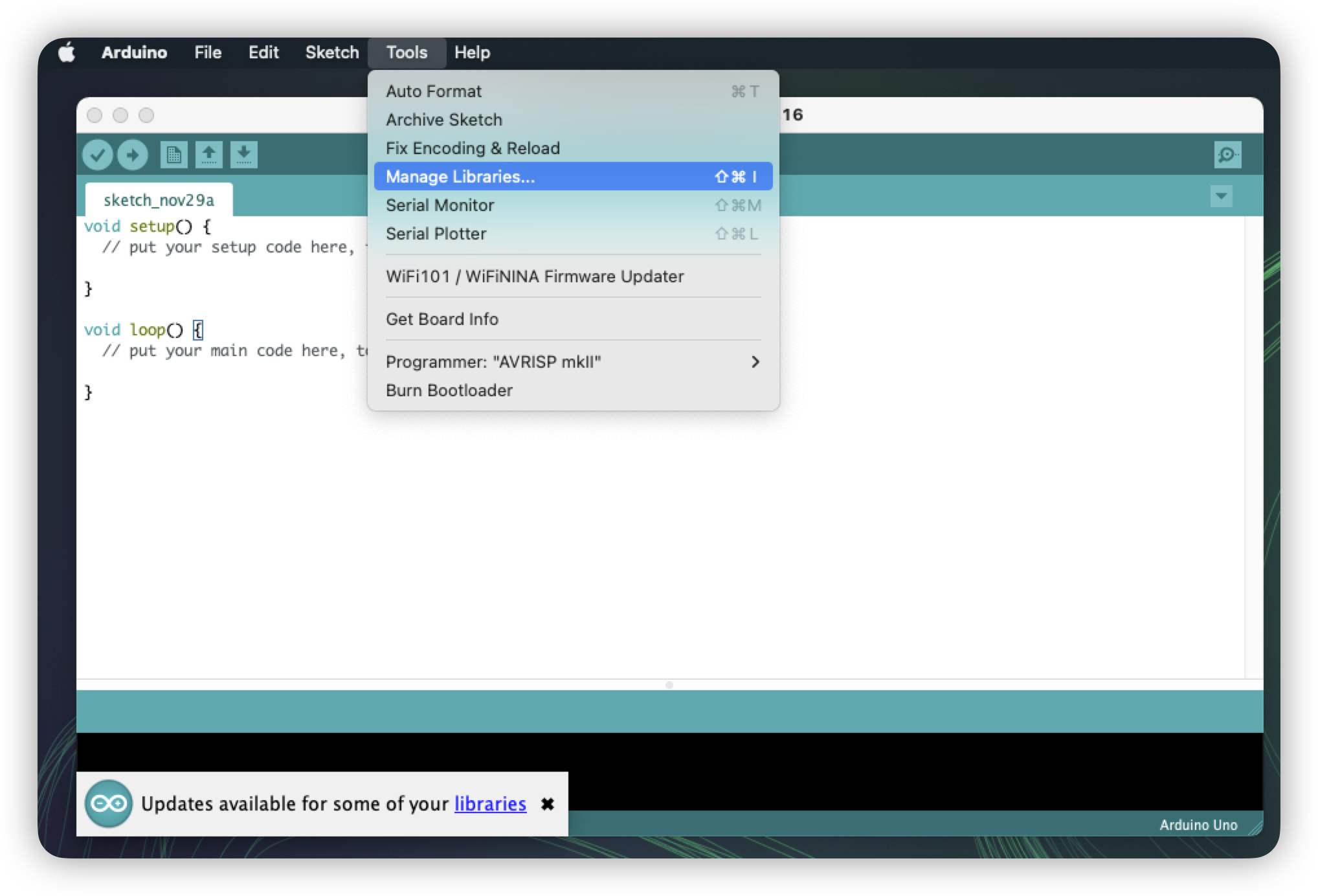
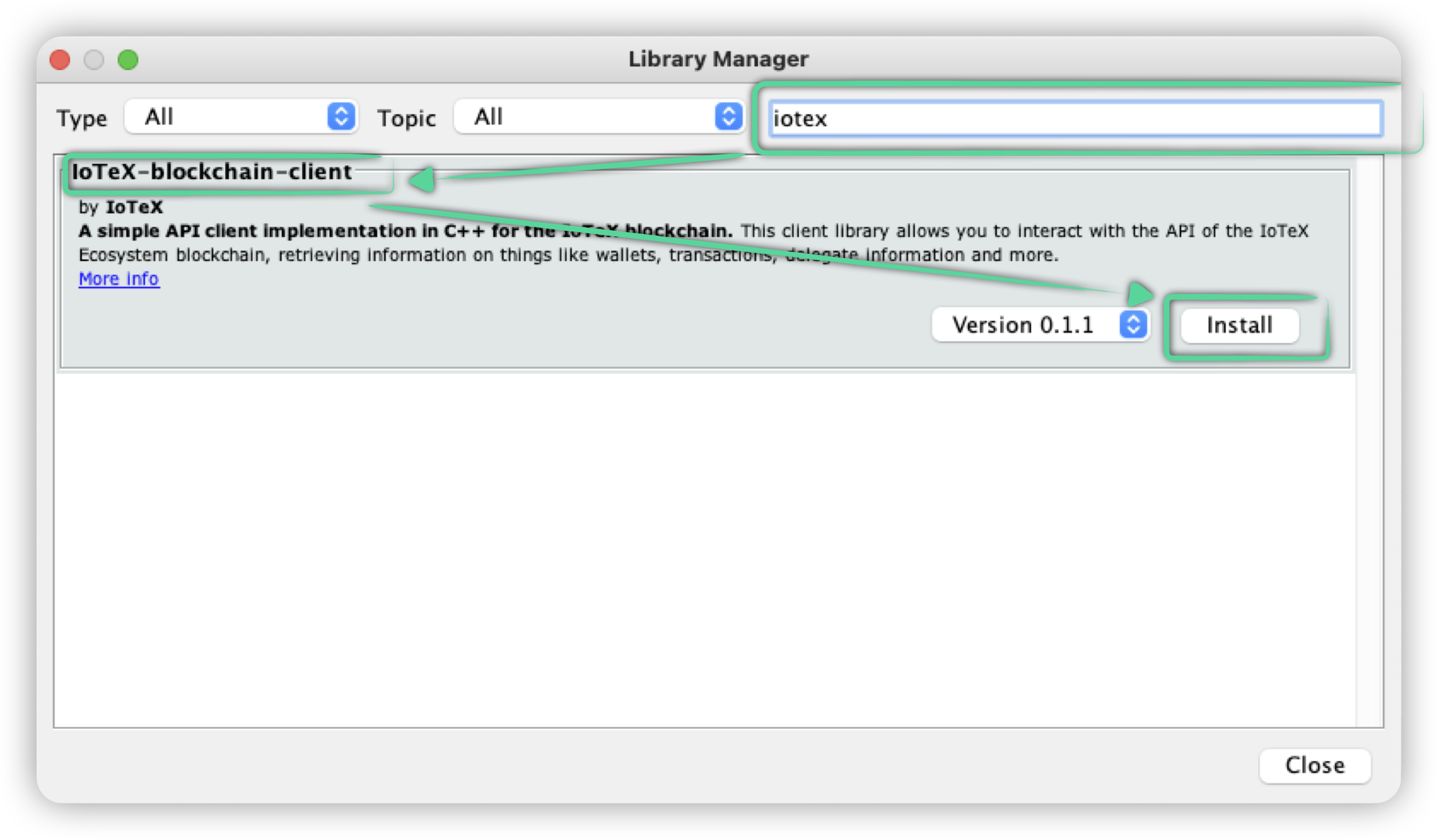
</details>


# Arduino IDE

## Installing the library

In Arduino IDE, go to `Tools`->`Manage libraries...`

<figure><img src="https://content.gitbook.com/content/EyawgxYexImpo6OGzEiR/blobs/we5j4WDbFp52KCJvq4dY/image.png" alt=""><figcaption></figcaption></figure>

In the Library Manager dialog, search for `IoTeX-blockchain-client` and click `install`&#x20;

<figure><img src="https://content.gitbook.com/content/EyawgxYexImpo6OGzEiR/blobs/0siNygKDQ8RN2oJiYrb8/image.png" alt=""><figcaption></figcaption></figure>

## Dependencies

Using the Arduino IDE built-in Library Manager, also install the following libraries:

* [WiFiNINA](https://github.com/arduino-libraries/WiFiNINA) : used for WiFi functionality in Nano 33 IoT
* [FlashStorage](https://github.com/cmaglie/FlashStorage) : used for EEPROM storage emulation in Nano 33 IoT

  <figure><img src="https://content.gitbook.com/content/EyawgxYexImpo6OGzEiR/blobs/jb73CtWfFj5y04uMoB1Z/image.png" alt=""><figcaption></figcaption></figure>

## Including the library in your sketch

Go to Sketch->Include library and select IoTeX-blockchain-client.

Alternatively, paste the following code `at the` beginning of your sketch:

`#include "IoTeX-blockchain-client.h"`

## Using the library in your sketches

Create the `Connection` object, passing the connection details:

```cpp
const char ip[] = "gateway.iotexlab.io";
const char baseUrl[] = "iotexapi.APIService";
const int port = 10000;

Connection<Api> connection(ip, port, baseUrl);
```

Now you are ready to call any of the API methods.

You can find examples of most of the API methods under the [examples](https://github.com/iotexproject/arduino-sdk/tree/main/examples) directory.

## Debug logs

Debug log level is set to NONE by default. The log level can be changed at runtime or at compile time.

Logs are printed to the `Serial` serial port by default. You need to initialize the serial port in your sketch by calling `Serial.begin(<baud rate>).`

The log level can be set per module, and also globally. A log statement is printed if it's level is higher than the log level configured for it's module, and higher than the global log level.

### Setting debug log level at run time

The log level can be set at run time using the `IotexHelpers` global object:

#### Setting per module log level

You can set the log level for a specific module. The existent log modules are:

* "GENERAL"
* "HTTP"
* "CONTRACT"

Simply call the following method on the `IotexHelpers` global object:\
`void setModuleLogLevel(const std::string& module, IotexLogLevel level)`

Eg. This will set the HTTP log level to `DEBUG`:\
`IotexHelpers.setModuleLogLevel("HTTP", IotexLogLevel::DEBUG);`

#### Setting the log level globally

You can also set the log level globally for all modules.

Simply call the following method on the `IotexHelpers` global object:\
`void setGlobalLogLevel(IotexLogLevel level)`

Eg. This will set the log level globally to `DEBUG`:\
`IotexHelpers.setGlobalLogLevel(IotexLogLevel::DEBUG);`


# Linux Systems

## Get the source code

```bash
git clone https://github.com/iotexproject/arduino-sdk
cd arduino-sdk
```

## Building the library

Requires cmake 3.1.0 or higher.

Refer to <https://cmake.org/install/> for instrutions on how to install cmake.

```bash
mkdir build && cd build
cmake ..
make
```

If successful, build files are placed in the `build` directory.

## Building and running the tests

### Building the tests

```bash
mkdir build && cd build
cmake -DUNIT_TEST=ON ..
make
```

Unit tests build files are placed in `build/tests.`

### Running the tests

```bash
cd build
./tests/iotex_unit_tests
```

## Using the library in your application

Include the IoTeX-Client main header in your program as below:

`#include <IoTeXClient.h>`

Create the `Connection` object, passing the connection details:

```cpp
const char ip[] = "gateway.iotexlab.io";
const char baseUrl[] = "iotexapi.APIService";
const int port = 10000;
Connection<Api> connection(ip, port, baseUrl);
```

Now you are ready to call any of the API methods.

You can find examples of most of the library methods under the [examples](https://github.com/iotexproject/arduino-sdk/tree/main/examples) directory.

## Debug logs

Debug logs are disabled by default. They can be enabled at runtime or at compile time.

Follow the instructions below in order to enable them and set the log level.

The log level can be set per module, and also globally. A log statement is printed if it's level is higher than the log level configured for it's module, and higher than the global log level.

The library prints logs to stdout using `printf().`

### Setting debug log level at compile time

This can be done by setting the `LOG_LEVEL` cmake variable before building. Eg:

`cmake -DUNIT_TEST=ON -DLOG_LEVEL=DEBUG ..`

The possible values for `LOG_LEVEL` are:

* NONE (default)
* ERROR
* WARNING
* INFO
* DEBUG
* TRACE

### Setting debug log level at run time

The log level can also be set at runtime using the `IotexHelpers` global object.

#### Setting per module log level

You can set the log level for a specific module. The existent log modules are:

* "GENERAL"
* "HTTP"
* "CONTRACT"

Simply call the following method on the `IotexHelpers` global object:\
`void setModuleLogLevel(const std::string& module, IotexLogLevel level)`

Eg. This will set the HTTP log level to `DEBUG`:\
`IotexHelpers.setModuleLogLevel("HTTP", IotexLogLevel::DEBUG);`

#### Setting the log level globally

You can also set the log level globally for all modules.

Simply call the following method on the `IotexHelpers` global object:\
`void setGlobalLogLevel(IotexLogLevel level)`

Eg. This will set the log level globally to `DEBUG`:\
`IotexHelpers.setGlobalLogLevel(IotexLogLevel::DEBUG);`


# PlatformIO

The library has been published in [PlatformIO library registry](https://platformio.org/lib/show/13239/IoTeX-blockchain-client)

In order to use it with your program, simply add `IoTeX-blockchain-client` to the `lib_deps` of your `platformio.ini` and include the main header file `#include "IoTeX-blockchain-client.h"` in your sketch

You can check the [examples](https://github.com/iotexproject/arduino-sdk/tree/main/examples) for more information

**Note:**  Due to a bug in PlatformIO, dependencies in`library.json`are not detected unless they are also provided in `platformio.ini`. For Nano33 or other SAMD boards, the `WiFiNINA`and  `FlashStorage`libraries also need to be added to your `lib_deps`


# Examples

## GetAccountMetadata()

Gets the account metadata for an IoTeX address.

```cpp
AccountMeta accountMeta;
ResultCode result = connection.api.wallets.getAccount("io1xkx7y9ygsa3dlmvzzyvv8zm6hd6rmskh4dawyu", accountMeta);
```

If result is `SUCCESS` then the account metadata is be stored in `accountMeta` The account metadata contains the following fields:

* **address**: the IoTeX address
* **balance**: the balance in RAU
* **nonce**: the account nonce
* **pendingNonce**: the account's pending nonce
* **isContract**: true if the address is a contract

## GetTransactionByHash()

Gets the data for a transfer given the transaction hash.

```cpp
ActionInfo_Transfer data;
ResultCode result = connection.api.wallets.getTransactionByHash("5444318f1a460c74d3e86918b640272d93d0b30e2bf2dc329dfd3faa636e52ec", data);
```

If result is `SUCCESS` then the action data is stored in `data`. The  transfer action data contains the following fields:

```
{
  actHash
  blkHash
  timestamp
  blkHeight
  sender
  gasFee
  action {
    senderPublicKey
    signature
    core
    version
    nonce
    gasLimit
    gasPrice
    execution
    amount
    contract
    data
  }
}
```

## Creating an account

We can create an account in the device from an existing private key, or generating a new private key.

### From an existing private key

```cpp
const char pkString[] = <private_key>;

// Convert the privte key hex string byte array
uint8_t pkBytes[IOTEX_PRIVATE_KEY_SIZE];
signer.str2hex(pkString, pkBytes, IOTEX_SIGNATURE_SIZE);

Account account(pkBytes);
```

### Generating a new private key

```cpp
// Generate a random private key
uint8_t pkBytes[IOTEX_PRIVATE_KEY_SIZE];
randomGenerator.fillRandom(pkBytes, sizeof(pkBytes));

// Create the account 
Account account(pkBytes);
```

### Getting account details

Now that the account is created, you can get the address in Ethereum or IoTeX format, and the public/private keys:

```cpp
// Create buffers for the account details
char publicKeyBuf[IOTEX_PUBLIC_KEY_C_STRING_SIZE] = {0};
char privateKeyBuf[IOTEX_PRIVATE_KEY_C_STRING_SIZE] = {0};
char ethAddressBuf[ETH_ADDRESS_C_STRING_SIZE] = {0};
char ioAddressBuf[IOTEX_ADDRESS_C_STRING_SIZE] = {0};

// Get the account details (ad hexadecimal strings)
account.getPublicKeyString(publicKeyBuf);
account.getPrivateKeyString(privateKeyBuf);
account.getEthereumAddress(ethAddressBuf);
account.getIotexAddress(ioAddressBuf);
```

## Sending a transfer of IOTX

Sends a transfer of IOTX tokens

First create the account object:

```cpp
// Private key of the origin address
const char pkString[] = <private_key>;

// Destination IoTeX address
char destinationAddr[IOTEX_ADDRESS_C_STRING_SIZE] = <destination_address>;

// Convert the private key and address hex strings to byte arrays
uint8_t pkBytes[IOTEX_PRIVATE_KEY_SIZE];
signer.str2hex(pkString, pkBytes, IOTEX_SIGNATURE_SIZE);

// Create the account object
Account originAccount(pkBytes);

// Get the IoTeX address
char originIotexAddr[IOTEX_ADDRESS_C_STRING_SIZE] = "";
originAccount.getIotexAddress(originIotexAddr);
```

Then query the blockchain to get the account nonce:

```cpp
AccountMeta accMeta;
ResultCode result = connection.api.wallets.getAccount(originIotexAddr, accMeta);
IotexString nonceString = accMeta.pendingNonce;
uint64_t nonce = atoi(nonceString.c_str());
```

Now broadcast the transfer with the retrieved nonce:

```cpp
// Amount of RAU to transfer. Eg: 1 RAU
char amount[IOTEX_ADDRESS_C_STRING_SIZE] = "1";

// Send the transfer 
uint8_t hash[IOTEX_HASH_SIZE] = {0};
result = originAccount.sendTokenTransferAction(connection, nonce, 20000000, "1000000000000", amount, destinationAddr, hash);
```

## Signing a message

Signs a message.

First convert the private key to a byte array:

```cpp
const char pkString[] = <private_key>;
uint8_t pkBytes[IOTEX_PRIVATE_KEY_SIZE];
signer.str2hex(pkString, pkBytes, IOTEX_SIGNATURE_SIZE);
```

Now sign the message

```cpp
// Message to sign as a byte array
const uint8_t message[] = { 0xab, 0xcd };
uint8_t signature[IOTEX_SIGNATURE_SIZE] = {0};
signer.signMessage(message, sizeof(message), pkBytes, signature);
```

The signature is stored as a byte array in `signature.`

## Storing the private key to persistent memory in the device

You can store the private key in the EEPROM or flash memory of your Arduino device, or in a text file in Linux.

First convert the private key to a byte array:

```cpp
const char pkString[] = <private_key>;
uint8_t pkBytes[IOTEX_PRIVATE_KEY_SIZE];
signer.str2hex(pkString, pkBytes, IOTEX_SIGNATURE_SIZE);
```

First initialize the storage module (not needed for Nano33 IoT or Linux):

```cpp
// The number of bytes we want to use for the EEPROM
// This is passed to EEPROM.begin()
// Should be at least IOTEX_PRIVATE_KEY_SIZE
uint32_t eepromSize = IOTEX_PRIVATE_KEY_SIZE;
storage.Initialize(eepromSize);
```

Now store the private key:

```cpp
// Specify any address number between 0 and (eepromSize - IOTEX_PRIVATE_KEY_SIZE). 
// This is the EEPROM address where the private key is stored. 
// There needs to be suficcient space between eepromAddress and eepromSize to store the whole private key (at least IOTEX_PRIVATE_KEY_SIZE bytes)
const uint32_t eepromAddress = 0;
ResultCode result = storage.savePrivateKey(eepromAddress, pkBytes);
```

You can also read the private key that is stored in the device:

```cpp
result = storage.readPrivateKey(eepromAddress, pkBytes);
```

## Sending a XRC20 token transfer

First convert the private key to a byte array:

```cpp
const char pkString[] = <private_key>;
uint8_t pkBytes[IOTEX_PRIVATE_KEY_SIZE];
signer.str2hex(pkString, pkBytes, IOTEX_SIGNATURE_SIZE);
```

Similarly, convert the destination address to a byte array:

```cpp
const char destAddrString[] = "0x5840bf8e5d3f5b66EE52B9b933bDAC9682E386D0";
uint8_t destAddrBytes[ETH_ADDRESS_SIZE];
signer.str2hex(destAddrString, destAddrBytes, ETH_ADDRESS_SIZE);
```

Generate the contract call data:

```cpp
// Amount to transfer
uint64_t value = 1000000000000000000;
uint8_t data[IOTEX_CONTRACT_ENCODED_TRANSFER_SIZE] = {0};
Xrc20Contract::generateCallDataForTransfer(destAddrBytes, value, data);
char callData[IOTEX_CONTRACT_ENCODED_TRANSFER_SIZE * 2 + 1] = {0};
signer.hex2str(data, IOTEX_CONTRACT_ENCODED_TRANSFER_SIZE, callData, sizeof(callData));
```

Create the account object and get the account metadata in order to obtain the nonce:

```cpp
Account originAccount(pkBytes);
AccountMeta accMeta;
char originIotexAddr[IOTEX_ADDRESS_STRLEN] = {0};
originAccount.getIotexAddress(originIotexAddr);
connection.api.wallets.getAccount(originIotexAddr, accMeta);
int nonce = atoi(accMeta.pendingNonce.c_str());
```

Broadcast the XRC20 token transfer

```cpp
// The token address. Eg: VITA token
const char tokenAddress[] = "io1hp6y4eqr90j7tmul4w2wa8pm7wx462hq0mg4tw";
uint8_t hash[IOTEX_HASH_SIZE] = {0};
ResultCode result = originAccount.sendExecutionAction(connection, atoi(accMeta.pendingNonce.c_str()), 20000000, "1000000000000", "0", tokenAddress, callData, hash);
```

## Calling a contract function

This example shows how to call a contract function using the addData function of the contract with address **`io1n49gavyahsukdvvxxandkxephdx93n3atcrqur`** as an example. You can find the contract ABI [here](https://github.com/iotexproject/arduino-sdk/blob/main/examples/ContractAddData/addDataAbi.h).

First convert the private key to a byte array:

```cpp
const char pkString[] = <private_key>;
uint8_t pkBytes[IOTEX_PRIVATE_KEY_SIZE];
signer.str2hex(pkString, pkBytes, IOTEX_SIGNATURE_SIZE);
```

Create the account object and get the account metadata in order to obtain the nonce:

```cpp
Account originAccount(pk);
AccountMeta accMeta;
char originIotexAddr[IOTEX_ADDRESS_C_STRING_SIZE] = "";
originAccount.getIotexAddress(originIotexAddr);
ResultCode result = connection.api.wallets.getAccount(originIotexAddr, accMeta);
int nonce = atoi(accMeta.pendingNonce.c_str());
```

Create the function call parameters:

```cpp
ParameterValue paramImei = MakeParamString(imei);
ParameterValue paramData = MakeParamBytes(data, sizeof(data), true);
ParameterValue paramSig = MakeParamBytes(signature, sizeof(signature), true);
```

Create the dictionary that contain the parameters and their values:

```cpp
ParameterValuesDictionary params;
params.AddParameter("imei", paramImei);
params.AddParameter("data", paramData);
params.AddParameter("signature", paramSig);
```

Create the contract object:

```cpp
// The contract abi as a serialized json string
String abi = <contract_abi_json_string>;
Contract contract(abi);
```

Generate the call data:

```cpp
String callData = "";
contract.generateCallData("addData", params, callData);
```

Broadcast the contract execution action

```cpp
uint8_t hash[IOTEX_HASH_SIZE] = {0};
result = originAccount.sendExecutionAction(connection, nonce, 20000000, "1000000000000", "0", contractAddress, callData, hash);
```


# Tutorials

{% embed url="<https://developers.iotex.io/posts/Blockchain-Powered-Smart-Lock>" %}

{% embed url="<https://developers.iotex.io/posts/A-Blockchain-Powered-Smart-Lock-with-Arduino-Nano-IoT-33-(Part-2)>" %}


# IoTeX Core Concepts


# Roll-DPoS Consensus

## Randomized Delegated Proof of Stake (Roll-DPoS)
To have a fast and efficient consensus mechanism with instant block finality in the context of DePIN, the IoTeX blockchain combines the concepts of Delegated Proof of Stake (DPoS), Proctical Bizantine Fault Tolerance (PBFT) and Verifiable Random Functions (VRFs). VRF is a family of functions that can produce publicly verifiable proofs for the correctness of their random outputs. At a high level, our Roll-DPOS has four phases elect candidates, form committee, propose block and finalize block.

<figure><img src="https://content.gitbook.com/content/EyawgxYexImpo6OGzEiR/blobs/CxInuYf9JCt8UVaR6BbM/image.png" alt="" width="375"><figcaption><p>Randomized Delegated Proof of Stake (Roll-DPoS)</p></figcaption></figure>

### Elect Candidates

All nodes in the IoTeX network participate this phase in terms of voting for the committee candidates. To encourage nodes to vote, the system makes sure the delegates share forged rewards with their voters. The candidates forms a set of at least 36 delegates; this number will increase in the future to further avoid the centralization of the mining power. Once the candidates are selected, they will be  fixed in one epoch, which consists of 30 iterations.&#x20;

### Form Committee&#x20;

In each iteration, a random committee of size 24 is selected from the candidate pool using VRF for creating blocks in the next 30 rounds. The use of VRF is important as it provides a non-interactive way to sort all delegates for proposing blocks in a fairness and security way. To this end, we use the efficient VRF as being used in Algorand.

### Propose Block

In each round (which is roughly every 2.5 seconds), every committee node in turn proposes a new block and broadcasts it to the network, together with the the proof. Only the block proposed by the expected committee node and has not been proposed in the same iteration is considered by other nodes, which is called a candidate block.&#x20;

### Finalize Block

In the same round, all other nodes use PBFT to vote for/against the candidate block. If more than 2/3 committee nodes agree on candidate block's validness, it is finalized and is appended to the blockchain by everyone in the network. After that, "propose block" and "finalize block" are executed in the next round; if the current iteration finishes, another random committee will be formed before propose block and finalize block are executed again.


# Voters and Delegates

IoTeX is committed to building a decentralized and inclusive ecosystem. As a digital democracy, IoTeX acknowledges and rewards community contributions in various ways.&#x20;

## Voters

In the IoTeX ecosystem, any token holder who stakes at least 100 IOTX and votes for a Delegate is recognized as a "Voter." Voting for a Delegate is a mandatory part of the staking process. By doing so, Voters help to secure and decentralize the network. In return for their participation, Voters receive rewards in the form of IOTX tokens, with the amount depending on their staking settings. This system creates a cycle that incentivizes voting, secures the network, and maintains decentralization.

[↗ Learn more about voting and staking](/blockchain/learn-iotex/staking-and-governance)

### Delegates

<figure><img src="https://content.gitbook.com/content/EyawgxYexImpo6OGzEiR/blobs/3ACYOz8SOCDGCj6a72gU/image.png" alt=""><figcaption></figcaption></figure>

Delegates are elected by IOTX token holders and represent the IoTeX network. They run the protocol, maintain consensus, promote project awareness, organize community-wide initiatives, and more. Any token holder can self-candidate as a Delegate in the IoTeX ecosystem. After profile registration (which costs 100 IOTX) the minimum requirement to become a Delegate is to receive at least 1.2 million votes from a single account, which can be the candidate's own account self-voting, or a third-party account endorsing the candidate.

The top 100 Delegates, ranked by votes, receive rewards proportional to their share of the total votes versus the total votes in the network. This incentivizes participation and ensures the IoTeX ecosystem remains secure, decentralized, and vibrant.

[↗ Register a Delegate profile here](https://stake.iotex.io/portal)

## Consensus Delegates

The top 36 Delegates with the most votes are “Consensus Delegates” that manage transaction verification and block production. Consensus Delegates also receive fixed block rewards for every mined block in addition to the variable rewards shared by all IoTeX Delegates.

[↗ Read the IoTeX Delegates Documentation](https://delegates.iotex.io)


# EVM Compatibility

IoTeX is compatible with the most recent Ethereum Virtual Machine (EVM), allowing developers to deploy smart contracts written in Solidity and interact seamlessly with the IoTeX blockchain.&#x20;

{% hint style="info" %}
Currently, IoTeX supports the **Shangai EVM** **release** and the **Solidity** compiler **0.8.20**
{% endhint %}

This compatibility provides access to a wide range of Ethereum-based tools and libraries, enhancing the development ecosystem.

[↗ Building and Deploying Smart contracts on IoTeX](/blockchain/build/web3-development)


---

[Next Page](https://docs.iotex.io/llms-full.txt/1)