> For the complete documentation index, see [llms.txt](https://docs.iotex.io/llms.txt). Markdown versions of documentation pages are available by appending `.md` to page URLs; this page is available as [Markdown](https://docs.iotex.io/depin/builders/reference-docs/ioctl-client/jwt-auth-tokens.md).
# JWT Auth Tokens
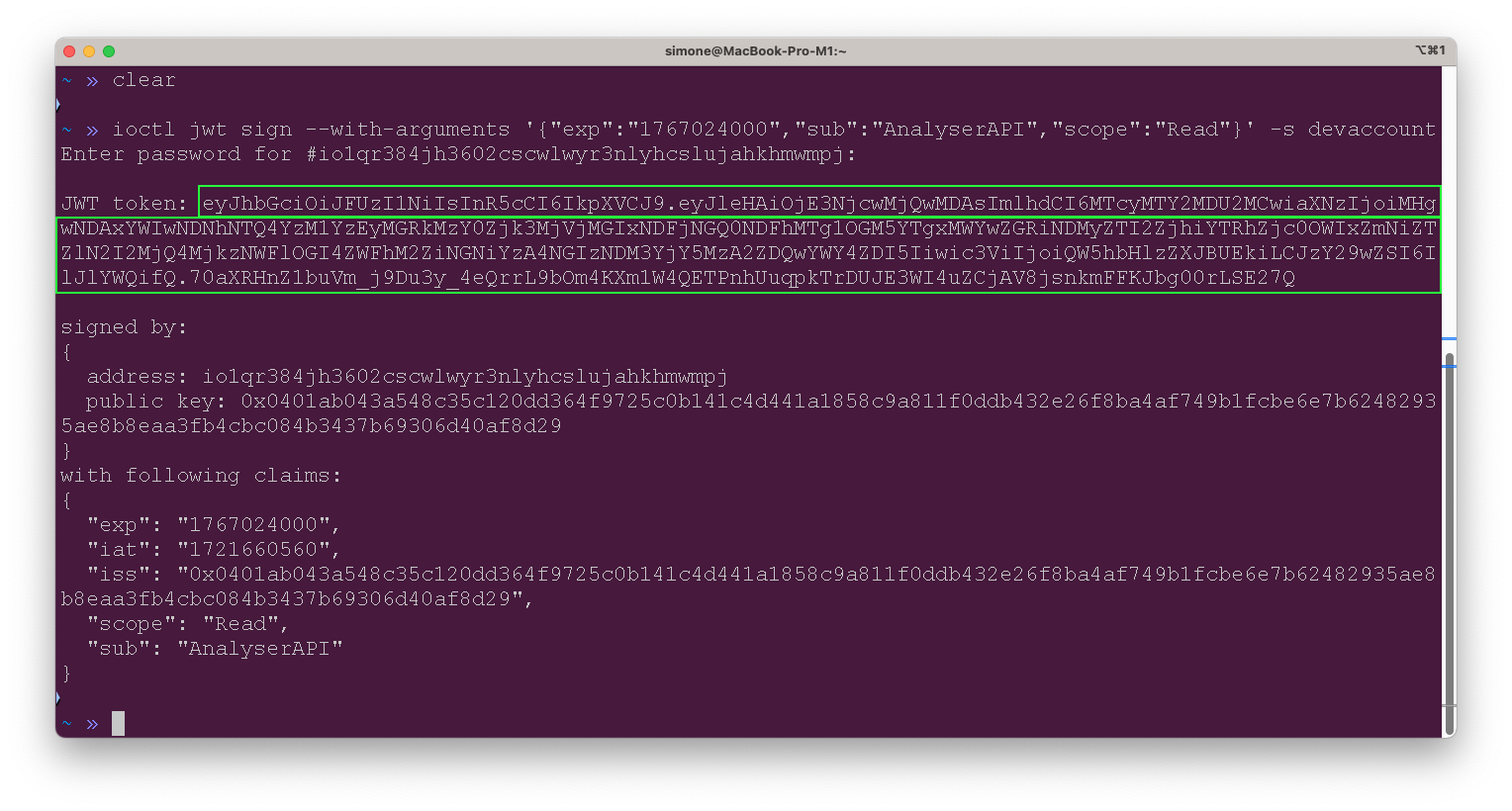
## Use ioctl to issue a JWT
Every account ioctl created contains a pair of 256-bit private/public key. We can use it to sign and issue JWT:
```json
➜ ioctl jwt sign --with-arguments '{"exp":"1608193125","sub":"weather","scope":"Create"}' -s my_account -y
Enter password #my_account
```
Enter your password to sign the token:
Read More about JWT Tokens
### What is JWT
JWT (JSON Web Token) is a very popular technology widely used in web API and user authentication. It contains certain access control claims, such as what data/resource can be access, the access expire time, and access rights (read, write, or delete).
The token is base64-encoded and digitally signed using a secret (with the *HMAC* algorithm) or a private key. By verifying the signature it can be guaranteed that the claims must come from the holder of the signing key.
In a nutshell, JWT consists of three parts separated by dot . , which are
* Header
* Payload
* Signature
### Example
Here is an example of a JWT encoded token:
```
eyJhbGciOiJFUzI1NiIsInR5cCI6IkpXVCJ9.
eyJleHAiOjE2MDU4NzIyNDksImlhdCI6MTYwODE2ODQ0NywiaXNzIjoiMHgwNDFkMjRiNDc0ZjM5YzVmMTBlNjlmZmNmMzhlZjA4ZmViY2U4ZTNkMGZmNWFjOWI0YzMzNjA2OWI1ZDEwYmNjMGZjN2MxNDNhNDQwMTRmMTQ5YWFkNzQ3YWMwNTJmNzhmMDZiODA3M2I0YzA0NWI0NGJlMWFiYTIzMTM3ZTcxNjFlIiwic3ViIjoid2VhdGhlciIsInNjb3BlIjoiQ3JlYXRlIn0.
i3KHZTmF1jWKIDSBOF1BWEg4G7C4H7BIdshS0uzz45687UU3K2Uzey3R5Qs7QrHrsU0J99PeR7i_Qc03wVYVjw
```
Decoding the header part:
```
eyJhbGciOiJFUzI1NiIsInR5cCI6IkpXVCJ9
```
gives the following header, indicating it is signed by ES256 algorithm (256-bit Elliptic-curve Signature):
```
{
"alg": "ES256",
"typ": "JWT"
}
```
Decoding the payload part:
```
eyJleHAiOjE2MDU4NzIyNDksImlhdCI6MTYwODE2ODQ0NywiaXNzIjoiMHgwNDFkMjRiNDc0ZjM5YzVmMTBlNjlmZmNmMzhlZjA4ZmViY2U4ZTNkMGZmNWFjOWI0YzMzNjA2OWI1ZDEwYmNjMGZjN2MxNDNhNDQwMTRmMTQ5YWFkNzQ3YWMwNTJmNzhmMDZiODA3M2I0YzA0NWI0NGJlMWFiYTIzMTM3ZTcxNjFlIiwic3ViIjoid2VhdGhlciIsInNjb3BlIjoiQ3JlYXRlIn0.
```
gives the following claims:
```
{
"exp": 1608193125,
"iat": 1608168517,
"iss": "0x041d24b474f39c5f10e69ffcf38ef08febce8e3d0ff5ac9b4c336069b5d10bcc0fc7c143a44014f149aad747ac052f78f06b8073b4c045b44be1aba23137e7161e",
"sub": "weather",
"scope": "Create"
}
```
where:
* `"exp"` is the token's expiration time
* `"iat"` is the token's issue time (you can convert date/time [here](https://www.unixtimestamp.com/))
* `"iss"` is the public key of issuer
* `"sub"` is the subject, here it refers to a resource/data named **weather**
* `"scope"` is the access control rights granted for the resource, here it allows to **create**
The signature in our example is:
```
i3KHZTmF1jWKIDSBOF1BWEg4G7C4H7BIdshS0uzz45687UU3K2Uzey3R5Qs7QrHrsU0J99PeR7i_Qc03wVYVjw
```
that can be verified against the issuer public key `iss` above.
---
# Agent Instructions
This documentation is published with GitBook. GitBook is the documentation platform designed so that both humans and AI agents can read, navigate, and reason over technical content effectively. Learn more at gitbook.com.
## Querying This Documentation
If you need additional information that is not directly available in this page, you can query the documentation by asking a question.
Perform an HTTP GET request on the following URL with the `ask` and `goal` query parameters:
```
GET https://docs.iotex.io/depin/builders/reference-docs/ioctl-client/jwt-auth-tokens.md?ask=&goal=
```
`ask` is the immediate question: it should be specific, self-contained, and written in natural language.
`goal` is what the user is ultimately trying to achieve, the reason they need the answer. Sharing it helps GitBook give you a better, more relevant answer. A goal is most helpful when it describes the outcome the user wants rather than restating the question. For example, with `ask=how do I create an API token`, a goal like `automate deployments from our CI pipeline` lets GitBook tailor the answer to that use case.
The response will contain a direct answer to the question and relevant excerpts and sources from the documentation.
Use this mechanism when the answer is not explicitly present in the current page, you need clarification or additional context, or you want to retrieve related documentation sections.