> For the complete documentation index, see [llms.txt](https://docs.iotex.io/llms.txt). Markdown versions of documentation pages are available by appending `.md` to page URLs; this page is available as [Markdown](https://docs.iotex.io/blockchain/ecosystem/powered-by-iotex-devices/pebble-tracker/quick-start.md).
# Quick Start
## Quick Start
Congratulations on receiving your **Pebble Tracker**.
This guide will help you quickly register it on the IoTeX blockchain and get started with using it.
## Unboxing
Before turning on your Pebble Tracker, let's take a look at what's in the box:
## Finding a SIM Card
Pebble Tracker connectivity supports both [LTE-M](https://en.wikipedia.org/wiki/LTE-M) and [Narrowband-IoT](https://en.wikipedia.org/wiki/Narrowband_IoT) cellular technologies, which provide radio bands that are optimised for IoT applications like smart metering, industrial controls, residential security, etc.
{% hint style="warning" %}
**Note:** The SIM card is not included with Pebble Tracker
{% endhint %}
IoTeX has partnered with [1NCE](https://1nce.com/), an IoT SIM cards provider that covers over 100 countries and regions globally, providing a convenient data plan: if your country is covered, you can buy a Pebble-ready SIM card on the dedicated IoTeX "**Autobahn.earth**" portal:
{% embed url="" %}
If your country is not currently covered by the 1NCE network, below are some useful information for you to find a working SIM card for your Pebble Tracker:
{% hint style="info" %}
**Is your country covered by the Narrowband-IoT network?**
Please check if either NB-IoT or LTE-M is available in your Country [on the gsma website](https://www.gsma.com/iot/deployment-map/). Once you know which technology is supported, please find a local or international provider where you can buy a SIM card that supports the correct technology for your country.
{% endhint %}
{% hint style="info" %}
**Make sure the IoT SIM card you buy supports either NB-IoT or LTE-M**
Please notice that Pebble tracker does not support GSM, 3G, or 4G bands:\
make sure your SIM card provider supports either **NB-IoT** or **LTE-M** or both in your country.
{% endhint %}
If you have issues finding a working SIM card, please join this forum discussion where other community members share their experiences with different SIM card providers in their country:
{% embed url="" %}
## Installing the SIM card
Once you have a SIM card, use a paperclip or the provided SIM card tool to open the SIM slot and push the card inside:
## Turn On Your Pebble Tracker
* Press and hold the **power/confirm** button located on the right side of the Pebble Tracker.
* Continue holding until the IoTeX logo appears on the screen.
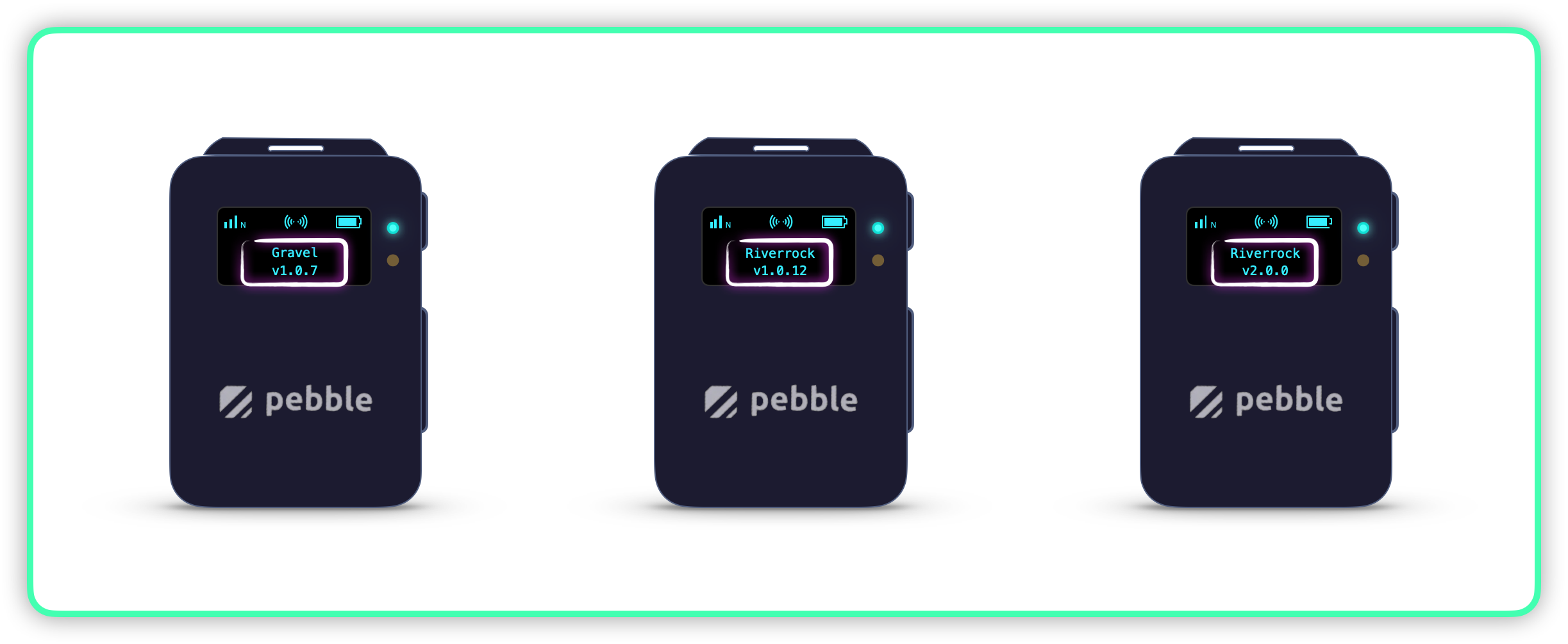
## Check the Software Version
* Once the device is powered on, **check the software version** displayed on the screen.
Check if your Pebble Software version is at least v2.0.0
{% hint style="warning" %}
If your Pebble Software version is **`v1.0.x`**, please follow the migration guide to Pebble `v2.0` before continuing → [Migrating to Pebble v2.0](/blockchain/ecosystem/powered-by-iotex-devices/pebble-tracker/migrating-to-pebble-v2.0.md)
{% endhint %}
{% hint style="success" %}
Proceed with [Device Registration](/blockchain/ecosystem/powered-by-iotex-devices/pebble-tracker/device-registration.md)
{% endhint %}
---
# Agent Instructions
This documentation is published with GitBook. GitBook is the documentation platform designed so that both humans and AI agents can read, navigate, and reason over technical content effectively. Learn more at gitbook.com.
## Querying This Documentation
If you need additional information that is not directly available in this page, you can query the documentation by asking a question.
Perform an HTTP GET request on the following URL with the `ask` and `goal` query parameters:
```
GET https://docs.iotex.io/blockchain/ecosystem/powered-by-iotex-devices/pebble-tracker/quick-start.md?ask=&goal=
```
`ask` is the immediate question: it should be specific, self-contained, and written in natural language.
`goal` is what the user is ultimately trying to achieve, the reason they need the answer. Sharing it helps GitBook give you a better, more relevant answer. A goal is most helpful when it describes the outcome the user wants rather than restating the question. For example, with `ask=how do I create an API token`, a goal like `automate deployments from our CI pipeline` lets GitBook tailor the answer to that use case.
The response will contain a direct answer to the question and relevant excerpts and sources from the documentation.
Use this mechanism when the answer is not explicitly present in the current page, you need clarification or additional context, or you want to retrieve related documentation sections.