> For the complete documentation index, see [llms.txt](https://docs.iotex.io/llms.txt). Markdown versions of documentation pages are available by appending `.md` to page URLs; this page is available as [Markdown](https://docs.iotex.io/blockchain/build/web3-development/get-testnet-iotx-tokens.md).
# Get Testnet IOTX Tokens
## What are Testnet Tokens?
The IoTeX testnet is a separate network from the mainnet, although it has equivalent functionalities, including the presence of an 'IOTX' token along with XRC20 tokens.
{% hint style="info" %}
The IoTeX testnet is frequently reset and is susceptible to bugs during the deployment of beta releases of the blockchain. Since testnet wallet balances and smart contract balances can be reset or wiped out at any time, test tokens do not hold any real 'value.'
{% endhint %}
## Why use Testnet Tokens?
Testing dApps functionalities consumes IOTX tokens, which can become very expensive if you develop on the IoTeX mainnet directly. The IoTeX mainnet is used for real-value transactions involving tokens with actual value.
If you develop or test your contracts directly on the mainnet you not only consume gas fees when running transactions but also risk potential serious monetary loss due to any bugs or mistakes.
As blockchain developers, it's advisable to use the IoTeX testnet for your development. Here, any dApp can be deployed to a production-like network where tokens don't have any real value.
{% hint style="info" %}
It's important to note that testnet IOTX tokens **are not tradable on exchanges**, serving exclusively as a valuable tool for development and testing.
{% endhint %}
## Claim Test IOTX Tokens
### Claim from your IoTeX Developer Profile
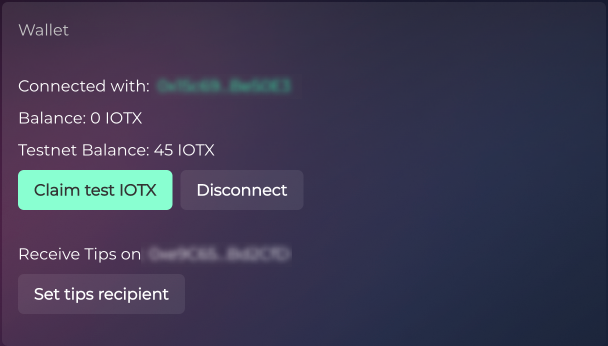
The **best way** for any developer to have access to testnet IOTX is to create a developer account on the IoTeX [Developer Portal](https://developers.iotex.io/) and claim test tokens in their personal profile. Simply connect your wallet on IOTX testnet and start claiming test IOTX immediately.
Claim test IOTX from your Developer profile
Claim Test IOTX from your IoTeX Developer Profile
### Claim from the public faucet
Another way to obtain test IOTX tokens for users that may need them for different purposes, other than developing, is to request them on the IoTeX public faucet:
Claim Test IOTX from the Public Faucet
### Ask on Discord
Another option to get some test IOTX tokens is to join our [Discord Server](https://iotex.io/devdiscord) and ask an admin in the `#developers-chat` channel:
Join the IoTeX Developer Chat on Discord
**Admin: simoneromano** (Simone \[IoTeX])
Admin: **jrpc\_jeremi** (Jeremi \[IoTeX])
###
---
# Agent Instructions
This documentation is published with GitBook. GitBook is the documentation platform designed so that both humans and AI agents can read, navigate, and reason over technical content effectively. Learn more at gitbook.com.
## Querying This Documentation
If you need additional information that is not directly available in this page, you can query the documentation by asking a question.
Perform an HTTP GET request on the following URL with the `ask` and `goal` query parameters:
```
GET https://docs.iotex.io/blockchain/build/web3-development/get-testnet-iotx-tokens.md?ask=&goal=
```
`ask` is the immediate question: it should be specific, self-contained, and written in natural language.
`goal` is what the user is ultimately trying to achieve, the reason they need the answer. Sharing it helps GitBook give you a better, more relevant answer. A goal is most helpful when it describes the outcome the user wants rather than restating the question. For example, with `ask=how do I create an API token`, a goal like `automate deployments from our CI pipeline` lets GitBook tailor the answer to that use case.
The response will contain a direct answer to the question and relevant excerpts and sources from the documentation.
Use this mechanism when the answer is not explicitly present in the current page, you need clarification or additional context, or you want to retrieve related documentation sections.