# IoTeX Analytics API

IoTeX Analytics is a service built upon the IoTeX core API, extracting data from the IoTeX blockchain and indexing it for application use via API calls or a GraphQL web interface.

## Quick Links

<table data-view="cards"><thead><tr><th></th></tr></thead><tbody><tr><td><a href="https://analyser-api.iotex.io/api"><strong>API Endpoint</strong></a></td></tr><tr><td><a href="https://analyser-api.iotex.io/graphql"><strong>GraphQL Playground</strong></a></td></tr><tr><td><a href="https://analyser-api.iotex.io/docs/#introduction"><strong>Full API reference</strong></a></td></tr></tbody></table>

## Get Started

### Configure ioctl CLI

Ensure you have the IoTeX `ioctl` CLI installed and updated to the latest release:

```bash
ioctl version
ioctl update
```

If `ioctl` is not installed:

**Install ioctl:**

```
curl https://raw.githubusercontent.com/iotexproject/iotex-core/master/install-cli.sh | sh
```

**Create a new account**

```
ioctl account createadd $ACCOUNT_NAME
```

[→ More about ioctl](https://docs.iotex.io/blockchain/build/web3-development/ioctl-cli/create-accounts)

### Obtain an API Key

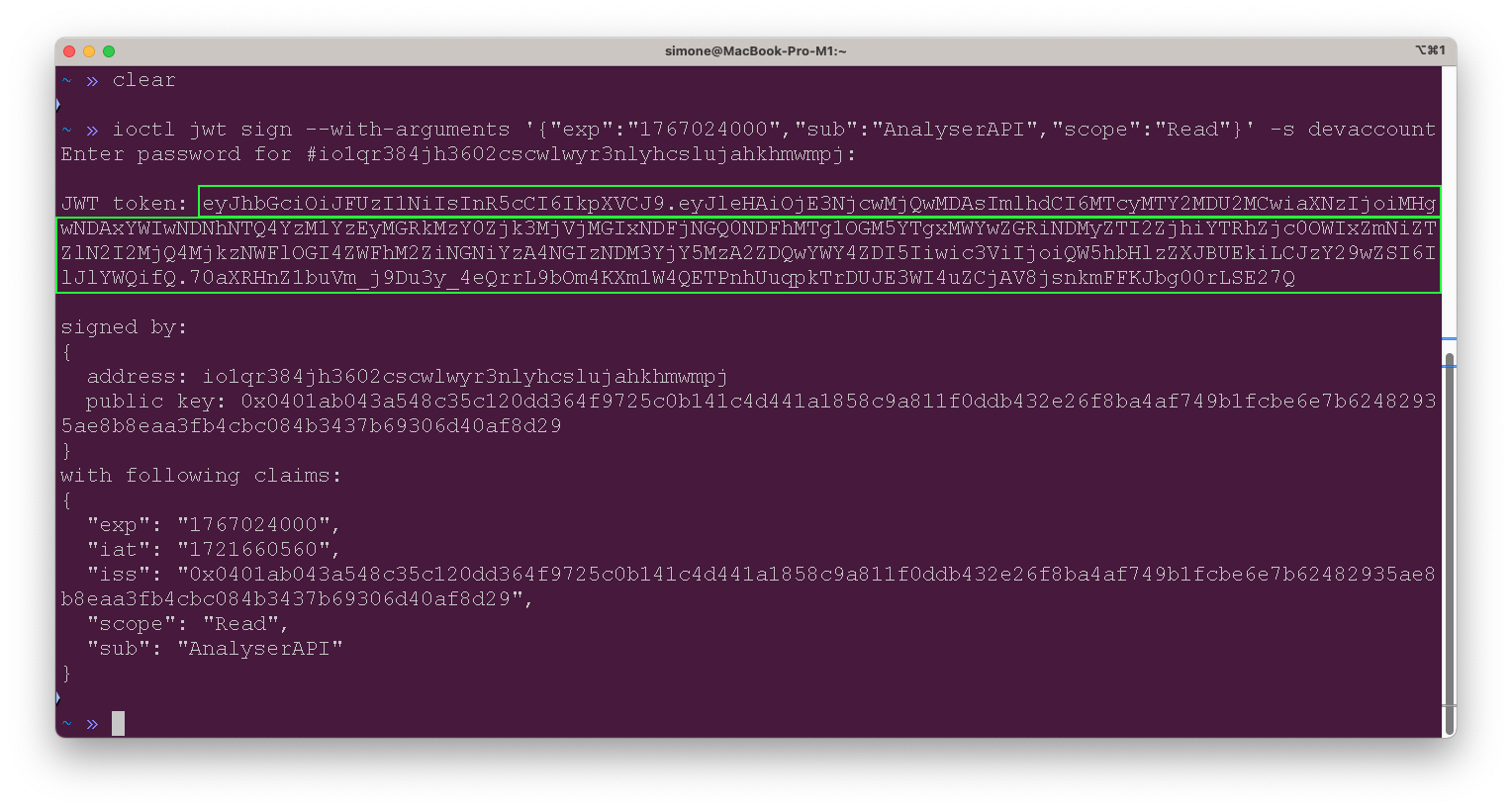
Access to the analytics API requires an API token, which you can obtain using the `ioctl` tool. **The service is free**, and you can generate your API token with the following `ioctl` command:

```bash
ioctl jwt sign --with-arguments '{
  "exp": "1767024000",  
  "sub": "AnalyserAPI",    
  "scope": "Read"           
}' -s ACCOUNT_NAME
```

<figure><img src="https://content.gitbook.com/content/EyawgxYexImpo6OGzEiR/blobs/g3kNOUlzn73ZpWbFBwfy/image.png" alt=""><figcaption></figcaption></figure>

[→ Read more about the ioctl jwt command ](https://docs.iotex.io/blockchain/reference-docs/ioctl-client/jwt-auth-tokens#use-ioctl-to-issue-jwt)

After generating the JWT token, you can use it to access the API and perform the necessary operations. Keep the token secure and do not share it with unauthorized users to ensure the security of your API interactions.

## Example Queries

Replace `YOUR_JWT_TOKEN` with your actual JWT token and the address you want to query.

### Transaction History By Address

The `ActionService.ActionByAddress` API endpoint retrieves the history of actions (transactions) associated with a specified IoTeX address. It includes details such as transaction hashes, block numbers, sender and receiver addresses, transaction value, and timestamp.

The first result is the newest one.

```bash
export JWT_TOKEN="YOUR_JWT_TOKEN"
export ADDRESS="0x350eDE228A8F9157dC6bDE7C03566cE94C53e6f6"

curl --request POST \
  --url https://analyser-api.iotex.io/api.ActionService.ActionByAddress \
  --header "Content-Type: application/json" \
  --header "Authorization: Bearer $JWT_TOKEN" \
  --data "{
    \"address\": \"$ADDRESS\",
    \"pagination\": {
      \"skip\": 0,
      \"first\": 5
    }
  }"

```

### EVM Transactions by Address

The `ActionService.EvmTransfersByAddress` endpoint retrieves the list of EVM (Ethereum Virtual Machine) transfers associated with a specified IoTeX address. It includes details such as transaction hashes, block numbers, sender and receiver addresses, transfer value, and timestamp.

The first result is the newest one.

```bash
curl --request POST \
  --url https://analyser-api.iotex.io/api.ActionService.EvmTransfersByAddress \
  --header "Content-Type: application/json" \
  --header "Authorization: Bearer $JWT_TOKEN" \
  --data "{
    \"address\": \"$ADDRESS\",
    \"pagination\": {
      \"skip\": 0,
      \"first\": 1
    }
  }"
```

## Included modules

<table><thead><tr><th width="175">Module</th><th>Description</th></tr></thead><tbody><tr><td><a href="https://analyser-api.iotex.io/docs/#chain-service-api">Chain</a></td><td>The Chain service provides general information on the current status of the IoTeX blockchain and the IOTX token, like chain height, current epoch, total supply, total votes, etc...</td></tr><tr><td><a href="https://analyser-api.iotex.io/docs/#delegate-service-api">Delegate</a></td><td>The Delegate service provides detailed data about the IoTeX delegates, block producers, staking deposits, mining rewards, and more. </td></tr><tr><td><a href="https://analyser-api.iotex.io/docs/#account-service-api">Account</a></td><td>The Account service provides all the information related to blockchain accounts, from balances to transactions to aliases for known addresses.</td></tr><tr><td><a href="https://analyser-api.iotex.io/docs/#voting-service-api">Voting</a></td><td>The Voting service specializes in delegates ranking and votes.</td></tr><tr><td><a href="https://analyser-api.iotex.io/docs/#action-service-api">Action</a></td><td>The Action service allows any query to list transactions filtered by different criteria, like actions by date, address, type, etc... </td></tr><tr><td><a href="https://analyser-api.iotex.io/docs/#xrc20-service-api">XRC20</a></td><td>The XRC20 service gives easy access to XRC20 fungible tokens data (equivalent to the ERC20 standard used on Ethereum), like token holders and contract addresses.</td></tr><tr><td><a href="https://analyser-api.iotex.io/docs/#xrc721-service-api">XRC721</a></td><td>The XRC721 service gives easy access to XRC721 non-fungible tokens data, like token holders and contract addresses.</td></tr><tr><td><a href="https://analyser-api.iotex.io/docs/#hermes-service-api">Hermes</a></td><td>The Hermes service gives access to rewards distributed by the IoTeX official <a href="https://hermes.to/">Hermes system</a>.</td></tr></tbody></table>


---

# Agent Instructions: Querying This Documentation

If you need additional information that is not directly available in this page, you can query the documentation dynamically by asking a question.

Perform an HTTP GET request on the current page URL with the `ask` query parameter:

```
GET https://docs.iotex.io/blockchain/build/web3-development/chain-indexing/iotex-analytics-api.md?ask=<question>
```

The question should be specific, self-contained, and written in natural language.
The response will contain a direct answer to the question and relevant excerpts and sources from the documentation.

Use this mechanism when the answer is not explicitly present in the current page, you need clarification or additional context, or you want to retrieve related documentation sections.